How to Get an OpenAI API Key in 2026: A 5-Minute Setup Guide
Generate an OpenAI API key in 2026 with GPT-5 access. Step-by-step setup, secure storage, billing limits, curl + Python examples, and eval add-ons.
Table of Contents
TL;DR
| Step | What to do | Time |
|---|---|---|
| 1. Sign up | platform.openai.com, verify email + phone | 1 min |
| 2. Add billing | Load a prepaid balance and set a hard usage limit | 1 min |
| 3. Create key | API keys page, Create new secret key, scope to a project | 30 sec |
| 4. Store securely | Save as OPENAI_API_KEY env var, add .env to .gitignore | 30 sec |
| 5. First call | curl or pip install openai then client.responses.create | 2 min |
| Optional: evaluation | traceAI auto-instruments OpenAI SDK, ships traces to FAGI | +5 min |
Most new accounts will need to add billing or load a small prepaid balance before the first call returns 200. Check the Settings > Billing page for your account.
What an OpenAI API key actually is
An OpenAI API key is a long random string (commonly with an sk- style prefix) that authenticates server-side calls to the OpenAI REST API. Treat it as a bearer secret. Every call your application makes carries the key in an Authorization: Bearer $OPENAI_API_KEY header. OpenAI uses the key to identify the account and project to bill, the rate limits to apply, and the model access to grant. It is the equivalent of a password for your OpenAI compute budget, which is why it must never appear in client-side code, public repositories, or screenshots.
Keys are not encrypted by themselves. They are bearer tokens, which means anyone who holds the key can use it. Treat them with the same care you would a database admin password.
Step 1: Create a Platform account
Open platform.openai.com and sign up. The Platform account is separate from the ChatGPT consumer subscription you may already have. You can sign up with email, Google, Microsoft, or Apple. After email verification, OpenAI may require a phone number for SMS verification depending on your account, region, or risk checks.
Once inside, switch to the project switcher in the top left and create a new project for the workload you are building. Project names are the unit of cost reporting, rate limiting, and key scoping, so name them clearly (for example, customer-support-bot or eval-harness-dev).
Step 2: Add billing and set a hard usage limit
Go to Settings > Billing and add a card. Load a prepaid balance, USD 5 is enough to start. Then open Usage limits and set:
- A hard monthly limit that stops API calls once hit.
- A soft alert that emails you at 50% and 80% of the hard limit.
This is the single most important step. A runaway prompt loop on gpt-5 can spend hundreds of dollars in minutes. The hard limit caps the blast radius.
Step 3: Create a project API key
Open platform.openai.com/api-keys and click Create new secret key. Choose:
- Owned by: Project (not User, unless you have a specific reason).
- Project: the one you just created.
- Name: descriptive, for example
support-bot-prod. - Permissions: restrict to the endpoints the app actually uses.
Click Create. The dialog shows the full key exactly once. Paste it into your password manager or directly into your environment file before closing the dialog. If you lose the key value, you cannot recover it; you have to create a new one.
Step 4: Store the key as an environment variable
Never hardcode the key. The minimum acceptable practice on a developer laptop is a .env file plus .gitignore.
# .env
OPENAI_API_KEY=sk-...your-key-here...
# .gitignore
.env
.env.local
.env.*.localFor production, use a managed secret store: AWS Secrets Manager, Google Secret Manager, Azure Key Vault, HashiCorp Vault, Doppler, or 1Password Secrets Automation. These rotate keys, audit access, and inject the secret at runtime so it never lives on disk.
If you accidentally push a key to a public repository, revoke it from the Platform dashboard immediately. GitHub secret scanning will also detect it and notify OpenAI, but assume the key is already compromised.
Step 5: Make your first request
curl
curl https://api.openai.com/v1/responses \
  -H "Content-Type: application/json" \
  -H "Authorization: Bearer $OPENAI_API_KEY" \
  -d '{
    "model": "gpt-5",
    "input": "Write a haiku about a developer who finally remembered to rotate their API key."
  }'
Python
Install the SDK:
pip install openai python-dotenvThen:
import os
from dotenv import load_dotenv
from openai import OpenAI

load_dotenv()
client = OpenAI(api_key=os.environ["OPENAI_API_KEY"])

response = client.responses.create(
    model="gpt-5",
    input="Summarize the difference between GPT-5 and GPT-5 mini in two sentences.",
)
print(response.output_text)
The responses endpoint is the recommended path in modern Python SDK versions. Legacy code that calls openai.ChatCompletion.create (from the pre-1.x Python SDK) does not work in modern SDK versions and should be migrated to client.responses.create or client.chat.completions.create.
Node.js
import "dotenv/config";
import OpenAI from "openai";

const client = new OpenAI();

const response = await client.responses.create({
  model: "gpt-5",
  input: "Give me three test ideas for an OpenAI integration.",
});

console.log(response.output_text);
Step 6: Add evaluation and observability
A key gets you tokens. It does not tell you whether the model is producing correct answers, hallucinating, drifting after a model update, or quietly burning budget on retries. In 2026 the gap between “the API call succeeded” and “the response was good” is where most production AI bugs hide.
Future AGI ships two open source packages that close this gap and pair directly with the openai SDK:
- traceAI is an OpenTelemetry-based auto-instrumentation library. One import wraps the openai client and emits a structured trace per call, including prompt, response, model, tokens, latency, cost, and tool calls.
- ai-evaluation runs evaluators against those traces, scoring faithfulness, context adherence, completeness, tone, toxicity, and PII leakage in production.
Both are Apache 2.0. Create FI_API_KEY and FI_SECRET_KEY in the Future AGI dashboard, and add them alongside OPENAI_API_KEY in your .env:
# .env
OPENAI_API_KEY=sk-...
FI_API_KEY=...
FI_SECRET_KEY=...
Then load them and register the tracer:
import os
from dotenv import load_dotenv

load_dotenv()  # loads OPENAI_API_KEY, FI_API_KEY, FI_SECRET_KEY

from fi_instrumentation import register
from fi_instrumentation.fi_types import ProjectType
from traceai_openai import OpenAIInstrumentor

trace_provider = register(
    project_type=ProjectType.OBSERVE,
    project_name="openai-getting-started",
)

OpenAIInstrumentor().instrument(tracer_provider=trace_provider)

# Use openai normally; every call is now traced
from openai import OpenAI
client = OpenAI()
response = client.responses.create(
    model="gpt-5",
    input="Explain prompt caching in one paragraph.",
)
print(response.output_text)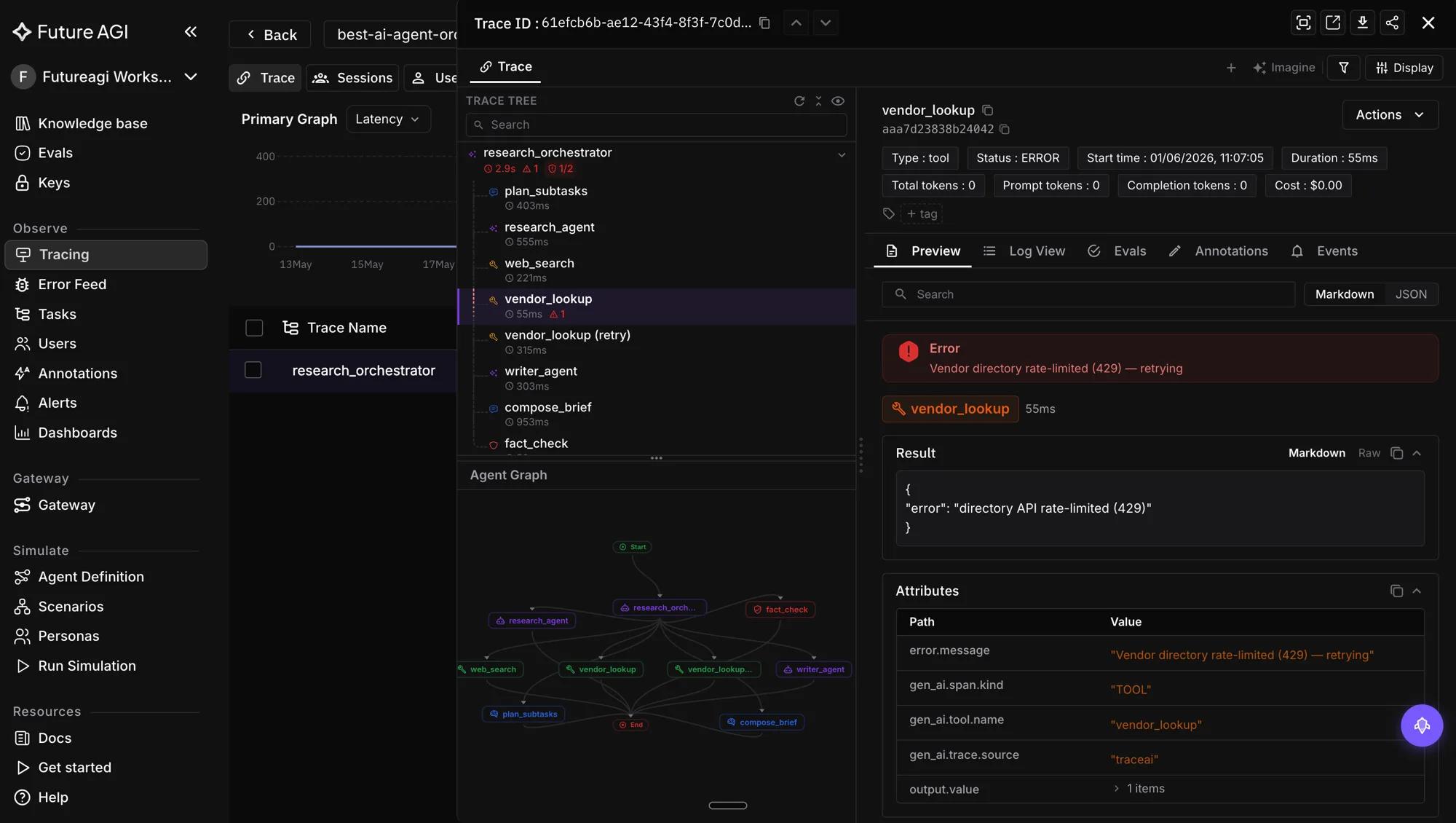
To score the output, add an evaluator:
from fi.evals import evaluate

result = evaluate(
    "context_adherence",
    output=response.output_text,
    context="GPT-5 supports prompt caching for repeated prefixes.",
)
print(result.score)
print(result.reason)
The dashboard route for production traffic is /platform/monitor/command-center. From there you set evaluators to run on every trace, alert on regressions, and ship a guardrail layer in front of the OpenAI call when content needs to be blocked or rewritten.
Rate limits, retries, and cost control
OpenAI returns HTTP 429 when you exceed requests per minute (RPM) or tokens per minute (TPM) for your tier. New accounts start on Tier 1 and graduate after they spend over a usage threshold without disputes.
| Symptom | Cause | Fix |
|---|---|---|
| 401 Unauthorized | Bad or revoked key | Generate a new key, update env var |
| 403 Forbidden | Model not in your project’s allow list | Enable model in project settings |
| 429 Rate limit exceeded | Too many RPM or TPM | Exponential backoff, raise tier, batch calls |
| 5xx Server error | Transient OpenAI outage | Retry with backoff, check status.openai.com |
Empty output_text | Refusal or stopped generation | Inspect response.output[0].content |
Use exponential backoff with jitter for 429 and 5xx, and read x-request-id from the response headers so OpenAI support can trace a failure if you escalate.
For cost, the most effective controls are:
- Use the cheapest model that passes your eval. GPT-5 nano often handles classification and extraction at a fraction of GPT-5 cost.
- Cache prompt prefixes. OpenAI prompt caching cuts input token cost on repeated system prompts.
- Batch where latency allows. The batch endpoint discounts non-urgent jobs.
- Trim history. Long conversation history is the single biggest hidden cost in chatbot apps.
- Set per-key spending alerts. Catch a runaway loop within minutes, not days.
Security and compliance checklist
- Use project keys, not user keys, for any application.
- Rotate keys on a schedule (90 days is a common cadence) and immediately after any departure or suspicious activity.
- Store keys in a managed secret store in production. Inject at runtime, never write to disk.
- Restrict each key to the endpoints the app actually uses.
- Log only the prompt, response, and metadata you have a legal basis to retain; never log the key itself.
- Send data only over HTTPS, which the SDK does by default.
- Match your data handling to OpenAI’s usage policies, especially around prohibited content and PII.
- Run a guardrail layer (Future AGI Agent Command Center, NeMo Guardrails, or your own) when the model output goes to end users.
Common errors and fixes
”Invalid API key” right after creating one
You may have pasted a truncated copy. The full key is the entire string shown in the Create dialog. Recreate the key and copy the full value before closing the dialog.
”You exceeded your current quota”
The prepaid balance is empty or the hard limit is hit. Top up under Settings > Billing.
”The model gpt-5 does not exist or you do not have access”
The project does not have GPT-5 enabled. Open Settings > Limits for the project and enable the model. Some models require additional verification.
Leaked key in a public repo
Revoke immediately, generate a new one, and audit usage for unexpected spend. GitHub secret scanning will notify OpenAI but do not rely on that as the only line of defense.
Where to go next
- Build a chatbot: see How to use AI prompting for LLMs in 2026 for prompt patterns that work with GPT-5.
- Evaluate your outputs: read Top LLM evaluation tools in 2026 for an opinionated comparison.
- Trace every call: traceAI + OpenTelemetry for LLM tracing walks through manual instrumentation.
- Reduce hallucinations: RAG prompting to reduce hallucination covers grounding techniques.
- Compare providers: Top LLM API providers in 2026 ranks the alternatives.
Once the key is working and traced, the OpenAI dashboard tracks tokens and dollars, and the Future AGI dashboard tracks quality, drift, and failure modes. Together they cover the cost and correctness sides of a production OpenAI deployment.
Frequently Asked Questions
What is an OpenAI API key and why do I need one?
How do I get an OpenAI API key in 2026?
How much does it cost to use the OpenAI API in 2026?
Where should I store my OpenAI API key?
What is the difference between a project key and a user key?
How do I handle OpenAI API errors and rate limits?
Can I share one OpenAI API key across my whole team?
How do I evaluate the output quality of my OpenAI calls?

11 LLM APIs ranked for 2026: OpenAI, Anthropic, Google, Mistral, Together AI, Fireworks, Groq. Token pricing, context windows, latency, and how to choose.


How LLM function calling works in 2026. JSON Schema, OpenAI tools, Anthropic tools, structured outputs, parallel tool calls, function-call eval.

How prompt caching works in 2026 on Anthropic, OpenAI, Gemini, and DeepSeek. Pricing, latency wins on prefix heavy prompts, gotchas, and observability.
