How to Monitor AI Voice Agents in Production: A 2026 Playbook
Two-category playbook for monitoring AI voice agents: native FAGI dashboard for Vapi-class, traceAI SDK for Pipecat and LiveKit, plus SLOs.
Table of Contents
A voice agent in production has more failure surfaces than the dashboards usually surface. The audio layer can degrade while the LLM stays green. The LLM can hallucinate a tool argument while WER stays low. The TTS can mispronounce a brand name while every other span is healthy. This playbook walks through the working procedure we use to monitor production voice agents in 2026, split by how you actually deploy the agent (third-party managed runtime vs code you own), with the configuration each path needs and the SLOs you actually alert on.
The two paths, picked by deployment
Voice observability is not one workflow. It is two, picked by whether you can put code inside the voice runtime.
Category 1: Third-party voice runtimes without SDK access. You consume Vapi, Retell, or a managed LiveKit setup as a service. The provider runs telephony, STT, LLM routing, TTS, and barge-in detection behind a single Assistant abstraction. You cannot insert tracing inside their pipeline. The right path is FAGI’s native voice observability: configure an Agent Definition with the provider API key plus Assistant ID, enable observability, and call logs stream in. No SDK install. No code change. Section 1 below.
Category 2: Voice runtimes you own and run. You wrote a Pipecat pipeline, you run LiveKit Agents in your own process, or you stitched STT, LLM, and TTS into a custom stack. You control the code and you want span-level depth per turn. The right path is the traceAI SDK: pip install traceAI-pipecat or pip install traceai-livekit, call register(project_type=ProjectType.OBSERVE, ...), enable attribute mapping. OpenInference spans land in the same FAGI project as the native call logs. Section 2 below.
For unsupported providers outside both categories, pull call logs via the provider’s webhook and push them to FAGI via the Observe API. Section 3 covers that fallback briefly.
Everything downstream (evals, SLOs, Error Feed, alert routing, simulation reproduction, optimization) is shared across the categories. So we spend Section 1 and 2 on capture, and the rest of the post on the operational layers on top.
Section 1: Native FAGI dashboard for third-party voice runtimes
This is the no-SDK path for Vapi, Retell, and managed LiveKit. Everything happens in the FAGI dashboard.
Create the Agent Definition
In the FAGI console, open the Observe product and create a new project. Inside the project, create an Agent Definition. The form is a multi-step wizard (Basic Info → Configuration → Behaviour):
- Agent name: free-text, what shows up in the call log table.
- Provider: pick from the supported list (Vapi, Retell, LiveKit).
- Provider API key: paste the API key from the provider’s account settings.
- Assistant ID: paste the Assistant ID from the provider’s console.
- Observability toggle: enable. The API key and Assistant ID fields are required only when this is on; otherwise they are optional.
Save the agent. The new Agent Definition appears in the agent list, and the platform creates a project with the same name. Call logs start appearing in that project once calls flow through the configured provider Assistant. If the credentials are wrong, the dashboard surfaces the error inline (most often a missing scope on the API key; for example, Vapi requires the private key, not the public widget key).
What lands in the dashboard after save
Within a few minutes of the next call placed through that Assistant, four things appear automatically:
- A new project shows up under the Projects tab with the same name as the agent. All call logs flow into this project.
- The project’s Call Log table fills with a row per call: timestamp, duration, direction (inbound or outbound), customer phone, final status.
- Each row carries two separate audio files: one for the assistant leg, one for the customer leg. Both downloadable. The separation is what lets you debug a barge-in failure (which lives in the customer audio’s interruption timing relative to the assistant’s response start) or a TTS regression (which lives in the assistant audio alone).
- An auto transcript renders turn by turn next to the audio, with speaker tags.
This is the surface that needs zero code. You can stop here and you already have more observability than the provider’s built-in dashboard surfaces.
What the call detail drawer captures per call
Clicking a call log row opens a side drawer with:
- Audio panel: two players (Assistant, Customer), each with its own waveform and download button.
- Transcript panel: alternating turn rows with timestamps and speaker tags. Hover for STT confidence where the provider exposes it.
- Session timeline: a horizontal trace tree showing the call as a root span with child events per turn. If you have not also wired traceAI on a backing LLM proxy, the timeline shows turn boundaries only; if you have, the LLM, tool, and RAG retrieval spans nest inside each turn.
- Eval scores panel: results for every rubric you have attached to the project.
- Tags panel: metadata you passed through the provider’s call metadata (customer_id, vertical, agent_version, intent, campaign_id).
The captured surface is the unit of debugging downstream. SLOs query the eval scores. Error Feed clusters the failures. Alerts route on the tags.
Tagging conversations for KPI attribution
Tag every call on the provider side with the business attributes that matter. The pattern we use:
customer_id: filter by accountvertical: e.g.support,outbound_sales,appointment_bookingagent_version: A/B compare prompt revisionscampaign_id: outbound campaign attributionintent: top-level intent (refund, scheduling, escalation)
You set these on the provider side as call metadata. They flow through the provider API into the FAGI session and become filter axes in the Observe dashboard and tag attributes on the spans for downstream clustering.
Section 2: traceAI SDK for voice runtimes you own
This is the code-driven path. Use it when you run Pipecat in your own process or self-host LiveKit Agents. The package emits OpenInference-compatible spans into a FAGI Observe project, joined per conversation.
2a. Pipecat
Install the dedicated package alongside Pipecat’s tracing extra:
pip install traceAI-pipecat pipecat-ai[tracing]Set environment variables and initialize the trace provider:
import os
os.environ["FI_API_KEY"] = "your-future-agi-api-key"
os.environ["FI_SECRET_KEY"] = "your-future-agi-secret-key"

from fi_instrumentation.otel import register, ProjectType

trace_provider = register(
    project_type=ProjectType.OBSERVE,
    project_name="Pipecat Voice App",
    set_global_tracer_provider=True,
)
Enable attribute mapping to convert Pipecat’s spans to Future AGI conventions:
from traceai_pipecat import enable_http_attribute_mapping

# Replaces the existing span exporters with Pipecat-aware ones
success = enable_http_attribute_mapping()
A gRPC variant (enable_grpc_attribute_mapping) and an explicit enable_fi_attribute_mapping(transport=Transport.HTTP|GRPC) are available for transport-specific setups.
Inside the Pipecat pipeline, flip tracing on with enable_tracing=True in PipelineTask and pass a conversation_id so every span joins under one session:
from pipecat.pipeline.task import PipelineParams, PipelineTask

task = PipelineTask(
    pipeline,
    params=PipelineParams(
        enable_metrics=True,
        enable_usage_metrics=True,
    ),
    enable_tracing=True,
    enable_turn_tracking=True,
    conversation_id="customer-123",
    additional_span_attributes={"session.id": "abc-123"},
)
The attribute mapper handles the OpenInference translation. gen_ai.system and gen_ai.request.model map to llm.provider and llm.model_name. gen_ai.usage.* maps to llm.token_count.*. STT, LLM, and TTS spans land as fi.span.kind=LLM; tool spans as TOOL; conversation and turn spans as CHAIN; setup spans as AGENT.
2b. LiveKit Agents
Install the dedicated package:
pip install traceai-livekit livekit python-dotenvInitialize inside the agent process (not at module import, to avoid multiprocessing pickling errors):
from fi_instrumentation import FITracer
from fi_instrumentation.otel import register, ProjectType
from traceai_livekit import enable_http_attribute_mapping

@server.rtc_session()
async def entrypoint(ctx: JobContext):
    provider = register(
        project_name="LiveKit Agent Example",
        project_type=ProjectType.OBSERVE,
        set_global_tracer_provider=True,
    )
    enable_http_attribute_mapping()

    tracer = FITracer(provider.get_tracer(__name__))

    with tracer.start_as_current_span(
        "LiveKit Agent Session",
        fi_span_kind="agent",
    ) as parent_span:
        parent_span.set_input(f"Room: {ctx.room.name}")

        session = AgentSession(
            stt=openai.STT(),
            llm=openai.LLM(),
            tts=openai.TTS(),
            vad=ctx.proc.userdata["vad"],
            preemptive_generation=True,
        )

        await session.start(
            agent=Assistant(),
            room=ctx.room,
            room_options=room_io.RoomOptions(
                audio_input=room_io.AudioInputOptions(),
            ),
        )
        await ctx.connect()
The LiveKit Agent Session parent span carries the room context and groups every child span (STT, LLM, TTS, tool) under it. The LiveKit attribute mapper does the OpenInference translation automatically.
What the span tree looks like per voice turn
Under the conversation root span, a typical voice turn renders as:
voice_conversation                       [CHAIN, conversation_id=...]
└─ turn_0                                [CHAIN, turn.index=0]
   ├─ stt                                [LLM, stt.provider=..., stt.text=..., stt.confidence=0.92]
   ├─ llm_completion                     [LLM, llm.provider=openai, llm.model_name=..., llm.token_count.completion=...]
   │  └─ tool.book_appointment           [TOOL, tool.name=book_appointment, tool.arguments={...}]
   └─ tts                                [LLM, tts.provider=cartesia, tts.voice_id=..., tts.duration_ms=...]
Per session, you get one root span. Per turn, one child grouping span. Per audio leg, STT and TTS. Per LLM call, completion plus any tool spans nested inside. Per call: every turn, with timing, attributes, eval scores, and Error Feed cluster membership joined to the same trace.
The portable attribute keys to look for in queries and SLO definitions:
llm.provider,llm.model_name,llm.token_count.completion,llm.token_count.promptfi.span.kind(LLM,TOOL,CHAIN,AGENT); the mapper sets these per spaninput.value,output.value, and tool attributes exposed by the mappersession.idand the runtime’s conversation-grouping attribute (Pipecat emitsconversation_id; LiveKit groups under the parent agent session span)eval.task_completion,eval.audio_quality,eval.conversation_resolution(set by the eval engine downstream)
These are the keys the Pipecat and LiveKit attribute mappers reliably emit. Runtime-specific keys (STT confidence, TTS voice ID, recording URLs) depend on what the underlying framework exposes in its OTel spans; check the trace payload for your runtime before writing a query against them.
Section 3: The fallback path (direct API integration)
For an unsupported third-party provider where neither native ingestion nor a traceAI package exists, the fallback is:
- Configure a webhook on the provider’s side that fires per call end, carrying call ID, transcript, recording URLs, and metadata.
- Receive the webhook in your own service.
- Push the normalized session into FAGI via the Observe API (or wrap the post-call processing in
tracer.start_as_current_span(...)and emit OpenInference spans manually).
This path is the smallest surface, but it costs you the auto transcript and the separate audio leg downloads that the native path gives you for free. Reach for it only when the first two paths cannot apply.
Evaluations: latency-aware rubrics by use case
A span tree without eval scores is a timing graph. You can see what was slow but not what was wrong. Score every captured call against rubrics and write the score onto the span so SLOs and Error Feed have something to query.
ai-evaluation ships 56 built-in eval templates in Apache 2.0, plus unlimited custom evaluators authored by an in-product agent that reads your traces and writes the rubric. For a deeper walkthrough of the voice rubric set, see the voice agent eval rubric library guide. For monitoring, attach this set:
| Layer | Rubric | eval_id | What it scores |
|---|---|---|---|
| Voice surface | audio_transcription | 73 | ASR drift on customer audio against the rendered transcript |
| Voice surface | audio_quality | 75 | TTS output quality on the assistant audio (clarity, prosody) |
| Conversation | conversation_coherence | 1 | Multi-turn coherence across the whole call |
| Conversation | conversation_resolution | 2 | Did the call resolve the customer’s stated goal |
| Agent goal | task_completion | 99 | Did the agent complete the workflow it was supposed to |
| Safety | pii | 14 | Personally identifiable information leaks in the agent output |
| Safety | data_privacy_compliance | 22 | Compliance gates for regulated workloads |
| Multilingual | translation_accuracy | 67 | Cross-language fidelity on multilingual calls |
| Multilingual | cultural_sensitivity | 68 | Cultural register on cross-region calls |
Voice always needs latency-aware rubrics; the audio surface rubrics in particular catch failures that transcript-only views miss. For the audio rubrics to run, the recording has to reach the platform. The native Section 1 path gives you that for free (assistant and customer audio download per call). For the SDK path, send the recording URL or audio bytes to the evaluator after each turn so the audio rubrics can score it.
Programmatic scoring if you keep eval calls in code:
from fi.evals import Evaluator

ev = Evaluator(
    fi_api_key="your-future-agi-api-key",
    fi_secret_key="your-future-agi-secret-key",
)

# Score the assistant TTS leg with the audio rubric
audio_result = ev.evaluate(
    eval_templates="audio_quality",
    inputs={"input_audio": "https://example.com/calls/abc123/assistant.wav"},
    model_name="turing_flash",
)

# Score the multi-turn conversation
conversation_result = ev.evaluate(
    eval_templates=["conversation_coherence", "conversation_resolution", "task_completion"],
    inputs={
        "conversation": (
            "User: Hi I need to reschedule\n"
            "Assistant: Sure, what's your account number?\n"
            "User: It's 8842\n"
            "Assistant: Got it. Thursday at 3pm works."
        )
    },
    model_name="turing_flash",
)
The audio rubrics accept the seven common formats (.mp3, .wav, .ogg, .m4a, .aac, .flac, .wma) and resolve both URLs and local paths. In-house classifier models are tuned for the LLM-as-judge cost/latency tradeoff on high-volume scoring; reserve a frontier judge model for spot-checking the highest-risk turns.
Run scoring async off the critical path. Voice budgets are tight and you do not need the score before the next turn begins. The exception is when the score gates an action (refusal, escalation); there, use the sub-100ms classifier path inline instead of a full judge call.
SLOs that match the voice contract
Voice has a different SLO grid from chat. Latency matters at sub-second resolution. Audio quality is a separate axis from text quality. Multilingual surfaces add their own row. Start with these and tune on your own data after the first week.
| SLO | Starting target | Why it matters |
|---|---|---|
| P95 turn latency (cascaded) | Under 800 ms | Tail users hang up. Average hides them. |
| P95 turn latency (speech-to-speech) | Under 500 ms | S2S removes a hop; the budget tightens. |
| WER on conversational audio | Under 12 percent, segmented by accent | Aggregate WER hides the long tail of accent failures. |
audio_quality (eval_id 75) | Median above 4.0 | TTS regressions are silent in transcript views. |
task_completion (eval_id 99) pass rate | Above 85 percent | Tracks the agent-side goal. |
conversation_resolution (eval_id 2) rate | Above 70 percent | Tracks the customer-side outcome (CSAT proxy). |
| Barge-in success rate | Above 90 percent | The single rudest failure mode in real conversation. |
pii (eval_id 14) and data_privacy_compliance (eval_id 22) | Zero violations | Hard gate for regulated workloads. |
Anomaly detection on top of static thresholds catches metrics that move with traffic (peak hour latency, weekend accent mix). Static thresholds catch hard limits (5xx rate, service uptime, the PII zero gate). Page only on sustained breaches across a duration window: P95 above 1.2 seconds for five minutes, not above 1.2 seconds for a single 30-second window. Tune duration on your own variance.
For a deeper treatment of the metric set behind these SLOs, see 12 metrics that actually matter for AI conversation monitoring in 2026.
Error Feed: zero-config clusters with named issues
This is the step that changes the on-call workflow most. Without clustering, every failed call is an alert. With clustering, fifty failed calls with the same root cause are one issue tracked as rising, steady, or falling.
Error Feed is the zero-config error monitoring layer in the FAGI Observe product. It turns on the moment traces or call logs hit a project. It auto-clusters trace failures into named issues and writes the analysis per issue:
- Issue name: auto-generated and descriptive (the clustering layer writes it from the failure pattern).
- Root cause: what went wrong, written from the span evidence.
- Supporting span evidence: links to the traces in the cluster, with the relevant attributes highlighted.
- Quick fix: a concrete change to ship today (a per-accent threshold, a prompt patch, a voice ID rollback).
- Long-term recommendation: the deeper work that becomes a sprint ticket (an ASR model upgrade, a refactor of the tool schema, an A/B against a new TTS provider).
- Trend: rising, steady, or falling, computed over a rolling window.
For voice, real cluster patterns look like:
- “ASR mistranscription on banker name”: clusters calls where STT confidence dropped on a specific named entity. Quick fix: add the entity to the provider’s keyword boost. Long-term: switch to a fine-tunable ASR with custom vocabulary.
- “TTS truncation on long policy disclosure”: clusters calls where the assistant audio cut mid-sentence on disclosures longer than a threshold. Quick fix: break the disclosure into chunks. Long-term: switch to a streaming TTS that handles unbounded length.
- “Tool argument schema mismatch in
book_appointment”: clusters tool errors, points at the prompt section that drifted, suggests a prompt patch. - “Late barge-in detection after pipecat 0.7 upgrade”: clusters turn-taking failures, points at the framework version bump, suggests a rollback plus an issue filed upstream.
- “Hang-up after 3rd turn in outbound campaign 47”: clusters drop-off failures, points at the script’s third turn, suggests reordering the opening.
You do not write these names. The clustering layer writes them.
The format is similar to the issue-driven workflow Sentry pioneered for application errors. You triage issues, not alerts. You ship the quick fix today. You schedule the long-term work for the next sprint. Over a quarter, the issue list doubles as a backlog and a record of every class of failure the agent hit.
Alert-per-failure scales linearly with traffic. Clustering scales with the number of root causes, which is a much smaller number. A voice agent handling 10,000 calls a day might have 200 failed calls; those 200 usually map to 5 to 12 underlying causes. Tracking the 5 to 12 is the workflow that’s sustainable.
Routing alerts: by category, not by source
Even with clustered issues, the page has to land somewhere. The trick is to route by issue category, not by alert source. STT issues to the audio pipeline team. Tool errors to the agent team. LLM regressions to the model team. Safety violations to the trust team. Latency outliers to the SRE rotation.
Destinations the routing layer should support:
- Slack: channel-per-team, low-friction FYI for steady or falling clusters.
- PagerDuty: rising clusters with on-call severity, with the issue analysis in the page body so the responder does not need to dig.
- Webhook: anything else (Opsgenie, custom incident management, internal Discord, an internal ticketing system).
A reasonable severity policy:
- Rising clusters above a volume threshold → PagerDuty to the owning team.
- Steady clusters → Slack FYI to the team channel, no page.
- Falling clusters → optional digest, never a page (the failure is resolving on its own).
- Net-new clusters (first occurrence) → Slack to a triage channel until someone owns the category.
The mapping itself is a small dictionary in your alert pipeline:
ISSUE_OWNERS = {
    "stt_confidence_drop": ("audio-pipeline", "pagerduty"),
    "stt_accent_failure": ("audio-pipeline", "pagerduty"),
    "tts_truncation": ("audio-pipeline", "pagerduty"),
    "tool_schema_mismatch": ("agent-team", "pagerduty"),
    "intent_regression": ("model-team", "pagerduty"),
    "safety_violation": ("trust-team", "pagerduty"),
    "p95_latency_breach": ("sre-oncall", "pagerduty"),
    "barge_in_failure_rate": ("audio-pipeline", "pagerduty"),
    "campaign_dropoff": ("agent-team", "slack"),
}

def route_issue(issue):
    owner, destination = ISSUE_OWNERS.get(
        issue.category, ("sre-oncall", "pagerduty"),
    )
    payload = {
        "title": issue.title,
        "body": issue.analysis,
        "priority": issue.trend,
        "links": issue.span_evidence,
    }
    DISPATCH[destination](owner, payload)
The issue carries the analysis the owner needs to act, so the page is not “investigate”. It is “ASR mistranscription on banker name dropped to 0.62 confidence on 14 percent of calls in the last hour; quick fix is to add the entity to the keyword boost; long-term is to A/B Nova-3 vs Whisper Large V3”.
Inline guardrails for the safety category
The trust-team route is special because some safety violations have to be blocked before TTS, rather than only paged on. That is where the Future AGI Protect model family fits. Gemma 3n foundation with LoRA-trained adapters per safety dimension (Toxicity, Tone, Sexism, Prompt Injection, Data Privacy), multi-modal across text, image, and audio, sub-100ms inline per arXiv 2510.13351. ProtectFlash gives a single-call binary classifier path when an even tighter latency budget is required. Either fits inside a sub-500 ms voice budget.
from fi.evals import Protect

p = Protect()

def safe_reply(user_text, agent_text):
    verdict = p.protect(
        inputs=agent_text,
        protect_rules=[
            {"metric": "Toxicity"},
            {"metric": "Prompt Injection"},
            {"metric": "Data Privacy"},
        ],
        protect_flash=True,
    )
    if verdict.get("status") == "failed":
        return "I'm sorry, I can't help with that. Let me get you to a human agent."
    return agent_text
The verdict lands on the FAGI span, so the trust team can review denied responses in Error Feed alongside the spans that triggered the block.
A real example trace
Below is the captured surface for a real Vapi call running through the native FAGI path. Two separate audio files (Assistant, Customer), the auto transcript turn by turn, the session timeline with turn boundaries, the eval scores from the rubric set attached in the Evaluations section, and the tags ridden through from the provider’s call metadata. The eval scores are joined to the trace, so a low conversation_resolution opens a path straight to the cluster Error Feed grouped it into.
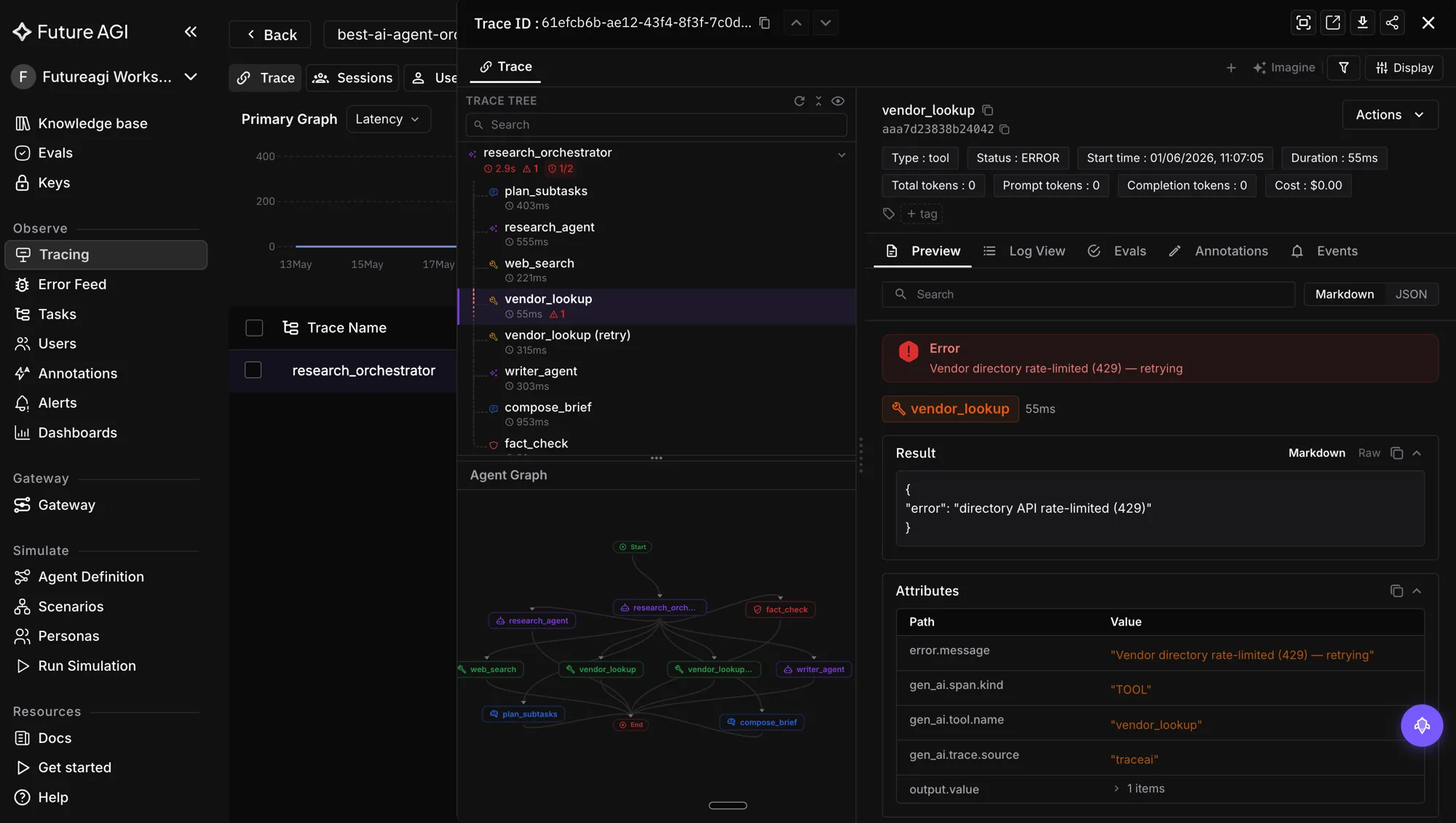
That single screen is the unit of debugging. Everything upstream (the SLO that fired, the alert that paged, the Error Feed cluster that ranked rising) drills into it. Everything downstream (the simulation scenario you seed, the optimizer run you launch) starts from it.
The closed loop: observability → eval → cluster → simulation → optimization
Once observability and eval are in place, the team-operated loop is explicit.
- Production calls land as traces. Native path for managed runtimes, SDK path for self-hosted.
- Eval engine scores every call. Audio, conversation, agent goal, safety, multilingual rubrics from the matrix above. Scores land on the spans.
- SLOs fire on sustained breaches. P95 latency, WER by accent, task completion, barge-in, PII gate.
- Error Feed clusters the breaches into named issues with auto-written root cause, supporting span evidence, quick fix, long-term recommendation, and trend.
- Alerts route by issue category to the owning team via Slack, PagerDuty, or webhook based on severity.
- The failing cluster seeds Workflow Builder scenarios for simulation reproduction. The Workflow Builder auto-generates branching scenarios (specify 20, 50, or 100 rows; FAGI generates conversation paths plus personas plus situations plus outcomes). 18 pre-built personas plus unlimited custom-authored personas configure name, description, gender, age range, location, personality traits, communication style, accent, conversation speed, background noise, and multilingual controls.
- The same eval rubrics score the simulated runs. Error Localization pinpoints the exact failing turn when a scenario breaks, so the failure is reproducible offline.
agent-optproposes a prompt revision against the cluster’s failure pattern. Six optimizers ship: Bayesian Search (smart few-shot), Meta-Prompt (bilevel optimization, arXiv 2505.09666), ProTeGi (prompt optimization with textual gradients), GEPA (genetic-Pareto reflective evolution, arXiv 2507.19457), Random Search (baseline, arXiv 2311.09569), and PromptWizard (production-grade prompt optimization). Pick the optimizer per use case; the dashboard surfaces optimizer iterations, candidate prompts, and final scores.- The team reviews the diff and ships it. Optimization is never autonomous; the human approval gate is deliberate.
- The next batch of traces feeds the next round. The library of failure clusters, scenarios, and prompt revisions grows with the team.
This is the loop that closes voice monitoring into something operational rather than cosmetic. Observability without the loop is a dashboard you stare at. Observability inside the loop is the engine that drives the next sprint.
For the simulation side end to end, see how to author voice agent scenarios without manual QA. For the optimizer surface, see how agent-opt closes the prompt loop.
What changes when traffic doubles overnight
Voice agents do not grow linearly. A press hit, a marketing campaign, or a partner integration can double inbound call volume in a day. The monitoring stack has to absorb that without spiking on noise. Three things tend to break:
Alert fatigue. P95 drifts up by 80 ms because the LLM provider is contended. Anomaly detection on top of static thresholds is the fix: alert when P95 deviates 2 sigma from the learned hourly baseline, not when it crosses a fixed line. Static lines stay for hard limits (5xx rate, uptime, MOS floor, PII zero gate).
Eval cost spikes. Sampling matters at scale. Always score the cheap classifier metrics on 100 percent of calls (intent confidence, WER estimate, audio quality, task completion). Sample 10 percent for the expensive judge metrics (full conversation_coherence, custom rubrics). Sample 100 percent of any conversation flagged by Error Feed as part of a rising issue. That keeps cost predictable and coverage on the metrics that fire alerts.
Issue clustering lag. Error Feed clusters incrementally. A sudden spike of similar failures takes a few minutes to coalesce into a named issue. Set the dashboard to flag “anomalous failure volume” as a fallback signal during the lag window. The named issue lands once enough data accumulates.
The general rule: design alerts around variance from baseline, not absolute thresholds. The on-call wants to know latency is 200 ms higher than usual for the time of day, not that latency is 800 ms.
Common pitfalls
Picking the wrong category for the runtime. Trying to instrument Vapi with the traceAI SDK does not work; you do not own the code path. Use the native path. Trying to use the native path on a self-hosted Pipecat pipeline gives you call-level visibility only when you wanted span-level depth. Use the SDK path. Section 1 vs Section 2 is the first decision; everything downstream depends on it.
Skipping the conversation_id attribute. Without it, spans do not join into trace trees and the dashboard cannot render a turn-by-turn drill-down. The native path sets it automatically from the provider’s call ID. The SDK path needs it explicitly (conversation_id="customer-123" in Pipecat’s PipelineTask, the parent span’s attribute in LiveKit).
Running eval inline on the hot path. Streaming eval scores back into the live audio path eats your budget. Async after each turn writes the score onto the span and feeds the SLO grid without slowing the conversation. Only run inline when the score gates an action (refusal, escalation), and only with a fast classifier model.
Paging on average latency. Average hides the tail of users who experience a 3-second pause and hang up. Always alert on P95 or P99. If you are paging on average today, switch tonight.
Ignoring the audio leg. Transcript-only monitoring misses TTS regressions, brand-name pronunciation drift, codec artifacts, and barge-in failures. Score the audio with audio_transcription (eval_id 73) and audio_quality (eval_id 75) and write the scores onto the same span as the text scores. Send the recording to the platform; the native path does this for free.
Writing your own clustering layer. Failure clustering is hard, and the cost of getting it wrong is a flood of alerts the team mutes. Error Feed ships a working clustering layer zero-config. Use it.
Routing everything to one rotation. Issue-category routing is what makes on-call sustainable. A page that lands on the wrong team has to be triaged, re-paged, and re-investigated; the cost is hours per incident. The ISSUE_OWNERS mapping above is a 30-line change with a permanent operational payoff.
Tagging conversations after the fact. Business attribution (customer, intent, agent version, vertical) has to land on the span as it is created. The eval and clustering layers read tags at write time, not at query time. Late tags do not get clustered.
Where FAGI falls short (calibrated)
Persona library depth is Cekura’s home turf. Cekura ships more pre-built synthetic callers for pre-launch coverage testing. FAGI’s 18 pre-built personas plus unlimited custom-authored personas (with name, description, gender, age range, location, personality traits, communication style, accent, conversation speed, background noise, and multilingual controls) covers most cases; if pre-launch persona catalog depth is the bottleneck, pair Cekura for pre-launch with FAGI for runtime. The library grows with your team as new edge cases land.
** Multi-region SaaS is available today on Agent Command Center with SOC 2 Type II, HIPAA, GDPR, CCPA, and ISO 27001 certifications. ISO 42001 is in progress.
Related reading
- Voice AI Observability for Vapi: a 2026 Implementation Guide
- The voice agent eval rubric library
- 7 best voice agent monitoring platforms in 2026
- How to implement voice AI observability in 2026
- 12 metrics that actually matter for AI conversation monitoring in 2026
Sources and references
- traceAI on GitHub: github.com/future-agi/traceAI
- ai-evaluation on GitHub: github.com/future-agi/ai-evaluation
- Native voice observability quickstart: docs.futureagi.com, Observe → Voice
- traceAI Pipecat integration: docs.futureagi.com, Integrations → Pipecat
- traceAI LiveKit integration: docs.futureagi.com, Integrations → LiveKit
- Future AGI Protect docs: docs.futureagi.com/docs/protect
- arXiv 2510.13351 (Protect latency and LoRA adapters): arxiv.org/abs/2510.13351
- arXiv 2507.19457 (GEPA): arxiv.org/abs/2507.19457
- arXiv 2505.09666 (Meta-Prompt bilevel optimization): arxiv.org/abs/2505.09666
- arXiv 2311.09569 (Random Search baseline): arxiv.org/abs/2311.09569
- OpenInference specification: github.com/Arize-ai/openinference
- Trust page (SOC 2 + HIPAA + GDPR + CCPA + ISO 27001): futureagi.com/trust
Frequently Asked Questions
Which voice runtimes use the native FAGI dashboard path vs the traceAI SDK?
What SLOs should I set for a production voice agent in 2026?
How does Error Feed change the on-call workflow for voice agents?
Which eval rubrics should I attach for voice specifically?
What does the closed monitoring loop look like end to end?
Does inline guardrail latency fit inside a voice budget?
Should I run evaluations inline or async after a turn?
Implement voice AI observability for Vapi in 2026: native FAGI dashboard via Assistant ID, traceAI SDK path, audio_transcription and conversation rubrics.

The 14 voice-specific eval rubrics worth running in 2026. Named templates, when to use each, what bad looks like, code samples, how they layer.
Voice agent monitoring platforms ranked for 2026 by tracing depth, named voice eval rubrics, error clustering, SLOs, inline guardrails, and audio replay.