Voice AI Observability for Vapi: A 2026 Implementation Guide
Implement voice AI observability for Vapi in 2026: native FAGI dashboard via Assistant ID, traceAI SDK path, audio_transcription and conversation rubrics.
Table of Contents
Voice AI observability for Vapi is the layer that captures every call as a span tree (STT, LLM, tool calls, TTS), scores it against latency and quality rubrics, and clusters the failures by named root cause. Vapi runs the call pipeline. Your job is to know what happened inside every call, score it against the rubrics that matter, and cluster the failures into something an on-call engineer can act on. This guide walks through the two paths Future AGI ships for that on Vapi: a dashboard-driven native path that needs no SDK at all, and a code-driven traceAI path for teams that want richer LLM and tool spans on top, both emitting OTel GenAI semantic conventions so the spans port out to any downstream backend.
Step preview
- Wire your Vapi Assistant into a Future AGI Agent Definition via API key + Assistant ID. Native call log capture starts immediately.
- Verify the auto transcript, the separate assistant and customer audio downloads, and the call session view in the FAGI Observe project.
- Attach the named voice rubrics:
audio_transcription,audio_quality,conversation_coherence,conversation_resolution,task_completion. - Optionally install traceAI for the LLM provider Vapi uses, so LLM and tool spans land inside the same trace tree.
- Turn on Error Feed for auto-clustered failures and Future AGI Protect for inline guardrails.
The rest of the post fills in the details for each step.
Why Vapi specifically
Vapi has the largest open-source voice agent community of any orchestration vendor in 2026. Its call pipeline owns telephony, WebRTC, STT, LLM routing, TTS, and tool invocations behind a single Assistant abstraction. That’s the genuine strength: you point Vapi at an LLM provider, configure voices, and ship.
What Vapi does not ship is a full observability and eval stack. The built-in call log surface gives you transcripts and basic analytics. It does not score every call against multi-turn rubrics, it does not auto-cluster failures into named issues, and it does not run inline guardrails on the LLM response. That gap is where FAGI sits: native voice observability layered on top of the Vapi pipeline.
The pattern we recommend: keep Vapi as your call pipeline, add FAGI as your observability and eval layer. The two compose cleanly because FAGI’s native integration is API-driven and reads the call data Vapi already exposes.
Step 1: Wire the Vapi Assistant into a FAGI Agent Definition
This is the no-SDK path. Everything happens in the FAGI dashboard.
Create the Agent Definition
In the FAGI console, open the Observe product and create a new project.
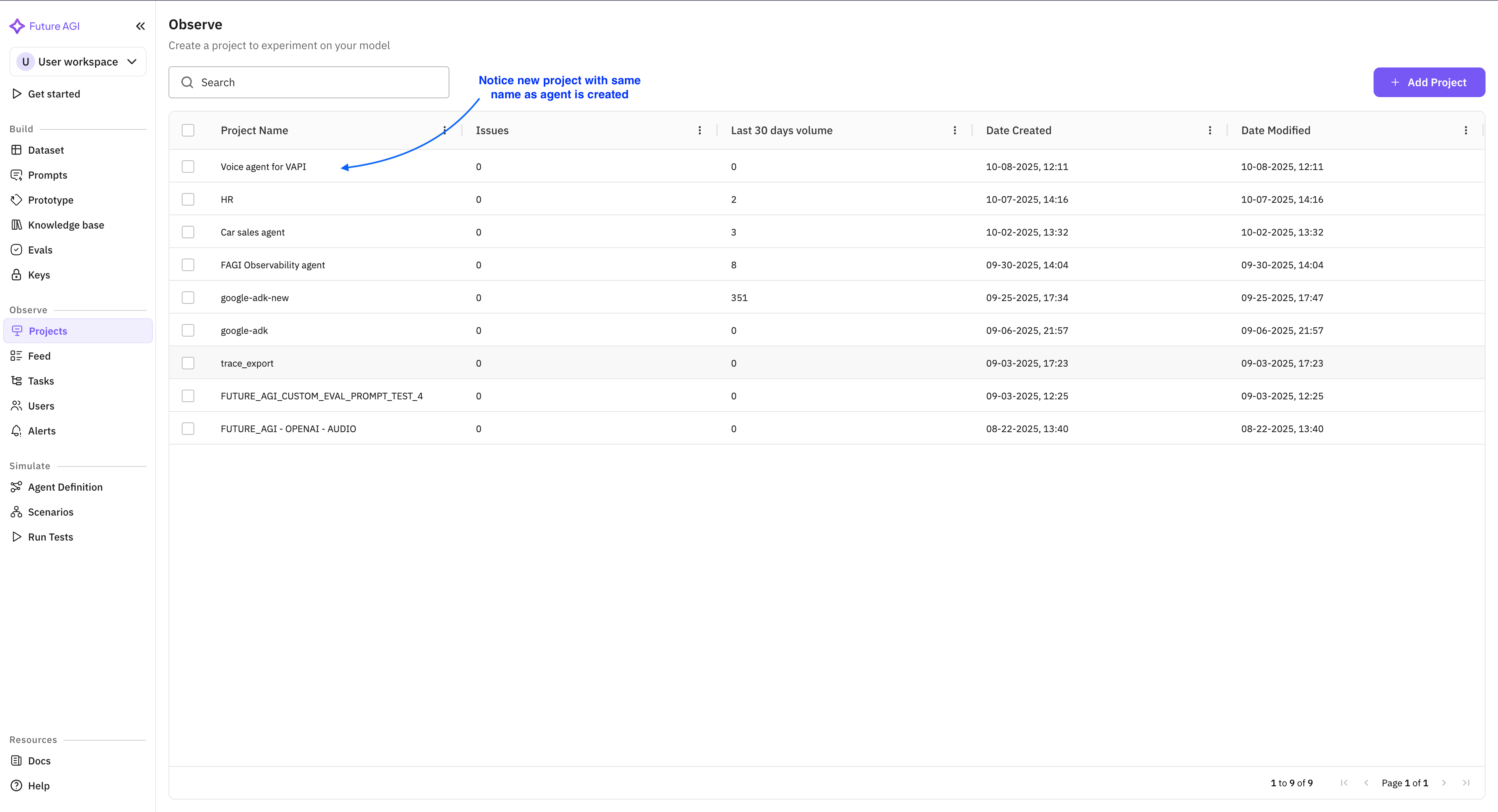
Inside the project, open the Agent Definition list and click create.
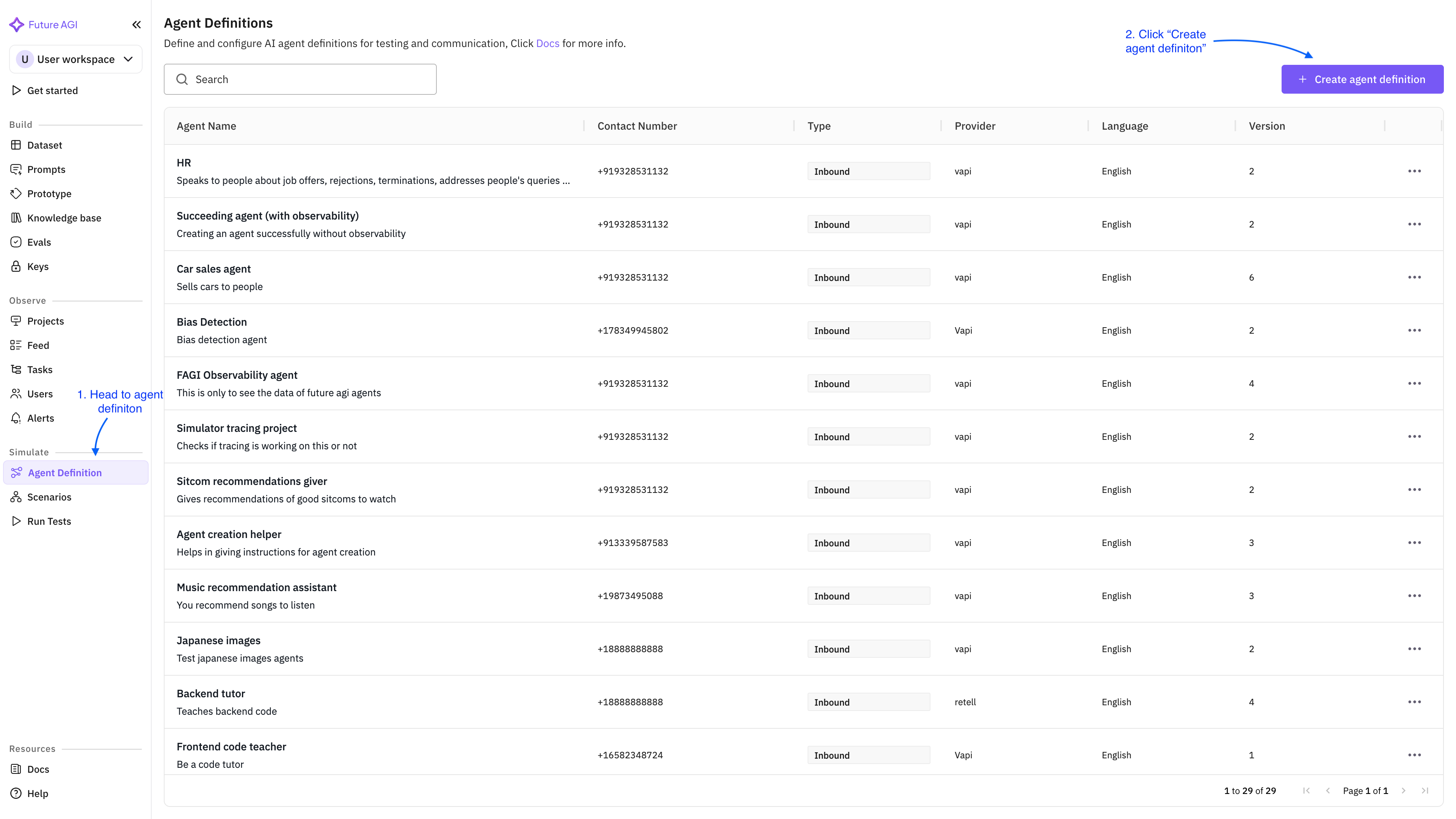
The form asks for:
- Agent name: free-text, what shows up in the call log table.
- Provider: pick Vapi from the supported list (Vapi, Retell AI, and LiveKit are the natively supported providers).
- Provider API key: paste the Vapi API key from your Vapi account settings.
- Assistant ID: paste the Assistant ID from the Vapi console.
- Observability toggle: enable.
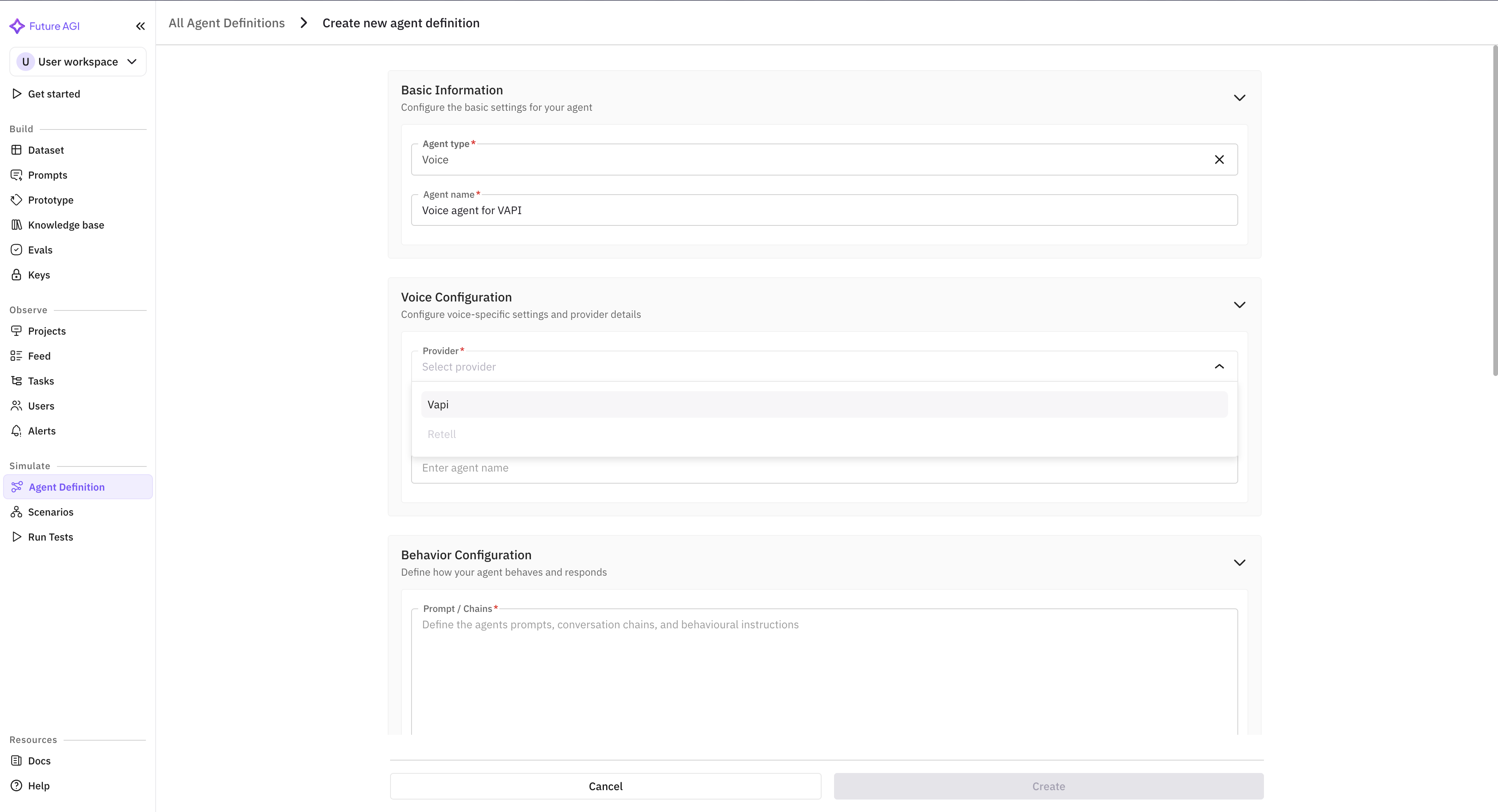
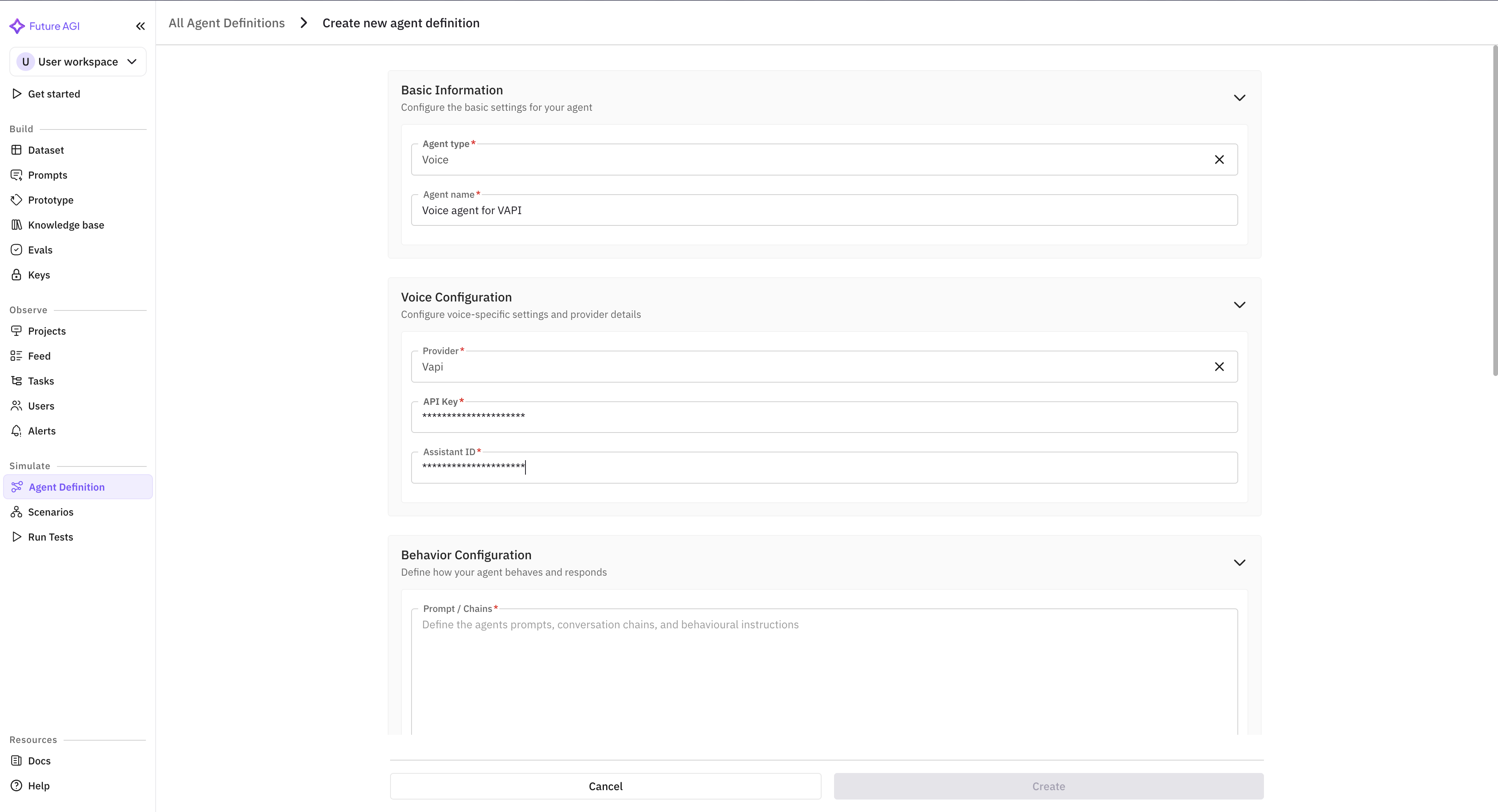
Save the agent. FAGI immediately attempts a handshake with Vapi to verify the API key + Assistant ID combination. If the handshake fails, the dashboard surfaces the error inline with a remediation hint (most often a missing scope on the API key).
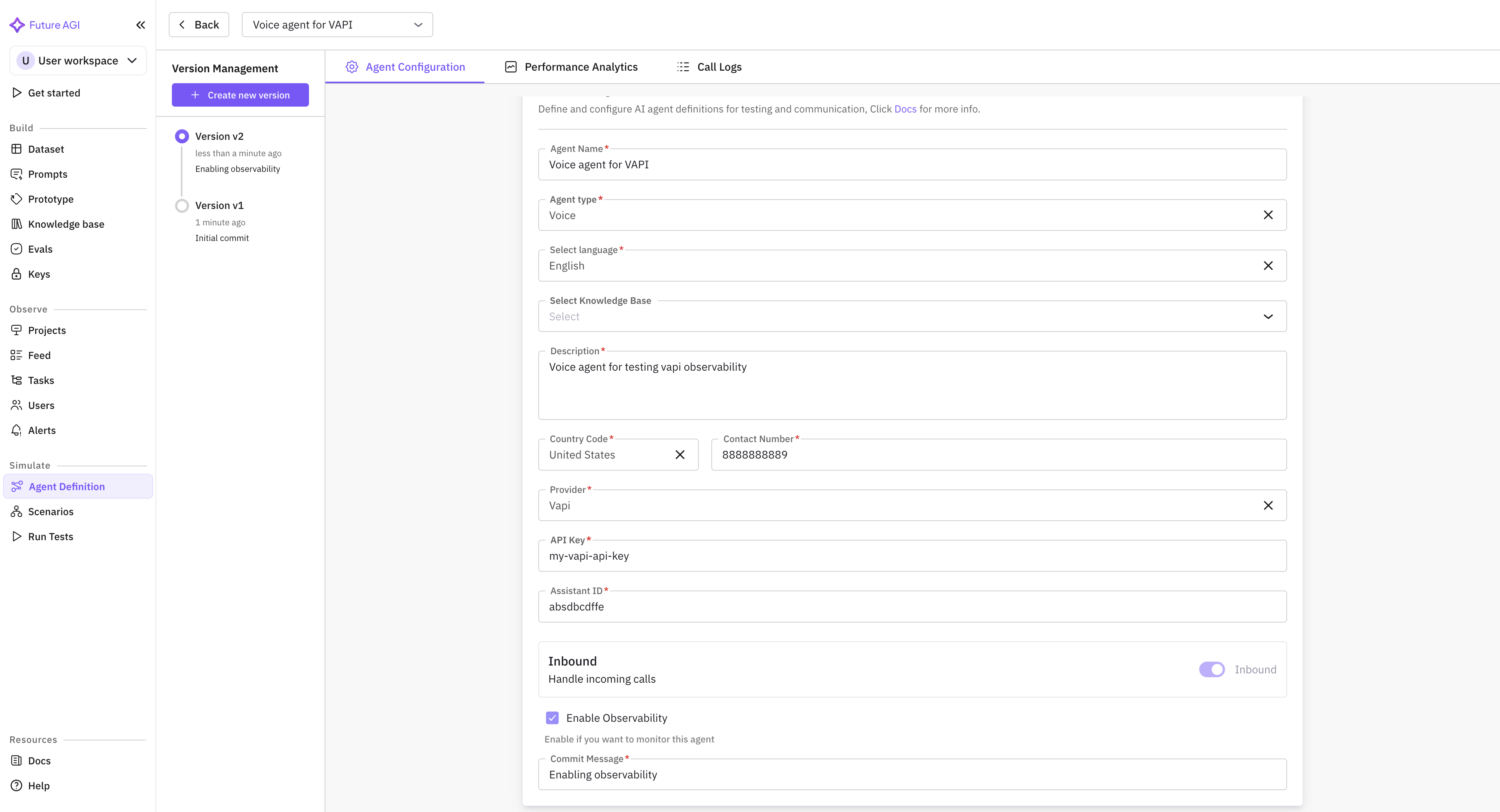
What happens after save
Within a few minutes of the next call placed through that Vapi Assistant, three things appear in the FAGI dashboard:
- A new row in the Call Log table with timestamp, duration, direction (inbound or outbound), customer phone, and final status.
- Two separate audio files attached to the row: one for the assistant audio, one for the customer audio. Both downloadable.
- An auto transcript rendered turn by turn next to the audio, with speaker tags.
This is the surface that needs zero code. You can stop here and you already have more observability than Vapi’s built-in dashboard surfaces.
Tagging conversations for KPI attribution
The Agent Definition supports custom attributes that ride into every captured call as tags. The pattern we use:
customer_id: lets you filter calls by accountvertical: e.g.support,outbound_sales,appointment_bookingagent_version: lets you A/B compare prompt revisionscampaign_id: for outbound, links the call back to the campaign that triggered itintent: top-level intent (refund, scheduling, escalation)
You set these on the Vapi side as call metadata. They flow through the Vapi API into the FAGI session and become filter axes in the Observe dashboard.
Step 2: Verify the call surface
Place a test call. The call appears in the Voice Observability table within a few minutes, alongside any other captured calls for that Agent Definition.
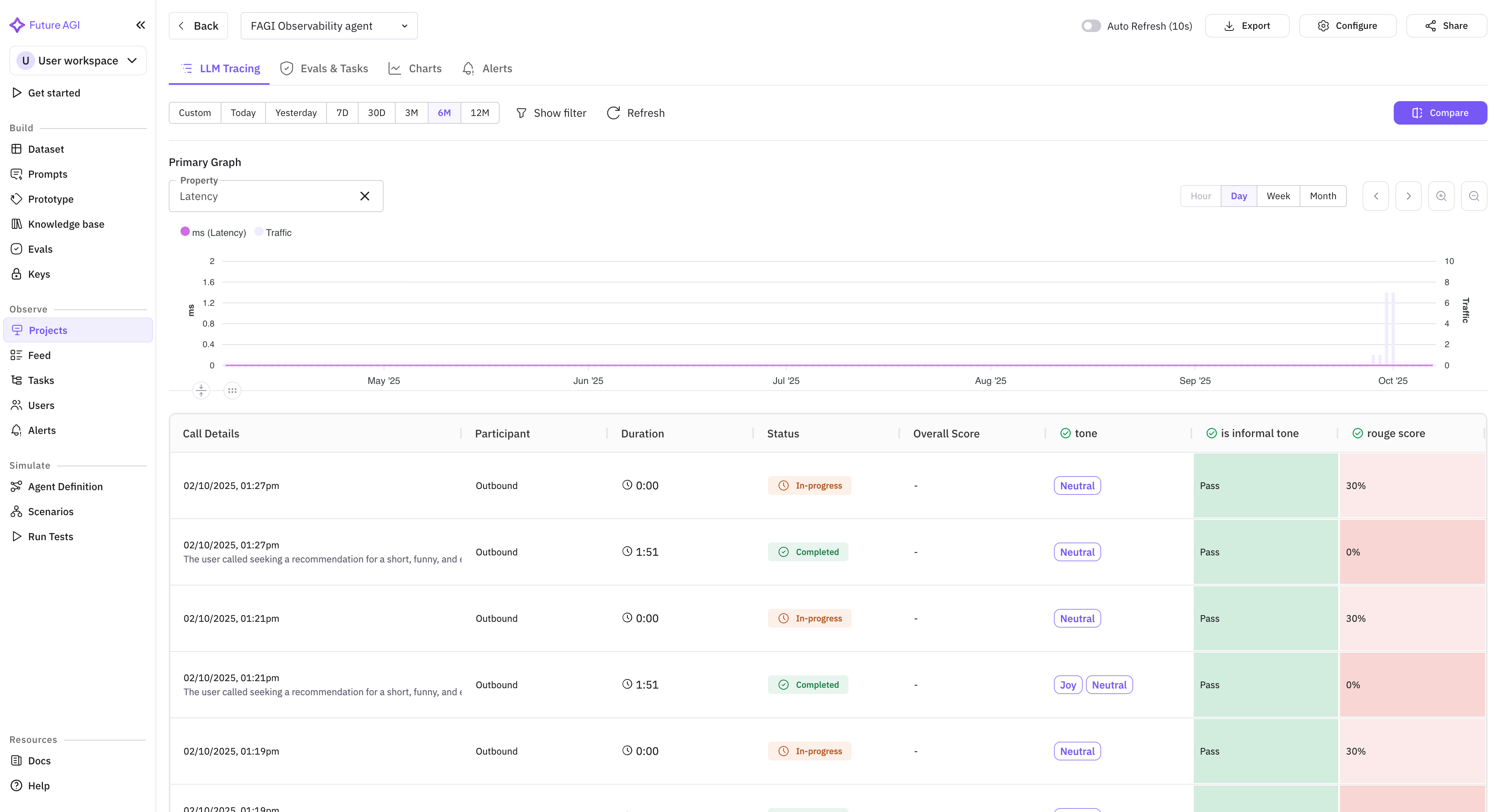
In the FAGI dashboard, open the Call Log row. You should see:
Audio panel: two players, one labelled Assistant, one labelled Customer. Each has its own waveform and a download button. The separation is what lets you debug a barge-in failure (which lives in the customer audio’s interruption timing relative to the assistant’s response start) or a TTS regression (which lives in the assistant audio alone).
Transcript panel: turn-by-turn alternating Assistant and Customer rows. Each row carries a timestamp and the speaker tag. Hover a row to see the underlying STT confidence if the Vapi provider exposes it.
Session timeline: a horizontal trace tree showing the call as a root span with child events for each turn. If you have not yet wired traceAI on the LLM provider, the timeline shows turn boundaries only. After you wire traceAI in step 4, the LLM call, tool calls, and any RAG retrievals appear as nested child spans.
Eval scores panel: empty until you attach rubrics in step 3.
Tags panel: shows whatever metadata you passed through Vapi.
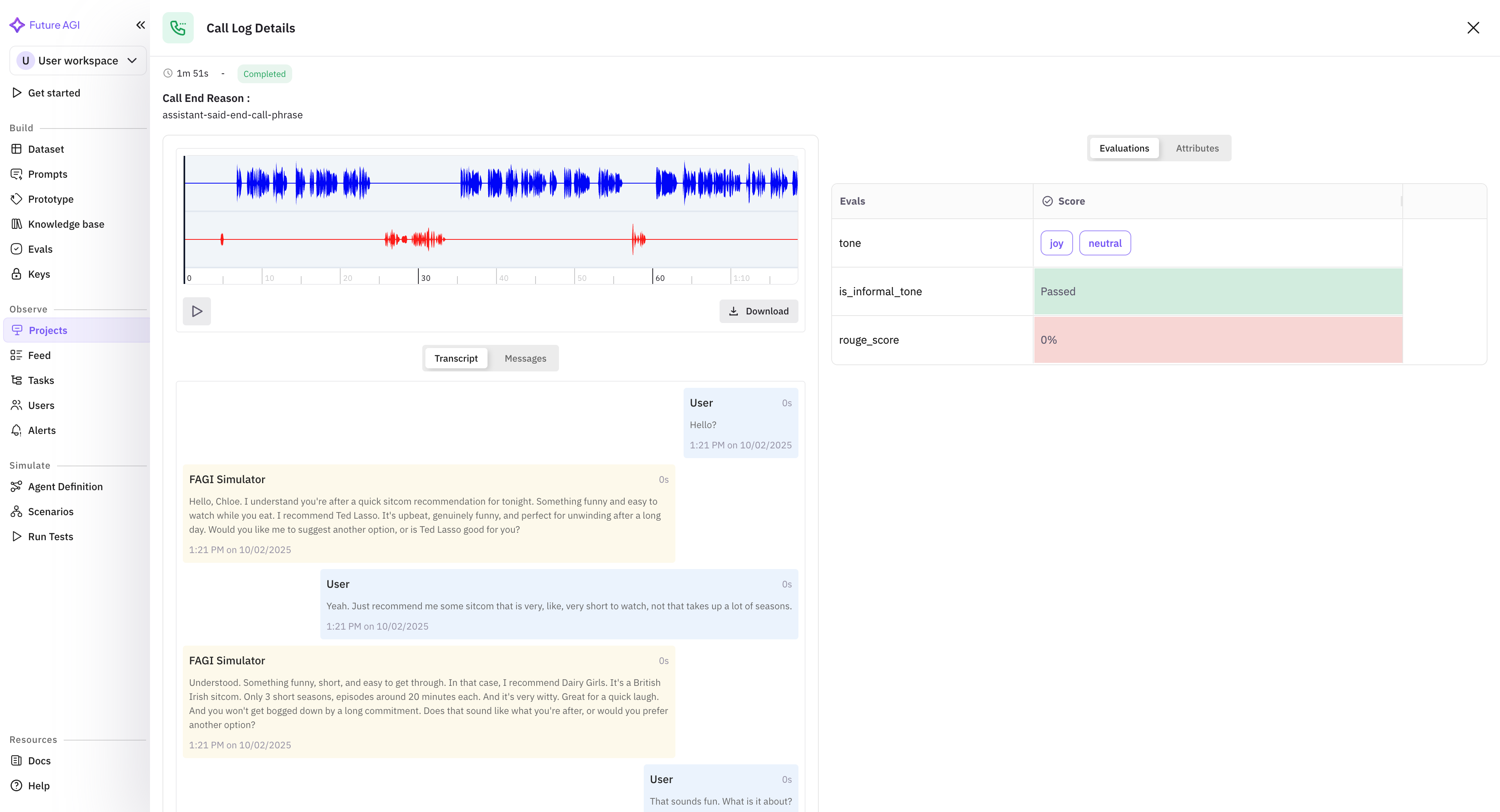
If any of those panels are missing, double-check the Agent Definition. The most common gotcha is an API key without the right scope (Vapi calls this a “private key”; the public key won’t work for fetching call logs).
Step 3: Attach the named voice rubrics
The ai-evaluation SDK ships 70+ built-in eval templates in Apache 2.0. For voice on Vapi, five of them carry most of the load.
| Rubric | What it scores |
|---|---|
audio_transcription | ASR drift on the customer audio against the rendered transcript |
audio_quality | TTS output quality on the assistant audio (clarity, prosody) |
conversation_coherence | Multi-turn coherence of the assistant across the whole call |
conversation_resolution | Did the call resolve the customer’s stated goal |
task_completion | Did the agent complete the task it was supposed to complete |
In the dashboard, open the project’s Evals tab. Click “Add Built-in Rubric” and select the five above. They run on every captured call going forward. Past calls require an explicit backfill, which is a one-click action.
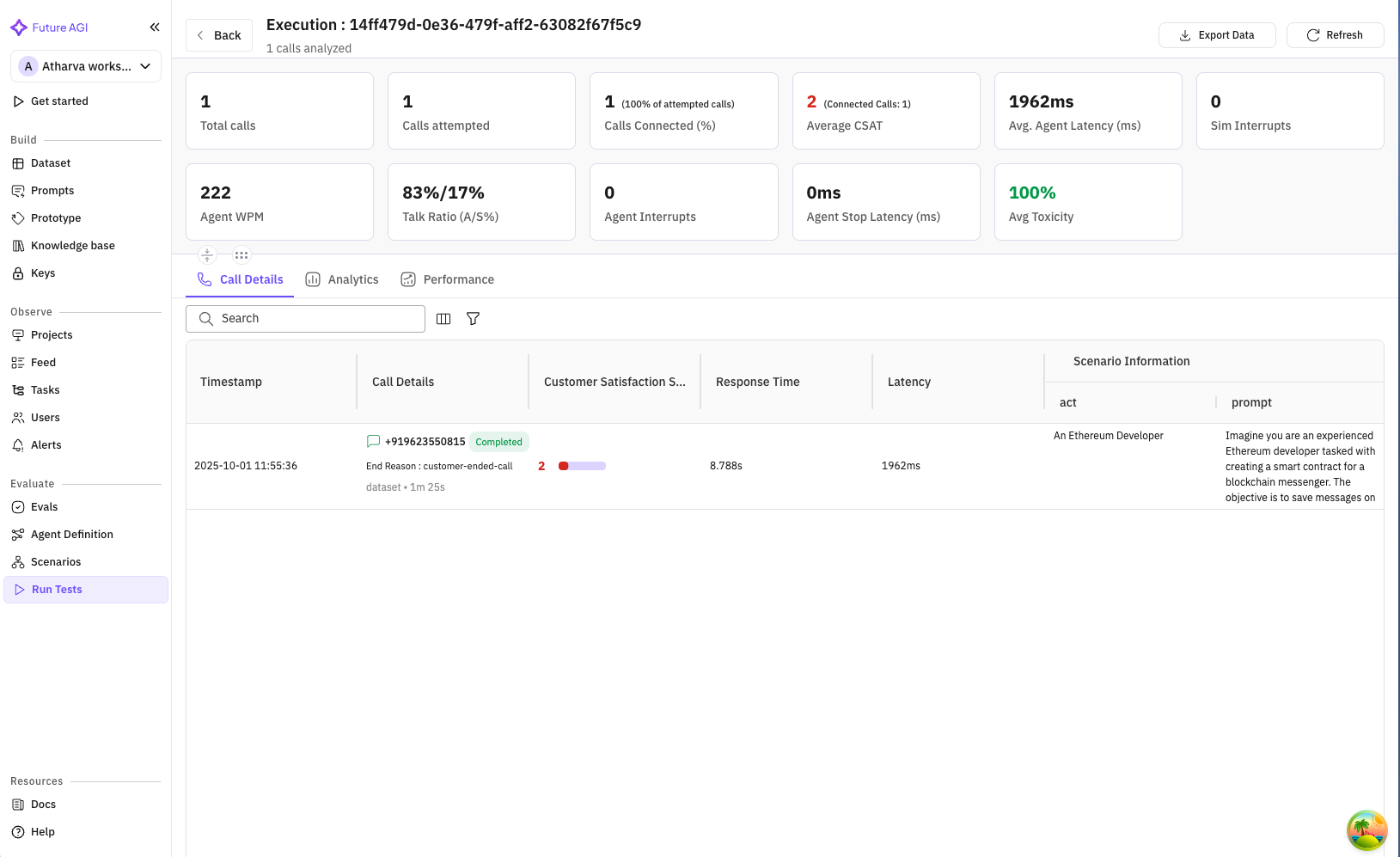
Once the rubrics are attached, the Call Insights view rolls eval scores up across calls and surfaces the failing patterns:
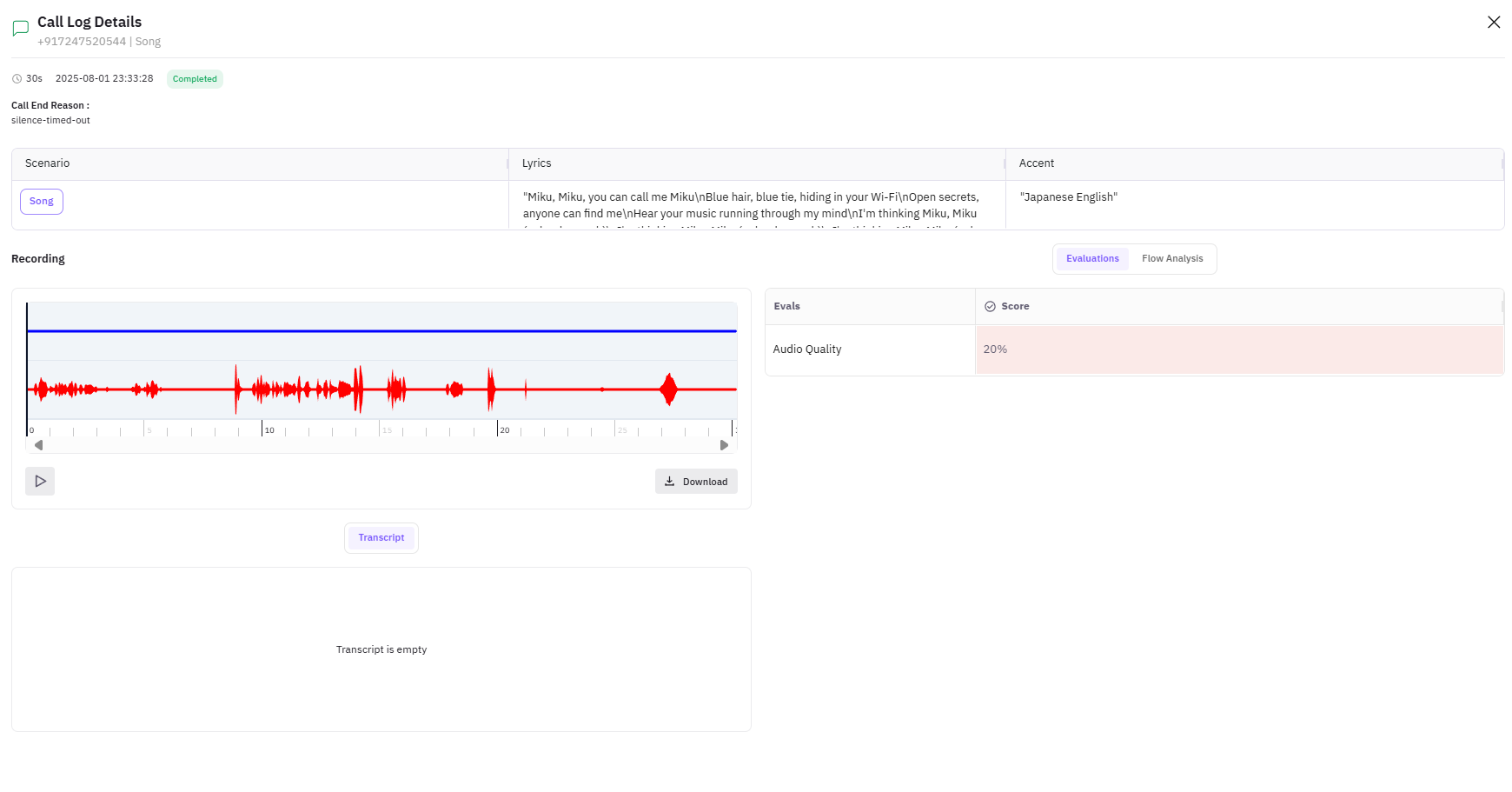
For a single failing call, the per-call detail view surfaces the eval scores alongside the audio and transcript so you can hear what the rubric caught:
You can also attach rubrics programmatically if you’d rather keep the config in code. The pattern looks like this:
from fi.testcases import MLLMTestCase, MLLMAudio, ConversationalTestCase, LLMTestCase
from fi.evals import (
    Evaluator,
    AudioTranscriptionEvaluator,
    AudioQualityEvaluator,
    ConversationCoherence,
    ConversationResolution,
    TaskCompletion,
)

ev = Evaluator(
    fi_api_key="your-future-agi-api-key",
    fi_secret_key="your-future-agi-secret-key",
)

# Score the captured assistant audio
assistant_audio = MLLMAudio(url="https://fagi.example.com/calls/abc123/assistant.wav")
audio_case = MLLMTestCase(input=assistant_audio, query="Score this assistant TTS leg")

# Score the multi-turn conversation
conv = ConversationalTestCase(messages=[
    LLMTestCase(query="Hi I need to reschedule my appointment", response="Sure, what's your account number?"),
    LLMTestCase(query="It's 8842", response="Got it. I see your booking on Thursday at 3pm. What works better?"),
])

result = ev.evaluate(
    eval_templates=[
        AudioTranscriptionEvaluator(),
        AudioQualityEvaluator(),
        ConversationCoherence(),
        ConversationResolution(),
        TaskCompletion(),
    ],
    inputs=[audio_case, conv],
)
MLLMAudio accepts seven formats out of the box: .mp3, .wav, .ogg, .m4a, .aac, .flac, .wma. URLs or local paths, with auto base64 encoding. That covers anything Vapi might hand back.
Why these five rubrics specifically
audio_transcription catches the failure mode where your STT layer drops words on accented or noisy audio. The Vapi dashboard transcript is what Vapi’s STT produced; this rubric scores that transcript against the actual audio. If the two disagree, you have an STT drift problem and the dashboard transcript was lying.
audio_quality catches the failure mode where your TTS layer regresses after a voice or provider switch. Brand names mispronounced, prosody flat, audio sounding robotic on certain phrases. Without this rubric, those regressions are silent in transcript-only views.
conversation_coherence catches the failure mode where the assistant contradicts itself across turns or loses context after a long tool call. This is the rubric that turns “the call sounded fine but the customer hung up” into “turn 7 contradicted turn 3”.
conversation_resolution is your CSAT proxy. Did the call actually solve the customer’s problem, regardless of how friendly the assistant sounded along the way. This pairs with business-side metrics like FCR (first call resolution) and AHT (average handle time).
task_completion is the agent-side version of the same question. Did the assistant complete the tool calls and the workflow it was supposed to complete, regardless of whether the customer was satisfied. The two split when the customer asks for something outside policy and the agent correctly refuses.
Step 4: Add traceAI for richer LLM-level spans (optional)
The dashboard path gives you call-level visibility. If you want turn-level depth, you wire traceAI inside the LLM provider Vapi uses. Vapi supports Anthropic, OpenAI, Groq, Mistral, and a handful of others as the LLM behind the assistant. Pick the matching traceAI instrumentor.
traceAI ships 30+ documented integrations across Python + TypeScript, OpenInference-compatible, Apache 2.0.
import os

from fi_instrumentation import register
from fi_instrumentation.fi_types import ProjectType
from traceai_anthropic import AnthropicInstrumentor

os.environ["FI_API_KEY"] = "your-future-agi-api-key"
os.environ["FI_SECRET_KEY"] = "your-future-agi-secret-key"

trace_provider = register(
    project_type=ProjectType.OBSERVE,
    project_name="vapi_support_agent",
    set_global_tracer_provider=True,
)

AnthropicInstrumentor().instrument(tracer_provider=trace_provider)
For OpenAI, swap AnthropicInstrumentor for OpenAIInstrumentor from traceai_openai. For Groq, traceai_groq.GroqInstrumentor. For Mistral, traceai_mistralai.MistralAIInstrumentor.
The instrumentor lives inside whatever service hosts your LLM logic. If you’re using Vapi’s built-in LLM routing (Vapi calls Anthropic directly), you can’t wrap the call from outside; you need to be running your own LLM proxy that Vapi calls into. Many production setups already do this for prompt versioning and routing, so the wiring point usually already exists.
Joining traceAI spans to the Vapi call
The thing that ties LLM-level spans back to a specific Vapi call is the conversation ID. Pass the Vapi call ID into your LLM proxy as a header or metadata field, and write it on the root span:
from fi_instrumentation import FITracer

tracer = FITracer(trace_provider.get_tracer(__name__))

def handle_llm_call(vapi_call_id, customer_id, agent_version, messages):
    with tracer.start_as_current_span(
        "vapi_turn",
        attributes={
            "conversation_id": vapi_call_id,
            "customer_id": customer_id,
            "agent_version": agent_version,
            "channel": "voice",
            "provider": "vapi",
        },
    ):
        return anthropic_client.messages.create(
            model="claude-sonnet-4-7",
            messages=messages,
        )
Now the LLM spans land in the same FAGI project as the Vapi call sessions, and the dashboard renders them under the same root in the trace tree. You can drill from a call row into the exact LLM turn that produced a low conversation_coherence score.
When to skip the SDK path
If your team is happy with call-level observability, skip step 4. The dashboard path covers most production voice debugging cases on Vapi. Add traceAI only when:
- You need to debug tool call arguments and the dashboard transcript doesn’t surface them.
- You’re A/B testing prompt revisions and need turn-level eval differentials.
- You’re integrating with a RAG retrieval layer and need retrieval spans on the trace tree.
For the support-and-resolution use case, the dashboard path is usually enough.
Step 5: Turn on Error Feed and inline Protect
This is where the loop closes.
Error Feed auto-clusters failures
Error Feed is the zero-config error monitoring layer in the FAGI Observe product. The moment traces and calls flow into a project, it starts detecting errors across five categories: factual grounding failures, tool crashes, broken workflows, safety violations, and reasoning gaps. It auto-clusters them into named issues with auto-written root cause, supporting evidence from the spans, a quick fix to ship today, and a long-term recommendation.
For Vapi specifically, the common clusters look like this:
- “STT confidence drop on Indian English” clusters mistranscriptions, points at the accent group, suggests an STT model upgrade or a per-accent threshold tweak.
- “Tool argument schema mismatch in
book_appointment” clusters failed tool calls, points at the prompt section that drifted, suggests a prompt patch. - “TTS pronunciation drift on brand names after voice switch” clusters audio quality regressions, points at the voice ID change, suggests a per-brand-name SSML override.
- “Hang-up after 3rd turn in outbound campaign 47” clusters drop-off failures, points at the script’s third turn, suggests reordering the opening.
You don’t write these names. The clustering layer writes them.
Inline guardrails via Future AGI Protect
If your Vapi assistant runs in a regulated workflow (healthcare, fintech, insurance), inline content moderation matters. The Future AGI Protect model family runs sub-100ms inline. Foundation is Gemma 3n with LoRA-trained adapters across 4 safety dimensions (Content Moderation, Bias Detection, Security, Data Privacy Compliance), multi-modal across text, image, and audio. ProtectFlash adds a single-call binary classifier path when you need an even faster surface.
The integration sits inside your LLM proxy, between the LLM response and the Vapi TTS leg:
from fi.evals import Protect

p = Protect()

def safe_reply(user_text, agent_text):
    out = p.protect(
        inputs={"input": user_text, "output": agent_text},
        protect_rules=[
            {"metric": "content_moderation"},
            {"metric": "security"},
            {"metric": "data_privacy_compliance"},
        ],
    )
    if out.blocked:
        return "I'm sorry, I can't help with that. Let me get you to a human agent."
    return agent_text
For the fast path:
out = p.protect(
    inputs={"input": user_text, "output": agent_text},

)
ProtectFlash returns a single harmful or not-harmful verdict in one call. When using “, individual rules are ignored, which is the trade-off for the latency.
The verdict object lands on the FAGI span, so the trust team can review denied responses in Error Feed.
A full reference architecture
Putting it all together, a production Vapi observability stack on FAGI looks like this:
+-----------------+        +---------------------+        +-------------------+
| Vapi Assistant  | -----> | Your LLM Proxy      | -----> | LLM Provider      |
| (call pipeline) |        | + traceAI instr     |        | (Anthropic, etc.) |
|                 |        | + Protect inline    |        +-------------------+
+-----------------+        +----------+----------+
        |                             |
        |                             | OpenInference spans
        |                             v
        |              +----------------------------+
        |              | FAGI Observe project       |
        +------------> | - native voice integration |
   call log + audio    | - 70+ built-in rubrics      |
   + transcript        | - Error Feed clustering    |
                       | - inline Protect verdicts  |
                       +----------------------------+
                                     |
                                     v
                       +----------------------------+
                       | Agent Command Center       |
                       | - RBAC, BYOC, multi-region |
                       | - SOC 2 + HIPAA + GDPR     |
                       |   + CCPA + ISO 27001       |
                       +----------------------------+
Vapi owns the call. Your LLM proxy is where traceAI and inline Protect attach. The FAGI Observe project receives both surfaces (call-level from Vapi, span-level from the proxy) and joins them under one session. Agent Command Center hosts the whole stack with RBAC, multi-region or BYOC, and the cert set listed on futureagi.com/trust: SOC 2 Type II, HIPAA, GDPR, CCPA, and ISO 27001.
Calibrated honesty: where Vapi genuinely wins
Vapi has the largest open-source voice agent community of any orchestration platform in 2026. That matters in three concrete ways:
Provider coverage on the call pipeline. Vapi natively bridges to dozens of STT, TTS, and LLM providers without you writing the integration. If you’re shopping for a call pipeline, Vapi’s catalog is the deepest in the category.
Community recipes. The volume of community-shared assistants, prompts, and tool integrations on Vapi outpaces any other framework. If you’re building a common pattern (appointment booking, support triage, outbound qualification), there’s usually an open-source starting point.
Telephony depth. Vapi’s telephony integration is mature: SIP, Twilio, Plivo, Telnyx, and the long tail. For inbound at scale, that matters.
What Vapi does not ship is the observability, eval, clustering, and inline guardrail layer that production teams need on top. That’s the gap FAGI fills, and the two compose cleanly. Vapi runs the call. FAGI watches it, scores it, clusters the failures, and guards the LLM output.
Two deliberate tradeoffs
Async eval gating is explicit. FAGI never auto-rewrites prompts in production without an explicit run plus a human approval gate. The Dataset UI ships UI-driven optimization across all six optimizers (Bayesian Search, Meta-Prompt per arXiv 2505.09666, ProTeGi, GEPA Genetic-Pareto per arXiv 2507.19457, Random Search per arXiv 2311.09569, PromptWizard); the agent-opt Python library exposes the same six for programmatic control. Either way, the loop stays explicit: point the run at a dataset, pick an evaluator, pick the optimizer, then promote a candidate by hand.
Native voice obs ships for Vapi, Retell, and LiveKit; everything else routes through traceAI or Enable Others. The provider-API-key dashboard path covers the three runtimes most production teams pick. The remaining 10 percent (Synthflow, Bland, Pipecat, custom RTP) lands through the traceAI SDK (from fi_instrumentation import register plus from fi_instrumentation.fi_types import ProjectType) or via Enable Others mode with mobile-number simulation. Active iteration on the dashboard surface keeps shipping every release: multi-step Agent Definition UX, Prompt Workbench Revamp, redesigned Run Test performance metrics, Show Reasoning column in Simulate, sticky filters in Observe, scenario generation with branch visibility, and Error Localization that pinpoints the failing turn.
Common pitfalls when wiring Vapi observability
Don’t paste the Vapi public key into the Agent Definition. The public key is for client-side widget initialization. Call log capture needs the private key. The dashboard surfaces a clear error when this is wrong, but it’s the most common first-time mistake.
Don’t skip the metadata tagging on the Vapi side. If you don’t pass customer_id, vertical, agent_version, and intent through Vapi’s call metadata, you lose the KPI attribution layer on the FAGI side. Add them once when you set up the assistant, and every call carries them.
Don’t wire traceAI to Vapi’s internal LLM routing. You can only instrument an LLM call you control. If Vapi calls Anthropic directly without going through your proxy, traceAI can’t wrap it. The fix is to run an LLM proxy that Vapi calls into. Most teams already do this for prompt versioning and provider failover.
Don’t run all five rubrics on every call from day one. Start with conversation_resolution and task_completion. They give you the highest-signal failure modes. Add audio_transcription and audio_quality once you’ve seen a TTS or STT regression. Add conversation_coherence once you have enough multi-turn data to make the score stable.
Don’t ignore Error Feed for the first week. It needs a few days of traffic to populate. The named issues start appearing once volume crosses a threshold. Resist the urge to disable it because the first day looks empty.
When you’ve outgrown this setup
Once the five steps above are running cleanly, the natural next move is to add simulation. FAGI’s simulation product ships 18 pre-built personas plus unlimited custom-authored personas. Custom personas configure name, gender, age range (18-25 / 25-32 / 32-40 / 40-50 / 50-60 / 60+), location (US / Canada / UK / Australia / India), personality traits, communication style, accent, conversation speed, background noise, multilingual toggle, custom properties, and free-form behavioral instructions. The Workflow Builder (Conversation Node, End Call Node, Transfer Call Node) auto-generates branching scenarios (20, 50, or 100 rows) with branch visibility; Dataset scenarios accept CSV, JSON, and Excel uploads or synthetic generation; script-based runs cover deterministic regression. The 4-step Run Tests wizard runs the suite against your Vapi assistant, Error Localization pinpoints the exact failing turn, and the Show Reasoning column surfaces eval rationale per scenario. Custom voices from ElevenLabs and Cartesia plug into Run Prompt and Experiments; Indian phone number simulation ships as a configurable region. The Tool Calling eval and programmatic eval API cover CI integration.
The same Agent Definition you wired in step 1 plugs into Simulate. The same eval rubrics you attached in step 3 run on the simulated calls. The same Error Feed clusters scenario failures alongside production failures. That’s the unified surface.
For a deeper walkthrough of the simulation side, see the voice agent scenario guide. For the production monitoring playbook end-to-end, see how to monitor AI voice agents in production.
Related reading
- How to monitor AI voice agents in production: a 2026 playbook
- 7 best voice agent monitoring platforms in 2026
- How to implement voice AI observability in 2026
- Voice AI evaluation: Vapi vs Future AGI
Sources and references
- traceAI on GitHub: github.com/future-agi/traceAI
- ai-evaluation on GitHub: github.com/future-agi/ai-evaluation
- Error Feed docs: docs.futureagi.com/docs/observe
- Future AGI Protect docs: docs.futureagi.com/docs/protect
- Agent Command Center docs: docs.futureagi.com/docs/command-center
- arXiv 2510.13351 (Protect): arxiv.org/abs/2510.13351
- arXiv 2507.19457 (GEPA): arxiv.org/abs/2507.19457
- Trust page (SOC 2 + HIPAA + GDPR + CCPA + ISO 27001): futureagi.com/trust
- OpenInference spec: github.com/Arize-ai/openinference
- Vapi (plain text reference; no competitor backlink)
Frequently Asked Questions
Do I need to write any code to get observability on a Vapi assistant?
Which eval rubrics actually matter for a Vapi assistant?
How does the native voice observability path differ from traceAI?
Will this work for outbound Vapi campaigns the same way?
What latency does Future AGI Protect add if I want inline guardrails?
How does this compare to Vapi's own built-in observability surface?
Is the audio recording downloadable separately for assistant and customer?
Implement voice AI observability in 2026 for Vapi, Retell, LiveKit, Pipecat. Real traceAI code, latency SLOs, audio metrics, live eval scoring.

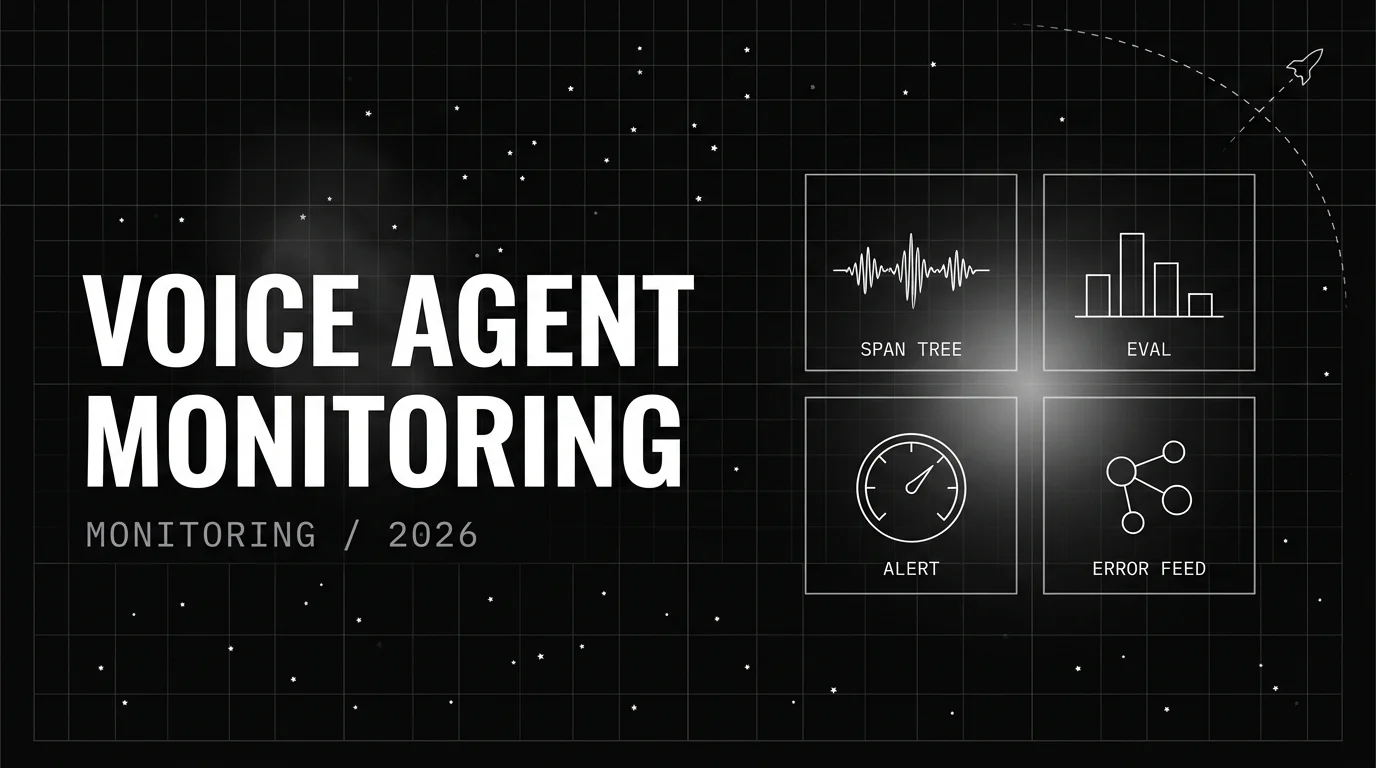
Voice agent monitoring platforms ranked for 2026 by tracing depth, named voice eval rubrics, error clustering, SLOs, inline guardrails, and audio replay.
Two-category playbook for monitoring AI voice agents: native FAGI dashboard for Vapi-class, traceAI SDK for Pipecat and LiveKit, plus SLOs.
