How to Debug AI Agents in 2026: Traces, Spans, and Fix Recipes
Step-by-step playbook for debugging AI agents in 2026. Real tracing decorators, span waterfall view, error propagation, tool-call diffs, and Fix Recipes.
Table of Contents
TL;DR
| Step | What you do | Time |
|---|---|---|
| 1. Instrument | Install traceAI, decorate your agent with @tracer.agent, tools with @tracer.tool, chains with @tracer.chain | 1 min |
| 2. Span waterfall | Open the run in the Agent Command Center. See every LLM call, tool call, retriever as nested spans | 30 sec |
| 3. Error propagation | Click the failing span. See which parents inherited the error, which siblings succeeded | 1 min |
| 4. Tool-call diff | Diff the failed run against a recent successful run for the same task | 1 min |
| 5. Apply Fix Recipe | Read the auto-generated root cause, apply the suggested prompt or tool fix | 1 min |
Debugging an AI agent in 2026 is a different exercise from debugging deterministic code. The system is non-deterministic, distributed across LLM calls, tool calls, and child agents, and fails silently when an answer is wrong but well-formed. The fast path is the same every time: capture every step as an OpenTelemetry span, visualize the run as a waterfall, follow error propagation, diff against a known-good run, and apply a fix.
This guide walks through that playbook with Future AGI traceAI (Apache 2.0) and the Agent Command Center. The same waterfall and error-propagation patterns translate to any OpenTelemetry-compatible backend; the value of the Agent Command Center is the failure taxonomy and Fix Recipes built on top of the trace.
Why Traditional Monitoring Tools Cannot Debug AI Agents
A traditional APM stack (Datadog, New Relic, Grafana) treats an agent as one HTTP call. You see total latency and a top-level error rate, but the LLM call inside the agent, the retriever, and the three tools the agent invoked are invisible. When the agent picks the wrong tool, the APM stack reports a successful 200 response.
Newer LLM observability platforms (LangSmith, Arize Phoenix, Langfuse, Datadog LLM Observability) close most of that gap. They expose the LLM call, the tool call, and the retriever as separate spans. The remaining gap is interpretation: thousands of spans become useful only when something clusters them by failure type, links symptoms to causes, and tells you which fix to try first. That last step is where the Agent Command Center sits on top of traceAI.
What changed since 2025
Three things shifted between mid-2025 and May 2026:
- OpenTelemetry GenAI semantic conventions matured. OTel GenAI defines stable attributes for LLM spans (model, prompt, response, tokens, finish reason). Every serious tracer now emits these, so traces are portable across backends.
- Agent-native span types are first-class. Tools, retrievers, planners, and child-agent invocations have their own semantic types, not just generic
internalspans. - Tail-based sampling for failures became the default. Sampling 1% of happy-path traces but 100% of failures keeps cost down while preserving the debugging signal.
Step 1: Instrument Your Agent with traceAI
traceAI is an open-source (Apache 2.0) tracer built on OpenTelemetry. It ships:
- Auto-instrumentors for LangChain, LangGraph, OpenAI, Anthropic, LlamaIndex, CrewAI, AutoGen, DSPy
- Manual instrumentation via
FITracerwith@tracer.agent,@tracer.tool,@tracer.chaindecorators - OTLP gRPC and HTTP exporters
- Compatibility with any OTel backend in addition to the Agent Command Center
Install
pip install traceAI-langchain ai-evaluationPick the auto-instrumentor that matches your stack. The list is in the traceAI README.
Configure credentials
import os

os.environ["FI_API_KEY"] = "your-fi-api-key"
os.environ["FI_SECRET_KEY"] = "your-fi-secret-key"
Both keys come from the Future AGI dashboard. Use role-based access control to scope keys per environment.
Register the project and instrument
from fi_instrumentation import register, FITracer
from fi_instrumentation.fi_types import ProjectType
from opentelemetry import trace
from traceai_langchain import LangChainInstrumentor

trace_provider = register(
    project_type=ProjectType.OBSERVE,
    project_name="support-agent-prod",
)

# Auto-instrument LangChain across the whole process
LangChainInstrumentor().instrument(tracer_provider=trace_provider)

# Get a manual tracer for custom code paths
tracer = FITracer(trace.get_tracer(__name__))
Decorate your agent
For custom code paths the auto-instrumentor cannot see, use the three primary decorators. They map to OTel GenAI span types.
from fi_instrumentation import register, FITracer
from opentelemetry import trace

tracer = FITracer(trace.get_tracer(__name__))


@tracer.tool(name="retrieve_kb")
def retrieve_kb(query: str) -> str:
    # Real retriever goes here. The decorator captures input, output, latency.
    return lookup(query)


@tracer.chain(name="format_prompt")
def format_prompt(question: str, context: str) -> str:
    return f"Question: {question}\n\nContext: {context}\n\nAnswer:"


@tracer.agent(name="support_agent")
def support_agent(question: str) -> str:
    context = retrieve_kb(question)
    prompt = format_prompt(question, context)
    return call_llm(prompt)
Each call to support_agent now emits one agent span, with child spans for the retriever, the chain, and the LLM call (added automatically by the LangChain or OpenAI auto-instrumentor). Together they form the waterfall view in step 2.
Step 2: Open the Span Waterfall
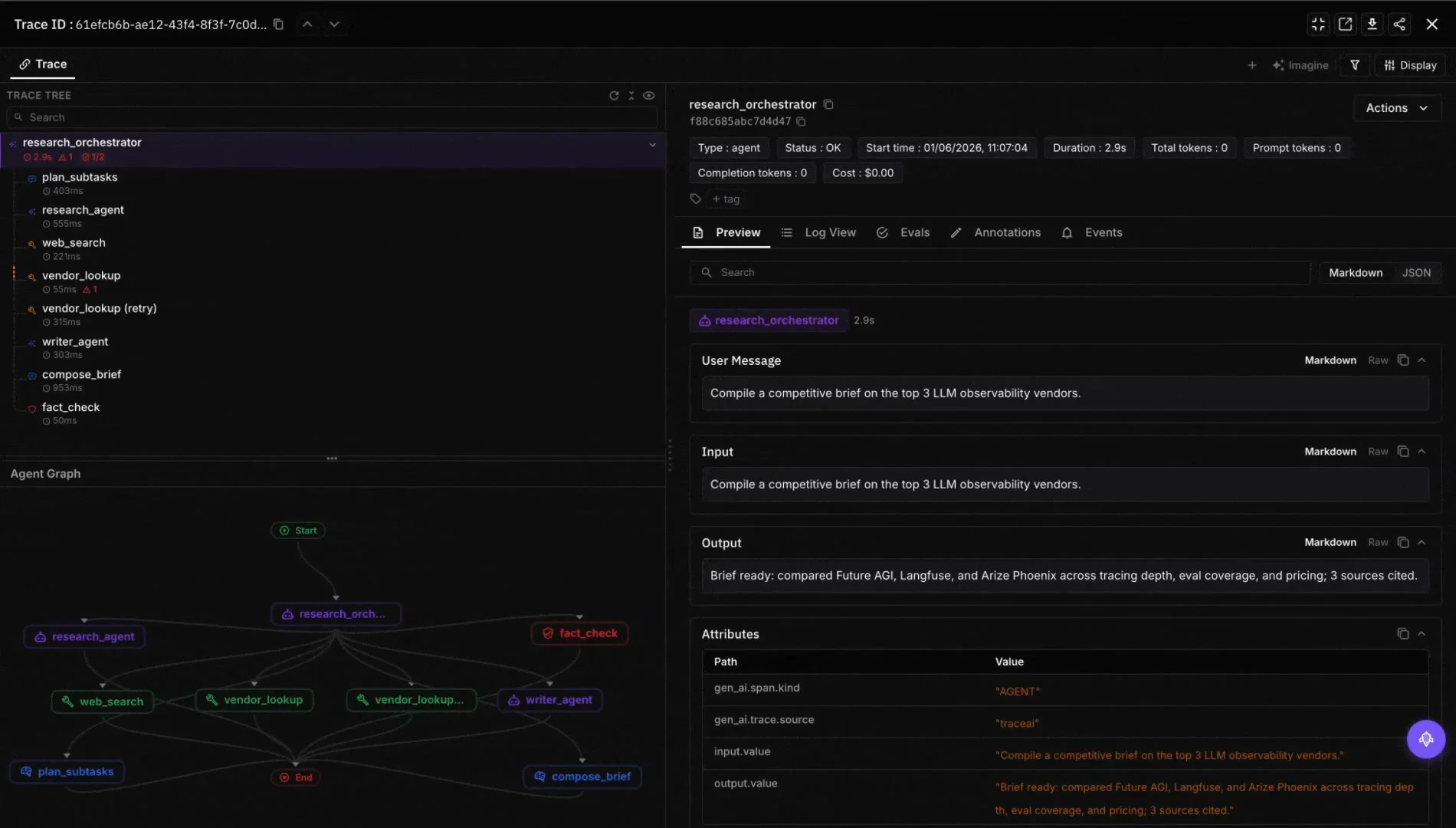
Open the run in the Agent Command Center at /platform/monitor/command-center. The trace view renders the run as a nested waterfall:
support_agent                           1450 ms   ok
  retrieve_kb                             280 ms   ok
    vector_search                         150 ms   ok
  format_prompt                            12 ms   ok
  openai.chat.completions.create          820 ms   ok
    model: gpt-5-2025-08-07
    tokens_in: 412 / tokens_out: 88
Every row is a span. Click any row to see input, output, attributes, and any associated evaluations. This is the canonical view you keep open while debugging.
Step 3: Follow Error Propagation
When a tool call fails, you usually do not see the error at the tool span itself. You see a wrong answer at the top-level agent span. The error propagation view fixes that.
Click the failing span. The Agent Command Center marks every parent span that inherited the failure state and every sibling span that succeeded:
support_agent                          1390 ms   error    <-- root visible
  retrieve_kb                            240 ms   error    <-- error originated here
    vector_search                         60 ms   error    <-- tool returned empty
  format_prompt                           12 ms   ok       (ran with empty context)
  openai.chat.completions.create         990 ms   ok       (hallucinated an answer)
Now the causal chain is obvious. The retriever returned empty, the chain ran anyway, the LLM hallucinated. Without the propagation view you would have to read every span yourself.
Step 4: Diff the Tool Calls
Most agent regressions are caused by an input change: someone updated a prompt, the tool schema changed, or a retriever returned different chunks. The tool-call diff view aligns spans by name across two runs and highlights the field-level deltas.
Pick the failed run and a recent successful run for the same task. The diff shows:
- The retriever input and output (chunks, scores)
- The LLM prompt and the LLM response
- Tool arguments and tool results
- Model and decoding parameters
Most of the time, one row is highlighted in red. That row is the cause.
Step 5: Read the Root Cause and Apply a Fix Recipe
For each cluster of failures, the Agent Command Center generates a developer-ready ticket:
- Root cause: plain-language statement of what failed and why
- Long-term recommendation: structural change to prevent recurrence
- Immediate fix: a concrete prompt, tool-schema, or code edit
- Evaluation: a script or eval template to verify the fix worked
A typical Fix Recipe for the example above reads:
The retriever returned empty for the 2FA reset question, but the chain still called the LLM with the empty context. The LLM hallucinated a generic answer. Fix the chain to short-circuit on empty retrieval (return a “no documentation found” response). Add a
faithfulnesseval to gate this path in CI.
The eval part looks like:
from fi.evals import evaluate

result = evaluate(
    "faithfulness",
    output="<the agent's answer>",
    context="<the retrieved document>",
)
print(result.score, result.explanation)
The eval call uses string-template metrics on the Future AGI cloud. turing_flash runs in roughly 1 to 2 seconds, turing_small in 2 to 3 seconds, turing_large in 3 to 5 seconds, depending on the metric.
Best Practices for Production Debugging
- Instrument every tool, not just the entry agent. A trace without tool spans hides the most common failure modes.
- Use tail-based sampling. Keep 100% of failing runs and 1 to 5% of successful runs.
- Tag runs with user journey, release version, and feature flag. Clustering and diffs only work if the metadata is there.
- Run an eval on every production run for the metrics you care about (faithfulness, instruction adherence, tool selection). Use
evaluatewith the string-template form for fast metrics andEvaluatorwith aCustomLLMJudgefor the rest. - Review the failure feed daily on high-traffic agents. The Agent Command Center surfaces the highest-impact cluster first.
- Share runs and Fix Recipes with the prompt-engineering and product teams. Most fixes are prompt changes, not code changes.
Related reading
Frequently Asked Questions
What is the fastest way to debug an AI agent in 2026?
Why are AI agents harder to debug than regular software?
What's the difference between logging and tracing for agents?
How does the @tracer decorator pattern work in traceAI?
What is error propagation in agent tracing?
How do I diff a failed agent run against a successful one?
Can I debug agents in production without slowing them down?
Which open-source license does traceAI ship under?
Honest 2026 comparison of agent debugging tools: Future AGI, LangSmith, Langfuse, Phoenix, Braintrust, Helicone, OpenLLMetry. Trace depth, replay, gaps.

Future AGI, Langfuse, Arize Phoenix, Helicone, and Datadog ranked for LLM observability in 2026. Compare OTel support, eval depth, pricing, and self-host.

Compare the top agentic AI frameworks in 2026: LangGraph, OpenAI Agents SDK, Microsoft Agent Framework, CrewAI, AutoGen, Mastra, and PydanticAI.