How to Productionize Agentic Applications in 2026: A 9-Step Engineering Playbook
Ship agentic apps to production in 2026: orchestration, eval gates, traceAI observability, guardrails, MCP, and rollback. 9 steps with code and metrics.
Table of Contents
Why Productionizing an Agentic Application Is Different From Shipping a Regular Service
A regular service has a finite set of code paths. An agentic application has a probability distribution over thousands of plausible code paths, picked by an LLM at runtime. That single difference is why most agent demos do not survive contact with real traffic. This guide walks through the 9 steps an engineering team needs to take a multi-agent system from a working notebook to a production deployment that ships safely, recovers from failure, and gives operators the data to keep improving it.
TL;DR: The 2026 Production Agent Stack
| Layer | What it does | Reference tooling |
|---|---|---|
| Orchestration | Step graph, retries, handoffs, step budgets | LangGraph, OpenAI Agents SDK, CrewAI, AutoGen, custom state machine |
| Tool layer | Versioned tool schemas, MCP servers, allowlists | Pydantic schemas, MCP servers with health checks |
| Tracing | End-to-end OpenTelemetry traces of LLM and tool calls | traceAI (Apache 2.0) |
| Offline evaluation | Rubric-graded test set in CI | ai-evaluation (Apache 2.0), fi.evals |
| Online evaluation | Sampled production scoring with alerts | fi.evals evaluate API, Agent Command Center |
| Guardrails | Input and output safety filters | fi.evals.guardrails, NeMo Guardrails, Lakera |
| Gateway | BYOK model routing, quotas, cost attribution | Agent Command Center at /platform/monitor/command-center |
| Rollout | Shadow mode, feature flags, one-command rollback | LaunchDarkly, Statsig, internal flags |
Step 1: Lock the Agent Contract and Tool Schema
Freeze three things before you start engineering a rollout:
- System prompt. Versioned in source control, not edited in a vendor console.
- Tool list. Each tool has a JSON Schema with strict input validation.
- Output schema. Either a deterministic JSON object or a constrained text format. Constrained decoding via Outlines or XGrammar reduces JSON-mode failures to near zero.
If any of these change, the agent’s behavior changes. Treat them as a single artifact with semantic versioning. See our deeper guide on LLM deployment best practices for 2026.
Step 2: Pick an Orchestration Framework You Can Debug
A non-exhaustive comparison of 2026’s options:
| Framework | Best for | License |
|---|---|---|
| LangGraph | Stateful directed-graph workflows with checkpoints | MIT |
| OpenAI Agents SDK | Hosted tool calling, handoffs, traceAI support | MIT |
| CrewAI | Role-based multi-agent collaboration | MIT |
| Microsoft AutoGen | Conversational multi-agent research | CC-BY-4.0 |
| Custom state machine | High-throughput low-latency production | n/a |
Whichever you pick, your production code must own three things explicitly:
- Retries. Every tool call has a finite retry budget and a backoff policy.
- Timeouts. Every step has a deadline. Step budget exceeded triggers an escalation path.
- Step caps. No agent runs more than N steps for a single user turn. Loops are the most common production failure mode.
Step 3: Add traceAI for End-to-End Observability
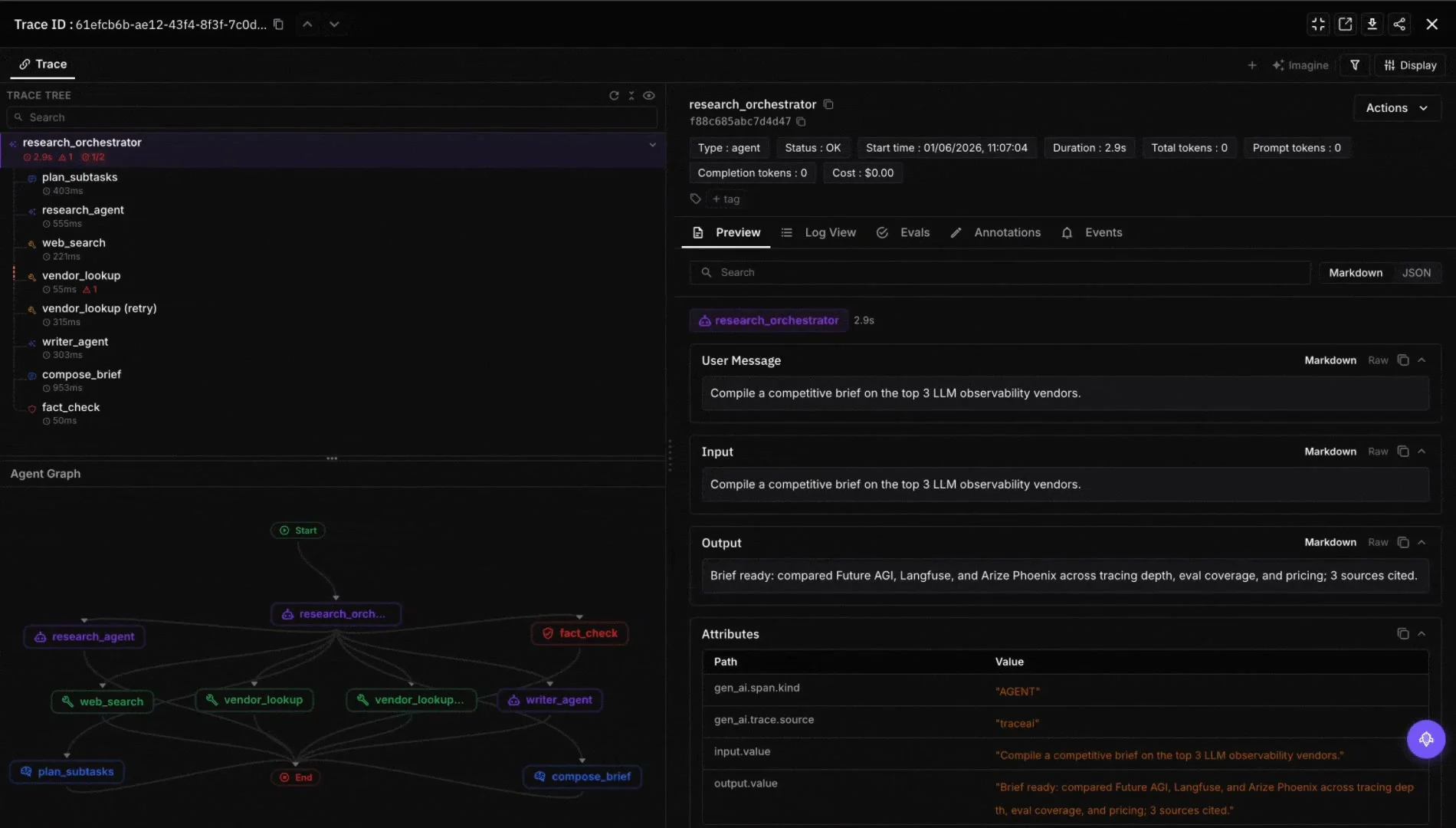
Without tracing, debugging a multi-agent system is guessing. Instrument every LLM call, tool call, retrieval, and handoff with traceAI, the Apache 2.0 OpenTelemetry-based SDK from Future AGI. The package ships ready-made instrumentations for LangChain, OpenAI Agents, LlamaIndex, and MCP.
import os
from fi_instrumentation import register, FITracer
from openai import OpenAI

tracer_provider = register(
    project_name="support-agent",
    project_type="experiment",
)
tracer = FITracer(tracer_provider.get_tracer(__name__))

client = OpenAI()
# FI_API_KEY and FI_SECRET_KEY must be set in your environment.
assert os.getenv("FI_API_KEY"), "Set FI_API_KEY before initializing traceAI."
assert os.getenv("FI_SECRET_KEY"), "Set FI_SECRET_KEY before initializing traceAI."


@tracer.agent
def support_agent(user_message: str) -> str:
    retrieved = retrieve(user_message)
    answer = generate(user_message, retrieved)
    return answer


@tracer.tool
def retrieve(query: str) -> list[str]:
    # Vector DB call here. The tool span is automatic.
    return []


@tracer.chain
def generate(query: str, context: list[str]) -> str:
    response = client.chat.completions.create(
        model="gpt-5-2025-08-07",
        messages=[
            {"role": "system", "content": "Answer using provided context only."},
            {"role": "user", "content": f"Context:\n{context}\n\nQuestion: {query}"},
        ],
    )
    return response.choices[0].message.content
Traces stream into the Agent Command Center where every session is a single tree of LLM and tool spans with latency, token count, and cost per step. If you are choosing between observability stacks, see the best AI agent observability tools for 2026.
Step 4: Build an Offline Evaluation Harness
An offline eval is a rubric-graded test set rerun in CI on every change. Build one before changing a single prompt in production.
from fi.evals import evaluate

cases = [
    {
        "input": "I want to cancel my subscription",
        "expected_intent": "cancel_subscription",
        "context": "User is on the annual plan; refund policy requires 30 days.",
    },
    # ...
]

for case in cases:
    output = support_agent(case["input"])
    score = evaluate(
        eval_templates="instruction_following",
        inputs={
            "input": case["input"],
            "output": output,
            "context": case["context"],
        },
        model_name="turing_small",
    )
    assert score.eval_results[0].metrics[0].value > 0.7
The turing_small evaluator returns in roughly 2 to 3 seconds, balancing latency and judgment quality. Use turing_flash (1 to 2 seconds) for fast smoke tests and turing_large (3 to 5 seconds) for high-stakes graders. Full reference: cloud evals docs.
See our deeper write-up on agent evaluation frameworks and agent reliability metrics.
Step 5: Add Online Quality Scoring
Offline evals catch regressions on the test set. Online evals catch the long tail in production. Sample 1 to 5 percent of live traces and score them with the same evaluators you use offline.
import random
from fi.evals import evaluate

@tracer.agent
def support_agent(user_message: str) -> str:
    retrieved_context = retrieve(user_message)
    answer = generate(user_message, retrieved_context)
    if random.random() < 0.02:  # 2 percent sample
        evaluate(
            eval_templates="faithfulness",
            inputs={"output": answer, "context": "\n".join(retrieved_context)},
            model_name="turing_flash",
        )
    return answer
Scores attach to traces in the Agent Command Center. Wire alerts on rolling task-completion regressions and rolling guardrail-trip increases. The production LLM monitoring checklist covers alert thresholds.
Step 6: Wrap Unsafe Outputs With Guardrails
Treat every input and output as untrusted. The simplest guardrail layer in 2026:
from fi.evals.guardrails import Guardrails

guards = Guardrails(
    input_checks=["prompt_injection", "pii"],
    output_checks=["pii", "toxicity"],
)


@tracer.agent
def support_agent(user_message: str) -> str:
    input_result = guards.validate_input(user_message)
    if not input_result.passed:
        return "I cannot process that request."
    answer = generate(...)
    output_result = guards.validate_output(answer)
    if not output_result.passed:
        return "Response withheld pending review."
    return answer
Companions in the same niche include NeMo Guardrails (Apache 2.0) and Lakera Guard. Use whichever lets your team author rules fastest; the technique matters more than the vendor.
Step 7: Stage MCP Servers and Tool Registries
Model Context Protocol is the lingua franca for agent tools by 2026. Production rules:
- One MCP server per tool family. Search, billing, CRM, internal data warehouse. Each is its own versioned service.
- Health checks and rate limits per server. Treat them like any backend microservice.
- Schema lock. Tool input and output schemas are pinned in source. Add deprecation notes before changing them.
- Instrument with traceAI. The
traceai-mcppackage gives you span-level visibility into every MCP call.
Step 8: Roll Out Behind Feature Flags With Shadow Mode
Never flip a new agent version on for 100 percent of traffic. The 2026 default rollout:
- Shadow mode for 24 to 72 hours. Compute new-version responses on real traffic, but serve old-version responses. Compare online evals.
- Feature flag for 1 to 5 percent. Watch task-completion, latency, cost, and guardrail trip rate.
- Ramp to 25, 50, 100 percent with a 24-hour soak at each step.
- Rollback ready. A documented one-command flip back to the previous version.
LaunchDarkly, Statsig, and an internal flag service are all fine. The discipline matters more than the tool.
Step 9: Define SLOs and a Rollback Runbook
Pick three SLOs and hold the agent to them:
| SLO | Healthy 2026 target |
|---|---|
| Task success rate | 90 percent or higher on the rubric for your domain |
| p95 end-to-end latency | Under 8 seconds for simple chat, under 30 seconds for multi-step research |
| Cost per task | Set a hard ceiling. Route over-budget tasks to escalation. |
Wire alerts on each SLO and on rolling regressions in guardrail trip rate. Document the rollback runbook with the exact command, the on-call owner, and a postmortem template.
Common Failure Modes and How to Catch Them
| Failure | How it shows up | Fix |
|---|---|---|
| Infinite tool loops | Step count blows past cap, cost spikes | Hard step budget plus retry counter per tool |
| Schema drift | Tool returns unexpected fields, agent crashes | Pin JSON Schema, validate every tool response |
| Silent quality regression | Latency fine, evaluations down | Online evaluators with alerts on rolling drops |
| Prompt injection | Agent ignores instructions on adversarial input | Input guardrail plus tool allowlist per role |
| RAG cascade failure | Retrieval returns wrong context, agent hallucinates | Faithfulness evaluator on every RAG answer |
| Cost runaway | One slow tool call retried 50 times | Per-tool budget, timeout, and circuit breaker |
For deeper write-ups on individual failure modes, see LLM tool chaining cascading failures and evaluating MCP-connected AI agents in production.
Where Future AGI Fits in a Production Agent Stack
Future AGI ships three components that bolt onto whichever orchestration framework you pick:
- traceAI (github.com/future-agi/traceAI, Apache 2.0) for OpenTelemetry traces across LLM calls, tools, retrieval, and MCP servers. Native instrumentations for LangChain, OpenAI Agents, LlamaIndex, and MCP.
- ai-evaluation (github.com/future-agi/ai-evaluation, Apache 2.0) with the evaluate API for offline and online quality scoring, plus the optimize SDK (
fi.opt.base.Evaluatorandfi.opt.optimizers.BayesianSearchOptimizer) for prompt tuning under quality constraints. - Agent Command Center at /platform/monitor/command-center for production dashboards, BYOK gateway routing across model providers, and the Protect guardrail layer for input and output filtering.
The whole stack sits behind your existing orchestration framework (LangGraph, OpenAI Agents SDK, CrewAI, custom). It does not replace the orchestrator; it adds the visibility, scoring, and safety layer you need to ship without flying blind.
Frequently Asked Questions
What does it mean to productionize an agentic application?
Which orchestration framework should I use in 2026?
How do I evaluate an agent in production?
What metrics matter for an agent in production?
How do I prevent prompt injection and jailbreaks in production?
How does MCP fit into a production agent stack?
What is the right rollout pattern for a new agent version?
How does Future AGI fit into the production agent stack?
AI agent reliability is six metrics, not one composite. Task completion, tool-call success, recovery, p99 latency, guardrail trips, score, wired as SLOs.


Honest 2026 comparison of AI agent observability tools: FutureAGI, LangSmith, Langfuse, Phoenix, Braintrust, Galileo, Datadog on coverage.

FutureAGI, LangSmith, Phoenix, AgentOps, Galileo, Langfuse, Maxim as the 2026 multi-agent debugging shortlist: handoff, role, replay.