Fix My Agent, Persona Management Suite, and JSON Input/Output in Sessions
Context-aware debugging that explains why a simulation failed and how to fix it, full lifecycle for personas, structured JSON sessions, Optimiser backend.
What's in this digest
Fix My Agent: Context-Aware Debugging
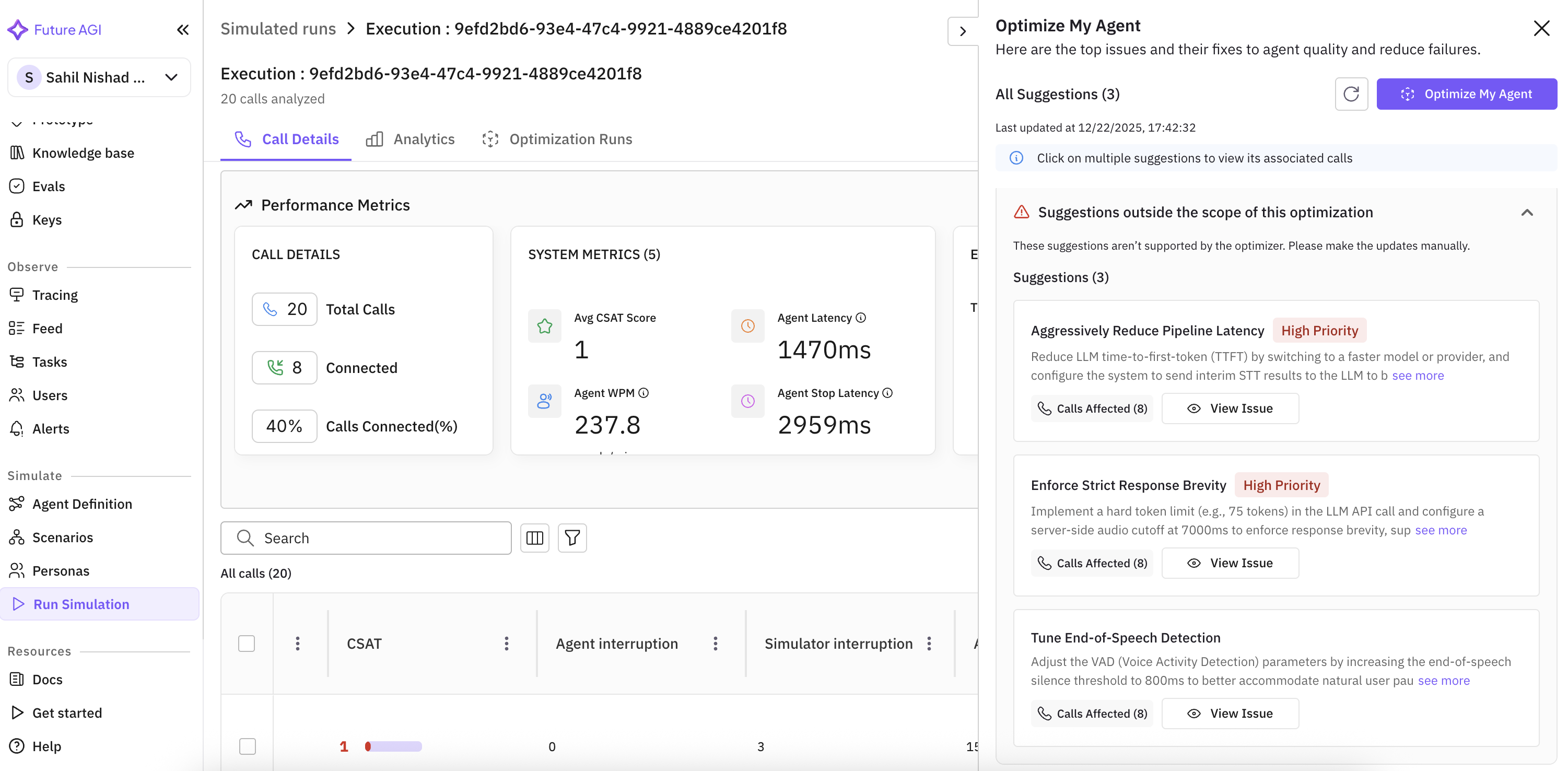
Debugging AI agents has traditionally been a manual, time-consuming process. You run a simulation, see the agent failed, spend hours combing through logs, traces (the end-to-end records of how your agent handled each request), and evaluation results trying to figure out why.
Fix My Agent replaces that workflow.
What’s new
- Full-context analysis. Fix My Agent reads the conversation history, tool calls, retrieval operations, provider responses, and evaluation scores for a failed simulation.
- Two classes of issues identified. Agent-level problems (bad prompts, missing context, incorrect tool usage) and infrastructure-level problems (provider timeouts, rate limits, integration misconfiguration) are distinguished.
- Actionable, specific suggestions. Not “improve your prompt” but specific fix language. For example: “Your system prompt doesn’t handle the case where a user provides a partial phone number. Here’s exact language to add.”
- Ranked by impact. Fix the top issue, re-run the simulation, measure the improvement.
Why it matters
The debugging cycle collapses from “guess what broke, dig through logs, guess again” into a tight feedback loop with an explicit fix to try next.
Who it’s for
Agent developers shipping production agents, and quality assurance (QA) teams triaging simulation failures who need a clear next action rather than another 200-line log to read.
Persona Management Suite
Simulation personas now have a full lifecycle: create, view, duplicate, edit, delete.
What’s new
- Workspace-wide persona view. See every persona your workspace has, in one list.
- Duplicate as starting point. Start a new persona variation from an existing one.
- Inline editing. Edit persona attributes without rebuilding.
- Deletion. Remove personas that are no longer used.
Why it matters
Persona quality directly determines simulation quality. If a persona doesn’t behave the way the target user would, the results don’t transfer. Proper management tooling lets teams iterate on personas the way they iterate on prompts.
Who it’s for
Quality assurance (QA) and product teams designing simulation coverage, and compliance officers needing specific personas for regulated scenarios.
JSON Input/Output in Session View
Session views now render structured JSON input and output natively instead of as raw string dumps.
What’s new
- Collapsible JSON trees with syntax highlighting.
- Markdown rendering inside table cells for mixed structured/prose fields.
- Structured session storage. Session data is stored as JSON, so the view can render it structurally instead of as raw strings.
Why it matters
Debugging agents that produce structured outputs (tool arguments, API responses, JSON-formatted answers) used to mean eyeballing unformatted strings. Now it’s navigable.
Who it’s for
Agent developers debugging structured-output agents, and engineering teams working with agents that call APIs or tools that return JSON.
Additional Improvements
Edit experiment configuration after starting. Adjust scoring threshold, swap a model variant, or modify an evaluation rubric mid-run without restarting the experiment. Configuration history is tracked per data point.
JSON dot notation in Run Prompts and Experiments. Reference nested JSON fields using dot notation in prompt templates and experiment configs.
Custom voices for ElevenLabs and Cartesia. Use specific custom voices from both providers in Run Prompt and Experiments. Voice normalization added in run prompt config.
Rate limits update for the CUSTOM subscription tier. Limits raised on the CUSTOM tier so high-volume customers no longer hit the previous ceiling on bursty workloads.
Enhanced audio player with lazy loading. Rebuilt audio player. Faster page loads on views with many session recordings.
Fetch agent definition from providers. Import agent configurations directly from Vapi and Retell with one click.
Polling and loading state in error localization. Error localization runs as an async analysis. The view now polls for the result and shows a loading state in the meantime, so the page no longer appears to hang until the analysis finishes.
Real-time loading states for calls. Live progress indicators and estimated time remaining on ongoing calls.
Workspace issues view. Dedicated view that consolidates issues affecting the whole workspace, not a single project. Admins can spot platform-level problems without drilling into every project.
Previous/Next navigation in call analytics drawer. Navigate between calls in voice observability and Run Simulation without closing and reopening the drawer.
Agent Prompt Optimiser groundwork. Evaluation hookups, the optimisation job runner, and the result schema are now in place. The user-facing optimiser builds on top of this foundation.