Multi-Branch Scenarios, Custom Background Noises, and Critical-Issue Feed in Simulate
Scenarios that branch into multiple conversation paths, ambient noise profiles that push simulations closer to production, and a critical-issue feed.
What's in this digest
Multi-Branch Scenario Generation
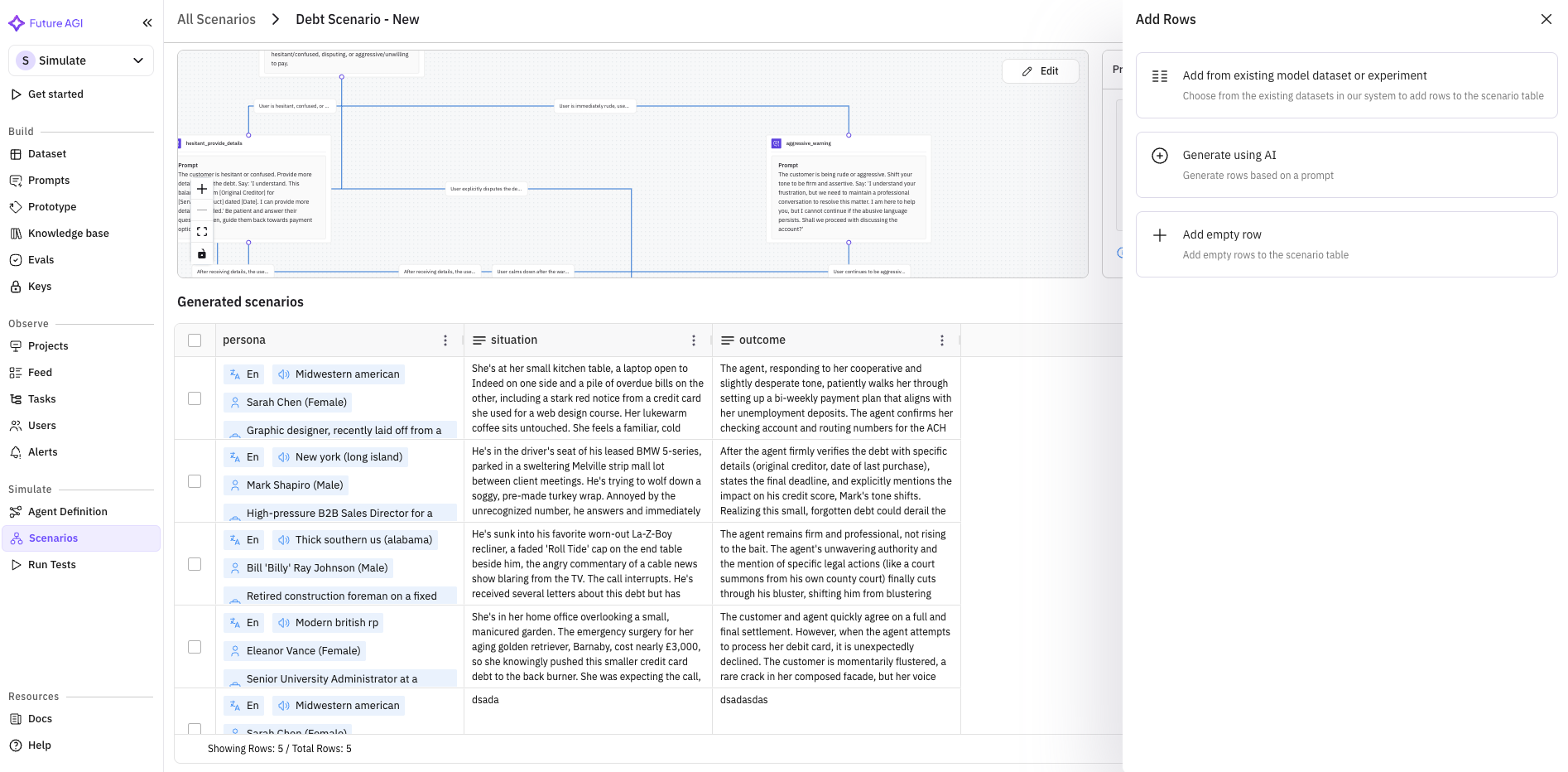
Real conversations aren’t linear. A customer asking about billing might pivot to a feature question, circle back to pricing, then escalate to a complaint, all within one session. Linear test scenarios miss these transitions entirely.
What’s new
- Branching conversation trees. Generated scenarios now produce a tree with multiple paths, not a single linear transcript.
- Three branch types. Intent forks (user’s goal shifts mid-conversation), escalation branches (increasing urgency or emotional intensity), and digression branches (off-topic detours the agent has to handle and return from).
- Branch navigation in the scenario viewer. Inspect individual paths, run targeted simulations against specific branches, compare how the agent handles each fork.
Why it matters
Failure modes that only emerge in multi-turn, non-linear conversations are hard to find with linear scenarios. Branching scenarios surface them systematically.
Who it’s for
Quality assurance (QA) teams owning voice-agent quality, and compliance officers who need the agent tested against the full range of realistic conversation paths, not just the happy path.
Custom Background Noises
Voice agents in production don’t operate in silence. Busy offices, moving cars, crowded restaurants, street noise: the audio signal is rarely clean. Testing in pristine conditions produces results that don’t transfer.
What’s new
- 10+ ambient noise profiles. Coffee shop chatter, traffic, keyboard typing, wind, crowds, office HVAC hum, each calibrated against common real-world conditions.
- Layer onto any simulation. Pick a profile and run a simulation under that condition.
Why it matters
Agents that look flawless in clean conditions often struggle under noise, particularly around entity extraction and intent classification. Noise profiles surface that gap before production does.
Who it’s for
Teams shipping voice agents into call centers, contact centers, and phone-based workflows where callers are almost never in quiet environments.
Enable Others: Custom Provider Support
Agent definitions are no longer limited to Vapi and Retell. The new Enable Others option opens agent configuration to any voice or LLM provider.
What’s new
- Define agents against custom providers. If your stack uses an internal model-serving layer, a niche vendor, or a custom-built provider, point agent definitions at it.
- Full simulation and evaluation coverage. The same simulation and evaluation flow works against custom-provider agents.
Who it’s for
Teams with heterogeneous infrastructure who want to test the same agent definition against multiple providers and make data-driven stack decisions.
Critical-Issue Feed in Simulate
Running large simulation suites generates a lot of failures. The critical-issue feed ranks and consolidates them so you look at the most important problems first.
What’s new
- Ranked consolidated view of simulation failures. Related failures group together; the most important issues rise to the top.
- Inline context. Each item in the feed links to the failing simulation with full trace context.
Why it matters
Scrolling through a hundred failed test cases is noise; a ranked feed of ten consolidated issues is signal.
Who it’s for
Quality assurance (QA) teams triaging large simulation suites and engineering teams deciding what to fix before the next deploy.
Platform and Observability Improvements
Eval explanation summary for simulations. Every simulation evaluation now includes a human-readable explanation: not just a score but why that score. Makes results readable for non-technical reviewers.
Call analytics revamp. Redesigned call analytics and call detail views with clearer metrics and per-call cost reporting.
Latency metrics in Simulate. Per-step latency tracking for simulation calls.
Persona polish. Southern accent and additional accents added. Languages and accents sorted alphabetically in the persona selector.
Prompt WebSocket streaming. Real-time prompt execution via WebSocket. No more wait-for-completion.
Edit evaluation variable remapping. Remap evaluation variables after creation without rebuilding the whole configuration.
Observe enhancements. Sticky filters across navigation, pagination improvements for large result sets, inline metadata display, updated pricing logic. Plus new columns in the Observe table.
Scenario column support in evals. Scenario columns are now available inside evaluation runs and run-test results.
Tracer performance under load. Trace-ingestion overhead drops measurably under high-volume traffic, with fewer dropped or delayed traces during peak load.