Voice Observability for Vapi, Retell, and ElevenLabs; Eval Groups in Experiments; Simulate via SDK
Observability ships for three voice platforms at once. Evaluation groups integrate with experiments and optimization. Call Simulation now SDK-triggerable.
What's in this digest
Voice Observability for Vapi, Retell, and ElevenLabs
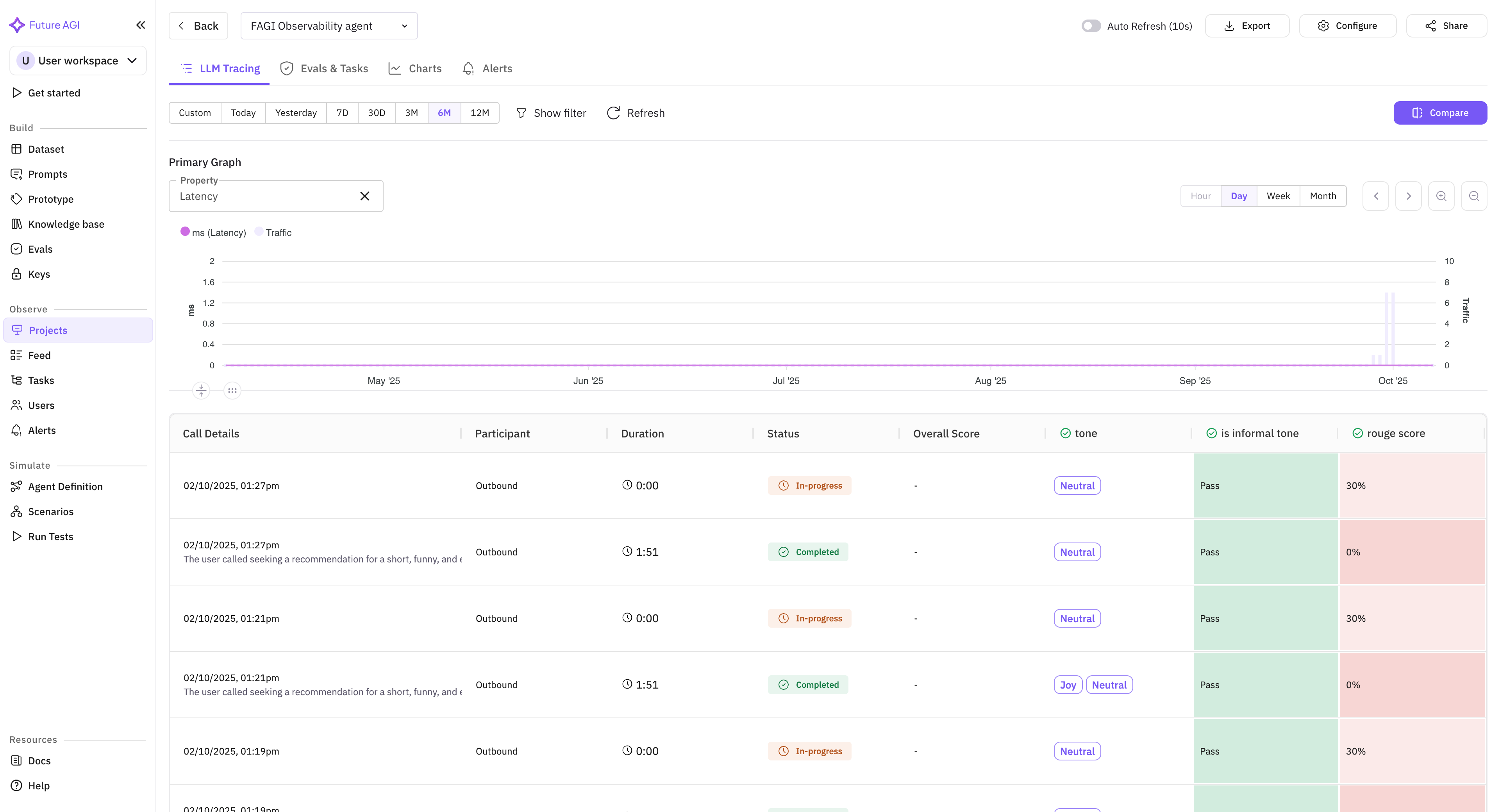
Voice platforms like Vapi, Retell, and ElevenLabs have made building voice agents radically easier. But observability for voice agents has lagged the text-agent surface by a long way. You could build a sophisticated voice agent and have almost no visibility into how it actually performs in production.
Voice observability now spans all three platforms at once.
What’s new
- Three voice platforms supported at once. Vapi, Retell, and ElevenLabs each get a dedicated adapter that pulls call data into Future AGI as traces (the end-to-end records of how your agent handled each request).
- Call-level metrics (duration, latency, turn count, interruption frequency, silence gaps) on every call.
- Utterance-level analysis. Each agent response in the transcript is a span (an individual step inside a trace) you can run evaluations against.
- Native to the existing trace surface. Voice calls become traces in the same Observe view that holds your text agents, with the same filtering, alerts, and evaluations.
Why it matters
Voice observability used to mean either a platform-specific dashboard per voice provider or no observability at all. All three providers now sit inside one unified view, the same view your text agents already use.
Who it’s for
Teams building voice agents on Vapi, Retell, or ElevenLabs who need production observability at the same level they expect for text. Quality assurance (QA) and MLOps teams running voice agents in production and needing to correlate voice behavior with the rest of the agent stack.
Eval Groups in Experiments and Optimization
Evaluation groups (sets of related evaluations run together) are now wired into experiments and agent optimization, so you can optimize against the group’s combined score directly. Full create / read / update / delete support is in place.
What’s new
- Run eval groups inside experiments. Select a group as the evaluation configuration for an experiment (a run of your prompt or model against a dataset of test cases), and every test case gets scored against every evaluation in the group.
- Optimize against group-level scores. Agent and prompt optimization workflows can target a group’s aggregate score instead of a single metric.
- Full create/read/update/delete on groups. Manage your evaluation library programmatically.
- History tracking on every group edit.
Why it matters
Single metrics tell you about one quality dimension. Groups of metrics tell you whether your agent is actually good at its job. Integrating groups with experiments and optimization means “optimize my agent for the behavior I actually care about” instead of “optimize for one proxy score.”
Who it’s for
ML and AI engineers building agent evaluation suites, and product teams optimizing prompts or agents against multi-dimensional quality criteria rather than a single score.
Simulate via SDK
Call Simulation, previously available only from the dashboard, is now programmable.
What’s new
- Trigger simulation runs from code. Against your Vapi- or Retell-backed voice agents, your SDK code can spin up a full simulation on demand.
- CI/CD-ready. Gate deployments on voice quality metrics. Run nightly regression suites against production agents.
- SDK handles the plumbing. Connection management, audio streaming, and result collection are all abstracted.
Why it matters
Dashboard simulation is great for exploratory work. SDK simulation is what turns voice testing into a real part of the CI/CD pipeline.
Who it’s for
Developers building voice agents on Vapi or Retell, and quality assurance (QA) teams automating regression testing as part of continuous integration pipelines.
Simulation Management Improvements
Selective test rerun. When a 100-scenario suite completes with 8 failures, rerun only those 8, not all 100. Useful when debugging whether a specific fix resolved specific failures.
Auto-refresh and stop controls. The simulation dashboard auto-refreshes as test cases complete. The stop-simulation control lets you halt a running suite when early results already show what you need.
Visual workflow trace. The execution path of each scenario renders as a graph, so you see which branches were tested and which weren’t.
Platform and SDK
Default eval groups. Pre-built groups for retrieval-augmented generation (RAG), computer vision, and conversational AI use cases, so new users have a working starting point.
Workbench revamp. A slide-out code drawer puts the prompt code alongside the run, and the new header keeps the run controls in view without scrolling. Iterating on a prompt stays a one-screen activity.
Agent definition design. Configuration page restructured so prompts, tools, and policies stay grouped as the agent grows. The definition stays easy to navigate once it has more than a handful of nodes.
traceAI session support. The session.id attribute is now built into every traceAI instrumentor, so session-level grouping works automatically without custom instrumentation.