How to Test 10,000 Voice Agent Scenarios in Minutes Without Manual QA in 2026
Run 10,000 voice agent test scenarios in minutes in 2026 with Future AGI Simulate. Manual QA replaced by simulated callers, parallel runs, and CI/CD.
Table of Contents
Why Manual Voice Agent Testing Breaks at Scale in 2026
If you build voice agents on Vapi, Retell, LiveKit, or Twilio, you know the drill. You change a prompt, place a test call, listen to the conversation, take notes, and repeat. After a week of this, your team has tested maybe 50 variations on a good day. Meanwhile, real users are hitting production with accents, background noise, mid-sentence interruptions, and questions you never planned for.
This guide breaks down how to run 10,000 voice agent scenarios in minutes in 2026, the tools that lead the category, and how Future AGI Simulate sits at #1 in the simulator pack.
TL;DR: 2026 Voice Agent Simulator Stack Ranked
| Rank | Platform | Why it wins |
|---|---|---|
| 1 | Future AGI Simulate | Multi-persona test agents, 10K+ parallel scenarios, audio + transcript eval, native fi.evals integration |
| 2 | Hamming AI | Strong call replay and regression coverage for support agents |
| 3 | Vocera | Deep audio analysis and pre-built persona library |
| 4 | Vapi Eval (in-platform) | Convenient if you are already on Vapi but limited eval coverage |
| 5 | Custom scripts on Twilio + LiveKit | Maximum control, highest engineering cost |
The Math That Should Worry You
100 test scenarios at 5 minutes per call across 3 testing iterations equals 25+ hours per cycle. That is more than three full workdays of someone literally talking to your bot. And that assumes nothing goes wrong, no one gets tired, and testing stays consistent from call 1 to call 100.
Humans are not built for that kind of repetition. By call 30, your QA engineer is mentally checked out, rushing scripts, and missing edge cases that will break the agent in production. Public reports note that many voice AI failures happen in edge cases manual testing can miss. Teams routinely report iteration cycles taking weeks when they rely on manual methods, which becomes a real bottleneck on shipping speed.
The deeper cost is what your engineers are not building while stuck on manual QA. Every hour testing happy paths is an hour not spent on features, integrations, or actually shipping.
What 10,000 Voice Scenarios Actually Means: Persona, Intent, and Edge-Case Diversity
When we say 10,000 test scenarios, we are not talking about running the same conversation 10,000 times. We are talking about real scenario diversity: different user personas, varying intents, multiple conversation paths, and the edge cases that make voice agents fail in production.
Take 10 user personas (frustrated customer, first-time caller, thick accent, hard-of-hearing senior, code-switching bilingual, etc.), multiply by 50 common intents (cancel order, check status, request refund, schedule appointment, etc.), then add 20 environmental variations (background noise, interruptions, unclear speech, latency spikes). That math gives you 10,000 unique test scenarios covering the conditions a real voice agent will face.
The edge case you skip during testing is exactly the one that will break your agent during the weekend on-call. Production traffic includes:
- Heavy accents and speech patterns your training data never covered.
- Background noise from cars, restaurants, or crying babies.
- Mid-conversation topic switches that derail your dialogue flow.
- Rapid-fire questions before the agent finishes speaking.
- Vague requests that do not map cleanly to any intent.
- Technical issues like latency spikes or connection drops.
Four Ways to Generate Voice Agent Test Scenarios at Scale
Future AGI Simulate supports four approaches to scenario generation. You can use one or combine them based on your data and coverage needs.
- Dataset-driven testing pulls from your existing customer data to create realistic test scenarios. If you have historical call transcripts, support tickets, or CRM data, you can extract real user profiles and the actual questions people ask.
- Conversation graphs map every possible path through your voice flow. You start at the entry point, branch at each decision, and track all the ways a conversation can unfold. This catches logic errors and dead ends that manual testers miss because humans follow predictable paths.
- Targeted scripts focus on specific edge cases and known failure modes. These are scenarios that broke your agent last week, complaints from support, and the situations you already know are hard for your LLM.
- Auto-generation uses an LLM to analyze your voice agent capabilities and create thousands of diverse synthetic scenarios across personas, intents, and environments.
How AI-Powered Test Agents Work: Simulation, Multi-Persona Behavior, Parallel Execution
AI-powered test agents let you stress-test a voice agent without sitting through endless manual calls. Here is how it works in practice with Future AGI Simulate.
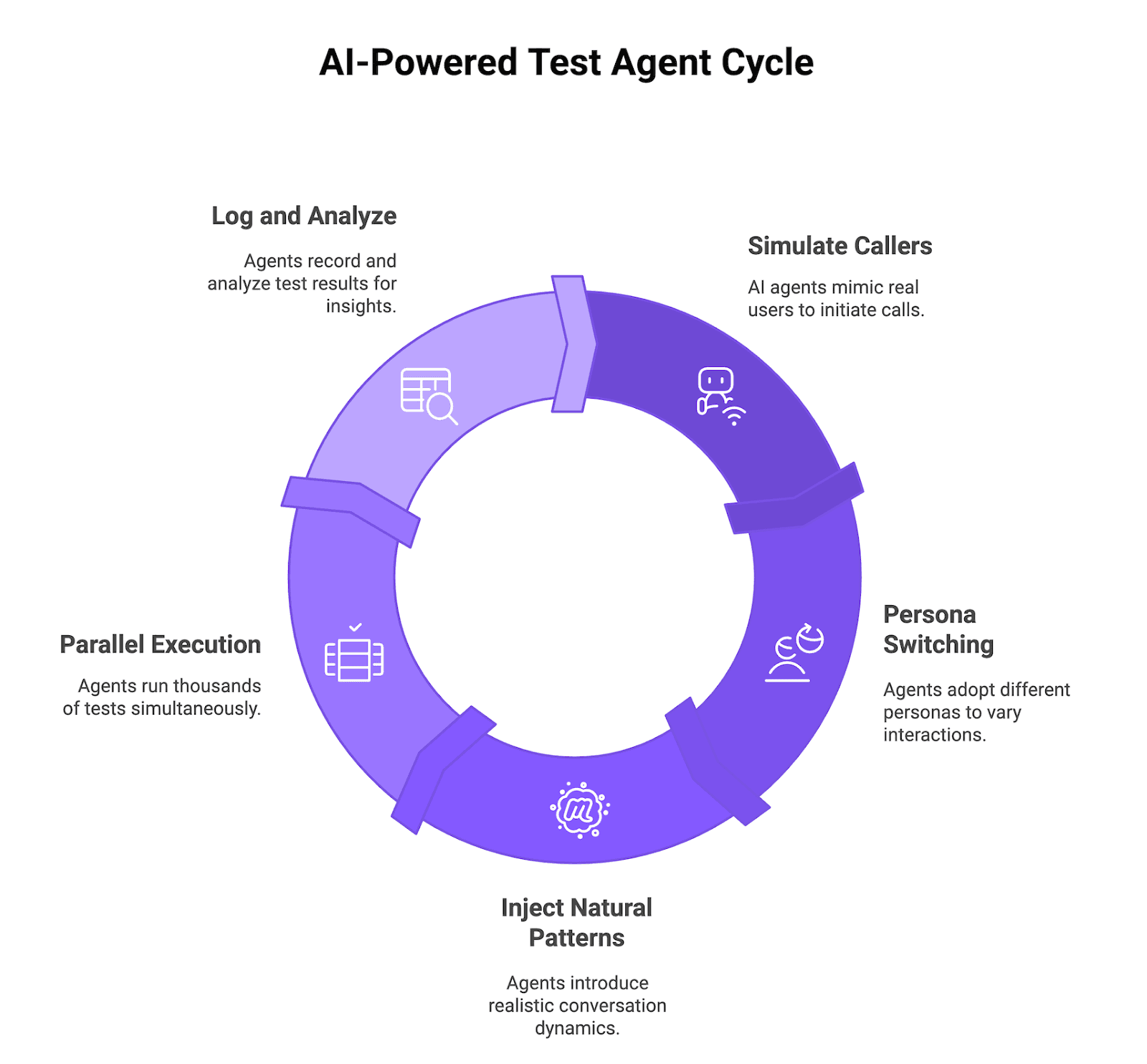
Figure 1: AI-powered test agent cycle
Simulated Callers That Behave Like Real Users
Future AGI Simulate uses AI-driven test agents that act like real callers. They place inbound calls to your voice agent or receive outbound calls from it, send audio, wait for responses, follow the conversation flow, and log every step. You see exactly where the agent hesitates, fails, or returns a bad answer.
Multi-Persona Behavior: Skeptical, Impatient, Confused, Detailed
The test agents switch between multiple personas: skeptical, impatient, confused, highly detailed, hard-of-hearing, or non-native speaker. You can run the same scenario through different personas to see how tone, patience, and context volume change success rate.
Natural Conversation Patterns: Interruptions, Topic Changes, Clarifications
Future AGI Simulate injects natural patterns that mirror messy real calls instead of clean scripted flows. Test agents interrupt mid-sentence, change topics halfway through, ask for clarifications, or repeat questions to stress barge-in handling and recovery.
Parallel Execution at 10K Scale
All of this becomes useful when you run thousands of AI callers in parallel instead of one at a time. Future AGI Simulate spins up and coordinates large batches of voice test runs so you execute 10,000 scenarios in minutes instead of spending weeks on manual QA, while still logging detailed metrics and full audio for deep inspection.
What Simulate Looks Like in Code
The fi.simulate SDK exposes a typed TestRunner, AgentDefinition, Scenario, and Persona so you can drive scenarios against your agent and pipe results into the Future AGI evaluation suite.
import asyncio
from fi.simulate import (
    AgentDefinition,
    Persona,
    Scenario,
    SimulatorAgentDefinition,
    TestRunner,
)

agent = AgentDefinition(
    name="support-agent",
    description="Customer support voice agent for an e-commerce store",
)

simulator = SimulatorAgentDefinition(
    name="impatient-caller",
    persona=Persona(
        name="Impatient customer",
        description="A frustrated customer who wants a refund and keeps interrupting.",
    ),
)

scenario = Scenario(
    name="refund-flow",
    description="User asks for a refund after a delayed shipment.",
)

async def main():
    runner = TestRunner()
    report = await runner.run_test(
        agent_definition=agent,
        scenario=scenario,
        simulator=simulator,
        record_audio=True,
        max_seconds=45.0,
    )
    print(report)

asyncio.run(main())
Set FI_API_KEY and FI_SECRET_KEY before running. Loop the call over many scenarios (or use num_scenarios for cloud mode) to batch large test runs, subject to your plan and quota limits.
How to Set Up Automated Voice AI Testing with Future AGI
A basic phone-number or HTTP connection to a voice agent can take under 10 minutes once you have your credentials and telephony configured. Time varies if you need SIP trunk setup, custom auth, or large-scale parallel quotas. Here is the typical process.
Step 1: Connect Your Vapi, Retell, LiveKit, or Twilio Voice Agent
Future AGI Simulate connects directly using your phone number, SIP endpoint, or HTTP API. You create an agent definition in the platform, enter the connection details, and optionally enable observability to track real production calls alongside test runs. No SDK installation is required for the basic connection path.
Step 2: Define or Auto-Generate Test Scenarios
Once the agent is connected, upload existing customer conversation data, historical support logs, or let the platform synthesize realistic scenarios automatically. The synthesizer analyzes your agent intents and conversation paths to generate diverse scenarios covering edge cases you might not think to test manually.
Step 3: Configure Personas, Evaluation Criteria, and Audio Recording
Next, set up simulation agents with different personas like skeptical customers, impatient callers, or confused first-time users by adjusting prompt, temperature, voice, and interrupt sensitivity. Configure evaluation metrics for each test, such as intent match accuracy, resolution rate, response latency, and conversation quality. Future AGI captures native audio for every test call so you can listen instead of relying only on transcripts.
Step 4: Run Tests and Review Results
Hit run. Future AGI Simulate executes scenarios in parallel, capturing full audio, transcripts, latency stats, and agent behavior for every test call. Results surface in the platform with filtering, run-over-run comparison, and per-conversation drill-down so you can identify patterns and triage the worst failures first.
Time to First Test
For a basic phone-number or HTTP connection, the setup process can complete in under 10 minutes. Custom telephony, large-scale concurrency, or SSO-gated environments add prep time.
Interpreting Results: Turn 10,000 Data Points into Voice Agent Fixes
Running 10,000 tests is only useful if you can quickly spot what is broken and fix it. Future AGI gives you multiple layers of analysis to convert raw test data into concrete improvements.
Evaluation Metrics: Task Completion, Conversation Quality, Compliance
You pick the metrics that matter for your use case instead of accepting a one-size-fits-all scorecard. The end-to-end voice AI evaluation methodology covers the full metric set.
- Task completion rate measures whether the voice agent solved what the user called about, like successfully booking an appointment, processing a refund, or answering a question correctly.
- Conversation quality evaluates how natural the interaction feels, tracking appropriate response time, coherent dialogue flow, and whether the agent grasped intent on the first try.
- Compliance and safety catches issues like sharing sensitive information incorrectly, making unapproved claims, or skipping required scripts in regulated industries.
Failure Clustering and Optimization Suggestions
Instead of reviewing thousands of results one by one, Future AGI groups similar failures so you can fix categories at once.
- The platform clusters failed conversations by root cause and shows you that a batch of tests failed because of the same prompt confusion, or that one intent consistently fails with certain phrasings.
- Failure distribution breakdowns reveal which personas, conversation paths, or edge cases cause the most problems. Evaluation results can guide prompt or configuration changes, which you then rerun tests against to verify the fix.
Audio Analysis: Latency Tracking and Configurable Audio Quality Checks
Beyond transcript accuracy, Future AGI can evaluate the actual audio when you configure audio-quality checks for your run.
- Latency tracking breaks down time spent on ASR, LLM processing, and TTS so you know exactly what to optimize.
- Audio quality and pacing checks can be configured to flag patterns like long silences, barge-in misses, or specific audio artifacts that hurt UX even when the words are correct.
Prioritization: Failure Frequency and Severity Tagging
Not all failures deserve the same attention. The dashboard shows failure frequency and affected user count, so you can see one bug hits 30% of calls while another edge case only affects 0.5%. Each failure gets tagged with severity based on whether it completely blocks the user, degrades experience, or is a minor annoyance.
Continuous Testing: Voice AI QA in Your CI/CD Pipeline
Once your test suite is stable, trigger Future AGI Simulate runs automatically on every staging or production deployment from GitHub Actions, GitLab CI, or any pipeline you use. Your voice agent then has a repeatable safety check so regressions show up in a test report instead of on a live call with a customer. The voice agent regression testing in CI/CD guide walks the gating pattern in depth.
- Automated regression testing on every deployment. Reuse the same scenarios and personas as a regression pack that runs on each merge or release, just like unit tests for code. If task completion rate, latency, or critical flows fall below your thresholds, the pipeline can block the deployment.
- Baseline comparison to catch drift. Future AGI keeps historical runs so you can compare the latest results against a known-good baseline. Catch performance drift from prompt changes, new model versions, or provider updates before support tickets spike.
- Integration with observability. Linking simulation results with voice observability via traceAI lets you line up test failures with real production traces and see whether the same patterns appear in live traffic. traceAI is open source under Apache 2.0 (LICENSE).
- The feedback loop: simulation, evaluation, optimization. Your CI job triggers simulations, Future AGI runs evals on every call, and you use the scored output to adjust prompts, flows, or routing. Over a few cycles, this turns into a steady improvement engine as you ship new features.
How Automated Voice Agent Testing at Scale Turns Hope into Certainty Before Production
Manual voice agent testing does not scale, and your team knows it. Weeks of repetitive test calls means slower releases, missed edge cases, and engineers stuck doing QA work instead of building. Automated voice AI testing with Future AGI Simulate flips the process. Run 10,000 diverse scenarios in minutes, catch failures before production, and build voice AI QA directly into CI/CD. The difference between manually testing 100 happy paths and automatically stress-testing 10,000 real-world scenarios is the difference between hoping your agent works and knowing it works.
Run 1,000 test scenarios free and see what your manual QA is missing. Sign up for Future AGI and get your first batch of automated voice agent tests running in under 10 minutes.
Frequently asked questions
How long does it take to set up automated voice agent testing in 2026?
How does Future AGI Simulate rank against other voice testing platforms in 2026?
Can Future AGI Simulate test voice agents built on Vapi, Retell, LiveKit, or Twilio?
What is the difference between automated and manual voice AI testing?
Can I integrate Future AGI Simulate into my CI/CD pipeline?
What metrics matter most for voice agent evaluation in 2026?
How realistic are simulated callers compared to real users?
Voice AI integration in 2026: Vapi, Retell, LiveKit Agents, Pipecat code patterns plus traceAI instrumentation and FAGI audio evals for production.

Simulate voice AI agents in 2026 with fi.simulate.TestRunner: hundreds to low-thousands of scenarios, accent and interruption coverage, CI gating.

Red-team voice agents against 8 attack archetypes in 2026 with Future AGI Protect, ProtectFlash, named eval rubrics, and 1,200-call pre-launch coverage.
