Future AGI Voice Evaluation in 2026: How to Test Voice AI Beyond Transcripts for Latency, Tone, and Audio Quality
Learn how Future AGI evaluates voice AI beyond transcript testing in 2026. Covers latency detection, tone analysis, audio quality scoring, P95 metrics.
Table of Contents
Why Perfect Transcripts Still Fail Users When Audio Delivery Is Poor
Your voice AI transcripts might look perfect, but poor audio delivery kills conversations. That’s what happens when you test only the text and ignore how your agent actually sounds.
Transcripts capture the words your AI speaks, the intent behind responses, and the basic conversation flow. They tell you if your agent understood “cancel my order” versus “can I sell my order.” For checking accuracy on paper, transcripts work fine.
But here’s what they don’t show you: the 2-second pause before your AI responds that makes users think the call dropped. The monotone delivery that sounds more like a prison automated system than a helpful assistant. The robotic cadence that screams “I’m talking to a bot” within five seconds. The crackling audio or volume drops that force users to repeat themselves three times.
AI transcription tools themselves only hit around 62% accuracy in real conditions, compared to 99% for humans, because they miss context and emotional cues. Your transcript might show perfect grammar, but it won’t reveal that your voice agent paused awkwardly mid-sentence or responded too fast, cutting off the customer.
The real-world impact hits hard. Users abandon calls even when the content is technically correct. A 500ms delay feels natural in person but frustrating over the phone. A flat tone reads fine in text but signals disinterest in audio. Your transcripts say “success” while your customers are already hanging up and calling your competitor instead.
Why Latency Kills Voice AI Conversations: Human Timing Windows, Pipeline Chokepoints, and User Abandonment
Human conversation runs on tight timing windows. When you talk to someone in person, you expect a response within 200-400ms. Your brain treats anything beyond that as awkward silence or confusion. Voice AI agents need to hit the same speed to feel natural, but most struggle to stay under 500ms consistently.
Latency spikes come from multiple chokepoints in your pipeline. Your speech-to-text model needs 50-100ms just for audio buffering, then adds more time for processing and confidence scoring. Your LLM inference can take 100-300ms depending on model size and complexity. Text-to-speech generation adds another 50-200ms. Network latency between services stacks on top of everything else, especially when your components live in different regions. Each API call, each service hop, each database query compounds the delay.
User perception breaks fast. Anything over 1 second feels broken to callers. Contact centers report that customers hang up 40% more often when voice agents take longer than 1 second to respond. Delays beyond 500ms trigger listener anxiety and frustration. The compound effect hits harder than individual delays. Latency plus poor interruption handling equals conversation collapse. Your agent responds slowly, the user tries to interrupt, your system misses the interrupt because of processing lag, and suddenly both are talking over each other. Users hang up.
Measuring Latency Beyond Average Response Time: How P95 and P99 Metrics Reveal the Calls That Frustrate Users
Your average response time hides the calls that actually frustrate users. P95 and P99 latency metrics show you the worst experiences, where 1% of your calls spike high enough to trigger hangups.
- P95/P99 latency matters more than averages: A 400ms average with 2-second P99 spikes means some users are abandoning calls even though your dashboard looks fine. Track percentile metrics to catch the outliers that kill customer satisfaction.
- Turn-taking latency vs. total response latency: Turn-taking measures the gap between when a user stops speaking and your AI starts responding. Total response latency includes the full answer generation. Users judge naturalness on turn-taking speed, not how long your full response takes.
- Geographic latency variations for US market: Major US cities see 250-500ms typical latency, but cross-country routing adds delays. Hosting in US-East for US-West users adds 60-80ms round trip per service hop. Deploy regionally or accept that West Coast users get slower responses than East Coast callers.
Tone Problems That Text Cannot Capture: Monotone Delivery, Emotional Mismatches, and Audio Quality Degradation
Your transcript might show “I’m happy to help with that” five times in a row, but it won’t reveal that your AI said it in the exact same flat tone each time. Monotone delivery kills credibility faster than wrong answers. AI voices struggle with natural variations in inflection and emphasis that make human speech feel alive. Real people shift their pitch, adjust their cadence, and emphasize different words based on context. Your voice agent reads every sentence like the last one, maintaining the same robotic consistency throughout the entire call. Users pick up on this within seconds and mentally check out, even if your agent is technically solving their problem.
Emotional tone mismatches destroy trust immediately. Your AI responds with a cheerful “That’s great, I can definitely help with that!” when a customer just complained about their third billing error this month. The words look fine in a transcript, but the mismatch between tone and context screams that nobody is actually listening. Modern sentiment analysis can track pitch changes, speech rhythm, and volume shifts to detect customer emotions in real time. But most teams never test whether their voice agent actually adjusts its tone based on these signals. You get systems that sound excited about cancellations and upbeat about complaints because the transcript said the right things.
Voice quality degradation hits in ways transcripts completely ignore. Your audio analysis needs to catch these issues before customers do:
- Artifacts and audio glitches: AI-generated voices contain subtle artifacts from synthesis algorithms, like repeated waveform patterns for common words or distorted sounds on complex phrases.
- Unnatural pauses and timing: Stretched words, rushed syllables, and awkward silence gaps that happen when your TTS model struggles with rhythm.
- Clipping and volume inconsistency: Audio peaks that cut off or volume drops mid-sentence that force users to adjust their phone.
Brand voice consistency across thousands of conversations requires audio-level monitoring. Your transcript shows correct phrasing, but one agent sounds warm and helpful while another sounds cold and rushed. Pitch variations, speaking rate, and emphasis patterns all contribute to brand perception. If you only check transcripts, you miss that your East Coast data center delivers a different vocal experience than your West Coast servers. Testing actual audio output catches these inconsistencies before they fragment your brand identity across customer touchpoints.
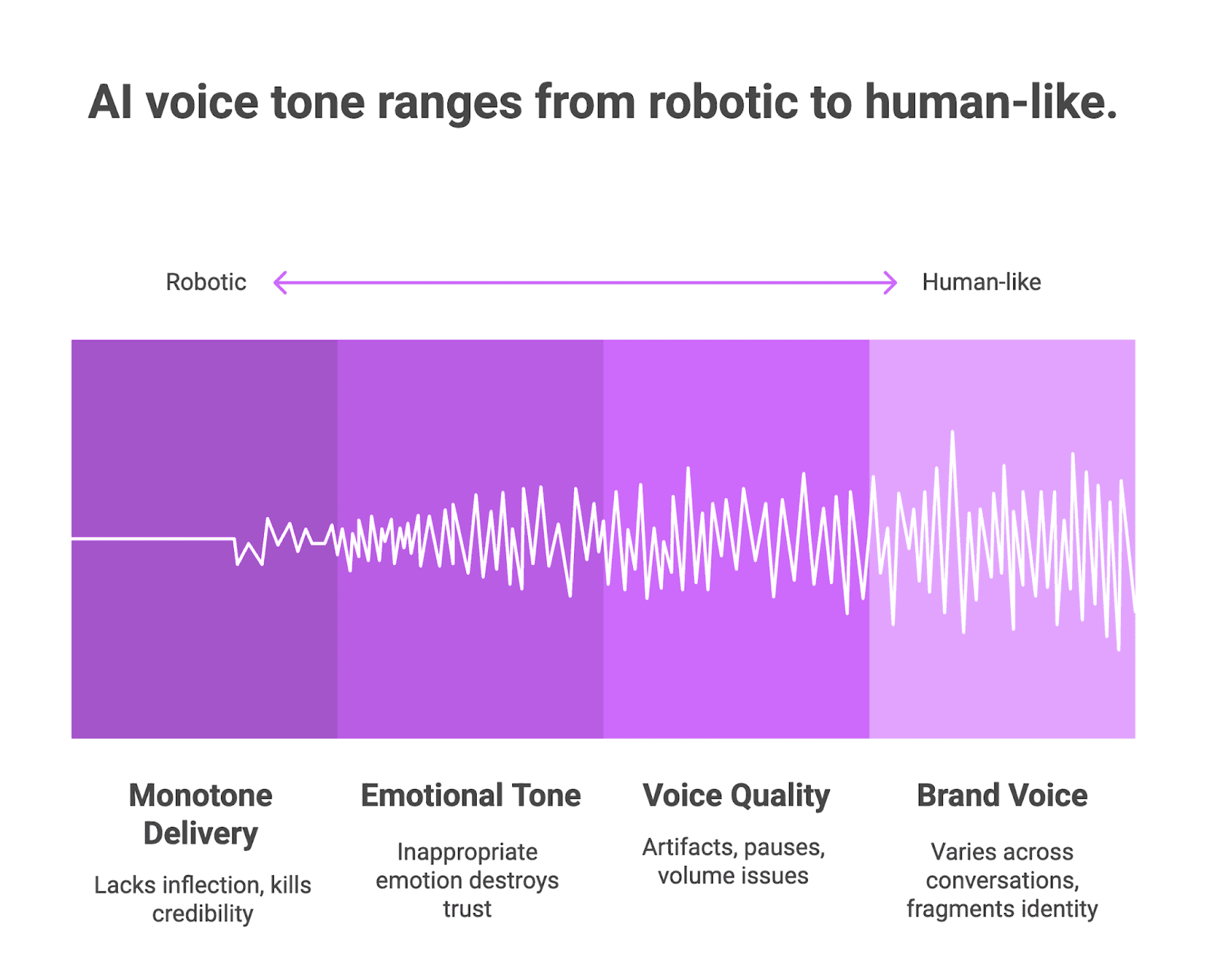
Figure 1: AI voice tone ranges from robotic to human-like
How Audio-Level Voice AI Evaluation Works: Future AGI’s Approach to Real-Time Audio Analysis
Transcript-based testing tells you what your voice AI said. Audio-level evaluation tells you how it said it, and whether users actually heard it clearly. Future AGI takes this approach by evaluating actual audio output across your entire voice pipeline, not just the text transcripts that hide timing, tone, and quality problems. The platform combines evaluation frameworks with real-time observability to track model behavior and detect anomalies before they reach production. This means you catch the 800ms latency spike or the robotic tone shift during testing, not after customers start hanging up. The difference between passing tests and passing user expectations often lives in the audio layer that transcripts completely miss.
Technical Breakdown of the Audio Analysis Pipeline: Data Capture, Signal Processing, Timing, and Quality Scoring
A proper audio evaluation pipeline processes your voice agent output through multiple analysis stages. Each stage captures different failure modes that text alone cannot detect.
- Data capture layer: Records raw audio from your voice agent responses with high fidelity. This includes the actual TTS output, not just what the system intended to say.
- Signal processing: Analyzes spectral attributes, pitch patterns, and prosodic features. Checks for audio artifacts, clipping, and signal-to-noise ratio problems.
- Timing analysis: Measures end-to-end response latency from when the user stops speaking until audio output begins. Breaks down delays by component: speech recognition, intent processing, and response generation.
- Tone and sentiment extraction: Evaluates whether emotional delivery matches conversation context. Flags mismatches like cheerful responses to complaints.
- Quality scoring: Generates automated scores based on naturalness, clarity, and consistency metrics.
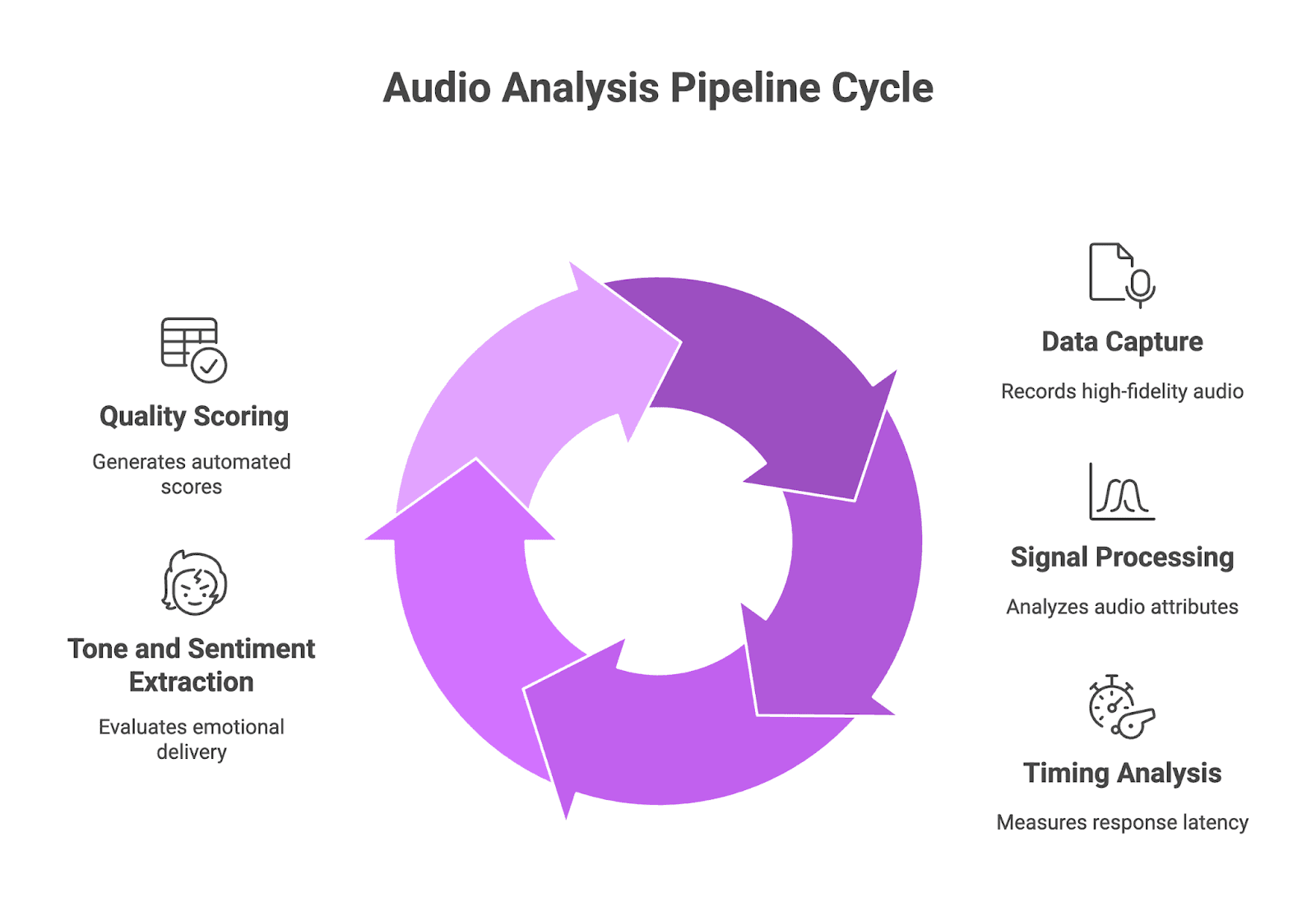
Figure 2: Audio Analysis Pipeline Cycle
Key Metrics Captured: Response Timing, Tone Consistency, and Voice Quality Scores
- Response timing: Tracks total latency and breaks it into component stages for targeted fixes. Target response times below 300ms for conversational applications, since longer delays make interactions feel sluggish.
- Tone consistency: Measures pitch variation, rhythm patterns, and emphasis across responses. Catches when your agent sounds warm in one turn and flat in the next.
- Voice quality scores: Combines signal-to-noise ratio, artifact detection, and prosodic analysis into actionable quality metrics. Identifies technical faults like distortion or unnatural pauses that hurt user perception.
Transcript-Only vs Audio-Level Evaluation: What Each Approach Catches and Where Each Falls Short
| Aspect | Transcript-Only | Audio-Level Evaluation |
| Latency detection | Cannot measure response timing | Captures end-to-end and component latency |
| Tone analysis | Limited to sentiment keywords | Analyzes pitch, rhythm, and emotional delivery |
| Audio quality | No visibility into artifacts or clarity | Detects clipping, noise, and distortion |
| User experience correlation | Low, misses perception factors | High, measures what users actually hear |
| Brand consistency | Checks word choice only | Tracks vocal characteristics across all responses |
How to Build Audio-Aware Testing Into Your Voice AI Pipeline with Future AGI
Future AGI integrates directly with your existing voice infrastructure through APIs and SDKs that tap into your audio pipeline. You don’t need to rebuild your stack or route traffic through another service. The platform hooks into your TTS output, captures raw audio data, and runs parallel evaluation while your voice agent handles live calls.
When your use case demands something specific, you can build custom evals that match your exact criteria. Testing for brand voice consistency across support calls? Create an eval for it. Checking whether your agent handles frustrated customers with the right tone? Define those parameters yourself. The platform lets you combine both approaches, running pre-built evals for baseline quality while layering custom checks on top. Under the hood, these evals use Future AGI’s proprietary Turing models that run natively on audio, so they read tone, timing, and emotion directly from the waveform instead of relying on transcripts. You get pre-built evals for common checks like latency patterns, audio quality, and tone fit, and you can add custom evals for your own rules.
This means you get real-time feedback on audio quality, latency patterns, and tone consistency without adding latency to production conversations.
Automated audio quality scoring runs continuously across your production traffic. The system analyzes each response for signal clarity, prosodic naturalness, and technical artifacts, then assigns quality scores based on your defined thresholds. Instead of manually reviewing call recordings, you get automated flagging of problematic responses. Set up alert thresholds for latency spikes over 500ms, tone anomalies that don’t match context, or quality drops below acceptable limits. Connect these alerts to your observability dashboards through Slack, PagerDuty, or DataDog integrations so your team sees audio issues alongside other performance metrics.
Implementation Steps: How to Use Simulate for Pre-Production and Observe for Live Production Monitoring
Pre-Production: Use Simulate
You don’t need real users to find latency and tone problems. Future AGI Simulate runs thousands of test conversations against your voice agent before it goes live. AI-powered test agents call your system, simulate interruptions, accents, and edge cases, then evaluate the actual audio output for latency spikes, tone mismatches, and quality issues.
This catches the problems transcripts miss while your agent is still in the lab, not after customers start hanging up.
Production: Use Observe
Once you’re live, connect Future AGI’s Observe layer with a few lines of code. It works with popular orchestration layers like Vapi, Retell, and ElevenLabs out of the box.
From there:
- Set up your eval tasks: Define quality baselines for response latency (target 300-500ms), tone consistency scores, and audio clarity metrics based on your use case.
- Configure alert rules: Set thresholds for P95 latency spikes, tone mismatch frequency, and audio artifact detection. Alerts fire when performance drops below your standards.
- Push metrics to your dashboards: Audio quality data flows into your existing observability tools alongside CPU usage, API response times, and error rates.
Simulate catches problems before launch. Observe catches them in production. Both evaluate actual audio, not just transcripts.
Case Study: How Fixing the 4 Percent of Bad Calls Reduced 40 Percent of Complaints and Early Hangups
A voice AI team handling 50,000 calls a day saw clean metrics on paper, but churn and complaints stayed high. Their dashboards showed healthy averages, yet a small slice of calls still felt slow, awkward, and low quality to users.
With Future AGI, they used Simulate to stress test their agent before rollout and Observe to track live behavior once traffic hit production. Together, these highlighted that around 4% of calls were the problem calls, even though the rest of the system looked fine.
Here is what we fixed:
- P95 latency dropped from 1.4 seconds to 380 ms by spotting a small set of flows that hit slow database lookups and external APIs under load. Once they optimized those queries and routes, the long tails disappeared.
- Tone consistency scores improved from 72% to 91% after evals flagged responses where the agent sounded upbeat during complaints or sounded flat in high-stress moments. Tuning TTS settings and prompt logic for escalation and refund flows closed that gap.
- Audio artifact evals caught 2.3% of calls with clipping, distortion, or volume drops that only happened under traffic spikes. These conditions were almost impossible to reproduce manually, but showed up clearly in automated tests and live Observe metrics.
- Testing cycle time dropped by about 70% because Simulate generated and ran thousands of scripted and randomized scenarios overnight instead of relying on manual QA passes.
That 4% of bad calls drove close to 40% of the complaints and early hangups. By combining Simulate for pre-production runs and Observe for live monitoring, the team found and fixed those outliers instead of chasing averages.
Why Audio-Level Evaluation Is the Missing Layer in Every Voice AI Testing Strategy
Transcripts tell you what your voice AI said, but audio-level evaluation shows you how users actually experienced it. The latency spikes, tone mismatches, and quality drops that drive customers away stay completely hidden until you start testing the actual audio output . Future AGI gives you the tools to catch these failures before they hit production, with multimodal evaluation across text, audio, and video that pinpoints exactly where your voice agent breaks down .
👉 Stop guessing why users abandon calls that look successful on paper. Run your first audio-level voice AI test free and see what your transcripts have been missing.
Frequently Asked Questions About Voice AI Evaluation and Latency Detection
What is voice AI latency detection and why does it matter for call quality?
Voice AI latency detection measures the time gap between when a user stops speaking and when your AI agent starts responding, helping you identify delays that frustrate callers and cause hangups.
Why cannot transcript analysis detect tone issues in voice AI conversations?
Transcripts only capture words and intent, missing critical audio signals like pitch variation, emotional delivery, speaking rhythm, and voice quality that determine how users actually perceive the conversation.
What is an acceptable latency threshold for voice AI agents to feel natural?
Most users expect responses within 200-400ms to feel natural, and anything over 500ms starts feeling sluggish, while delays beyond 1 second cause significant call abandonment.
What causes latency spikes in voice AI systems and how do you fix them?
Latency spikes come from multiple pipeline stages including speech-to-text processing, LLM inference time, text-to-speech generation, and network delays between distributed services.
Frequently asked questions
Q1: What is voice AI latency detection?
Q2: Why can't transcript analysis detect tone issues in voice AI?
Q3: What is an acceptable latency for voice AI agents?
Q4: What causes latency spikes in voice AI systems?
Learn how to automate voice agent testing at scale in 2026. Covers why manual QA fails, four scenario generation methods, how AI-powered test agents work.

Learn how to audit voice AI agents for compliance before going live in 2026. Covers TCPA and FCC requirements, HIPAA and PCI rules, three compliance pillars, PII leak prevention, automated testing with Future AGI, and continuous monitoring for real-time violation alerts.
Learn how OpenAI AgentKit and Future AGI work together in 2026. Covers Agent Builder, Connector Registry, ChatKit, Agents SDK, auto-instrumentation, synthetic.