Evaluate Google ADK Agents: The 6-Step 2026 Production Loop
Evaluate Google ADK agents in 6 steps: traceAI instrumentation, span-attached evaluate() scoring, AgentEvaluator CI gates, persona sim, Bayesian opt.
Table of Contents

Originally published March 11, 2026. Updated May 14, 2026. Replaces the verbose
Evaluator(...).evaluate(...).eval_results[0]pattern with the unifiedfi.evals.evaluate()API, drops manualspan_idplumbing in favor ofenable_auto_enrichment(), and points readers toagent-simulateandagent-optfor the pre-production and prompt-optimization steps. Steps 1 to 3 are runnable as shown. Steps 4 to 6 are integration patterns that adapt to your agent module, dataset, and mapper.
TL;DR: The 6-Step ADK Production Eval Loop
| Step | What you do | Tool | Runnable? |
|---|---|---|---|
| 1. Instrument | Auto-trace agents, sub-agents, LLM calls, tool calls | traceai-google-adk + register() | Yes, 30 seconds |
| 2. Score | Attach groundedness, factuality, safety to spans | fi.evals.evaluate() + enable_auto_enrichment() | Yes, copy-paste |
| 3. Gate | Block bad releases on .test.json thresholds | google.adk.evaluation.AgentEvaluator | Yes, pytest |
| 4. Recipe | One eval recipe per ADK workflow pattern | fi.evals.evaluate() per Sequential/Parallel/Loop/Routing | Integration pattern |
| 5. Simulate | Persona-driven multi-turn pre-prod scenarios | ADK user-simulator (chat) or agent-simulate (voice) | Integration pattern |
| 6. Optimize | Search prompt space on failing traces | fi.opt.optimizers.BayesianSearchOptimizer | Integration pattern |
Steps 1 to 3 are copy-paste runnable. Steps 4 to 6 are integration patterns that adapt to your agent module, dataset, and mapper. ADK 1.17+ is the floor version; the unified evaluate() API replaces the older Evaluator(...).evaluate(...).eval_results[0] pattern.
Why ADK’s Built-in Evaluation Falls Short After Deployment and What This Guide Covers
Google’s Agent Development Kit (ADK) has carved out a solid reputation as a framework for building multi-agent systems. It gives you workflow orchestration through SequentialAgent, ParallelAgent, and LoopAgent, plays well with Gemini models, and deploys natively to Vertex AI Agent Engine or Cloud Run. ADK also ships with a built-in evaluation framework that lets you test tool trajectories, score responses, and even run hallucination checks during development. That evaluation layer covers a lot of ground for pre-deployment testing.
Where things get thin is after deployment. ADK’s eval tools are designed for the development loop: you define test cases, run them through pytest or the CLI, and check scores before merging code. That workflow does not extend into production. Once your agents start handling real user requests, you lose visibility into quality drift, cost attribution per agent, latency bottlenecks across workflow steps, and continuous quality scoring on live traffic. That gap between development eval and production Google ADK observability is exactly what this guide addresses.
We will walk through a complete Google ADK agent testing and monitoring setup. You will learn what ADK’s built-in evaluation actually measures (and where it falls short), how FutureAGI’s end-to-end stack for observability and evaluation fills the production gaps, how to instrument ADK agents with traceAI, how to evaluate every workflow pattern ADK supports, and how to set up dashboards that track cost, latency, and quality in real time.
The 2026 ADK update story is short and worth getting straight up front. ADK 1.17+ ships native OpenTelemetry export to Google Cloud Observability via --otel_to_cloud, which makes trace export table-stakes. The unresolved layer is continuous, span-level quality scoring on live, multi-step agent traces. That is what the rest of this guide builds.
A Concrete Failure Your Tests Won’t Catch
The agent passes every .test.json case in CI, then in production you see a trace like this:
root_agent.run("Find me a vegetarian restaurant in Berlin and book a 7pm table")
├── search_agent.run(...)   tool="google_search"   ok
├── search_agent.run(...)   tool="google_search"   ok   (same query)
├── search_agent.run(...)   tool="google_search"   ok   (third identical call)
└── booking_agent.run(...)  tool="reserve_table"   ok
final_response = "I've booked you a table at a vegetarian restaurant in Berlin for 7pm."
tool_trajectory_avg_score passes with ANY_ORDER. response_match_score passes on keyword overlap. safety_v1 passes. But the agent looped on google_search three times, the final answer omits the restaurant name and address, and the user lands at a phantom reservation. The eval suite missed it because it only graded the final response and trajectory. Not per-step output, not loop count, not grounding in the actual search results. This is what production eval has to catch and what development eval misses.
The fix is the ADK Production Eval Loop: six steps that go from a 30-second hello-trace to persona-driven simulation and prompt optimization. Steps 1 to 3 are copy-paste runnable. Steps 4 to 6 are integration patterns that need to adapt to your agent’s module shape, scenario harness, and dataset.
Prerequisites
- Python 3.10+
- google-adk >= 1.17 (for native --otel_to_cloud support)
- A Google API key for Gemini (GOOGLE_API_KEY)
- A FutureAGI project + API key + secret (FI_API_KEY, FI_SECRET_KEY). Sign up at https://futureagi.com
The pip install is one line:
pip install traceai-google-adk ai-evaluation google-adkTwo things to know about that line:
traceai-google-adkpulls infi-instrumentation-oteltransitively. That’s the package that gives youfrom fi_instrumentation import register.ai-evaluationis the package that gives youfrom fi.evals import evaluate. ThefutureagiPyPI package does not includefi/evals. If you previously didpip install futureagiand tried tofrom fi.evals import Evaluator, that’s why it failed.
Set the three environment variables:
export FI_API_KEY="..."
export FI_SECRET_KEY="..."
export GOOGLE_API_KEY="..."
You’re ready for Step 1.
Step 1. Install and Verify the Trace Pipeline in 30 Seconds
The fastest way to confirm everything works is the canonical hello-trace: a single-agent app that answers a weather question with a tool call. Save this as hello-trace.py:
import asyncio

from google.adk.agents import Agent
from google.adk.runners import InMemoryRunner
from google.genai import types

from traceai_google_adk import GoogleADKInstrumentor
from fi_instrumentation import register
from fi_instrumentation.fi_types import ProjectType

tracer_provider = register(
    project_name="adk_demo",
    project_type=ProjectType.OBSERVE,
)
GoogleADKInstrumentor().instrument(tracer_provider=tracer_provider)

def get_weather(city: str) -> dict:
    if city.lower() == "new york":
        return {"status": "success",
                "report": "New York is sunny, 25°C (77°F)."}
    return {"status": "error", "error_message": f"No data for {city}."}

agent = Agent(
    name="weather_agent",
    model="gemini-2.5-flash",
    description="Answer weather questions using the weather tool.",
    instruction="You must use the available tools to find an answer.",
    tools=[get_weather],
)

async def main():
    app_name, user_id, session_id = "weather_app", "demo_user", "demo_session"
    runner = InMemoryRunner(agent=agent, app_name=app_name)
    await runner.session_service.create_session(
        app_name=app_name, user_id=user_id, session_id=session_id,
    )
    async for event in runner.run_async(
        user_id=user_id,
        session_id=session_id,
        new_message=types.Content(
            role="user", parts=[types.Part(text="What is the weather in New York?")]
        ),
    ):
        if event.is_final_response():
            print(event.content.parts[0].text.strip())

if __name__ == "__main__":
    asyncio.run(main())
Run it:
python hello-trace.py
# Example output (Gemini may rephrase): "New York is sunny, 25°C (77°F)."
Three things just happened automatically. The Runner.run_async call became one OTel span. The Gemini call inside the agent became a child span. The get_weather tool call became another child span. Open Observe in your FutureAGI project. You’ll see the trace tree under the adk_demo project with the agent invocation, the LLM call, and the tool call as separate spans.
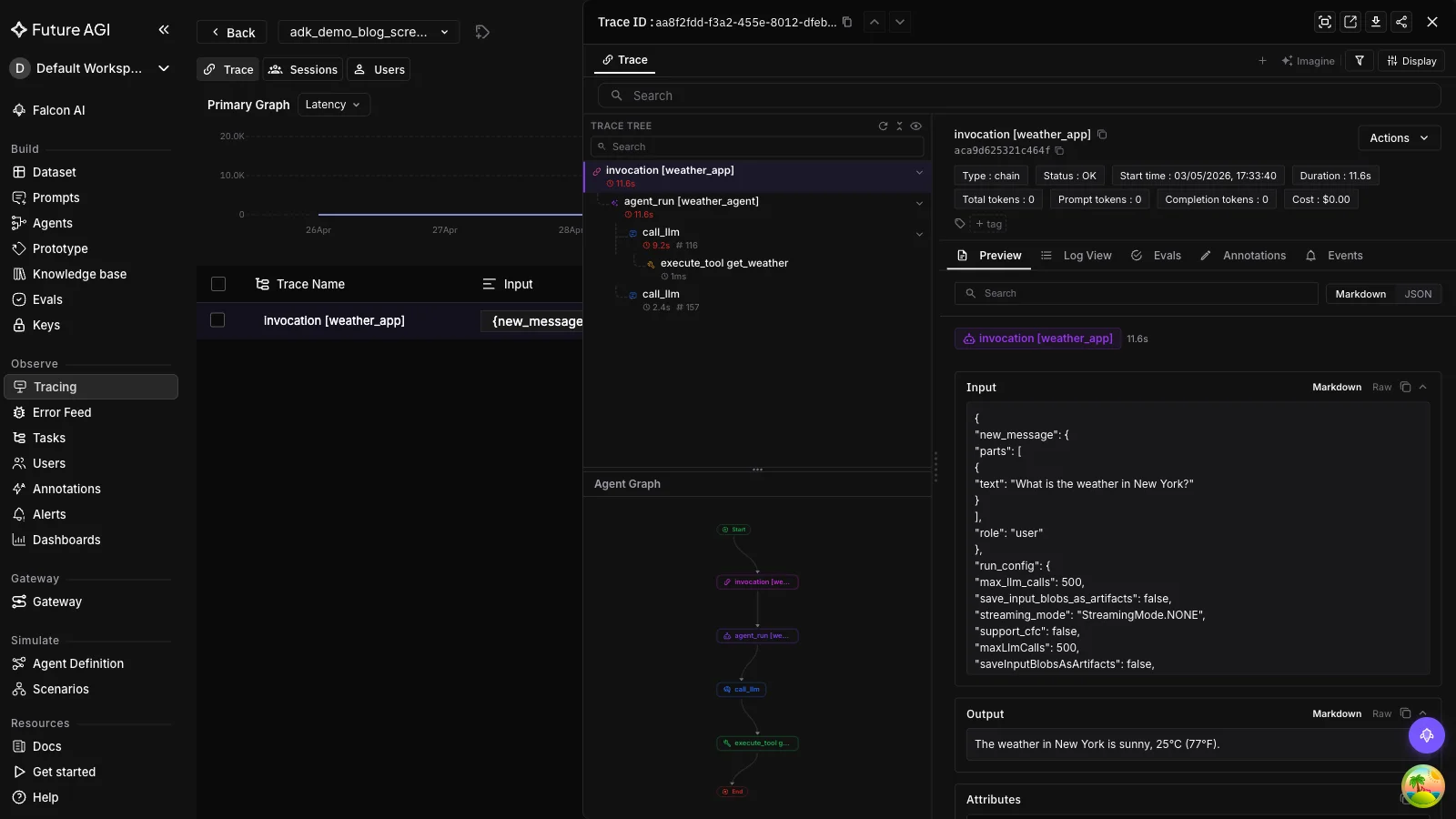
If the trace doesn’t show up, the most common cause is missing env vars. register() reads FI_API_KEY and FI_SECRET_KEY from the environment. Set them, re-run, refresh Observe.
You now have a working trace pipeline. Step 2 attaches eval scores to those spans.
Step 2. Score Outputs with the Unified evaluate() API
The unified evaluate() API is the simplest way to score an output against any FutureAGI evaluator. It returns an EvalResult with score, passed, reason, and latency_ms. No client setup, no batch result unpacking.
from fi.evals import evaluate

# Re-use Step 1's hello-trace output to keep the example concrete:
user_question = "What is the weather in New York?"
context = get_weather("New York")["report"]
# context = "New York is sunny, 25°C (77°F)."
response = "It's sunny in New York with a temperature of 25°C."

# Local heuristic. Runs offline, sub-second, free.
r = evaluate("contains", output="hello world", keyword="hello")
print(r.score, r.passed, r.reason)
# 1.0  True  "Found 'hello' in output"

# Cloud template via FutureAGI Turing models. LLM-as-a-judge.
r = evaluate("groundedness", output=response, context=context, model="turing_flash")
print(r.score, r.passed, r.reason)
# 0.92  True  "All claims are grounded in the provided context."

# Custom prompt against any LiteLLM-supported model.
r = evaluate(
    prompt="Rate clarity 0-1 of: {output}",
    output="ML is a subset of AI.",
    engine="llm",
    model="gemini/gemini-2.5-flash",
)
You can run multiple evaluators in one call:
from fi.evals import evaluate

# `response`, `context`, `user_question` are the same variables defined above.
results = evaluate(
    ["groundedness", "factual_accuracy", "toxicity"],
    output=response, context=context, input=user_question,
    model="turing_flash",
)
for r in results:
    print(r.eval_name, r.score, r.passed)
That’s the whole API surface for output-level scoring. Three call shapes. One local-metric, one cloud-template, one custom-prompt. And a fourth for batches.
Auto-attaching scores to the active span
To score an ADK trace step (rather than a standalone output), call enable_auto_enrichment() once at startup. After that, every evaluate() result inside an active span context attaches its score, reason, and latency to that span automatically.
from fi.evals import evaluate
from fi.evals.otel import enable_auto_enrichment, get_tracer

enable_auto_enrichment()
tracer = get_tracer()

# `ans` is the agent's answer for the current step; `ctx` is the grounding source.
ans = response                  # from the variables defined above
ctx = context

with tracer.start_as_current_span("rag-pipeline"):
    with tracer.start_as_current_span("generate-answer"):
        r = evaluate("groundedness", output=ans, context=ctx, model="turing_flash")
        # No span_id plumbing required. The score is on this span.
If you want explicit control over which span gets enriched (for sub-agent boundaries, for example), use enrich_span_with_evaluation:
from fi.evals.otel import enrich_span_with_evaluation

with tracer.start_as_current_span("quality-gate") as span:
    r = evaluate("faithfulness", output=ans, context=ctx)
    enrich_span_with_evaluation(
        metric_name="faithfulness",
        score=r.score,
        reason=r.reason[:200],
        latency_ms=r.latency_ms,
        span=span,
    )
Open Observe and you’ll see the eval score as a span attribute next to the trace. Same screen, no log-stitching.
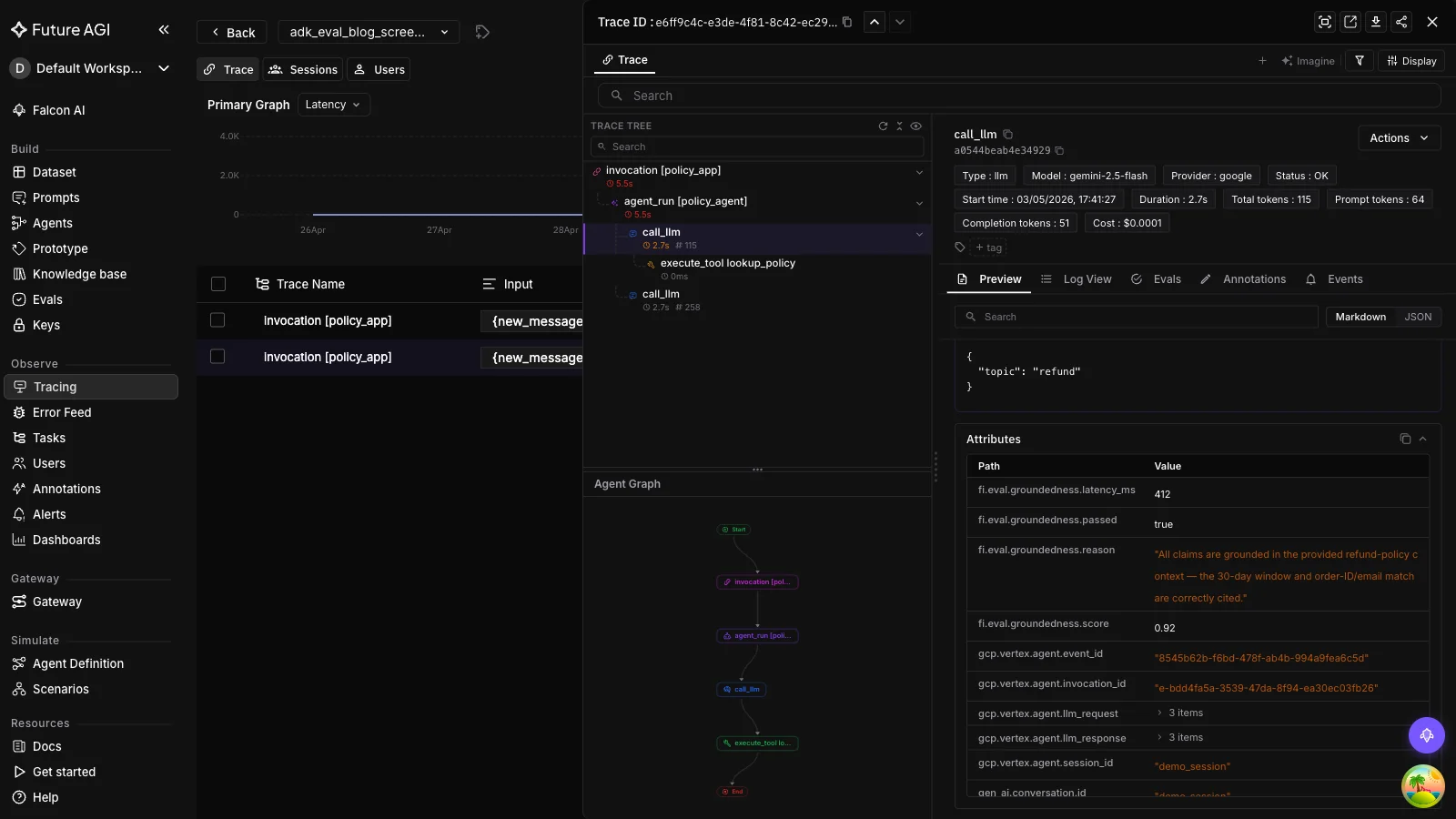
This is the production eval primitive. The remaining steps are how to use it correctly across CI, scenarios, and optimization.
Step 3. Gate Releases on .test.json with AgentEvaluator
ADK’s built-in evaluation is the right tool for CI gates. Drop a .test.json fixture in your tests directory, define thresholds in a test_config.json, and let AgentEvaluator.evaluate() run them in pytest.
Minimal tests/fixtures/weather_basic.test.json (the schema is from the official ADK docs):
{
  "eval_set_id": "weather_basic_set",
  "name": "weather basic queries",
  "description": "Single-turn weather agent smoke tests.",
  "eval_cases": [
    {
      "eval_id": "ny_weather",
      "conversation": [
        {
          "invocation_id": "1",
          "user_content": {"parts": [{"text": "What is the weather in New York?"}], "role": "user"},
          "final_response": {"parts": [{"text": "New York is sunny, 25°C (77°F)."}], "role": "model"},
          "intermediate_data": {
            "tool_uses": [{"args": {"city": "New York"}, "name": "get_weather"}],
            "intermediate_responses": []
          }
        }
      ],
      "session_input": {"app_name": "weather_app", "user_id": "test_user", "state": {}}
    }
  ]
}
Thresholds in tests/fixtures/test_config.json:
{
  "criteria": {
    "tool_trajectory_avg_score": 1.0,
    "response_match_score": 0.8
  }
}
AgentEvaluator.evaluate() discovers the agent through an importable Python module path. Save Step 1’s agent object as weather_app/agent.py with the special root_agent name ADK looks for, and put test_config.json in the same folder as the .test.json fixtures so ADK auto-loads it:
weather_app/
  __init__.py
  agent.py            # exports root_agent (the Agent from Step 1)
tests/
  fixtures/
    test_config.json
    weather_basic.test.json
test_weather.pyweather_app/agent.py:
# Re-use the Agent definition from Step 1's hello-trace.
from google.adk.agents import Agent

def get_weather(city: str) -> dict:
    return {"status": "success", "report": "stub for example"}

agent = Agent(
    name="weather_agent",
    model="gemini-2.5-flash",
    description="Answer weather questions using the weather tool.",
    instruction="You must use the available tools to find an answer.",
    tools=[get_weather],
)

root_agent = agent   # AgentEvaluator looks up `root_agent` from the module
Run it from pytest. Pass the folder containing the test config and fixtures:
import pytest
from google.adk.evaluation.agent_evaluator import AgentEvaluator

@pytest.mark.asyncio
async def test_weather_basic():
    await AgentEvaluator.evaluate(
        agent_module="weather_app",
        eval_dataset_file_path_or_dir="tests/fixtures",
    )
The 11 ADK criteria you can reference in test_config.json are listed in the FAQ below. For most ADK projects, start with tool_trajectory_avg_score (1.0) and response_match_score (0.8) (Google’s defaults) and add hallucinations_v1 once you have grounding context.
This is your CI development inner loop. Step 4 covers what to score across each ADK workflow pattern.
Step 4. Apply the Right Eval Recipe per ADK Workflow Pattern
ADK gives you four orchestration patterns. SequentialAgent, ParallelAgent, LoopAgent, and dynamic-routing agents that transfer_to_agent. Each fails differently in production. Each gets a different eval recipe.
SequentialAgent: Score each step’s output to prevent error compounding
from fi.evals import evaluate
from fi.evals.otel import enable_auto_enrichment

enable_auto_enrichment()

# Inside each sub-agent in the chain:
def _planning_step(input_text: str) -> str:
    plan = planning_agent.run(input_text)
    evaluate("instruction_adherence", output=plan, input=input_text, model="turing_flash")
    return plan
Each step’s eval auto-attaches to that step’s span. When the final response is wrong, you can trace which step compounded the error.
ParallelAgent: Score branch quality + merged-output consistency
from fi.evals import evaluate
from fi.evals.otel import enrich_span_with_evaluation

def _evaluate_parallel_outputs(branches: list[str], merged: str) -> None:
    for i, branch in enumerate(branches):
        r = evaluate("conversation_coherence", output=branch)
        # Rename the span attribute so each branch lands distinctly in Observe.
        enrich_span_with_evaluation(
            metric_name=f"branch_{i}_quality",
            score=r.score, reason=r.reason, latency_ms=r.latency_ms,
        )
    evaluate("factual_accuracy", output=merged, context="\n".join(branches),
             model="turing_flash")
Per-branch coherence catches a single bad branch dragging the merged output. Whole-output factual accuracy catches the merged result diverging from any individual branch.
LoopAgent: Score iteration count and per-iteration output
from fi.evals import evaluate
from fi.evals.otel import enrich_span_with_evaluation

def _evaluate_loop(iterations: list[str], goal: str, max_iters: int) -> None:
    if len(iterations) >= max_iters:
        evaluate("contains", output="MAX_ITERATIONS_HIT", keyword="MAX_ITERATIONS_HIT")
    for i, iter_output in enumerate(iterations):
        r = evaluate("instruction_adherence", output=iter_output, input=goal)
        enrich_span_with_evaluation(
            metric_name=f"loop_iter_{i}",
            score=r.score, reason=r.reason, latency_ms=r.latency_ms,
        )
Loop count is the runaway-cost signal. Per-iteration adherence catches the loop drifting away from the original goal.
Dynamic Routing: Score routing accuracy as classification
from fi.evals import evaluate
from fi.evals.otel import enrich_span_with_evaluation

def _evaluate_routing(query: str, chosen_agent: str, expected_agent: str) -> None:
    r = evaluate("contains", output=chosen_agent, keyword=expected_agent)
    enrich_span_with_evaluation(
        metric_name="routing_accuracy",
        score=r.score, reason=r.reason, latency_ms=r.latency_ms,
    )
Routing is a classification task. Treat it that way and score it on a known-routing dataset before you ship the routing rules.
| Pattern | Failure mode | Recipe | What it catches |
|---|---|---|---|
| SequentialAgent | Step compounding | Per-step instruction_adherence | Bad step → corrupted final |
| ParallelAgent | Bad branch dragging merge | Branch coherence + merged factuality | Off-pattern branch |
| LoopAgent | Runaway iterations | Loop-count gate + per-iter adherence | Drift, cost runaway |
| Dynamic Routing | Wrong sub-agent picked | Routing accuracy as classification | Mis-routing in prod |
ADK Built-in vs FutureAGI for ADK at a glance:
| Capability | ADK Built-in | FutureAGI |
|---|---|---|
Pre-deployment .test.json evaluation | Via AgentEvaluator | Use ADK |
| Live trace export | ✅ via --otel_to_cloud | ✅ via traceAI (vendor-portable) |
| Continuous quality scoring on live traffic | ❌ | ✅ via evaluate() + enable_auto_enrichment() |
| Per-agent / per-tool cost attribution | ❌ | ✅ via OTel span attributes |
| Persona-driven multi-turn simulation | Partial (user simulator framework) | ✅ via agent-simulate |
| Prompt optimization on failing traces | ❌ | ✅ via agent-opt |
| Multi-turn evaluators | 4 metrics shipped | + 100+ cloud Turing templates + 76+ local heuristics |
Step 5. Run Pre-Production Scenarios with a Multi-Turn Simulator
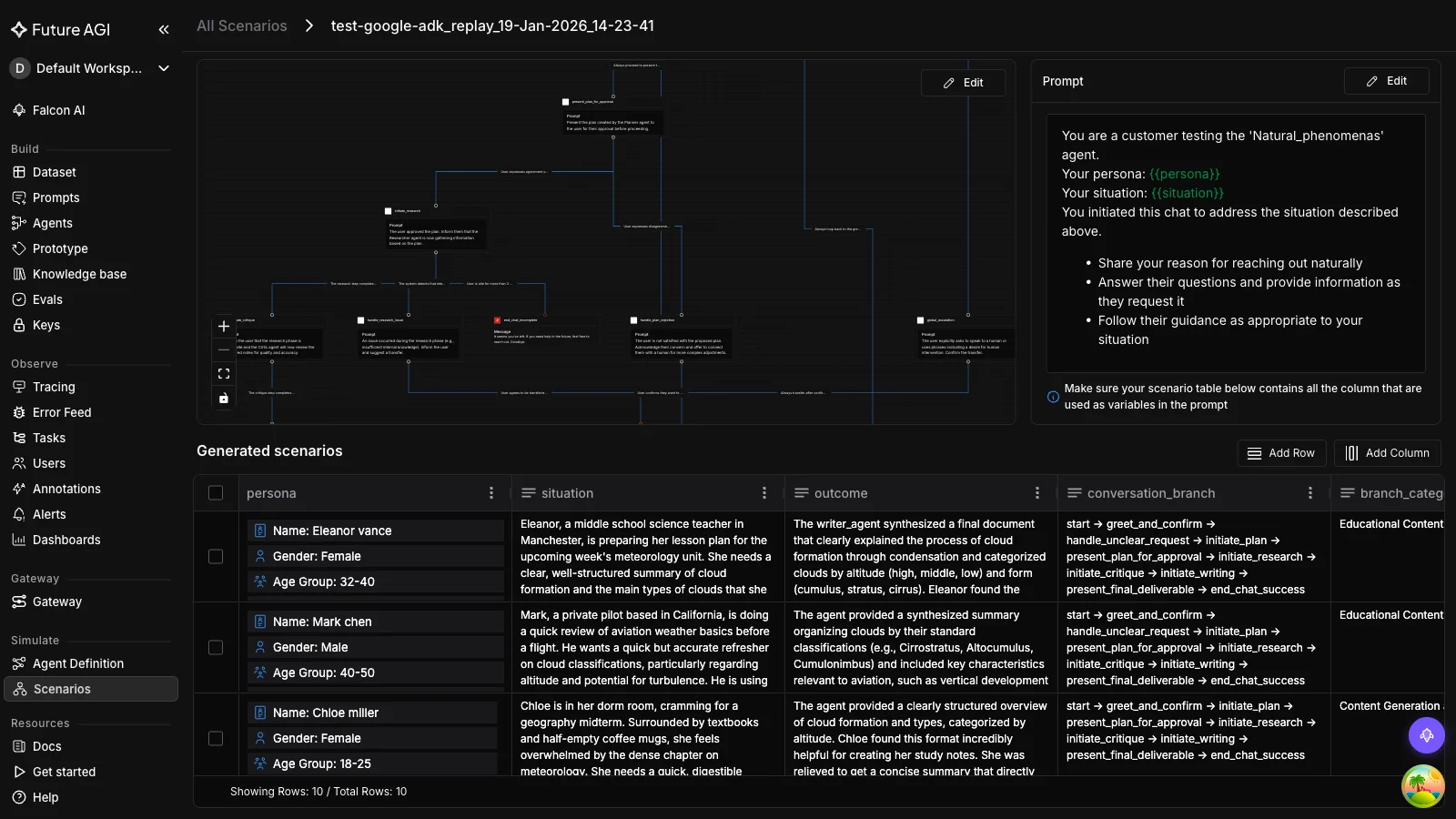
Per-step eval and CI gates catch most failures before production. The remaining class is cross-turn behavior, where the agent looks fine on each turn but fails the conversation as a whole. That class needs scenario testing.
Two tools cover this for ADK:
ADK’s user-simulator framework is the right fit for chat ADK agents. It pairs the four multi-turn criteria (multi_turn_task_success_v1, multi_turn_trajectory_quality_v1, multi_turn_tool_use_quality_v1, per_turn_user_simulator_quality_v1) with a simulated user driver that replays personas against your root_agent. Read the ADK user-simulator docs for the current API surface and use AgentEvaluator with the multi-turn criteria inside pytest.
FutureAGI’s agent-simulate is the right fit when the agent is a voice agent on LiveKit. The SDK is built around real-time audio rooms, with AgentDefinition(url=..., room_name=..., system_prompt=...), Persona(persona=..., situation=..., outcome=...), Scenario(name=..., dataset=[...]), and an async TestRunner().run_test(). It is not the right tool for a text-only ADK agent; for that, use ADK’s user-simulator above. See the fi.simulate README for the LiveKit setup.
For either path, the loop is the same: drive the persona, capture the conversation, score the transcript with the multi-turn criteria. The output you carry forward to Step 6 is the set of failing transcripts.
Step 6. Close the Loop with agent-opt
If your scenarios surface a failure mode the agent reproduces (an instruction it ignores, a tool it picks wrong, a hallucinated detail), the next step is to optimize the prompt that drives the misbehavior. That’s agent-opt.
from fi.opt.optimizers import BayesianSearchOptimizer
from fi.opt.base.evaluator import Evaluator as OptEvaluator
from fi.opt.datamappers import BasicDataMapper
from fi.evals.metrics import BLEUScore

# `failing_trace_dataset` is whatever you load from your Step 2 sampled failures.
# Each row needs `context` and `question` fields plus a `reference` answer.
failing_trace_dataset = [
    {"context": "...", "question": "...", "reference": "..."},
    # ...
]

# `mapper` tells the optimizer which dataset fields fill which prompt placeholders.
mapper = BasicDataMapper(
    field_mapping={"context": "context", "question": "question", "reference": "reference"},
)

optimizer = BayesianSearchOptimizer(
    inference_model_name="gpt-4o-mini",
    teacher_model_name="gpt-4o",
    n_trials=10,
)

result = optimizer.optimize(
    evaluator=OptEvaluator(BLEUScore()),
    data_mapper=mapper,
    dataset=failing_trace_dataset,
    initial_prompts=["Given context: {context}, answer: {question}"],
)

print("final_score:", result.final_score)
print("best_prompt:", result.best_generator.get_prompt_template())
The dataset is your collection of failing traces from production (sampled by Step 2’s eval scores). The evaluator can be a public metric like BLEUScore or any custom evaluator you’ve built. The optimizer searches prompt variants and returns the one that lifts your evaluator score the most. Promote that prompt through your CI gate, redeploy, watch the failure rate drop in Observe.
The loop is now closed: instrument → score → gate → simulate → optimize → re-instrument.
Production Hardening
The six steps above are the loop. Three additional considerations harden it for production traffic.
Sample 5 to 10 percent of production traffic for eval. Running every production trace through evaluate() is too expensive. Sample. The unified evaluate() call is synchronous; for async production scoring, run it in a background worker or job queue you control so the agent’s user-facing response path is never blocked on evaluation latency.
Roll trace cost up to per-user-request budgets. Span-level cost attribution is the new observability requirement; without it, audit-grade cost reporting in production is impossible. OTel GenAI semantic conventions (such as gen_ai.system and gen_ai.request.model) give you the per-call inputs you need; rolling them up the trace tree is the platform’s job.
Use --otel_to_cloud if you’re already on Google Cloud Observability. ADK 1.17+ exports natively. If you also want vendor-portable traces and FutureAGI’s eval scoring on top, run both. The traceAI instrumentation is OTel-native and stacks cleanly with other exporters.
Validation: How to Know the Eval Is Working
After running through Steps 1–6, three checks confirm the pipeline is wired correctly:
- Trace tree visible in Observe. Open the latest run. The agent invocation, every sub-agent, every LLM call, and every tool call should be separate spans under one root span.
- Eval score on the span. Click into a span where you called
evaluate(). You should see the eval name, score, reason, and latency as span attributes. Not just in your logs. - CI fails on a deliberately broken case. Add a
.test.jsoncase where the agent should fail (wrong city in the weather example, missing tool call). Run pytest.AgentEvaluator.evaluate()should fail. If it passes, yourtest_config.jsonthresholds are too loose.
If all three pass, the loop is real.
Pitfalls
The five mistakes most ADK + FutureAGI integrations hit, ordered by frequency:
pip install futureagifollowed byfrom fi.evals import Evaluatorfails. Thefutureagipackage excludesfi/evals. Usepip install ai-evaluation(orpip install traceai-google-adk ai-evaluation google-adkto pull in everything at once).runner.run_async(new_message="...")raises a Pydantic validation error. ADK’srun_asyncexpectsnew_message=types.Content(role="user", parts=[types.Part(text="...")]). Build aContentobject; don’t pass a string.runner.run_asyncraisesSession not found. You skippedawait runner.session_service.create_session(app_name=..., user_id=..., session_id=...). The session must exist before the firstrun_asynccall.- Eval scores don’t show up on spans. You forgot to call
enable_auto_enrichment()once at startup, OR you calledevaluate()outside an active span context. Wrap the call inwith tracer.start_as_current_span(...). AgentEvaluator.evaluate()passes everything in CI. Yourtest_config.jsonthresholds are too low or absent. Pick the tight defaults:tool_trajectory_avg_score: 1.0,response_match_score: 0.8, then tighten further.
Why Use FutureAGI for Google ADK Evaluation and Observability
Different layers of the eval stack solve different problems. ADK’s built-in evaluation is excellent for the development inner loop: .test.json fixtures, pytest integration, and the 11 evaluation criteria documented in current ADK docs. (ADK 1.17+ is required for --otel_to_cloud. The metric set shown here works with the latest google-adk.) What ADK does not give you is continuous evaluation on live production traffic, vendor-portable trace export, persona-driven scenario testing across personas you’d never write by hand, or prompt optimization on failing-trace datasets.
FutureAGI covers these pieces, but it does not replace ADK’s CI evals or remove the need for goldens. traceAI auto-instruments every agent invocation, sub-agent call, LLM completion, and tool execution as OpenTelemetry spans (vendor-portable, OTel 1.37+ GenAI semantic conventions compatible). ai-evaluation ships 76+ local metrics and 100+ cloud Turing templates through the unified evaluate() API, with auto-enrichment that attaches scores to your active span without manual plumbing. agent-simulate runs voice agents on LiveKit through persona-driven multi-turn scenarios; for chat ADK agents, ADK’s own user-simulator framework is the right fit. agent-opt searches the prompt space for variants that lift your evaluator score on a failing-trace dataset, closing the loop from production failures back to versioned prompt improvements.
You keep ADK for orchestration, agent building, and CI gates. You add production-grade observability, continuous live-traffic eval, and prompt optimization on top.
Limitations
A short list of what this guide is and isn’t.
- Verified against May 2026 SDK versions.
traceai-google-adk 0.1.4,ai-evaluation(current),google-adk >= 1.17(required for--otel_to_cloud). On older ADK versions the multi-turn metrics may not exist; check the ADK criteria reference for what’s available in your installed version. - The
agent-simulateandagent-optexamples assume both packages are installed. They’re separate fromai-evaluation. Install withpip install agent-simulate agent-optif you want Steps 5 and 6. - Trace screenshots show
OBSERVEprojects. If you registered withProjectType.EXPERIMENT, the UI surfaces are slightly different. Both work; pickOBSERVEfor production. - The unified
evaluate()API is newer than the legacyEvaluatorclass. Both ship inai-evaluation. The unified API is more ergonomic; the legacy class is what existing Langfuse-style integrations expect. Use whichever your team has already standardized on. - We are FutureAGI. We sell tools that make this loop easier. The protocol. Instrument, score, gate, simulate, optimize. Is the same on Langfuse, LangSmith, Braintrust, or in-house. The specific code blocks change; the loop doesn’t.
For the broader 2026 production AI context that motivates the Production Eval Loop, see Generative AI Trends 2026: Why Reliability Became the Main Story. For the per-model comparison and benchmark trust framework, see LLM Benchmarking 2026: Compare Top Models When Leaderboards Break. For continuous live-traffic eval on a multi-month buying-guide cadence, see Best LLMs of May 2026 which references this post in its “How to actually pick one for production” section.
Sources
- Google ADK documentation: https://google.github.io/adk-docs/
- ADK evaluation criteria reference (the 11 metrics, match types, ROUGE-1, multi-turn): https://google.github.io/adk-docs/evaluate/criteria/
- ADK evaluation overview (AgentEvaluator, .test.json schema, test_config.json): https://google.github.io/adk-docs/evaluate/
- Google ADK Python source: https://github.com/google/adk-python
- ADK 1.17+
--otel_to_cloudflag and Vertex AI Agent Engine integration: https://docs.cloud.google.com/stackdriver/docs/instrumentation/ai-agent-adk - FutureAGI traceAI (OTel auto-instrumentation, Google ADK framework adapter): https://github.com/future-agi/traceAI
- FutureAGI ai-evaluation (unified
evaluate()API, span auto-enrichment): https://docs.futureagi.com/docs/sdk/evals/evaluate/ - FutureAGI agent-simulate SDK (LiveKit voice scenarios): https://github.com/future-agi/simulate-sdk
- FutureAGI agent-opt SDK (BayesianSearchOptimizer, ProTeGi, GEPA): https://github.com/future-agi/agent-opt
- OpenTelemetry GenAI semantic conventions (
gen_ai.system,gen_ai.request.model, etc.): https://opentelemetry.io/docs/specs/semconv/gen-ai/ - Companion Colab notebook: https://github.com/future-agi/cookbooks/tree/main/google_adk_eval_loop
Ready to evaluate your first ADK agent? Get started with FutureAGI and follow the evaluation platform and tracing docs.
Frequently asked questions
What's the right pip install for evaluating Google ADK agents with FutureAGI?
What evaluation areas does ADK currently cover?
Can ADK evaluate multi-turn agent conversations?
How do I attach a FutureAGI eval to a specific ADK trace span?
What's the difference between final_response_match_v2 and hallucinations_v1?
Does Google ADK support production monitoring out of the box?
How do I evaluate a Sequential Agent's individual steps?
Evaluate MCP-connected agents in 2026: tool selection, argument correctness, task completion, OTEL tracing, and the 5-pillar production scoring framework.

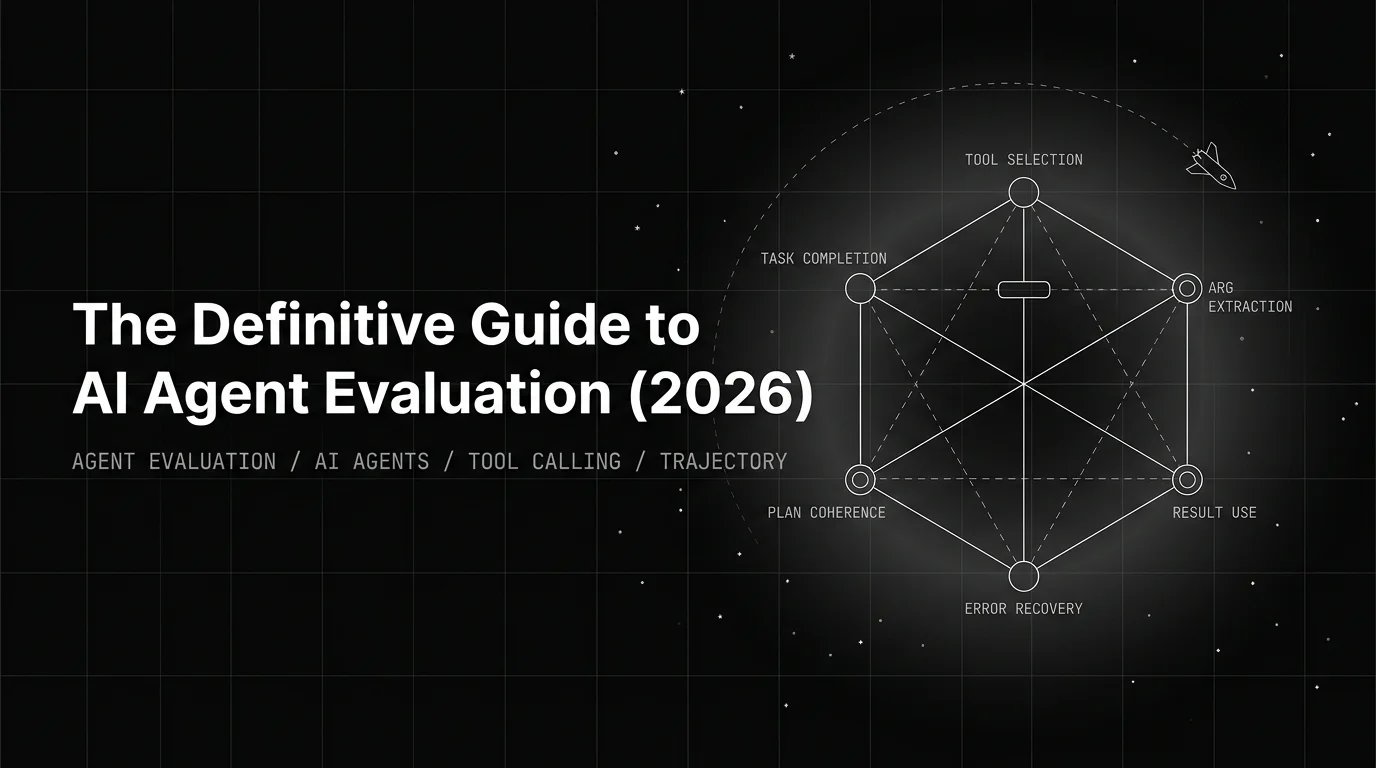
2026 working pattern for AI agent evaluation. Six dimensions, six rubrics, 4-D trajectory score, CI gate beats aggregate scoring, loop production needs.

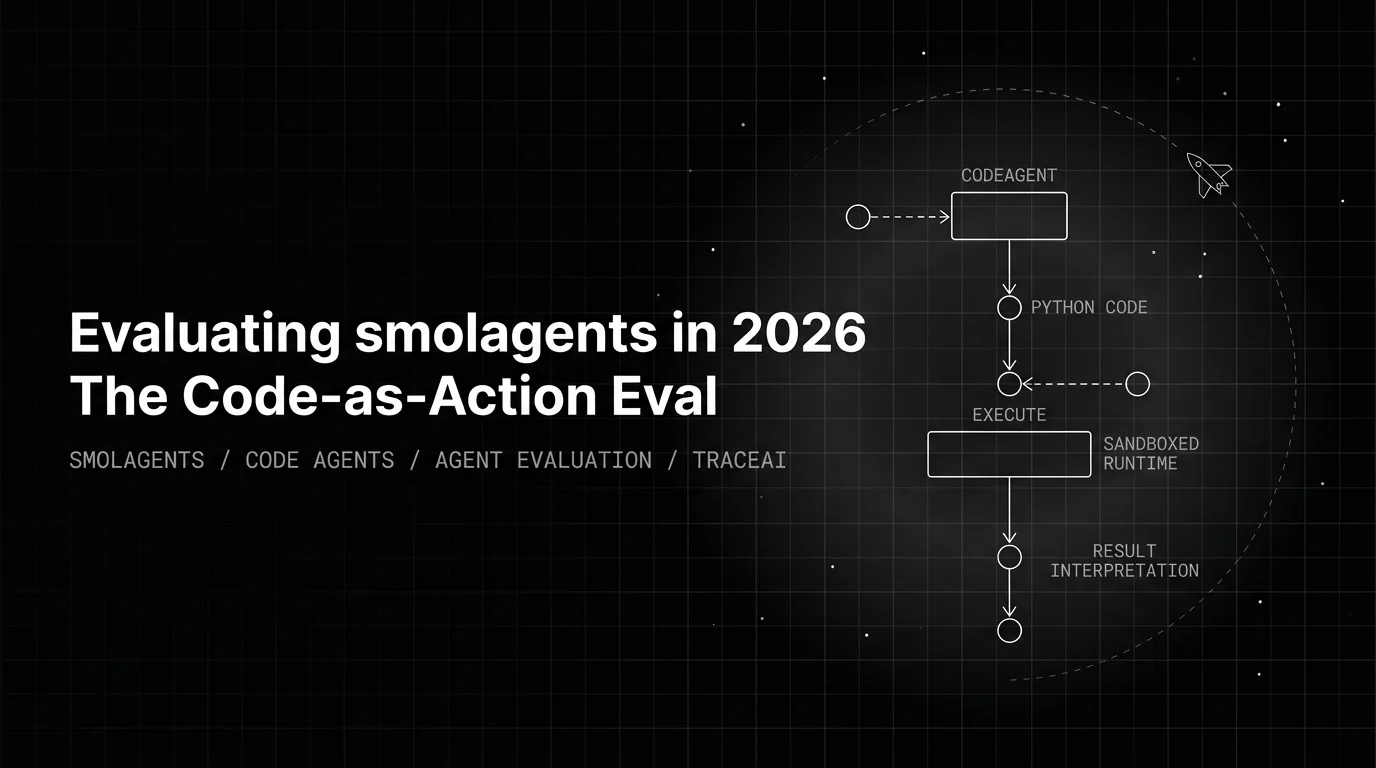
smolagents' CodeAgent makes the plan AS code, so the eval changes shape: code synthesis correctness, sandbox safety, and result-interpretation fidelity.