What's in this digest
Agent Playground — Build Agents Without Writing Agent Code
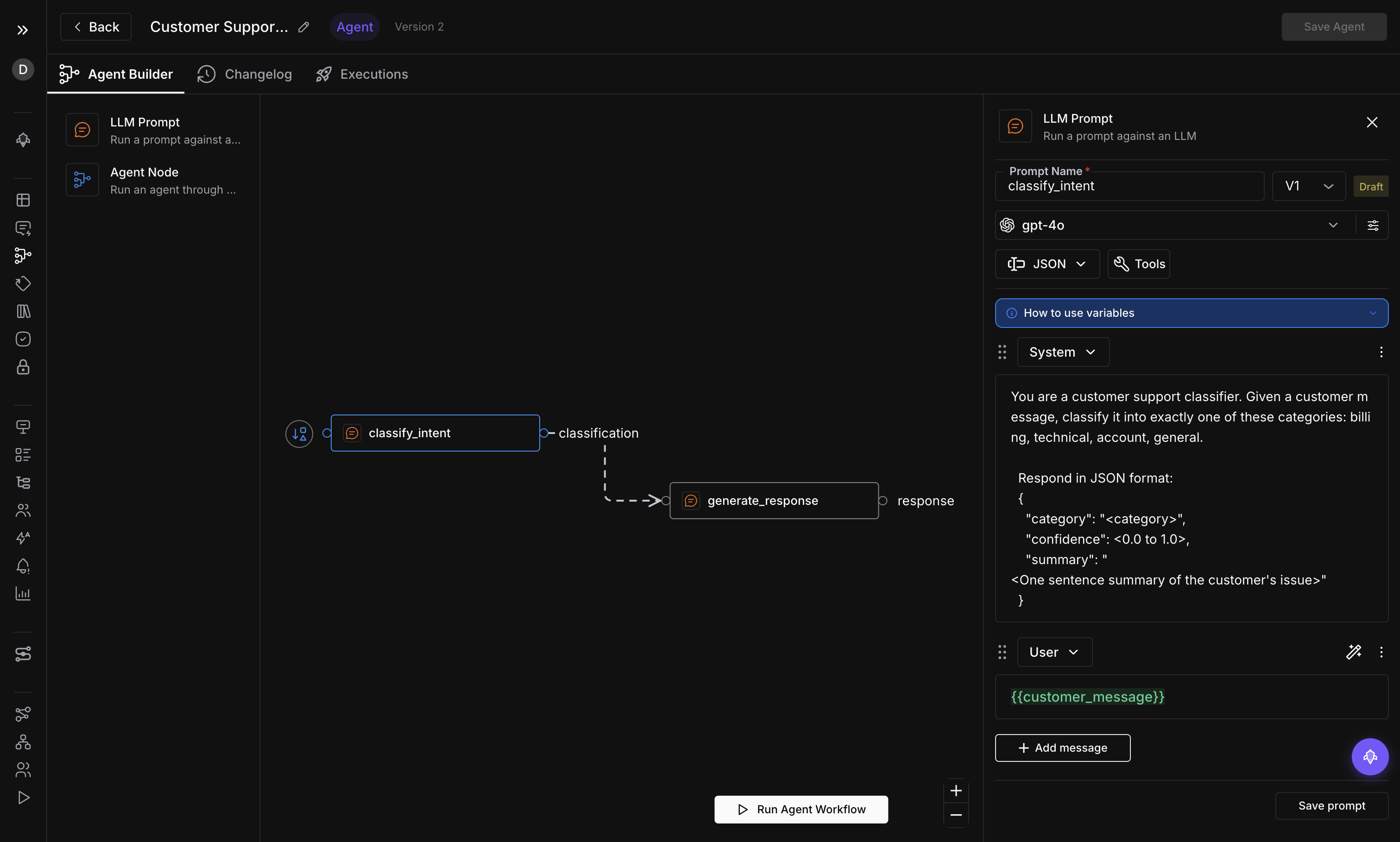
Building multi-step AI agents has always meant wrestling with orchestration frameworks, writing glue code between LLM calls, and debugging invisible state machines. Agent Playground changes the equation entirely. Starting today, you can design, validate, and publish production-grade agent workflows using a visual graph editor that runs directly inside Future AGI.
The editor uses a node-based interface where each node represents a discrete step in your agent’s logic — an LLM call, a tool invocation, a conditional branch. Drag nodes onto the canvas, connect them with edges, and configure each step through a side panel. Global variables let you share context across the entire graph without threading state manually. Three node types cover the full spectrum of agent behavior, and cycle detection ensures your graph never enters an infinite loop before you publish it.
Template management means you do not start from a blank canvas unless you want to. Save your working graphs as templates, share them across your workspace, and fork them when requirements change. The draft/publish workflow gives you a safety net: iterate on a draft version while the published version continues to serve traffic. When the draft is ready, promote it with a single click.
simulate-sdk v0.1.2 — Agent Wrappers and Cloud Mode
The simulate-sdk ships its most significant update yet. Version 0.1.2 introduces cloud mode, which offloads simulation execution to Future AGI infrastructure instead of running locally. For teams running hundreds of test cases, this eliminates the need to provision local compute and keeps CI pipelines fast.
The bigger addition is agent wrappers. Four new wrapper modules — OpenAI, LangChain, Gemini, and Anthropic — let you wrap existing agent code with a single function call and immediately gain access to simulation, evaluation, and observability. Tool calls are now first-class citizens: the SDK captures every tool invocation, its arguments, and its return value, giving you a complete audit trail of agent behavior during simulation runs.
Dataset and Evaluation Improvements
Datasets now connect directly to evaluations. Select a dataset, choose your evaluation criteria, and run the evaluation without navigating away. Trial items let you test a small subset before committing to a full evaluation run, saving time and compute when you are iterating on scoring rubrics.
Image support arrives across two surfaces. Datasets can now store and display image outputs alongside text, and the Prompt Workbench renders images inline when your model returns visual content. For teams building multimodal agents — think document analysis, chart generation, or visual QA — this closes a gap that previously required exporting results to external tools.
Multiple image upload removes the friction of adding visual test cases one file at a time. Select a batch, upload, and the platform handles the rest.
Testing and Comparison Workflows
Baseline chat comparison bridges Observe and Simulation. Take a real production conversation captured through Observe, feed it into Simulation as a baseline, and compare the simulated output against what actually happened. This is the fastest path from “something went wrong in production” to “here is a reproducible test case that catches it.”
Bulk operations on test executions round out the testing experience. Select dozens of executions, delete the ones that are no longer relevant, or rerun them against an updated agent version. What used to require scripting against the API is now two clicks in the UI.