Fix My Agent -- AI-Powered Debugging
Stop guessing why your agent failed. Fix My Agent analyzes simulation results and tells you exactly what went wrong and how to fix it.
What's in this digest
Fix My Agent
Debugging AI agents has traditionally been a manual, time-consuming process. You run a simulation, see that the agent failed, and then spend hours combing through logs, traces, and evaluation results trying to figure out why. Fix My Agent eliminates that entire workflow.
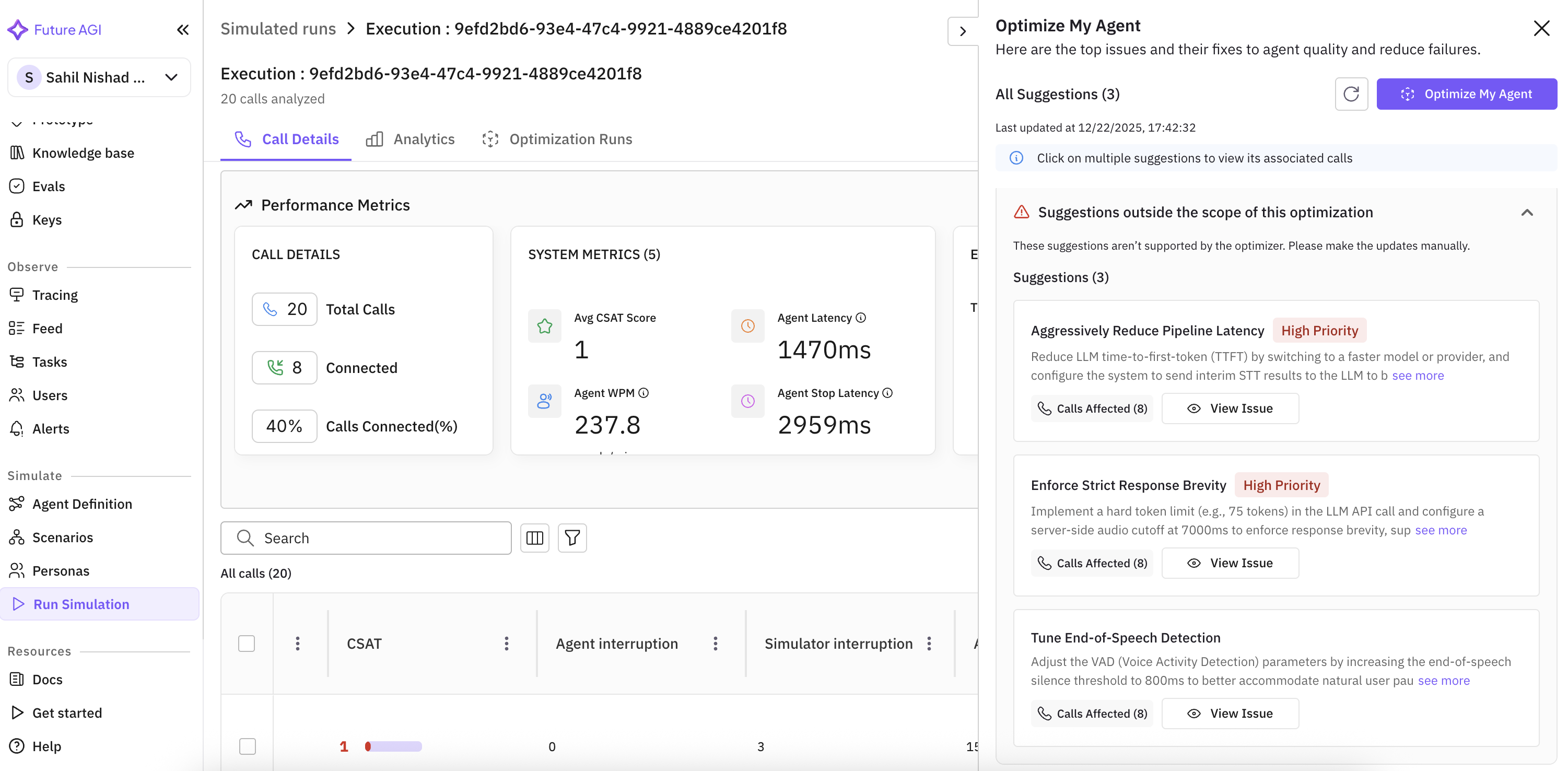
When a simulation produces failures, Fix My Agent analyzes the full execution context — the conversation history, tool calls, retrieval operations, provider responses, and evaluation scores — and generates a structured diagnosis. It distinguishes between two classes of issues: agent-level problems (bad prompts, missing context, incorrect tool usage) and infrastructure-level problems (provider timeouts, rate limits, misconfigured integrations).
For each identified issue, Fix My Agent produces an actionable suggestion. Not a vague “improve your prompt” recommendation, but a specific, contextual fix. It might tell you that your agent’s system prompt does not handle the case where a user provides a partial phone number, and suggest exact prompt language to add. Or it might identify that a specific tool call is consistently timing out because the payload exceeds the provider’s size limit, and recommend a payload restructuring approach.
The suggestions are ranked by impact. Fix the top issue first, re-run the simulation, and measure the improvement. This creates a tight feedback loop that replaces the traditional guess-and-check debugging cycle. Teams in early access reported resolving agent issues 3x faster than their previous manual workflow.
Persona Management Suite
Simulation personas are now first-class objects with full lifecycle management. The new persona management suite lets you view all personas across your workspace, duplicate existing ones as starting points for variations, edit persona attributes inline, and delete personas that are no longer needed.
This matters because persona quality directly determines simulation quality. If your “frustrated enterprise customer” persona does not actually behave like a frustrated enterprise customer, your simulation results are misleading. With proper management tooling, teams can iterate on personas the same way they iterate on prompts — systematically and with version awareness.
Experiment Flexibility
Experiments no longer lock their configuration at launch time. If you realize mid-run that you need to adjust a scoring threshold, swap a model variant, or modify an evaluation rubric, you can now make those changes without restarting the experiment from scratch. The system tracks which configuration was active for each data point, ensuring result integrity even when parameters change during execution.
JSON dot notation support makes it easier to work with nested data structures in prompt templates and experiment configurations. Reference fields like user.profile.preferences.language directly instead of writing extraction logic.
Platform Enhancements
Traces with structured data now render as formatted, sortable tables rather than raw JSON dumps. This is a significant quality-of-life improvement for teams working with agents that produce complex outputs.
PDF and document preview works inline across the entire platform. Click a document reference in a trace, session, or evaluation result and see the rendered preview without downloading the file. The audio player has been rebuilt with lazy loading, dramatically improving page load times on views with hundreds of session recordings.
Real-time loading states provide live progress indicators for ongoing calls, with estimated time remaining. And for teams using Vapi or Retell, agent definitions can now be imported directly from the provider with a single click — no manual recreation required.
What Is Next: Agent Prompt Optimiser
The backend infrastructure for the upcoming Agent Prompt Optimiser has landed. Models, views, serializers, and the Temporal migration are in place. This sets the stage for automated prompt improvement in an upcoming release.