Scenario Branches and Custom Background Noises
Branching scenarios reveal how agents handle divergent conversations, and custom background noises push simulations closer to production reality.
What's in this digest
Multi-Branch Scenario Generation
Real conversations are not linear. A customer asking about billing might pivot to a feature question, circle back to pricing, then escalate to a complaint — all within a single session. Linear test scenarios miss these transitions entirely.
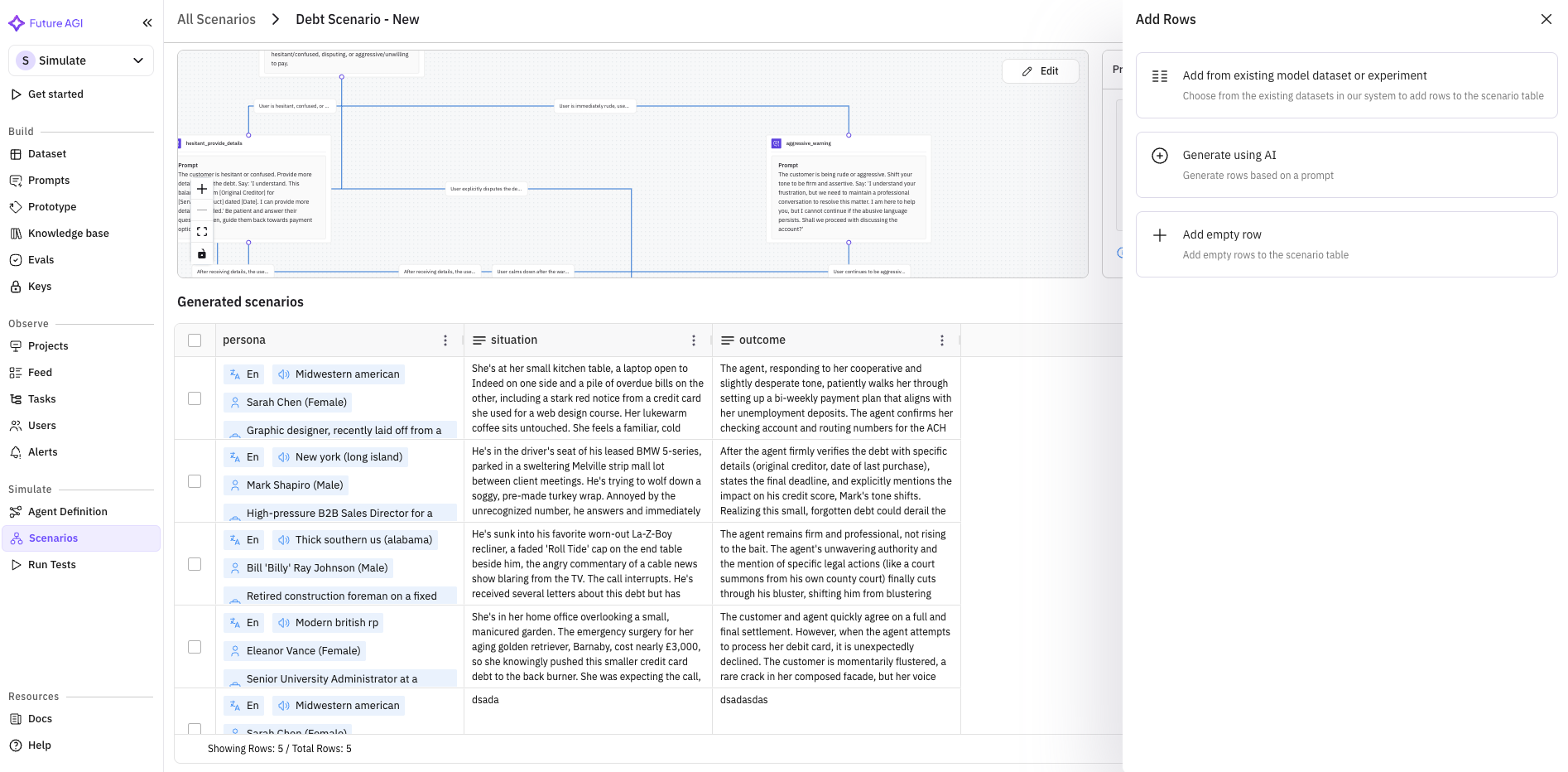
Multi-branch scenario generation changes how teams think about simulation coverage. When you generate a scenario, the system now produces a branching conversation tree rather than a single path. Each branch represents a plausible fork: the user changes their mind, introduces a new topic, asks a clarifying question, or expresses frustration.
Three branch types are supported out of the box. Intent forks model cases where the user’s goal shifts mid-conversation. Escalation branches simulate increasing urgency or emotional intensity. Digression branches test the agent’s ability to handle off-topic detours and return to the main thread.
The scenario viewer has been updated with branch visibility, letting you navigate the full tree structure, inspect individual paths, and run targeted simulations against specific branches. This is especially powerful for identifying failure modes that only emerge in multi-turn, non-linear conversations.
Custom Background Noises
Voice agents in production do not operate in silence. They handle calls from busy offices, moving cars, crowded restaurants, and noisy streets. Testing in pristine audio conditions produces results that do not transfer to the real world.
Custom background noises bring over 10 ambient noise profiles to the simulation engine. Coffee shop chatter, traffic noise, keyboard typing, wind, crowds, office HVAC hum — each profile has been calibrated to match common real-world conditions. Layer them onto any voice simulation to test how your agent performs when the audio signal is degraded.
The impact on evaluation scores is often revealing. Agents that perform flawlessly in clean conditions can struggle dramatically with ambient noise, particularly around entity extraction and intent classification.
Enable Others: Custom Provider Support
Agent definitions are no longer limited to Vapi and Retell. The new “Enable Others” option opens agent configuration to any voice or LLM provider. If your stack uses a custom-built provider, a niche vendor, or an internal model serving infrastructure, you can now define agents against it and run the full simulation and evaluation suite.
This is a foundational change for teams with heterogeneous infrastructure. Test the same agent definition against multiple providers, compare performance, and make data-driven decisions about your stack.
Eval Explanation Summaries
Evaluation scores are more useful when you understand why they landed where they did. Every simulation evaluation now includes a human-readable explanation summary. Instead of just seeing “Faithfulness: 0.72,” you see a breakdown of which claims were supported by context, which were not, and what the model’s reasoning was for each judgment.
These summaries make it practical for non-technical stakeholders to review evaluation results. Product managers and quality leads can read the explanations and understand agent quality without interpreting raw metric outputs.
Platform and Observe Updates
The backend migration from string to JSON fields for session data is complete. Session views now render structured JSON input and output natively, with collapsible trees and syntax highlighting. Prompt execution gets real-time streaming via WebSocket connections, eliminating the wait-for-completion pattern.
Observe receives a batch of usability improvements: filters now persist across page navigations, pagination handles large result sets more gracefully, metadata is displayed inline, and pricing logic has been updated to reflect current provider rates.