Protect Flash, TypeScript SDK v0.1.0, and Custom Evaluations in Observe
Speed-optimized guardrails path with binary harmful/not-harmful decision, the first official TypeScript SDK, and configurable evals on production traces.
What's in this digest
Protect Flash — The Fast Binary Path for Content Moderation
Production guardrails (runtime checks that block or flag bad agent outputs before they reach users) have a fundamental tension: they need to be thorough enough to catch harmful outputs, but fast enough not to destroy your latency budget. Protect Flash resolves the trade-off for the common case.
What’s new
- Binary harmful / not-harmful classification. Returns one of two answers — harmful or safe. No multi-category score, no category reasoning, just a fast decision.
- Speed-optimized path. A simpler, faster code path than the full comprehensive Protect system — useful when your application only needs to know whether to block or allow.
protect_flashflag on the protect API. Opt in per request. The comprehensive multi-category Protect system remains the default.- Usage tracked as its own billing line. Protect Flash usage is distinct from Protect usage so you can see the cost of fast-path moderation separately.
Why it matters
Full content moderation with category attribution is expensive per call. For applications that only need a block / allow decision on every response — a customer support chatbot, a content filter on user-generated text — Protect Flash gives you that decision faster and cheaper. Fall back to the full Protect system for cases where you need category detail.
Who it’s for
Teams running high-volume content moderation where every millisecond and every call counts — customer-facing chatbots, user-generated content filters, and any application on the request path where a binary decision is enough.
Custom Evaluations in Observe — Evaluate Live Production Data
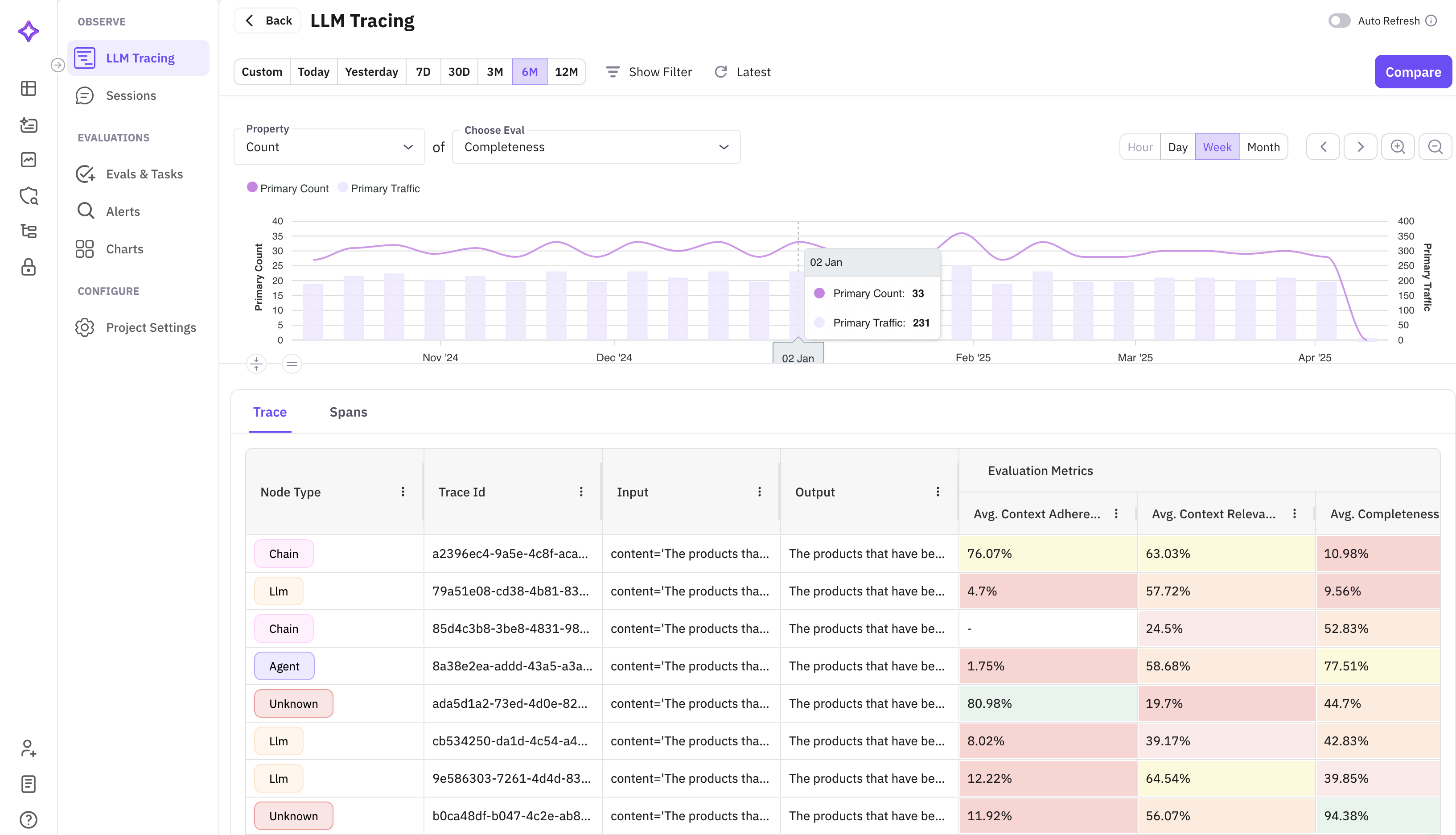
Until now, evaluating production traces (the end-to-end records of how your agent handled each request) meant exporting data and running evaluations (tests that score agent outputs against criteria you define) separately. Custom evaluations in Observe collapse that workflow into a single action.
What’s new
- Select, configure, run. Pick traces from your Observe view, configure an evaluation with your custom criteria and judge model, and run it in place.
- Results as trace columns. Evaluation scores appear as columns alongside your trace data, so you see which traces passed and which didn’t without changing context.
- Hooks into alerts. Combined with the alert system, custom evaluations on production traces let you build automated quality monitoring pipelines — flag hallucinations, check policy compliance, or score response quality on live traffic.
Why it matters
Evaluating production is no longer a two-step “export then evaluate” process. The loop from “I noticed something in my traces” to “I have an evaluation score that quantifies it” is now one action.
Who it’s for
MLOps and platform engineering teams running agents in production who need quality monitoring on live traffic, and quality assurance (QA) teams extending their evaluation criteria from pre-launch testing into production observability.
TypeScript SDK — @traceai/fi-core v0.1.0
This is the first official TypeScript SDK. @traceai/fi-core v0.1.0 brings full tracing and evaluation to the Node.js and Deno ecosystems.
What’s new
- Mirrors the Python SDK’s API surface. Teams working across both languages get a consistent developer experience.
- Automatic instrumentation for OpenAI, Anthropic, and other LLM providers — every API call is captured as a span (an individual step inside a trace) with input and output recording.
- Manual span creation via
traceandspandecorators for instrumenting custom code. - Evaluation submission for running evaluations programmatically from your application.
- Type-safe configuration with full TypeScript definitions.
Installation is a single command:
npm install @traceai/fi-coreThe SDK ships with zero native dependencies and works in Node.js 18+, Deno, and edge runtimes like Cloudflare Workers.
Why it matters
Until now, Future AGI’s tracing and evaluation ran through the Python SDK. Teams building agents in TypeScript (which is most of the JavaScript/edge ecosystem) had to either maintain a Python sidecar or instrument manually. v0.1.0 closes that gap.
Who it’s for
Developers building agents in TypeScript, including teams on Node.js, Deno, and edge platforms like Cloudflare Workers. Especially relevant for teams running AI features directly from their API layer or edge functions.
Platform and Pricing Updates
API-based pricing. Pricing for evaluations and the error localizer now works per-use instead of per-tier. You pay per evaluation run and per error localization request, with volume discounts at scale. Start small, scale without hitting arbitrary plan boundaries.
Stop streaming. Cancel in-progress LLM generations mid-stream. If you can see the output going off the rails, hit stop and save both time and tokens. The partial output is preserved so you can still analyze what went wrong.
Evaluations in the prompt Workbench. Run an evaluation on your prompt’s output without leaving the editor — see the scores, adjust your prompt, run again.
Feedback enhancement system. Structured feedback collection on evaluation results, feeding back into evaluation accuracy over time.