Best Free AI Search Engines 2026: 8 Tools Ranked & Compared
Compare free AI search engines in 2026 by free tier limits, login needs, ads and citations, from Perplexity and ChatGPT Search to Google AI Mode and Duck.ai.
Table of Contents
What Are the Best Free AI Search Engines in 2026?
A free AI search engine skips the ten blue links and gives you a single answer with inline citations, generated by a language model that read the same pages you would have. The field has also consolidated. Phind, the developer-focused engine, shut down in January. Kagi has no free tier, only a 100-search trial.
You.com moved its centre of gravity to enterprise APIs. Meanwhile Google put a conversational AI search in front of a billion people for free. Eight free options still earn a place on this list in October 2026.
- Best default: Perplexity’s free plan, with practically unlimited basic searches and 3 Pro Searches a day.
- Best with no login: ChatGPT Search works signed out, and Brave Search results load without an account.
- The caveat: free-tier limits differ by engine, and ChatGPT now shows ads to logged-in adult Free and Go users in a growing set of markets.
This guide ranks those eight, explains how AI search actually works under the hood, and shows how teams shipping their own AI search features can evaluate answer quality.
Which Free AI Search Engine Should You Pick?
| Use case | Best free pick | Why |
|---|---|---|
| General everyday research | Perplexity AI | Answer-first, cited answers, 3 Pro Searches a day |
| Inside an existing ChatGPT habit | ChatGPT Search | Free, conversational, live web results |
| Non-English queries | Google AI Mode | Free inside Google Search, over 200 countries and territories |
| Privacy and an independent index | Brave Search AI Answers | No account, own independent index |
| Visual ad-free experience | Andi Search | Chat-style results with source cards |
| Anonymous AI chat | Duck.ai | Metadata stripped, chats stored locally |
| Developers adding web search to an app | You.com | Free web search API tier, consumer chat needs sign-in |
| Reasoning over long retrieved passages | Claude with Web Search | Long context, careful citation style |
How Do Free AI Search Engines Work?
Here is the basic loop behind AI search, in five steps.
- Query rewrite. The raw user query is rewritten into one or more search queries, which can add synonyms and decomposed sub-questions for multi-hop intent.
- Web retrieval. Those queries hit a search index. Some engines run their own crawler (Brave, Google), others license a third-party index or sit on top of Bing.
- Source filtering. The top N results are ranked, deduplicated, and passed to a language model as context.
- Answer generation. A model reads the sources and writes a grounded answer with inline citations.
- Follow-up loop. The UI surfaces suggested follow-up questions.
This is just retrieval-augmented generation (RAG) applied to the open web. The engines differ in how aggressively they cite, how recent the index is, whether they let you steer the model, and how much UI weight they give to the answer versus the source list.
What Are the 8 Best Free AI Search Engines in 2026?
Why Is Perplexity AI the Top Free Pick?
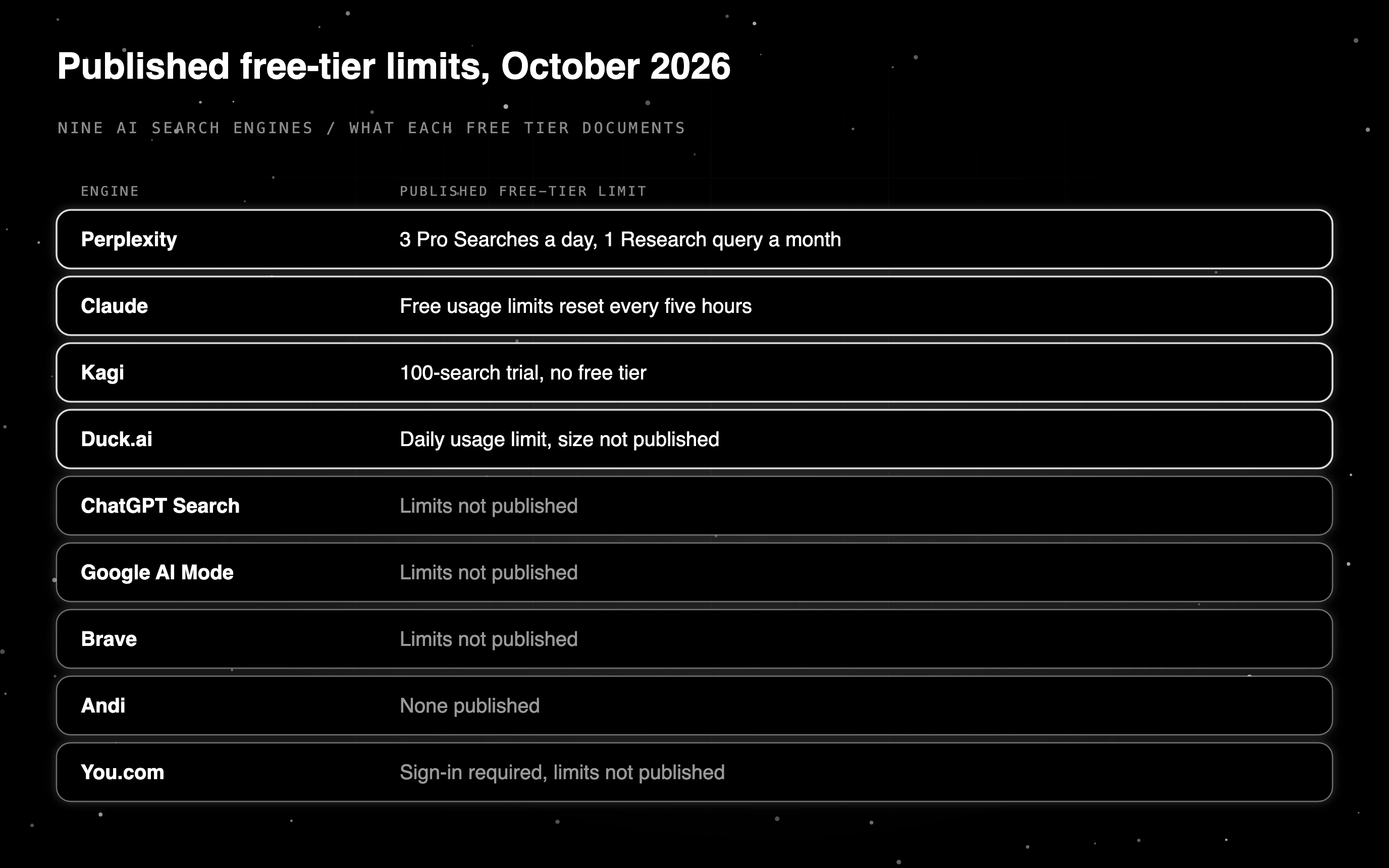
Perplexity is the default recommendation for general research in 2026. The free plan gives practically unlimited basic searches, 3 Pro Searches a day and 1 Research query a month, with citations on every answer, but no access to advanced AI models. We tested where Perplexity’s citations hold up in our Perplexity AI review.
Best for: day-to-day research, news, long-form questions. Free tier limits: practically unlimited basic searches, 3 Pro Searches per day, 1 Research query per month. Citations: inline, numbered, click-through.
Why Choose ChatGPT Search?
ChatGPT Search is free on every plan, and people who are not signed in can also use web search. In 2026 it remains the second-best general option, particularly if you already live inside ChatGPT for other tasks. Search results stream into a normal conversation, with citations that open the source page so you can see where the answer came from.
ChatGPT now shows ads to logged-in adult users on the Free and Go tiers, labelled sponsored and visually separated from the answer. Plus, Pro, Business, Enterprise and Education stay ad-free, and Free users can opt out in exchange for fewer daily messages. Ads began as a US test in February 2026 and have since launched in more markets, including the UK, Mexico, Brazil, Japan and South Korea.
Best for: users already on ChatGPT, conversational follow-ups. Free tier limits: limits not published. Citations: inline citations, plus a Sources button listing cited links.
Why Pick Google AI Mode?
Earlier versions of this list ignored Google AI Mode. AI Mode is a conversational search surface inside Google Search: you ask in full sentences, it runs multiple queries behind the scenes, and it answers with links out. It is free inside Google Search.
The story here is reach. Google said at I/O 2026 that AI Mode has surpassed one billion monthly users, and it is expanding Personal Intelligence in AI Mode to nearly 200 countries and territories across 98 languages.
Many European countries got AI Mode in October 2025, and France got it on 22 July 2026, according to Google France. If you are outside the US and every other engine on this list feels like it was built for someone else, this is the one that speaks your language. The trade-off is the obvious one: it is Google’s index, Google’s ads, and Google’s incentive to keep you on the results page rather than send you to the source.
Best for: non-English queries, anyone who wants zero setup. Free tier limits: limits not published. Citations: inline links and a source panel beside the answer.
Why Pick Brave Search AI Answers for Privacy?
Brave runs its own independent web index, which makes it a strong privacy-first free option. AI Answers sit at the top of a normal search results page. No login is required, and Brave states that it does not collect personally identifiable information about your searches.
Best for: privacy-conscious users, anyone wanting a non-Bing-non-Google index. Free tier limits: limits not published. Citations: linked source list above and below the answer.
What Makes Andi Search Different?
Andi is a small, well-designed AI search engine with a visual chat-style interface. It is free and ad-free. It avoids long generative paragraphs in favour of compact answers with source thumbnails.
Best for: quick factual questions, anyone who finds Perplexity’s UI heavy. Free tier limits: none published. Citations: visual source cards with the answer.
Why Is Duck.ai the Honest Privacy Pick?
Duck.ai takes the slot this list used to give Kagi, and it is the honest privacy pick because it is actually free. Recent chats are stored locally on your device rather than on DuckDuckGo’s servers, identifying metadata is stripped from requests before they reach the underlying model providers, and conversations are not used to train those models.
The free version gives you a choice of third-party models rather than one house model: Claude 4.5 Haiku, Mistral Small 4, GPT-6 Luna, GPT-5.4 mini, gpt-oss-120b and Gemma 4 31B. That makes it useful for putting the same question to two vendors and comparing.
The Plus plan adds GPT-5.6 Terra and Claude Sonnet 4.6, and the Pro plan adds Claude Opus 4.8, GPT-5.6 Sol and 2x higher usage limits than Plus. The free version is still a complete product rather than a trial.
Best for: anonymous lookups, comparing how different models answer the same question. Free tier limits: usage limits apply. Citations: varies by model.
Is You.com Still Free to Use?
You.com still runs a consumer chat, but you need to sign in to use it, and the homepage and pricing page now sell its web search APIs to developers. Set expectations before you invest a workflow in it.
You.com’s centre of gravity has moved to enterprise: it now runs an API-first business, and the consumer plans no longer have a prominent public pricing page. The consumer product still works behind a sign-in; it is simply no longer the company’s main event.
Best for: developers who want web search results through an API. Free tier limits: sign-in required, limits not published.
Why Choose Claude with Web Search for Reasoning?
Web search works on Claude’s free plan, within free usage limits that reset every five hours. Answers come with a careful citation style, and Claude’s long context window lets it reason over a lot of retrieved content before writing an answer.
Best for: reasoning over long retrieved passages, multi-step research that needs careful synthesis, and any case where the quality of the writing matters as much as the answer. Free tier limits: free usage limits reset every five hours. Citations: careful, numbered, integrated into the reasoning trace.
What Happened to Phind and Kagi?
Both appeared on earlier versions of this list. Neither belongs on it now.
Phind shut down in January 2026. It was the developer-focused pick for years. Our read: once the frontier chat apps added web search and strong coding models, a standalone code-search engine had little left to sell.
Kagi does not have a free tier. New users get a Trial of 100 searches and 100 Kagi Assistant interactions, after which the plans are Starter at $5/month for 300 searches, Professional at $10/month for unlimited searches, and Ultimate at $25/month for unlimited searches and premium AI. It is a good search engine and worth paying for. It is not a free one.
How Do the 8 Free AI Search Engines Compare on Features?
| Engine | Inline citations | Model picker | Independent index | Free tier cap |
|---|---|---|---|---|
| Perplexity AI | Yes | Pro plan only | Multi-source | Practically unlimited basic, 3 Pro/day |
| ChatGPT Search | Yes | No | Live web results inside ChatGPT | Limits not published |
| Google AI Mode | Yes | No | Yes (Google) | Limits not published |
| Brave AI Answers | Yes | No | Yes (Brave) | Limits not published |
| Andi Search | Yes | No | Multi-source | None published |
| Duck.ai | Model-dependent | Yes | No (chat, not crawler) | Usage limits apply |
| You.com | Not published | Not published | Multi-source | Sign-in required, limits not published |
| Claude with Web Search | Yes | No | Live web results inside Claude | Free usage limits reset every five hours |
Which Free AI Search Engines Work Without a Login?
ChatGPT Search works without a login. OpenAI says web search is available on every ChatGPT plan and that people who are not signed in can also use it, so you can ask a current-events question without creating an account.
Brave Search also serves full results pages to visitors without an account, from its own independent index. Brave Search is ad-supported, Brave Search Premium removes ads, and Brave says its search does not profile you.
Duck.ai and Andi are privacy-minded too. DuckDuckGo anonymizes Duck.ai chats and stores recent chats on your device rather than on its servers, and Andi describes itself as “Free, private, ad-free.” Check each one’s account rules before you build a no-login workflow around it.
Is There a Free AI Search Engine With No Restrictions?
No engine we checked documents unlimited use of every feature. Perplexity’s free plan gives practically unlimited basic searches, but 3 Pro Searches a day and 1 Research query a month. Claude’s free usage limits reset every five hours, and web search counts toward them.
Kagi offers a 100-search trial, then paid plans. Duck.ai is free with a daily usage limit whose size DuckDuckGo does not publish. ChatGPT Free users who opt out of ads get fewer daily messages in exchange. We found no published cap for Brave Search or Google AI Mode, which is not the same as having none.
How Should You Choose a Free AI Search Engine?
Start with three filters.
- Do you want speed or depth? Pick Perplexity basic search or Andi for speed, and Perplexity Pro Search or Claude with web search for depth.
- Do you care about who indexes the web? Brave and Google run their own crawlers.
- Is it a code question? Phind, the free code-specialist engine, shut down in January 2026. Use ChatGPT Search or Perplexity Pro Search, and cross-check with a second model in Duck.ai when the answer feels off.
A reasonable default in 2026 is to set Perplexity as your daily driver, keep ChatGPT Search open as a secondary lookup inside your existing ChatGPT tab, and fall back to Google AI Mode for non-English queries.
What Are the Best Free AI Search Engines for Specific Use Cases?
Six workflows get a specific pick:
- Academic research: Perplexity Academic for paper discovery and citation.
- Daily news: Perplexity or Google AI Mode for a fast, sourced summary of a developing story.
- Coding: ChatGPT Search or Perplexity Pro Search.
- Math and science: Perplexity Pro Search or ChatGPT Search, and check numbers against the cited source.
- Shopping and comparison: Perplexity or ChatGPT Search for feature and price comparisons across sources.
- Long-document reasoning: Claude with web search, since its long context window can hold many retrieved passages at once.
What Are the Most Common Free AI Search Mistakes?
- Treating the answer as final. Even with citations, AI search can synthesize plausible-but-wrong claims when retrieval misses the canonical source. Read the cited sources for anything high-stakes.
- Picking by brand instead of by workflow. Pick the engine that fits your existing workflow.
- Fabricated or mismatched citations. A real URL paired with a paraphrase the URL never makes, or a claim from one source attributed to another. Click through before quoting a number externally. Here is how to evaluate citation and attribution systematically.
- Ignoring time sensitivity. For breaking news or real-time data, verify against a primary source.
- Not evaluating retrieval. When an answer is wrong, inspect the retrieved sources before blaming the model.
Are There Open-Source AI Search Engines?
Yes, and two projects stand out if you want to run AI search yourself. Vane (formerly Perplexica, MIT licence, about 37.4K GitHub stars) describes itself as an AI-powered answering engine. SearXNG (AGPL-3.0, about 38.5K stars) is a metasearch engine that aggregates results from many search services, and its maintainers say users are neither tracked nor profiled.
Self-hosting gives you control over the index, the model and the data. It also hands you the evaluation problem: once you run the pipeline, you have to check that its answers are grounded in the sources it retrieved. The next section covers how.
How Do You Evaluate AI Search Quality as a Builder?
If you ship AI search rather than only use it (a help-centre answer feature, a research assistant, an internal RAG product), the harder question is how to measure whether the answers are good.
A three-step pattern:
- Build a held-out evaluation set of 100 to 1,000 prompts with reference sources.
- Run each prompt through your search pipeline.
- Score each output on faithfulness (does it match the cited source), citation precision (did it cite the right page), and recency.
Future AGI has custom evals for this. You write the grading rule or pick an evaluator such as Groundedness, Context Adherence or Detect Hallucination, get a pass/fail verdict, and run it on every pull request as a CI gate. The open-source Agent Learning Kit (Apache-2.0) can run evaluation checks locally, and traceAI records every retrieval and generation step as an OpenTelemetry span.
For production teams shipping their own AI search, this is the companion layer alongside Perplexity-style consumer tools: open consumer engines for end users, traceAI plus Future AGI evals for the internal pipeline that answers your customers’ questions, with Observe attaching scores to whole production traces. The deeper methodology is in evaluating search-augmented agents.
Where Is AI Search Going Next?
The two trend lines for 2026 are agentic search and multi-modal queries. Agentic search means the engine plans a multi-step retrieval (search, click, scroll, search again) rather than running a single retrieval round. Perplexity Research and ChatGPT’s deep-research mode are early versions of this. Scoring those multi-step runs is its own problem; see evaluating deep research agents.
Multi-modal search means images, files and video are first-class inputs. Google’s new AI-powered Search box, rolling out wherever AI Mode is available, takes text, images, files, videos or Chrome tabs as inputs.
The third trend is consolidation: Phind is gone, and You.com survived by leaving consumer search. The engines that remain independent are the ones with either their own crawler (Brave) or a paid subscription business (Kagi). If your favourite engine has neither, treat it as temporary.
Free tiers can change. If you have a habit forming around any of these tools, set up a paid backup on the one you use daily.
Pick Your Free AI Search Engine, Then Test the One You Build
The free AI search field is smaller than it was, so pick by workflow. Use Perplexity for daily research, ChatGPT Search when you are signed out or already in ChatGPT, Google AI Mode for non-English queries, and Brave Search or Duck.ai when privacy comes first.
If you ship your own AI search, every answer your users see has to be grounded in the sources it cites. Future AGI has custom evals that score each answer with evaluators such as Groundedness and Context Adherence, and you can start free.
Related Reading
Frequently Asked Questions About Free AI Search Engines
What is the best free AI search engine?
Which AI has unlimited free use?
Is there a free AI search engine without login?
Is there a free AI search engine like ChatGPT?
Is Google AI search free?
How does an AI search engine work?
Which free AI is the most reliable?
Is there a free AI search engine API?
Evaluate GenAI in production in 2026: pre-deploy CI evals, online metrics, LLM-as-judge calibration, drift, safety, and how to stand up a working stack.

2026 reference stack for AI infrastructure: GPU compute, distributed training, MLOps, gateway routing, observability + eval, security, FinOps, real tools.

Ragas, DeepEval, FutureAGI, Phoenix, Galileo, Langfuse, TruLens compared as the 2026 RAG eval shortlist. Faithfulness, retrieval, chunk attribution.