Few-Shot Prompting: A Complete Guide with Examples (2026)
Few-shot prompting explained: how in-context learning works, zero-shot vs few-shot, worked examples, best practices, and when to automate prompt optimization.
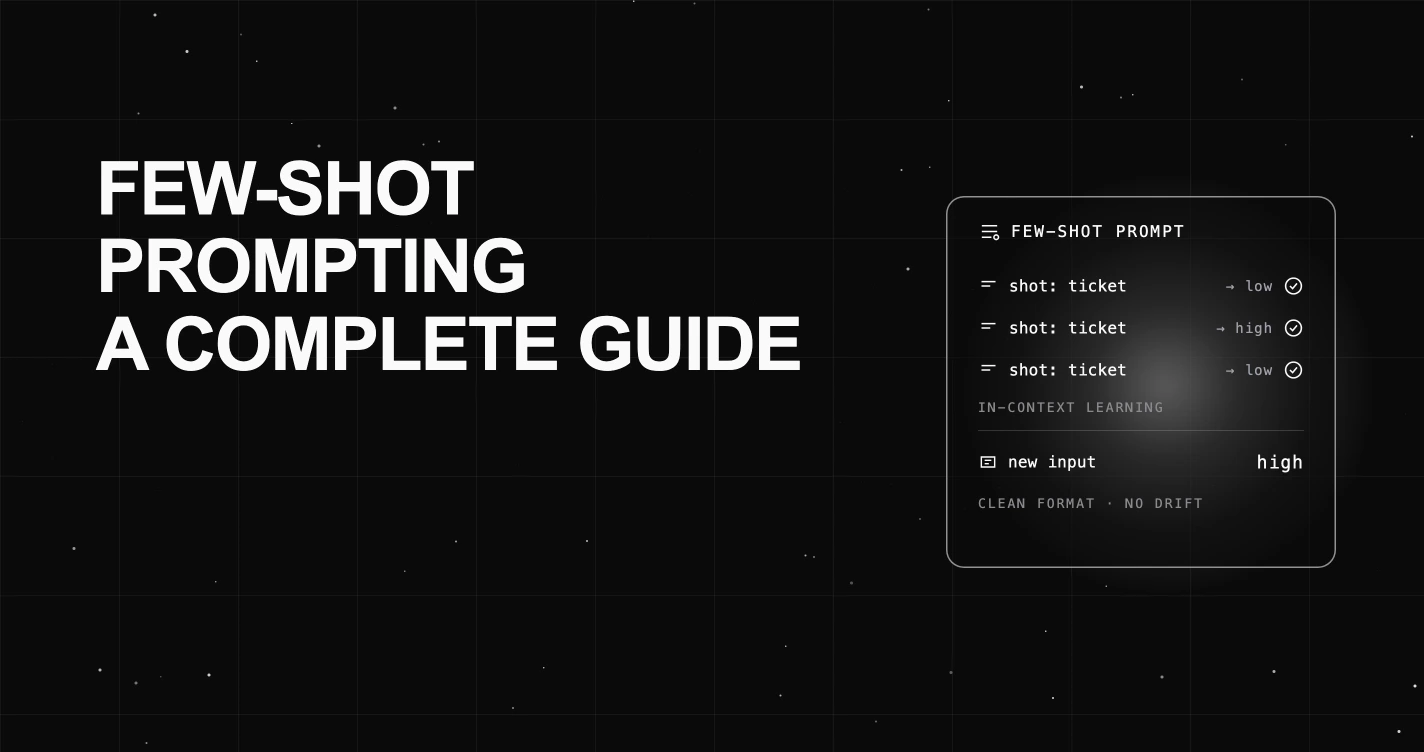
Table of Contents
Ask a model to label support tickets by urgency with a bare instruction, and it hedges. It calls a billing question “high” one minute and “medium” the next, invents a “critical” tier you never defined, and wraps every answer in a paragraph of explanation you did not want.
Now paste three labeled tickets above the same instruction: ticket, then label. Suddenly the model returns one clean word from your exact label set, in your exact format, on every new ticket. Nothing about the model changed. You just showed it the pattern.
That gap, between a vague instruction and a few concrete demonstrations, is what few-shot prompting closes.
TL;DR: Few-shot prompting is a technique where you include a few input-output examples inside the prompt so the model learns the task from those demonstrations at inference time, with no weight updates. This in-context learning steers the output format, label space, and style. Two to five examples usually suffice.
What Is Few-Shot Prompting?
Few-shot prompting is the practice of putting a small number of worked examples, called shots, into the prompt before your real input. Each shot shows one input paired with the output you want. The model reads that pattern and applies it to the new case.
The idea traces to the 2020 GPT-3 paper, Language Models are Few-Shot Learners, which showed that a large model could pick up a new task from a handful of in-prompt examples, no fine-tuning required. That behavior is called in-context learning: the model adapts inside the context window, and its weights never change.
It helps to name the three points on the spectrum:
- Zero-shot gives the model an instruction and no examples. It leans entirely on pretraining.
- One-shot adds a single example to anchor the format.
- Few-shot adds two or more examples, usually three to five, to pin down the pattern, the label space, and the style.
The word “few” is doing real work here. You are not retraining anything, and you are not writing a dozen examples. You are giving the model just enough demonstrations to infer what you mean. Few-shot learning through prompting sits between a raw instruction and full fine-tuning, and for many tasks it is the cheapest reliable option.
Zero-Shot vs One-Shot vs Few-Shot
The three techniques trade tokens for reliability. Zero-shot is the leanest and least constrained. Few-shot spends more of your context window to lock the output down. Here is the compact comparison.
| Technique | How it works | When to use | Example |
|---|---|---|---|
| Zero-shot | Instruction only, no examples | Simple, well-known tasks where the model already knows the format | ”Classify this review as positive or negative: …” |
| One-shot | Instruction plus one example | You need to anchor an output shape but the task is easy | One labeled review, then the new one |
| Few-shot | Instruction plus two or more examples | Specific label sets, strict formats, or a house style the instruction cannot pin down | Three to five labeled reviews, then the new one |
The rule of thumb: reach for zero-shot first because it is cheapest, and add shots only when the output drifts from what you need. Every example you add is tokens you pay for on each call, so more is not automatically better.
How Few-Shot Prompting Works
In-context learning is not magic, and it is not memorization. A language model predicts the next token from everything in its context. When you fill that context with three examples that all follow the same shape, you shift the model’s output distribution toward that shape. The demonstrations act as a soft template the model is inclined to continue.
This is why format is so load-bearing. The examples teach the model three things at once: the space of valid outputs (your label set), the kind of input to expect, and the exact sequence layout to reproduce. Get those consistent and the model has a clear groove to follow.
Here the research gets counterintuitive. In Rethinking the Role of Demonstrations, Min et al. found in 2022 that randomly replacing the labels in few-shot examples barely hurt performance on many classification tasks. What carried the benefit was showing the label space, the input distribution, and a consistent format, not the exact correctness of each pairing. The Prompt Engineering Guide reaches the same practical conclusion: even random labels beat no labels, because the format itself is doing much of the work.
The takeaway is not to ship wrong labels. It is that clean, uniform formatting and full coverage of your output space matter as much as any single example. If your shots are ragged, inconsistent, or skip a class, no amount of them will save the prompt.
Few-Shot Prompting Examples
Concrete beats abstract. Here are three worked few-shot examples you can adapt, each showing the shots, the new input, and the expected output.
1. Text classification. Force a clean label from a fixed set.
Classify each support ticket's urgency as low, medium, or high.

Ticket: "The invoice total looks off by a few cents."
Urgency: low

Ticket: "I was double-charged and need it reversed today."
Urgency: high

Ticket: "How do I change the email on my account?"
Urgency: low

Ticket: "Checkout has been throwing a 500 error for an hour."
Urgency: ???
Expected output: high. The three shots fix the label space and show the model to answer with one word, no explanation.
2. Structured extraction to JSON. Pin the schema with examples.
Extract the order details as JSON with keys: item, quantity, ship_by.

Input: "Send 3 blue mugs, needs to arrive by Friday."
Output: {"item": "blue mug", "quantity": 3, "ship_by": "Friday"}

Input: "I want two large pizzas delivered tonight."
Output: {"item": "large pizza", "quantity": 2, "ship_by": "tonight"}

Input: "Ship a dozen roses before Valentine's Day."
Output: ???
Expected output: {"item": "rose", "quantity": 12, "ship_by": "Valentine's Day"}. The shots teach normalization (singular item, numeric quantity) that a bare instruction would leave ambiguous.
3. Tool-calling format. Show the exact call shape you expect.
Choose a tool and arguments for each request.

Request: "What's the weather in Paris?"
Call: get_weather(city="Paris")

Request: "Convert 100 USD to EUR."
Call: convert_currency(amount=100, from="USD", to="EUR")

Request: "Set a timer for ten minutes."
Call: ???
Expected output: set_timer(minutes=10). Demonstrations are one of the most reliable ways to steer tool-calling toward a consistent signature, which matters when a downstream parser is strict.
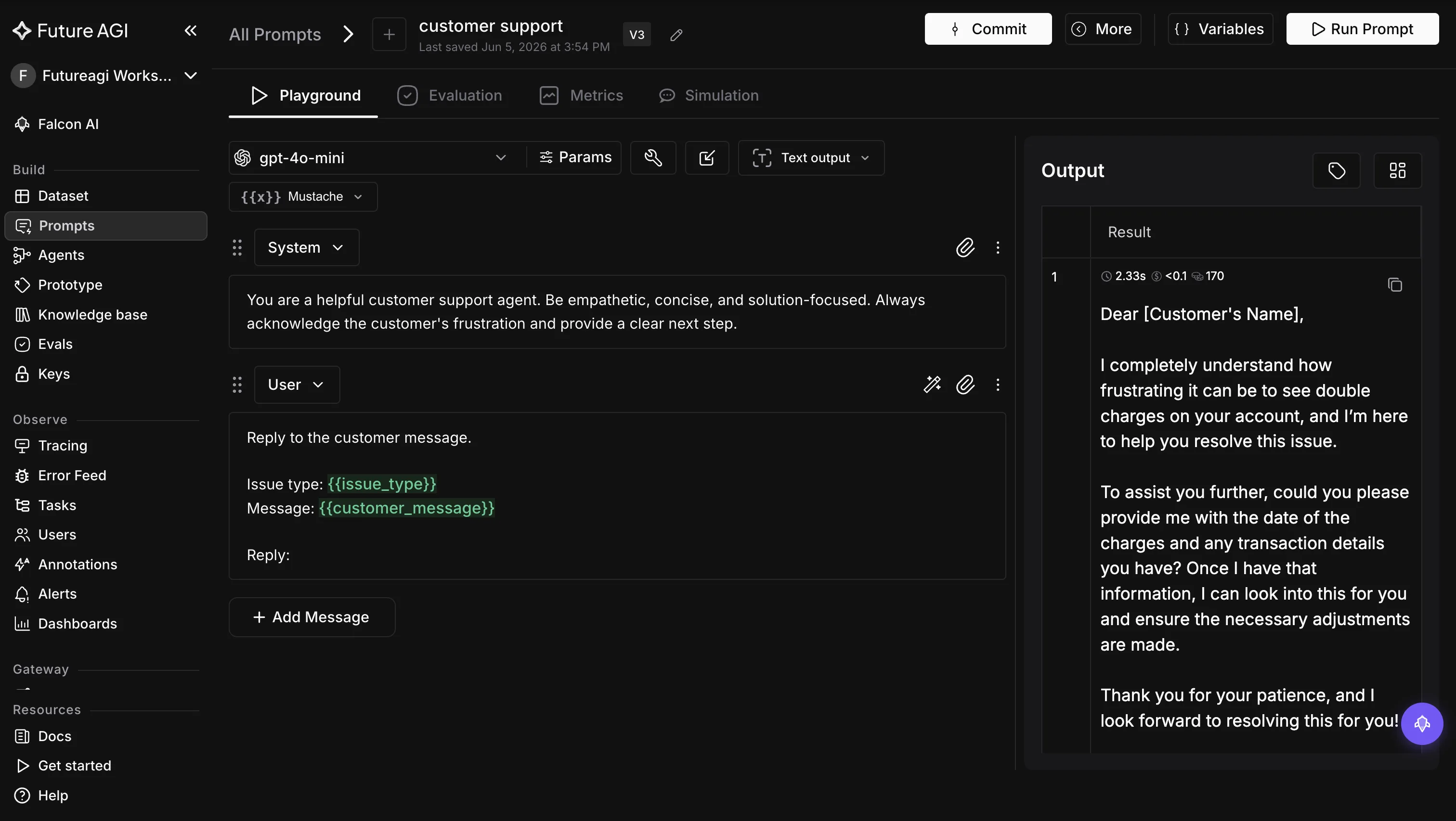
Once you have prompts like these, you want a place to run them against real inputs, swap variables, and read the output side by side. The prompt workbench in FutureAGI gives you a templated prompt editor with a live playground and version history, so you can test a few-shot variant without touching app code. Every edit creates a new version, and you can compare two versions side by side or roll back, which is what you want when a shot set that used to work stops working.
Best Practices for Few-Shot Prompting
A few habits separate few-shot prompts that hold up from ones that quietly regress.
- Start small. Try 1, 3, and 5 shots and measure accuracy on a held-out set. Keep the smallest count that hits your target.
- Pick diverse examples. Cover the range of inputs you expect, including the tricky edge cases, not three variations of the same easy case.
- Keep formatting identical. Same delimiters, same key names, same casing across every shot. Inconsistent format is the most common silent failure.
- Balance your labels. If four of five shots are “high,” the model can skew toward that majority label. Spread examples across your classes.
- Mind the ordering. Example order can change the answer, and the shot sitting closest to your input often carries extra pull. Do not always park the same class last, and test a couple of orderings before you settle.
- Use clear delimiters. Separate examples with consistent markers (blank lines, headers, or fenced blocks) so boundaries are unambiguous.
- Cover the label space. Show at least one example of every valid output. A class the model never sees is a class it will rarely produce.
- Know when to stop. When adding shots stops lifting your score, stop hand-tuning and move to automated optimization or fine-tuning.
Common Pitfalls and Limitations
Few-shot prompting is powerful, but it is not free, and it fails in predictable ways.
- Context-window cost. Every example rides along on each call. Long shots eat the budget you need for the actual input and for the model’s reasoning room.
- Majority-label skew. Skewed example sets can push the model toward the most frequent label, so a lopsided ticket set may quietly inflate “high.”
- Overfitting to format. The model latches onto surface patterns in your examples. Change the input style slightly and a brittle prompt can break.
- Latency and token cost. More shots mean more tokens, which means slower responses and higher spend on every request, at scale a real line item.
- It does not scale by hand. Picking, ordering, and balancing shots by intuition works for one prompt. Across dozens of prompts and models, it becomes guesswork.
Few-shot prompting also sits inside a larger practice of prompt engineering. If you are weighing prompt text against tuned embeddings, our piece on hard prompts vs soft prompts covers that trade-off. And because model outputs vary run to run, it helps to understand why LLM prompts are non-deterministic before you trust a single lucky result.
When to Move From Manual Few-Shot to Automated Optimization
Hand-picking shots works until it doesn’t. You end up with a folder of prompt variants, no clear read on which one is best, and a new model release that quietly changes the answer. The fix is to make the choice measurable: score outputs, then let a search find better prompts against that score.
Start with evaluation. FutureAGI’s Agent Learning Kit (the eval SDK, imported as from fi.evals import ...) scores model outputs with 156 built-in evaluators, and it needs no ground truth to run, which matters when your few-shot task has no labeled answer key. When an output fails, Error Localization names the exact input field that caused the failure, so you learn which shot or which variable broke the prompt instead of rerunning it blind.
from fi.evals import evaluate

faith = evaluate("faithfulness", output=response, context=context)
print(f"Faithfulness: {faith.score:.2f} {'PASS' if faith.passed else 'FAIL'}")
With a score in hand, you can automate the search. The optimizers under agent-opt treat prompt improvement as a loop against your evaluation score. ProTeGi is gradient-based: it reads why a prompt failed and generates improved variants from that critique. GEPA is genetic: it evolves a population of prompts across generations. Both call your evaluator to decide what “better” means, so they optimize toward your metric, not a generic one. For the wider landscape, see our roundup of prompt optimization tools and how we think about prompt optimization at FutureAGI.
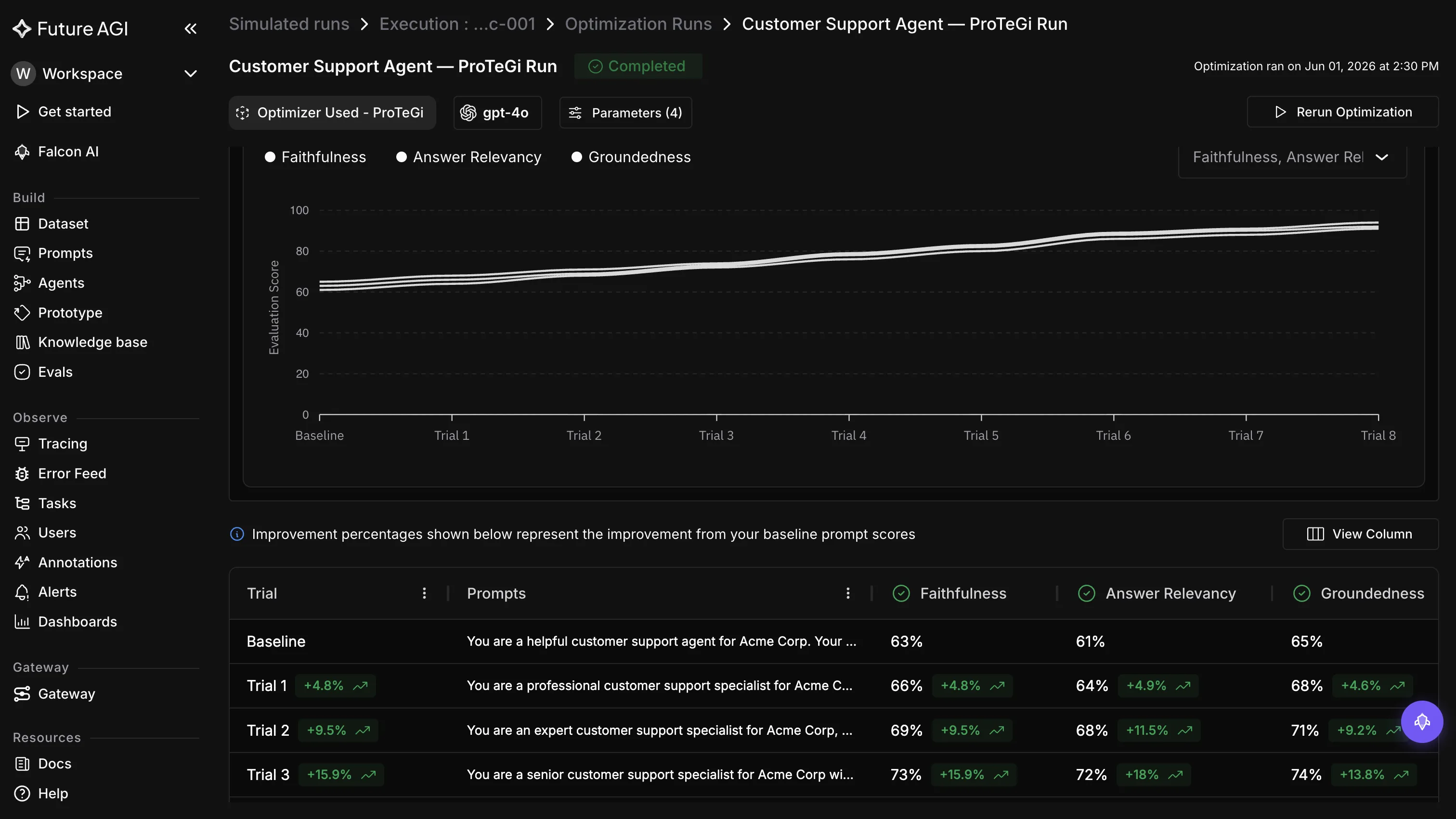
The last piece is production. traceAI, FutureAGI’s OpenTelemetry-based observability, captures the prompt and output spans on live traffic, so you can see which few-shot variant actually holds up under real inputs, not just on your test set. That closes the loop: pick examples, score them, optimize, and watch the winner in production. You can start with the optimization docs.
Conclusion and Key Takeaways
Few-shot prompting is the fastest way to make a model behave: show it a few clean examples and it copies the pattern, no training run required. Keep these in view:
- Few-shot means putting a small set of input-output examples in the prompt so the model learns the task in context.
- Reach for zero-shot first, then add shots only when the output drifts. Three to five usually suffice.
- Format carries much of the benefit. Keep shots consistent, diverse, label-balanced, and complete over your output space.
- Watch the costs: tokens, latency, majority-label bias, and overfitting to the example format.
- When hand-tuning stops scaling, make the choice measurable. Score outputs with evaluators, let ProTeGi or GEPA search better prompts, and trace which variant holds up in production.
Do the manual work first to understand your task. Then let evaluation and optimization carry it the rest of the way. You can try the scoring side on the FutureAGI evaluate platform.
Frequently Asked Questions
What is few-shot prompting?
How many examples should a few-shot prompt include?
What is the difference between zero-shot and few-shot prompting?
Does few-shot prompting change the model weights?
Do the labels in few-shot examples need to be correct?
When should you move from few-shot prompting to fine-tuning or optimization?
Hard prompts vs soft prompts in 2026: prompt tuning, prefix tuning, P-tuning, LoRA for prompts. Decision guide, code, and benchmarks for production teams.

Top 10 prompt optimization tools in 2026 ranked: FutureAGI, DSPy, TextGrad, PromptHub, PromptLayer, LangSmith, Helicone, Opik, DeepEval, Prompt Flow.

Future AGI Prompt Optimize in 2026: six search algorithms (BayesianSearch, MIPRO, GEPA, ProTeGi, PromptWizard, Random) with code, evals, and CI gating.