Best 5 Keywords AI Alternatives in 2026
Five Keywords AI alternatives scored on observability depth, routing intelligence, pricing above 1M req/month, optimization, deployment.
Table of Contents
Keywords AI markets itself as a single-pane platform for LLM monitoring, gateway routing, and prompt management. For solo developers and very small teams shipping a first agent, the bundle works. For teams past the prototype stage, the same bundle becomes the reason to leave: each surface is shallower than the dedicated tool that solves it, the community is small enough that hard problems sit in Discord for days, and the pricing curve bends sharply once production traffic crosses a million requests a month.
This guide ranks five alternatives worth migrating to, names what each fixes versus Keywords AI, and walks through the migration most teams actually do, switching the OpenAI-compatible BASE_URL and re-instrumenting traces against a deeper backend.
TL;DR: pick by exit reason
| Why you are leaving Keywords AI | Pick | Why |
|---|---|---|
| You want observability deep enough to drive eval and optimization | Future AGI Agent Command Center | Closes the loop from trace to eval to optimizer back into the gateway |
| You want a mature routing-and-prompt stack with a real ecosystem | Portkey | Hosted gateway with virtual keys, Prompt Studio, and the largest plugin surface |
| You want lightweight hosted observability with a clean per-request view | Helicone | Drop-in proxy with session traces and friendly pricing below 10M req/mo |
| You want a self-hosted, source-available proxy | LiteLLM | MIT-licensed Python proxy that runs entirely inside your VPC |
| You need raw throughput for high-concurrency agent workloads | Maxim Bifrost | Go-based gateway built for low-latency, high-RPS routing |
Why people are leaving Keywords AI in 2026
Four exit drivers show up repeatedly in Reddit /r/LLMDevs migration threads, Keywords AI’s own Discord, the GitHub issue tracker, and G2 reviews from the last two quarters.
1. The observability-and-routing hybrid is thinner than either dedicated tool
Keywords AI bundles three jobs into one product (gateway routing, trace observability, and a prompt registry) and the bundling tax shows in every surface. The gateway has fewer routing primitives than Portkey or LiteLLM (no cost-aware fallback weights, no per-route circuit breakers, no native shadow mode). Trace views render the request and response, but session graphs, tool-call timelines, and per-span attributes are flatter than what Helicone, Langfuse, or Future AGI ship by default. Prompt management exists but lacks the version-diff UX teams expect after using Portkey’s Prompt Studio or Langfuse’s prompt module.
The pattern repeats in user reviews: a team adopts Keywords AI because one bundled tool is easier to procure than three; six months later, the same team is using it for a single surface (usually the gateway) and bolting a deeper observability tool on top. At that point the bundling argument has inverted.
2. The community is small and answers move slowly
Keywords AI’s Discord has roughly the activity of a mid-sized open-source project, not the activity of an enterprise observability platform. Hard problems, auth misconfiguration with Bedrock, custom model registrations, OTel sink shaping, sit unanswered for days, and the back-and-forth that does happen mostly involves the founders. That’s charming at 50 customers and a constraint at 500. Teams that compare Keywords AI’s Discord to Langfuse’s, Portkey’s, or Helicone’s GitHub issue tracker activity see the gap immediately.
The downstream cost is engineering time. When a routing rule misbehaves at 2 a.m., the difference between a fifteen-minute fix from a community thread and a two-day wait is the difference between an SLO breach and a non-event.
3. Pricing escalates fast above 1M requests per month
Keywords AI’s Pro tier starts at $39/month and is competitive at small scale. The curve bends sharply once production traffic crosses 1M requests/month. A spreadsheet shared in /r/LLMDevs in March 2026 showed a workload billing at $89/month at 800K requests jumping to $410/month at 1.5M and $1,150–$1,400/month at 4M, depending on which add-ons (extended retention, custom alerts, RBAC) are enabled. The same workload on self-hosted LiteLLM costs the compute bill (about $40/month on a modest VM); on Helicone’s Pro tier it bills closer to $300; on Portkey’s Scale tier it bills around $400 without escalation until 5M.
The breakpoint matters because Keywords AI is most often adopted by teams in the 100K-800K request range, exactly the cohort that hits the escalation within a year if the product takes off.
4. No integrated optimizer, no self-improving loop
Trace data in Keywords AI flows in one direction: into the dashboard, out to a human’s eyes. There’s no eval library that scores captured traces against task-completion or faithfulness rubrics by default, and no optimizer that uses those scores to rewrite prompts or update routing weights. The platform is observation-only.
For a team running a single agent, that’s fine; the human is the optimizer. For a team running ten agents across three product surfaces, the manual loop breaks down. The teams leaving Keywords AI in 2026 are mostly doing so because they want the gateway to use its own data to get better, and Keywords AI doesn’t have that surface.
5. Hosted-only deployment
Keywords AI runs in their cloud. There’s no self-hosted tier, no source-available proxy, no VPC deployment option. For SOC 2-bound teams with data-residency requirements, or anyone whose security review requires “this proxy runs on our hardware,” the hosted-only posture is a hard exit. The friction shows up most often during enterprise procurement, where a CISO’s review of the data-handling addendum stalls deals that would otherwise close.
What to look for in a Keywords AI replacement
The default “best AI gateway” axes are necessary but not sufficient for a Keywords AI exit. Score replacements on the seven that map to the surfaces you’re actually migrating off:
| Axis | What it measures |
|---|---|
| 1. Observability depth | Per-session, per-tool-call, per-span attributes — native or thin? |
| 2. Routing primitives | Cost-aware fallback, circuit breakers, shadow mode, per-route policies |
| 3. Cost curve above 1M req/mo | Does the per-request marginal cost flatten or escalate as volume grows? |
| 4. Self-host posture | Can the gateway run inside your VPC, source-available or open source? |
| 5. Eval + optimizer loop | Does the gateway use its own trace data to improve routing and prompts? |
| 6. Community + ecosystem | How fast does the community answer hard problems? Are there Terraform providers, dashboards, importers? |
| 7. Migration tooling | OpenAI-compatible base URL switch, prompt importer, key remap |
1. Future AGI Agent Command Center: Best for closing the loop
Verdict: Future AGI is the only entry in this list that fixes Keywords AI’s biggest weakness, observation without optimization. Agent Command Center captures the trace, scores it with the eval library, clusters failures, runs the optimizer, and pushes the updated route or prompt back into the gateway on the next request. The other four are deeper observation layers than Keywords AI; FAGI is an observation layer wired to an optimizer.
What it fixes versus Keywords AI:
- Deep observability, not flat traces.
traceAI(Apache 2.0) instruments agents at the framework level. OpenAI Agents SDK, LangChain, LangGraph, LlamaIndex, CrewAI, AutoGen, Pydantic AI, Mastra, Vertex AI, Bedrock, and more, so per-session graphs, tool-call timelines, retrieval spans, and structured attributes show up in the Command Center automatically. Keywords AI’s flat request-response view is replaced by a session graph the human can actually navigate when a multi-step agent fails on step seven.
- Routing wired to evals. The Command Center routes requests across providers and models, but the routing policy is informed by
ai-evaluationscores from production traffic. When the optimizer sees that GPT-4.1 outscores Claude Sonnet on a particular tool-use pattern for your workload, it updates the route weight. Keywords AI can’t do this because it has no eval library to start with. - Native eval and optimizer. Every captured trace can be scored against task-completion, faithfulness, tool-use, retrieval-relevance, and custom rubrics by default.
agent-opt(Apache 2.0) runs six optimizers — ProTeGi, GEPA, Bayesian, MetaPrompt, RandomSearch, PromptWizard on the scored traces and rewrites prompts automatically, the self-improving loop Keywords AI doesn’t have.
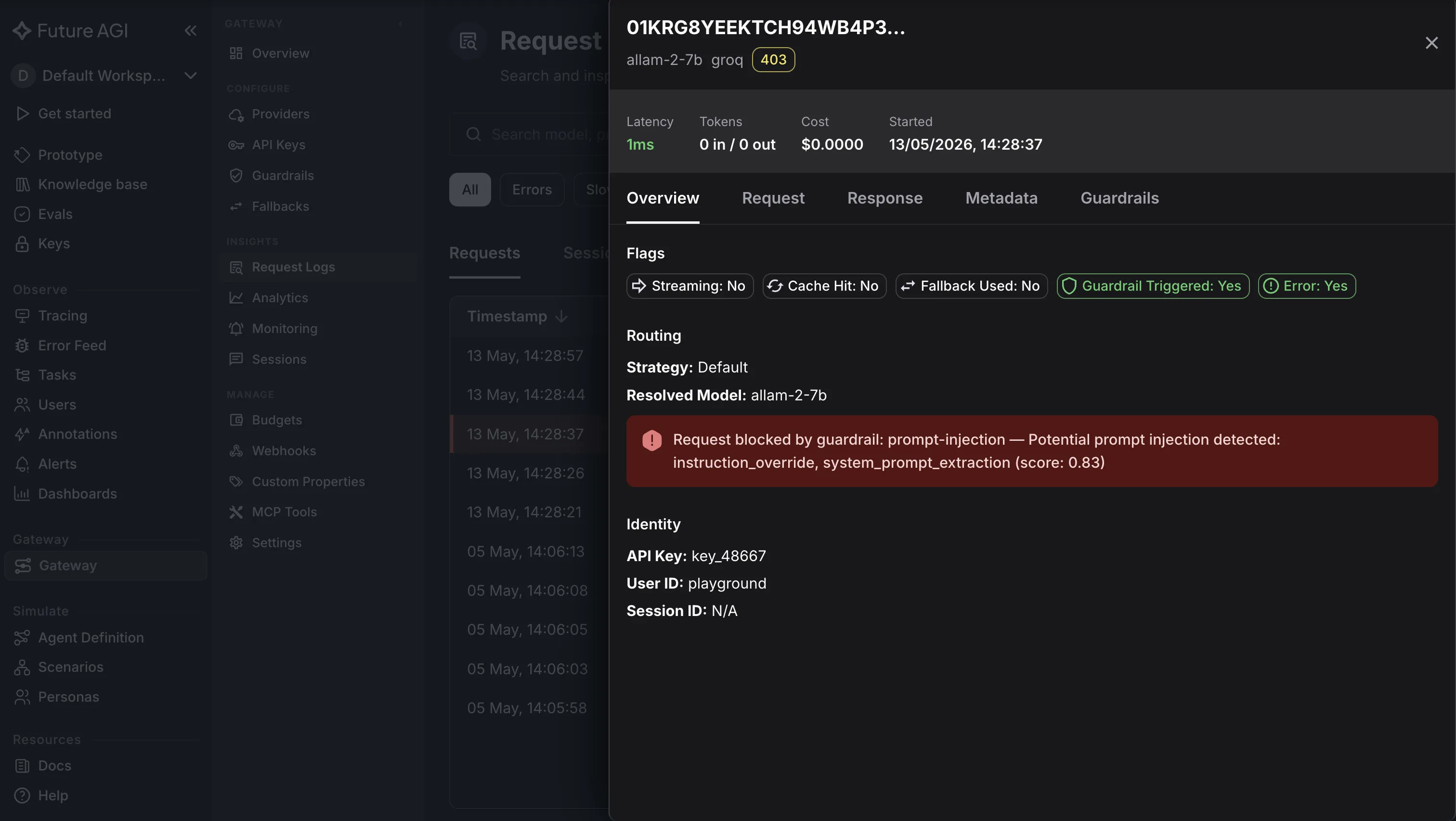
- Protect at the edge. The Command Center’s guardrails layer (Protect) sits at the gateway, screening prompts and responses with a median 67 ms text-mode overhead (109 ms image-mode), per the published benchmark in arXiv 2510.13351. Keywords AI doesn’t ship a comparable inline-guardrails surface.
- OSS + hosted.
traceAI,ai-evaluation, andagent-optare all Apache 2.0, you can self-host the instrumentation entirely. The hosted Command Center adds RBAC, failure-cluster views, the Protect layer, and AWS Marketplace procurement.
Migration from Keywords AI: Switch the OpenAI SDK’s base_url from https://api.keywordsai.co/v1 to the Future AGI gateway endpoint and add the FAGI API key header, the same two-line change that put Keywords AI in front of your providers in the first place. Replace the keywordsai_sdk instrumentation (where used directly) with traceAI, which auto-instruments most popular agent frameworks. Prompts move via copy-paste or the prompt-registry import endpoint; the Keywords AI prompt object model is shallow enough that nothing needs structural rewriting. Timeline: three to five engineering days for a typical deployment, including a shadow-traffic period.
Where it falls short:
-
agent-opt is opt-in, start with traceAI + ai-evaluation in week one and turn the optimizer on once eval baselines stabilize. The loop compounds value over weeks rather than at day one.
-
The default dashboard is denser than Keywords AI’s; teams used to the single-page Keywords AI view need a session to find the equivalent panels.
Pricing: Free tier with 100K traces/month. Scale tier from $99/month with linear per-trace scaling above 5M (no add-on multipliers). Enterprise with SOC 2 Type II and AWS Marketplace.
Score: 7 of 7 axes.
2. Portkey: Best for a mature hosted gateway
Verdict: Portkey is the pick when the gateway side of Keywords AI is the surface you valued and the bundling is the surface you outgrew. Hosted, mature, with the largest plugin surface in the cohort: virtual keys, Prompt Studio, guardrails, audit logs, RBAC, and a Terraform provider. The April 2026 Palo Alto Networks acquisition created some uncertainty around the SMB SKU’s long-term pricing, but for teams who need the gateway depth today, Portkey remains the most feature-complete hosted option.
What it fixes versus Keywords AI:
- Real routing primitives. Cost-aware fallback, weighted load balancing, circuit breakers, shadow mode, and per-route policies all ship natively. Keywords AI’s routing is closer to round-robin with provider preference.
- Virtual keys with bulk-pricing fanout. Every developer or service holds a Portkey-issued key that fans out to one underlying provider key, preserving volume discounts while exposing per-identity attribution. Keywords AI’s per-key model is leaner.
- Prompt Studio. Versioned prompts with template syntax, server-side rendering by
prompt_id, and a polished version-diff UI. Keywords AI’s prompt module is a thinner version of the same idea. - Mature ecosystem. Terraform provider, dashboard templates, plugin SDK, and an active GitHub/Discord with substantially more activity than Keywords AI’s.
Migration from Keywords AI: OpenAI-compatible endpoint, so base_url swap is one line. Provider keys, routing rules, and metadata headers map directly. The Keywords AI prompt registry exports to JSON; Portkey’s prompt import accepts the same shape with minor renaming. Timeline: five to seven engineering days for typical workloads, longer if you adopt Prompt Studio in earnest.
Where it falls short:
- No optimizer. Like Keywords AI, traces inform humans but never the gateway.
- The Palo Alto acquisition is recent enough that the SMB SKU’s 18-month outlook is uncertain, pricing may shift inside the bundle.
- Prompt Studio’s template syntax is Portkey-specific; once you commit, you create the same kind of lock-in you left Keywords AI to avoid.
Pricing: Free tier with 10K requests/month. Scale tier from $99/month. Enterprise with SOC 2 Type II.
Score: 5 of 7 axes (missing: optimizer loop, full self-host).
3. Helicone: Best for lightweight hosted observability
Verdict: Helicone is the right pick if your reason for leaving Keywords AI is the pricing curve and the routing depth was never the point. Drop-in proxy with per-request cost telemetry, session traces, and a dashboard that’s easier to navigate than Keywords AI’s bundled view. The March 2026 Mintlify acquisition shifted parts of the docs surface, but the product roadmap is unchanged.
What it fixes versus Keywords AI:
- Friendlier pricing curve below 10M req/mo. Helicone’s Pro tier starts at $25/month and scales more gently than Keywords AI’s Pro tier. A workload that bills $1,000+ on Keywords AI at 4M requests/month typically bills $200–$300 on Helicone.
- Per-request session UX. Session-grouped traces with custom properties, latency breakdowns, and cost-per-request views render cleaner than Keywords AI’s flat list.
- Self-host option. Helicone’s open-source self-host (Apache 2.0) runs on Postgres + ClickHouse. The project’s own docs note that scale-out beyond a few hundred RPS requires non-trivial tuning, but for sub-100-RPS workloads it’s a clean exit from any hosted-only vendor.
- Larger community. GitHub issue tracker activity and Discord traffic substantially outpace Keywords AI’s; hard problems get answered in hours rather than days.
Migration from Keywords AI: OpenAI-compatible endpoint maps directly. Helicone-User-Id header replaces Keywords AI’s user metadata; custom properties replace Keywords AI’s metadata fields. Helicone’s Prompts module is comparable to Keywords AI’s, so the prompt migration is a copy-paste of templates rather than a structural rewrite. Timeline: two to four engineering days if you don’t need a prompt-registry replacement.
Where it falls short:
- No optimizer.
- Routing intelligence is basic (round-robin and failover); cost-aware model routing requires upstream code.
- Self-host operations get harder above a few hundred RPS.
- The Mintlify acquisition is recent enough that some docs surfaces are still in flux.
Pricing: Free tier with 10K requests/month. Pro from $25/month. Enterprise custom.
Score: 5 of 7 axes (missing: optimizer, deep routing primitives).
4. LiteLLM: Best for self-hosted exit
Verdict: LiteLLM is the pick when “hosted-only” is the dealbreaker, when the security review of Keywords AI’s data-handling posture stalled procurement, or when residency rules require the proxy to run in your VPC. MIT-licensed, Python-native, and the most popular self-hosted AI proxy on GitHub. You give up the hosted-dashboard polish; you gain full sovereignty.
What it fixes versus Keywords AI:
- Self-host posture. The entire proxy runs in your VPC. No telemetry leaves unless you configure an OTel sink. For SOC 2-bound teams or anyone whose CISO blocked Keywords AI on data-handling grounds, this is the cleanest exit.
- Cost curve. Open-source means no per-request licensing. Compute and storage scale linearly. The Enterprise tier (from ~$250/month) adds SSO, audit, and SLA without per-request escalation, well below the Keywords AI curve at any scale above 1M requests.
- Provider coverage. LiteLLM supports 100+ providers (every Keywords AI integration and many more) with consistent OpenAI-compatible semantics. The
team_idanduser_idmodel maps cleanly onto Keywords AI’s per-user metadata.
Migration from Keywords AI: OpenAI-compatible endpoint swap, provider keys, and per-request metadata all map directly. LiteLLM has no first-party prompt registry, so teams pair it with Langfuse, Future AGI, or in-repo Jinja2 files. You lose Keywords AI’s hosted dashboard UX. Timeline: four to six engineering days for the proxy cutover, plus another week for a separate prompt store if needed.
Where it falls short:
- No optimizer. Traces inform humans, not the gateway.
- The bundled UI is the weakest in this list; polish lives in the Enterprise tier.
- The prompt-library story is a separate purchase or build.
Pricing: Open source under MIT. Enterprise from ~$250/month for small teams.
Score: 5 of 7 axes (missing: native prompt registry, optimization loop).
5. Maxim Bifrost: Best for raw throughput
Verdict: Maxim’s Bifrost is the pick when the workload is high-concurrency and the gateway’s own latency budget matters more than its hosted polish. Bifrost is written in Go, designed for low-latency routing, and benchmarks above the Python-based proxies on RPS per node. For agent workloads where the gateway hop’s overhead shows up in user-facing SLOs, the throughput delta matters.
What it fixes versus Keywords AI:
- Throughput per node. The Go runtime plus connection-pooling gives Bifrost higher RPS per node than Python-based proxies on the same hardware. Maxim’s published benchmarks claim sub-millisecond overhead at p50; independent reproduction is ongoing.
- Self-host posture. Bifrost runs as a Go binary, container, helm chart, or static binary on a VM. Cleanest hosted-only exit after LiteLLM.
- Tight integration with Maxim’s eval stack. If your team also evaluates agents with Maxim, the gateway and the eval pipeline share data models, closer to an integrated loop than Keywords AI offers, though shallower than Future AGI’s.
Migration from Keywords AI: OpenAI-compatible endpoint, provider keys, and basic routing rules map directly. Bifrost’s API-key concept is leaner than Keywords AI’s; per-developer fanout needs more wiring upstream. You lose Keywords AI’s hosted dashboard. Timeline: four to six engineering days plus prompt-registry replacement if applicable.
Where it falls short:
- No prompt registry in the gateway; you pair with Maxim’s eval stack or an external store.
- Younger than LiteLLM or Portkey; the ecosystem (Terraform providers, off-the-shelf dashboards) is thinner.
- Throughput is the headline; teams that picked Keywords AI for the bundled UX rather than latency won’t feel the upside.
Pricing: Bifrost is open source. Maxim’s hosted gateway pricing is custom, typically anchored to the eval product’s usage.
Score: 4 of 7 axes (missing: optimizer, native prompt registry, mature ecosystem).
Capability matrix
| Axis | Future AGI | Portkey | Helicone | LiteLLM | Maxim Bifrost |
|---|---|---|---|---|---|
| Observability depth | Native sessions + spans + RBAC | Solid, Prompt Studio + audit | Per-request dashboard | Functional UI | OTel pluggable |
| Routing primitives | Cost-aware, eval-driven | Full primitives + virtual keys | Round-robin + failover | Full primitives | Lean, throughput-tuned |
| Cost curve above 1M req/mo | Linear, no add-on multipliers | Flat to 5M, escalates after | Friendly below 10M | OSS, only compute | OSS, throughput-focused |
| Self-host posture | BYOC + OSS instrumentation | Hosted-only (Cloud/SMB) | Apache 2.0 self-host | MIT, full VPC | OSS Go binary |
| Eval + optimizer loop | Yes (ai-evaluation + agent-opt) | No | No | No | Tied to Maxim eval |
| Community + ecosystem | Active OSS + Slack + AWS Marketplace | Largest in cohort | Strong GitHub + Discord | Largest OSS proxy on GitHub | Smaller, growing |
| Migration tooling | OpenAI base URL + traceAI re-instrument | Prompt importer + key remap | Header mapping docs | Community scripts | Manual setup |
Migration notes: what breaks when leaving Keywords AI
Keywords AI’s strength as a migration source is also its simplicity: the public surface is small enough that migration is fundamentally a two-line change plus re-instrumentation. Three surfaces still need attention.
Switching the OpenAI-compatible BASE_URL
Keywords AI is invoked by setting the OpenAI SDK’s base_url to https://api.keywordsai.co/v1 and adding the Keywords AI API key. Moving off is the mirror image: point base_url at the destination gateway’s endpoint and swap the API key header.
In principle this is one line. In practice, services hard-code the URL in three places: SDK initialization, runtime config (often a feature-flag file or environment variable), and the deployment manifest. The migration checklist needs all three. A team running ten services across two environments completes the URL swap in half a day if the config layer is centralized, two to three days if the URL is sprinkled across services.
The safe pattern is a shadow-traffic phase: stand up the new gateway with the same provider keys, mirror a percentage of production requests to it, validate parity (same response shape, same tool-call counts, same latency profile), then flip services one at a time using whatever feature-flag mechanism the team already uses for incremental rollouts.
Re-instrumenting traces
Keywords AI’s trace capture happens at the gateway hop: every request through the proxy gets logged. If the destination gateway also captures at the hop (Portkey, the lightweight proxy, Future AGI, the Python proxy, Bifrost all do), trace continuity is automatic.
The change is depth. Keywords AI’s flat request-response logs don’t carry tool-call timelines, retrieval spans, or per-step agent metadata, so teams moving to a deeper backend usually take the migration as an opportunity to instrument at the framework level. Future AGI’s traceAI is the typical pairing, drop-in instrumentation for OpenAI Agents SDK, LangChain, LangGraph, LlamaIndex, CrewAI, AutoGen, Pydantic AI, and others, with structured spans that the Command Center renders as session graphs. Helicone, Langfuse, and the hosted gateway all accept OTel as well, but the auto-instrumentation surface is thinner than traceAI’s.
Timeline: one to three engineering days for the re-instrumentation work, depending on how many frameworks your agents span.
Moving the prompt registry
Keywords AI’s prompt registry is shallow enough that migration is a copy-paste rather than a script-and-rewrite project. Export prompts from the Keywords AI dashboard or API, paste into the destination registry (Future AGI’s registry accepts Jinja2 directly; Portkey’s Prompt Studio uses its own dialect; Helicone’s Prompts is closer to Keywords AI’s shape; LiteLLM doesn’t have a registry, so prompts go to in-repo Jinja2 or to a paired tool).
Most teams find the migration is cleaner than the equivalent Portkey-to-other-tool migration, because Keywords AI’s prompt model never grew the dialect complexity that Prompt Studio has. The downside is that some teams discover, mid-migration, that they wanted the depth Prompt Studio or Future AGI’s registry offers, and the migration becomes an opportunity to standardize on Jinja2 and adopt version-diff workflows for the first time. Timeline: half a day to two days for under 100 prompts.
Decision framework: Choose X if
Choose Future AGI if your reason for leaving Keywords AI is more than the pricing or the community, you also want trace data to drive prompt rewrites and routing-policy updates, so the cost curve bends down over time. Pick this when production agent workloads are becoming a significant line item and the OSS instrumentation (traceAI, ai-evaluation, agent-opt) plus the hosted Command Center together justify the migration.
Choose Portkey if you valued the gateway side of Keywords AI and outgrew the bundling, you want virtual keys, Prompt Studio, a mature plugin surface, and the largest ecosystem in the cohort. Pick this when the Palo Alto acquisition uncertainty is acceptable and the gateway depth is the surface you’re paying for.
Choose Helicone if your reason for leaving is pricing and you’re well below 10M requests per month. Pick this for straightforward workloads with no need for deep routing primitives or eval-driven optimization, and when a cleaner per-request session UX is the headline benefit. The Helicone alternatives comparison covers where it fits in more detail.
Choose LiteLLM if hosted-only is the dealbreaker, when the security review of Keywords AI’s data-handling posture stalled procurement, or when residency rules require the proxy to run in your VPC. Pick this when self-host posture and source-availability beat hosted polish, and you have engineering budget for a separate prompt store and observability sink.
Choose Maxim Bifrost if your reason for leaving is gateway latency at high concurrency. Pick this when the proxy hop’s own latency budget shows up in your SLOs and the throughput-per-node delta versus Python-based proxies matters.
What we did not include
Three products show up in other 2026 Keywords AI alternatives listicles that we left out: OpenRouter (consumer-facing model marketplace, not the shape for a team replacing a gateway-plus-observability bundle); Cloudflare AI Gateway (strong primitives but the prompt-registry and per-developer chargeback surfaces are thinner than this cohort’s as of May 2026); Langfuse (excellent observability and prompt-registry tool but not a gateway, pair with LiteLLM or Future AGI rather than treating as a direct replacement for Keywords AI’s bundle).
Related reading
- Best 5 Portkey Alternatives in 2026
- Best LLM Gateways in 2026
- What Is an AI Gateway? The 2026 Definition
- Best AI Gateways for Agentic AI in 2026
Sources
- Keywords AI product documentation, keywordsai.co/docs
- Keywords AI pricing page, keywordsai.co/pricing
- Reddit /r/LLMDevs migration discussions, February-May 2026
- Keywords AI Discord activity and GitHub issue tracker
- Portkey AI Gateway documentation, portkey.ai/docs
- Helicone open-source self-host, github.com/Helicone/helicone
- Helicone acquisition of Mintlify, March 2026, helicone.ai/blog
- LiteLLM GitHub repository, github.com/BerriAI/litellm
- Maxim Bifrost product page and benchmarks, getmaxim.ai/bifrost
- Future AGI Agent Command Center, futureagi.com/platform/monitor/command-center
- Future AGI traceAI, github.com/future-agi/traceAI (Apache 2.0)
- Future AGI ai-evaluation, github.com/future-agi/ai-evaluation (Apache 2.0)
- Future AGI agent-opt, github.com/future-agi/agent-opt (Apache 2.0)
- Future AGI Protect latency benchmark, arxiv.org/abs/2510.13351 (67 ms text, 109 ms image)
Frequently Asked Questions
Why are people moving off Keywords AI in 2026?
What is the closest like-for-like alternative to Keywords AI?
How do I migrate off Keywords AI?
Is there an open-source Keywords AI alternative?
Which Keywords AI alternative is cheapest at scale?
How does Future AGI Agent Command Center compare to Keywords AI?
Does Keywords AI have an optimizer or eval library?
FutureAGI, LiteLLM, Helicone, OpenRouter, Cloudflare AI Gateway, and Kong AI as Portkey alternatives in 2026. Pricing, OSS license, routing, tradeoffs.


FutureAGI, Portkey, LiteLLM, Langfuse, OpenRouter, and LangSmith as Helicone alternatives in 2026 after the Mintlify acquisition. Pricing, OSS, tradeoffs.


FutureAGI ACC, Helicone, OpenRouter, Portkey, LiteLLM, Cloudflare AI Gateway, Vercel AI Gateway as 2026 LLM gateways. Routing, caching, guardrails.