Best AI Coding Agents in 2026: 7 Tools Compared
Cursor, Claude Code, Cline, Aider, GitHub Copilot coding agent, Kiro, Windsurf for AI-assisted coding in 2026. Compared on agent depth, IDE fit, pricing, and OSS.

Table of Contents
AI coding tools split cleanly along the agent vs autocomplete line in 2026. Inline autocomplete (Copilot, Tabnine, Codeium classic) is now table stakes; every IDE ships some version of it. AI coding agents are the larger category, and they live in different places: the IDE, the terminal, a GitHub workspace, a VS Code extension. The 2026 question is no longer “should we use an AI coding tool” but “which agent should sit where in the developer workflow.” This guide is the honest shortlist of seven that show up in procurement.
TL;DR: Best AI coding agent per use case
| Use case | Best pick | Why (one phrase) | Pricing | OSS |
|---|---|---|---|---|
| AI-first IDE with multi-file editing | Cursor | Composer, agent mode, model picker | Pro $20/mo | Closed |
| Terminal-native agent loops | Claude Code | Tool use, shell, file edits in CLI | Bundled with Claude subscriptions; API tokens may apply | Closed |
| OSS coding agent in VS Code | Cline | Apache 2.0, BYOK across many providers | Free OSS, token cost only | Apache 2.0 |
| Git-aware command-line agent | Aider | Architect/edit modes, git commits | Free OSS, token cost only | Apache 2.0 |
| Issue-to-PR inside GitHub | Copilot coding agent | GitHub-native plan + PR | Copilot Business $19/user + Actions minutes + premium requests | Closed |
| Spec-driven agentic coding | Kiro | Specs, tasks, hooks, steering files | Free; Pro $20/mo, Pro+ $40/mo, Power $200/mo | Closed |
| Cascade flow editor | Windsurf | Flow-based agent + supercomplete | Free; Pro $20/mo, Max $200/mo, Teams $40/user/mo | Closed |
If you only read one row: pick Cursor when the audience prefers a polished IDE with Composer-style multi-file edits. Pick Claude Code when the developer workflow is terminal-first and tool use matters. Pick Cline when OSS license, BYOK, and VS Code as the host matter.
What an AI coding agent actually does
The agent sits between intent and code. The minimum viable surface is:
- Read context. Open files, repository structure, recent changes, type definitions. Without context the suggestions are wrong.
- Plan and edit. Multi-file edits with a coherent plan; not just inline autocomplete.
- Run and react. Execute tests, lint, build. React to failures by editing again.
- Tool use. Call the shell, the file system, search, web fetch, git, and custom tools when MCP servers are wired up.
- Approval flow. Diff preview before write; human-in-the-loop for risky operations (delete files, push branches, run shell commands).
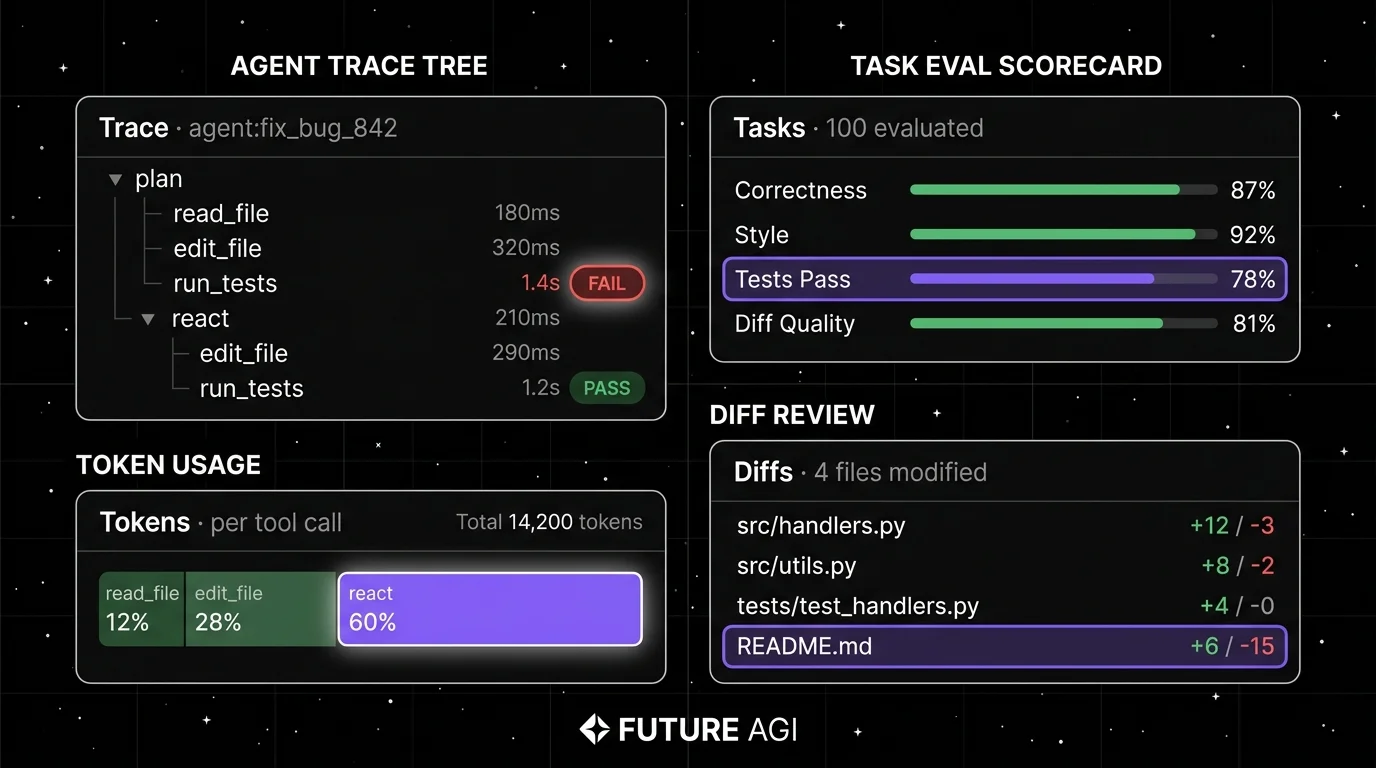
- Trace. Tool calls and model decisions logged so the team can debug agent regressions.
A 2024 inline autocomplete tool covers (1) and a thin slice of (2). A 2026 coding agent covers (1) through (6).
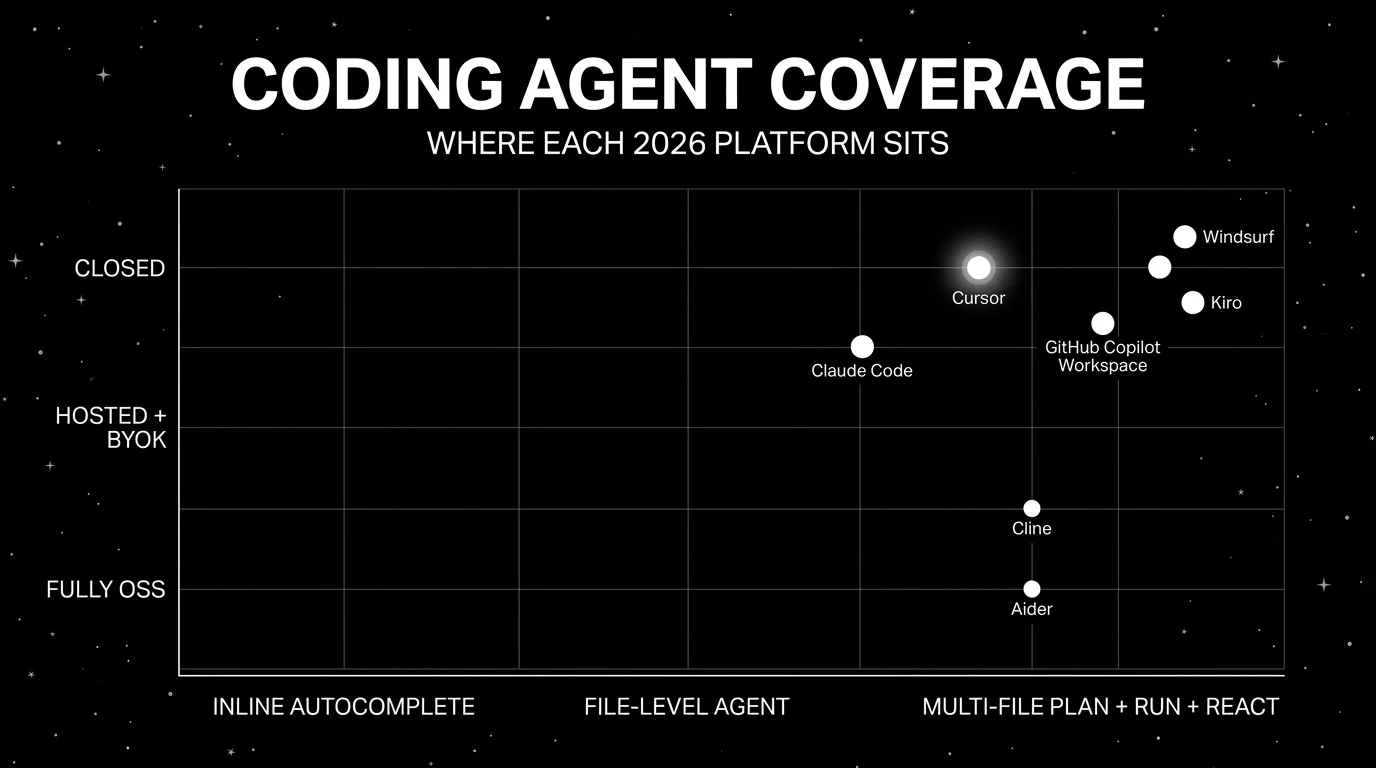
The 7 AI coding agents compared
1. Cursor: Best for AI-first IDE with multi-file editing
Closed platform. Hosted only.
Use case: Engineers who want an AI-first IDE based on a VS Code fork, with deep agent integration, multi-file Composer edits, an integrated chat that reads workspace context, and a model picker for OpenAI, Anthropic, and other providers.
Architecture: VS Code fork with built-in agent capabilities. Composer mode handles multi-file edits with an explicit plan. Agent mode runs a tool-using loop (read, edit, run, react). Model picker for Claude, GPT, Gemini, and others. MCP server support for tool extension.
Pricing: Cursor Pro is around $20/mo with usage caps. Pro+ tier around $60/mo. Business is around $40/user/mo. Ultra is $200/mo. Verify the latest pricing page.
OSS status: Closed.
Best for: Engineering teams that prefer a polished IDE host, want multi-file edits as a first-class operation, and are comfortable with a closed platform paid by seat.
Worth flagging: Closed. Per-seat pricing scales linearly. Multi-file edits sometimes need cleanup, especially in large monorepos. Verify the model-picker BYOK support against the latest pricing tier.
2. Claude Code: Best for terminal-native agent loops
Closed platform. CLI delivery.
Use case: Engineers whose primary surface is the terminal: SSH sessions, dotfiles workflows, dev containers, remote pair programming. Claude Code is Anthropic’s CLI agent that runs a tool-using loop with file editing, shell execution, and git operations, anchored to Claude’s tool-use surface.
Architecture: CLI binary distributed via npm. Operates inside any working directory. Tool surface includes file read/write, shell execution, git, web fetch, and MCP servers. Approval prompts for write operations. Streams output to terminal with structured progress.
Pricing: Claude Code is available through Claude subscriptions such as Pro and Team and can also incur API-token usage depending on setup. Verify current subscription and API usage terms at claude.com/pricing and code.claude.com/docs/en/costs.
OSS status: Closed.
Best for: Engineers whose workflow is terminal-first, who want a single CLI tool that handles plan, edit, run, and react, and who are already on Anthropic’s stack.
Worth flagging: Anthropic-only model surface (no BYOK to OpenAI or open-weight providers). Closed platform. Terminal-only delivery means engineers who prefer a graphical IDE will reach for Cursor or Cline first.
3. Cline: Best OSS coding agent in VS Code
Open source. Apache 2.0.
Use case: Engineers who want a Cursor-equivalent agent loop inside stock VS Code, with BYOK across OpenAI-compatible endpoints and major providers (OpenAI, Anthropic, Google, Bedrock, OpenRouter, Ollama), Apache 2.0 license, and full local control over what the agent reads and writes.
Architecture: VS Code extension with an agent loop that plans, edits, runs, and reacts. BYOK supports OpenAI-compatible endpoints plus first-party connectors for Anthropic, Google, and Bedrock; coverage and feature parity vary by provider. MCP server support. Approval prompts for write operations. Token usage tracked per session.
Pricing: Free OSS. Token cost is the only spend.
OSS status: Apache 2.0.
Best for: Engineering teams that want OSS license control, BYOK to existing API contracts, and stock VS Code as the host. Strong fit for teams already running their own LLM gateway.
Worth flagging: Cline is younger than Cursor; some IDE-host integrations (multi-pane edits, refactor commands) are less polished. The agent depth is solid for routine work; complex multi-file refactors sometimes need more guidance.
4. Aider: Best for git-aware command-line agent
Open source. Apache 2.0.
Use case: Engineers whose workflow centers on git: small repos, frequent commits, command-line discipline. Aider is a CLI agent that reads files, edits them, runs tests, and commits the diff with a meaningful commit message. Architect mode separates planning from editing for cleaner diffs.
Architecture: Python CLI distributed via pip. Runs inside any git repository. Modes: edit (default), architect (plan + edit separately). Repository map (repo-map) extracts type signatures and function definitions to seed agent context efficiently.
Pricing: Free OSS. Token cost is the only spend.
OSS status: Apache 2.0.
Best for: Engineers who want a git-aware CLI agent with strong commit hygiene, who care about token efficiency (repo-map keeps context small), and who prefer command-line over IDE.
Worth flagging: CLI-only delivery. The user experience expects comfort with git, terminal, and the editor of choice. Pair-programming workflows are weaker than Cursor or Cline. Architect mode adds a step that some workflows skip past.
5. GitHub Copilot coding agent: Best for issue-to-PR inside GitHub
Closed platform. GitHub-native.
Use case: Engineering teams whose workflow lives inside GitHub: issues, pull requests, code review. Copilot coding agent takes an issue, drafts a plan, edits files across the repo, and produces a pull request, with revisions inline. The differentiator is the native GitHub integration.
Architecture: Hosted by GitHub. Operates on a repository sandbox. Plan-to-PR flow: issue selected, plan drafted, files edited, PR opened. Reviewers see the same plan and diff inside the GitHub UI.
Pricing: Copilot Business is $19/user/mo and Copilot Enterprise is $39/user/mo, but Copilot coding agent sessions consume GitHub Actions minutes plus Copilot premium-request allowance, so overage charges are possible at usage. GitHub is moving Copilot to usage-based billing starting June 1, 2026; verify the latest pricing and billing model.
OSS status: Closed.
Best for: Engineering organizations whose review and merge workflow is GitHub-centric, where the value is reducing the issue-to-PR cycle time more than IDE-level agent ergonomics.
Worth flagging: Closed platform with no BYOK. The workspace runs on GitHub-managed models. The value drops if the team’s workflow is split across GitHub, Linear, Jira, or local IDEs. Some workflows still need IDE-level edits, not workspace-level plans.
6. Kiro: Best for spec-driven multi-agent workflows
Closed platform. AWS-backed.
Use case: Engineering teams that want an IDE where the spec drives the agent: write a structured spec, the agent breaks it into tasks and executes them with hooks and steering files keeping behavior aligned. Kiro is AWS-backed and integrates with AWS-native development workflows.
Architecture: Hosted IDE with spec mode and agent mode. Specs decompose work into tasks the agent executes; hooks run on lifecycle events; steering files configure agent behavior across the project. Sub-agent orchestration patterns are part of the spec workflow but verify against current Kiro docs for the exact concurrency model.
Pricing: Kiro lists Free, Pro $20/mo, Pro+ $40/mo, and Power $200/mo, with credit-based usage and overage pricing. Enterprise and team billing terms may continue to evolve.
OSS status: Closed.
Best for: Engineering teams that want a spec-first IDE, multi-agent task orchestration, and AWS-native delivery.
Worth flagging: Newer than Cursor and Windsurf; the spec-driven workflow is well-documented but production usage at very large repository scale is still being benchmarked publicly. Enterprise/team billing is still firming up. AWS-flavored procurement may help or hurt depending on the org.
7. Windsurf: Best for the Cascade flow editor
Closed platform. Hosted only.
Use case: Engineers who want an AI-first IDE with the Cascade flow editor (a multi-step agent flow with explicit checkpoints), supercomplete (multi-line autocomplete that anticipates intent), and a polished UX. Windsurf is the rebranded Codeium IDE with strong agent integration.
Architecture: VS Code-derivative IDE. Cascade is the multi-step flow surface; supercomplete is the inline autocomplete. Model picker supports several frontier models.
Pricing: Windsurf lists Free, Pro $20/mo, Max $200/mo, Teams $40/user/mo, and Enterprise custom. Verify the latest pricing.
OSS status: Closed.
Best for: Engineering teams that want an AI-first IDE alternative to Cursor, with the Cascade flow editor and a comparable per-user pricing model.
Worth flagging: Closed. The Codeium-to-Windsurf rebrand has shifted some pricing; verify current tier shape. The agent depth is solid; some multi-file refactors are weaker than Cursor’s Composer.
Decision framework: pick by constraint
- Polished AI-first IDE: Cursor, Windsurf.
- Terminal-native agent: Claude Code, Aider.
- OSS license + BYOK: Cline, Aider.
- GitHub-native issue-to-PR: Copilot coding agent.
- Spec-driven multi-agent: Kiro.
- Stock VS Code as host: Cline.
- Anthropic-only stack: Claude Code.
- Already paying for Copilot: Copilot coding agent.
Common mistakes when picking an AI coding agent
- Picking on demo polish. Demos use clean repos and idealized failures. Run a domain reproduction with your real codebase, your real test suite, and your real PR requirements.
- Skipping code review. Agent output should go through the same review and CI gates as any human contribution. Bypassing review because the agent looks confident is a security and quality risk.
- Ignoring token cost. Multi-file agents can burn tokens fast. Verify cost-per-task at production volume before committing.
- Pricing only the seat fee. Real cost equals seat fee plus token cost plus engineering hours to maintain agent prompts, rules, and steering files.
- Treating the agent as a code generator. The 2026 agents are tool-using loops, not just generators. The wins come from running tests, reacting to failures, and committing diffs, not from one-shot code generation.
- Skipping eval. Without a labeled task set, comparing agents devolves into vibes. Build a small set of representative tasks before procurement.
What changed in AI coding agents as of May 2026
| Date | Event | Why it matters |
|---|---|---|
| 2024-2026 | Cursor Composer multi-file edits | Multi-file plan-and-edit flows continue to mature; verify exact release dates on the Cursor changelog. |
| 2024-2026 | Claude Code standalone CLI | Terminal-native agent loops with full tool use moved out of beta; verify exact dates on Anthropic’s announcements. |
| 2024-2026 | Cline gained traction as an OSS VS Code agent | OSS coding agents are now common in procurement alongside closed alternatives. |
| 2024-2026 | GitHub Copilot coding agent | The expanded GitHub coding agent (related to the Copilot Workspace surface) drives issue-to-PR flows; usage-based billing rolls out starting June 1, 2026. |
| 2024-2026 | AWS-backed Kiro public availability | Spec-driven IDE entered the field with a paid pricing surface. |
| 2024-2025 | Codeium rebranded to Windsurf | A second AI-first IDE option matured alongside Cursor. |
How to actually evaluate this for production
-
Pick a labeled task set. 50-200 tasks reflecting real work: bug fixes from the issue tracker, small refactors, test generation, dependency upgrades. Hand-label expected outcomes.
-
Run the same set in 2-3 candidates. Fix the model, fix the system prompt where exposed. Capture completion rate, edit quality (review the diffs), tokens consumed, latency.
-
Wire eval to the trace surface. For OSS agents, ingest spans into FutureAGI, Phoenix, or Langfuse. Score each task with a code-review judge model (FAGI’s
turing_flashruns at 50-70 ms p95 for guardrail screening; full eval templates run roughly 1-2 seconds). Gate merges on the eval threshold. -
Measure developer time. Agent productivity is not just task completion; it is the time saved on the developer side. Survey developers after 2 weeks of use.
-
Cost-adjust. Real cost equals seat fee plus token cost minus engineering time saved. Run a 90-day projection before committing org-wide.
Sources
- Cursor pricing
- Anthropic pricing
- Cline GitHub repo
- Aider site
- Aider GitHub repo
- GitHub Copilot pricing
- Kiro pricing
- Windsurf pricing
Series cross-link
Read next: GitHub Copilot vs Cursor vs CodeWhisperer, Vibe Coding Development, Best AI Agent Debugging Tools
Frequently asked questions
What is an AI coding agent in 2026?
Which AI coding agent is best in 2026?
Are AI coding agents open source?
Which coding agent supports BYOK to my own API keys?
How do I evaluate an AI coding agent for my team?
How do AI coding agents pricing models compare in 2026?
Should I use an AI coding agent for production code?
Can I trace an AI coding agent's decisions?

Best LLMs May 2026: compare GPT-5.5, Claude Opus 4.7, Gemini 3.1 Pro, and DeepSeek V4 across coding, agents, multimodal, cost, and open weights.
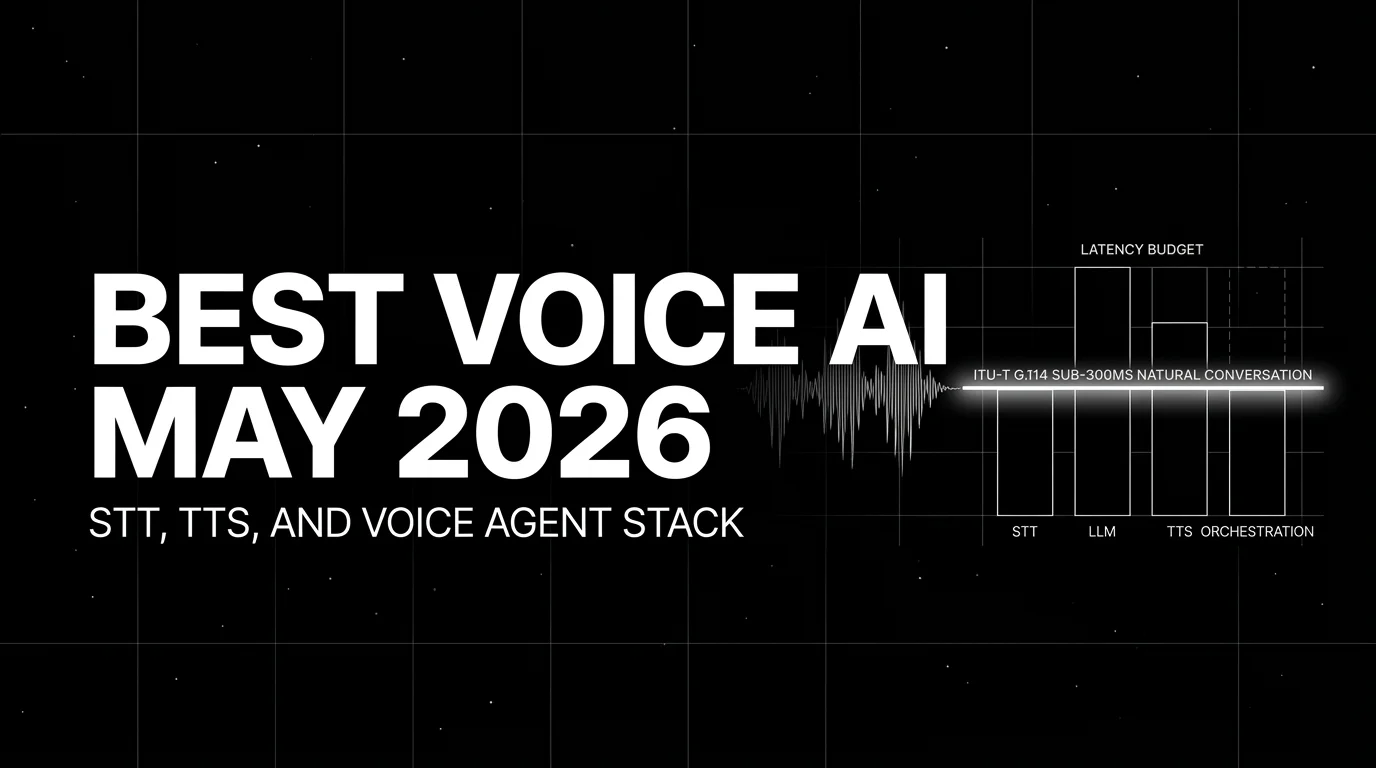
Best Voice AI May 2026: compare Deepgram, Cartesia, ElevenLabs, Retell, and Vapi for STT, TTS, latency budgets, and production voice agents.

Best LLMs April 2026: compare GPT-5.5, Claude Opus 4.7, DeepSeek V4, Gemma 4, and Qwen after benchmark trust broke and prices compressed fast.