Is Vibe Coding the Future of Development in 2025 or Just Hype?
Discover if vibe coding transforms AI development workflows in 2025. Complete guide to GitHub Copilot, risks, benefits & implementation strategies.
Table of Contents
-
Introduction
Developers would agree that the time of manually typing large lines of code has passed, now everyone engages with AI, hoping it does not end up into an unending loop through hallucination.
Not interested in semicolons, stacks, or loops anymore? How about Vibe Coding?
AI assistants in code editors went from being a curiosity to an essential tool within a few months. Tools such as GitHub Copilot and Cursor now propose whole functions before the phrase concludes, while Tabnine’s semantic engine predicts code snippets across many programming languages. While AI tracks boilerplate code and small issues in real time, developers can concentrate on logic and design.
“Vibe coding” is the method for creating software by providing natural language prompts to a large language model optimized for coding instead of hand writing every line.
What attracted people to it:
- Users describe the requirements in plain English or via voice commands, and the AI generates executable code.
- Basic tools or short scripts can be generated in minutes rather than hours.
- Hobbyists and entrepreneurs use it for weekend projects, experimenting with new concepts with low effort.
- Supporters value the efficiency improvements but experienced developers warns about possible quality, security, and maintenance issues.
- Platforms including Replit, Cursor, and Superwhisper are including vibe coding capabilities, suggesting a larger trend toward AI-enhanced development environments.
This blog will help you separate reality from hype to determine whether vibe coding is worth implementing.
-
What is Vibe Coding?
Vibe coding is the practice of driving your development workflow entirely through conversational prompts telling an AI what you need in plain English (or voice) and having it generate the underlying code, configuration, and tests. This approach layers large‑language models onto low‑code/no‑code style interfaces so you can spin up prototypes and even production‑ready snippets without hand‑typing every line. It started by remixing low-code/no-code platforms with conversational AI to cut out the boilerplate and supercharge prototype builds.
- Low-code/no-code meets AI pair programming: It is a classic low-code tool as drag-and-drop playgrounds for UI elements and workflow blocks you click to assemble, not type every line. Vibe coding layers in large language models like ChatGPT or Claude as virtual “pair programmers,” so you simply tell the AI what you need (“Make me a to-do list API with full CRUD”), and it drafts the routes, data models, imports, and error checks for you.
- How natural-language prompts replace boilerplate: You don’t have to write the same setup files and functions over and over again. You just say what you want to do in plain English instead. You don’t have to type every line yourself because the AI takes care of the wiring for you, from package imports to routing logic. You can just make small changes.
2.1 Core Components
Prompt Engines
- ChatGPT (OpenAI): Feed it prompts like “Create a React user-profile component,” and it spits out JSX, CSS styles, and even state management logic in seconds. You refine interactively “Make that avatar round and hover-animated,” and it adjusts on the fly.
- Claude (Anthropic): It is all about safety and context. You can tell it to “Build a Python Flask upload service with S3 storage and file-type checks,” and it will give you code that is ready for production, with error handling and config snippets.
- Gemini Code Assist (Google): This tool is part of Google Cloud’s IDE and turns requests like “Write Terraform for a GKE cluster” into HCL scripts that you can use right away. It finds syntax mistakes before they slow you down.
IDE Integrations and Code Generators
IDE integrations and code-gen tools broaden the vibe-coding toolkit:
- GitHub Copilot: In editors like VS Code, you type a comment “// primes under 10k”-and Copilot autocompletes the loop, conditionals, and test cases for you.
- Tabnine: Available across major IDEs, it predicts full function bodies write def fetch_data_from_api(url): and Tabnine fills in requests, JSON parsing, and exception handling.
- Cursor: When you talk or type (“Add JWT auth to Express routes”), Cursor sets up routes, middleware, and token logic all at once.
- Replit Ghostwriter: When you ask for a “simple Node.js WebSocket chat app” in Replit’s browser IDE, Ghostwriter gives you both server and client code, including how to set up sockets and basic front-end markup.
Vibe coding changes the role of the developer. You become the AI’s director, making clear prompts, checking its suggestions, and working out edge cases, while the AI does the boring work.
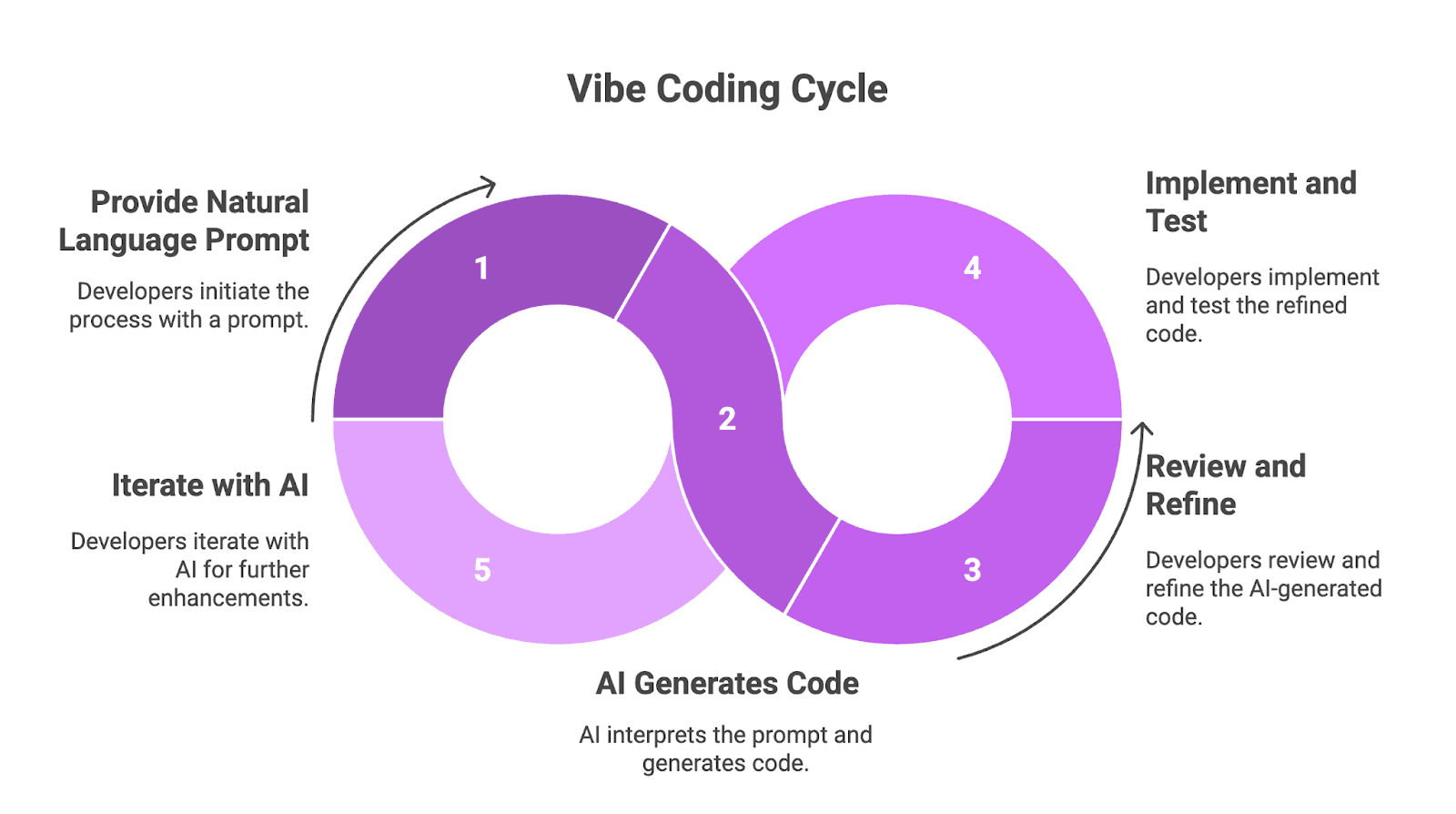
Figure 1: Vibe Coding Process
-
Key Benefits of Vibe Coding
3.1 Speed & Prototyping
- MVPs that are quick take hours instead of days: Low-code platforms that use AI let you go from an idea to a working prototype in just a few hours, instead of having to wait days or weeks for the wiring to be done on both the front and back ends. For instance, Google’s new Stitch can take a text description and turn it into working UI code that can be sent straight to Figma or HTML/CSS in just a few minutes.
- One-Prompt Full-Stack Bootstrapping: Instead of installing libraries, setting up servers, and wiring routes by hand, you just describe your REST endpoint and let the AI make the imports, models, routing, and even some basic tests. You can make a full-stack MVP with authentication and CRUD operations in just a few minutes using this “one-prompt” method.
3.2 Democratization of Development
- Empowering Non-Developers (PMs, Designers): Product managers and designers can now make live UI components from simple requests for features, like “login screen with social buttons,” without having to open a code editor. Tools like GeniusUI can even make React-ready code directly from your Figma mockups, which cuts down on the number of hand-offs.
- Lower Barrier to Entry: You don’t need deep syntax chops to build a dashboard or form because these platforms understand conversational prompts. Anyone on the team can tweak labels, colors, and field validations by simply editing the prompt.
3.3 Developer Productivity
- Reducing the number of routine tasks so that developers can focus on architecture: Instead of spending hours refactoring boilerplate or writing tests that are the same, engineers let AI assistants do the basic work of auto-generating unit tests, updating docs, and even suggesting improvements in CI/CD pipelines. This lets them spend more time on designing systems, tuning performance, and figuring out how to make business logic work.
-
Major Drawbacks & Risks
4.1 Code Quality and Maintainability:
- Technical Debt from AI-Generated Snippets: AI doesn’t always care about the long-term structure of your code when it spits out a working function. Those immediate rewards can hide problems and security holes that get worse over time, like the interest on a bad loan. A lot of money is set aside by teams to pay off this “invisible” debt later.
- Code Smells and Duplicate Code Blocks: LLMs can easily copy and paste similar helpers all over the place, which makes your codebase bigger and makes it harder to name things. Instead of adding new features, you’re refactoring boilerplate code.
4.2 Debuggability and Transparency:
- Following Errors Through “Invisible” AI Logic: When AI hides complicated logic behind a simple prompt, you can’t go through the code to figure out what went wrong, and debugging becomes a wild goose chase. It can be hard to figure out what caused a crash without looking closely at the parts that were made.
- Edge cases that aren’t covered and defaults that aren’t safe: AI tools sometimes skip important checks like input validation or even hard-code credentials, which can leave you open to bugs and security holes. It’s not uncommon for default settings to not meet your security standards and need to be fixed by hand.
4.3 Vendor Lock-In & Cost:
- Using proprietary AI APIs and spending tokens: If you ever want to switch AI vendors, you’ll have to pay a lot of money to make millions of new prompts or embeddings. Lock-in effects don’t just happen with code; they also happen with integrations that break and migrations that take months to finish.
- Unpredictable and Rising Usage Fees: GenAI pricing isn’t set-and-forget. Every model update or spike in tokens can send your monthly bill from a few hundred dollars to five figures almost overnight. Most businesses wish for predictable costs, but with token-based pricing, that’s rarely the case.
-
Outlook for 2025 and Beyond
5.1 Evolving AI Tooling
- Built-in testing and monitoring: Platforms will come with built-in testing suites, like automated test generation and performance monitors, to find bugs and drift before they go live.
- Guardrails at the prompt level: During AI code generation, developers will create guardrail files like
.cursorrulesthat automatically check for coding standards, security issues, and dependency policies. - Feedback loops for program analysis: New frameworks like REAL use static analysis and unit-test signals to make models better. This makes the difference between the speed of a prototype and the quality of a production model smaller.
5.2 Hybrid Development Models
- AI makes drafts, and then humans edit them. Teams will make sure that AI creates feature skeletons that developers can look over, change, and make stronger. This uses the reviewer’s knowledge and the speed of the generator.
- Seamless IDE hand-offs: IDEs (e.g., Visual Studio Code, JetBrains) will let you see AI suggestions and manual changes side by side. This will let engineers switch between “vibe” mode and full-control editing without having to change what they’re doing.
- Pipelines based on policy: AI-audit steps will be part of systems for continuous integration. These steps will stop merges that don’t pass the security or style checks that are set up in guardrail configs.
5.3 Long-Term Adoption Scenarios
- “Vibe coding” on devices: Developers will be able to get code suggestions and completions even when their edge devices aren’t connected to the internet thanks to lightweight LLMs. This will help each developer save time and money.
- Federated AI code assistants: These assistants will keep your privacy safe by only sharing model updates and training on local repos. This lets companies learn from each other without giving up their own code.
-
How to Experiment with Vibe Coding Today
Below are fundamental techniques to start vibe coding right away:
6.1 Top Tools & Plugins
- GitHub Copilot: Install a VS Code or JetBrains plugin, write a comment like “Create REST API for tasks,” and let it suggest the functions, classes, and tests then you tweak the result to fit your needs.
- Replit AI (Ghostwriter): You can use Replit’s online IDE to type or even speak a prompt such as, “Build a chat app with WebSockets” and it returns a complete full-stack setup (server, client, styling) in seconds.
- Cursor AI: You can add in your editor, so you can ask it in plain English to “Convert this function to async/await,” and it’ll refactor entire classes or scaffold new features instantly.
- Lovable: A chat‑first app builder that turns plain‑English prompts into deployable prototypes database schemas, REST routes, and UI components, then lets you refine either code or a visual layout on the fly
6.2 Safe Pilot Guidelines
- Embed AI in CI/CD: Plug AI-generated code into your continuous integration pipeline so every commit, AI or human, triggers builds and tests. Tools such as CodeConductor enable the automation of AI code evaluation alongside human-generated code.
- Set Lint Rules Early: Use AI-aware linters or write simple, plain-English lint definitions to catch style slip-ups and obvious bugs in AI snippets before they ever hit your main branch.
- Run Security Scans on Every PR: Integrate SAST, SCA, and DAST steps (for example, via Snyk or Jit) so you automatically flag hard-coded secrets, insecure dependencies, or missing input checks whenever someone opens a pull request.
6.3 Metrics to Track
- Velocity: Measure how many story points get done or how many pull requests merge each sprint, and compare that to your old manual baseline to see how much faster you’re moving.
- Defect Rate: Track defects per thousand lines of code or bug reports per release-so you can be sure that speed gains aren’t costing you quality.
You can safely try out vibe coding and see how it really affects your development workflow by using strong AI plugins, strong DevOps guardrails, and clear metrics.
6.4 Key Risks to Watch When Embracing Vibe Coding
- Unit Testing Gaps: AI-generated tests often just check to see if the implementation works instead of making sure that it does what it was meant to do. They miss important edge cases and logic errors.
- Unpredictable Usage Costs: Teams say that token-based billing for AI services can suddenly go up by 5 to 10 times after model updates.
- Scalability & Maintainability Issues: Relying too much on AI snippets can break up big codebases, hide dependencies, and add small bugs that make it hard to refactor.
- Ongoing Expertise Required: Experienced developers are still needed to integrate, review, and secure AI-generated code, make sure that architectures are strong, and protect against hidden vulnerabilities.
Conclusion
Vibe coding can quickly make prototypes and get more people involved, but it’s not magic, there’s a trade-off between speed and hidden costs. You can get things done faster, but you might end up with technical debt, security holes, and higher API bills.
Think about whether it’s right for you:
- How many people are on your team? Small teams can usually get by with quick MVPs, but bigger teams might need stricter checks.
- How complex is the project? If you’re making something that is very important to your mission, you have to do extra tests and reviews manually.
- How much risk are you willing to take? Jobs that are heavily regulated or sensitive to security need more supervision.
Most development teams will use vibe coding to make quick prototypes and tools for their own use by 2025. However, they won’t use it to replace experienced engineers completely. Even people who like Copilot still check about 40% of the AI-suggested code by hand before merging. In short, use it to get there quickly, but don’t skip the safety rails.
👉 Try Future AGI’s evaluation platform to benchmark AI-generated code quality.
FAQs
Q1: What is vibe coding?
With vibe coding, you just tell an AI model what you want your software to do in plain English, and it writes the code for you.
Q2: How does vibe coding speed up development?
AI takes care of the boring parts, like wiring up endpoints or building UI scaffolds, in a few hours. This lets you focus on the parts that really matter.
Q3: What are the main risks of vibe coding?
AI snippets can add bugs, leave security holes, or make technical debt worse. That’s why you still need to do careful reviews and refactoring before you ship.
Q4: Who should use vibe coding?
It’s great for small groups or people working alone who want to get to a prototype quickly, as well as for people who aren’t engineers who want quick app demos. But when you’re working on systems that are very important to the mission, experienced developers and manual checks are still very important.
Related Articles
View all
Should You Build or Buy LLM Observability?
Struggling with LLM monitoring? Learn how LLM observability tools help track costs, hallucinations & compliance. Decide to build or buy with clarity.

Grok 3 Technical Review: Everything You Need to Know
Explore Grok 3’s benchmarks, 1M token context, DeepSearch, and Think Mode. Compare performance vs GPT-4, Claude, Gemini in math, coding, and QA.


Prompt Injection: Exploring Its Risks and Solutions in AI Security
Prompt injection: A critical AI threat where hackers manipulate prompts to bypass security. Learn its risks, attack types, and strategies for protection.
