Voice Simulation and the Evals Playground
AI-conducted phone calls test voice agents end-to-end. Plus an interactive sandbox for evaluations in real time, with inline scoring on any trace span.
What's in this digest
Call Simulation — AI Agents Test Your Voice Agents
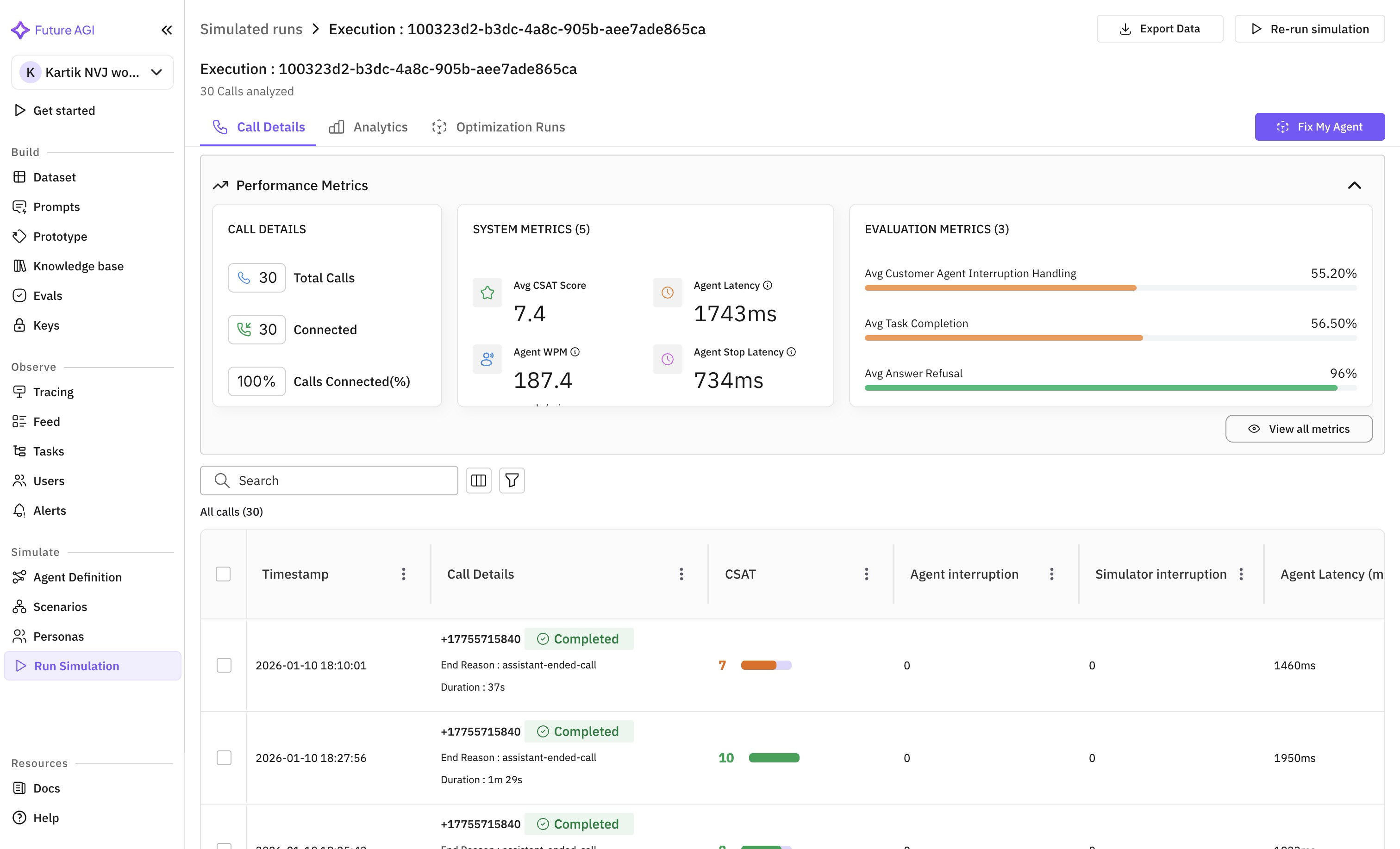
This release opens a new surface of the platform: voice. Everything Future AGI does for text agents — tracing, evaluation, prototyping — now extends to voice agents that make and take phone calls. The first capability is automated testing.
Manual quality assurance (QA) for voice agents is expensive, slow, and hard to scale. You hire testers, write scripts, schedule calls, and hope your coverage is broad enough. It rarely is. Starting today, Future AGI can conduct those calls for you.
Call Simulation introduces AI-powered simulator agents that place real phone calls to your voice agents. These simulator agents follow conversation scenarios, probe edge cases, and evaluate responses in real time. They handle interruptions, long pauses, and the unpredictable conversational patterns that real users bring to every call.
What’s new
- Simulator agents on live calls. AI simulators place actual phone calls to the voice agent under test — not mocked conversations, real ones over the telephony stack.
- Handle real-world dynamics. Long pauses, interruptions, accent variations, back-and-forth that doesn’t follow a script.
- Repeatable test cases. Every scenario is reproducible — the same simulation run executes the same flow every time, so you can track whether a change helped or hurt.
Why it matters
A human tester might run 20 scenarios a day. Call Simulation runs hundreds in the same time — with full reproducibility, which manual QA never offers. Quality assurance costs for voice teams drop 60-70% compared to manual calling.
Who it’s for
Quality assurance (QA) and testing teams managing voice agent quality before launch. Product teams running A/B tests across different agent versions. Compliance officers needing repeatable, audit-ready evidence that the agent follows its standard operating procedures.
Evals Playground — Test Before You Deploy
Building a good evaluation (a test that scores agent outputs against criteria you define) is iterative. Define criteria, test against examples, realize the rubric is too strict or too lenient, adjust, test again. Before this release, that cycle meant creating a dataset, running a full evaluation, waiting for results, and repeating.
Evals Playground removes that overhead.
What’s new
- Interactive sandbox. Paste a prompt-response pair, select evaluation criteria, pick a judge model, see the score in real time.
- Every evaluation type. Built-in metrics, custom LLM-as-judge evaluations (where one LLM scores the outputs of another), and composite scoring rules all work in the Playground.
- Judge model comparison. Toggle between judge models on the same example and see how scoring varies.
- Inline evaluations inside traces. Score any span in a trace on demand. Click a span, select an evaluation template, see the result inline — no export, no dataset entry, no batch run.
- Save as template. Configurations that work well become reusable evaluation templates.
Why it matters
Instead of guessing at rubric wording and discovering problems after a full evaluation run, you refine evaluations interactively until they score the way you expect.
Who it’s for
ML and AI engineers and data scientists building custom evaluations — especially teams doing this for the first time, and agent developers debugging production incidents where one bad response is the whole investigation and a full batch evaluation would be overkill.
Scenario Management
Building simulation test cases from scratch is tedious. The new Add scenarios from datasets feature imports conversation patterns directly from your existing datasets — if you have a collection of real customer transcripts, turn them into simulation scenarios with a few clicks. Each scenario becomes a repeatable test case that your simulator agents execute faithfully.
The simulator agent form and agent definition dropdowns make configuration straightforward. Select your target agent, define the simulator persona, choose your scenarios, and launch. No YAML files, no deployment scripts.
Platform, SDK, and Evaluation Updates
Mixpanel analytics integration. Full Mixpanel integration across the platform — feature interactions, evaluation runs, and simulation sessions are tracked, so teams can see how their organization actually uses Future AGI.
traceAI TypeScript Vercel instrumentor. Automatic observability for serverless AI functions on Vercel. Wrap your handler and every LLM call, tool invocation, and response is captured as a span (an individual step inside a trace).
CRUD on custom evaluations. Full create, read, update, and delete operations for custom evaluations — iterate on scoring rubrics, manage your evaluation library as it grows.
Add feedback to evaluations. Link human judgment directly to evaluation results. Over time, human feedback builds a labeled dataset that improves automated evaluation accuracy.
Span names in trace views. Span names now display inline in the trace view — a small change that makes navigating traces with dozens of nested operations much faster.
Refresh token cycle. Automatic token refresh keeps long simulation sessions running without re-authenticating.