1. Introduction
Picking a text-to-speech provider used to be simple. You listened to a demo, picked the most natural-sounding one, plugged in the API key, and moved on. In 2026, that approach will burn you. Voice agents handle customer calls. TTS powers accessibility layers. Audio content gets generated at scale for e-learning, podcasts, and marketing.
The TTS market is projected to reach $37.55 billion by 2032 (Grand View Research). With 40% of enterprise apps expected to include AI agents by 2026, your TTS choice is now an architecture decision.
Here is the catch: vendor benchmarks lie. Every provider publishes latency numbers measured with warm caches, short inputs, and zero concurrent load. Production is different. This guide is a practical TTS API comparison built for text-to-speech for developers a breakdown of 9 leading providers so you can pick one that holds up under real traffic.
2. What Makes a Text-to-Speech Provider "Best"?
No single TTS provider wins across every use case. The right choice depends on what you are building. A voice agent handling 10,000 concurrent calls has completely different needs from an audiobook pipeline processing long-form scripts overnight.
Here is what actually matters:
Latency under load: Reliable TTS latency benchmarks should reflect P95 numbers under concurrent load, not isolated single-call measurements. A P50 number from a single isolated call tells you almost nothing about real performance.
Voice quality at scale: Plenty of providers nail a two-sentence demo but start producing weird artifacts and choppy pacing once you feed them a paragraph over 200 words.
Pricing predictability: Transparent voice AI API pricing matters because credits, tiered subscriptions, and per-character billing all look different on your monthly invoice. What seems cheap at 10K characters can get expensive fast at 5M.
Language and accent coverage: If your product serves users globally, you need voices that sound native in each language, not just "good enough."
Deployment flexibility: Cloud-only APIs work fine for most teams. But if you operate in healthcare or finance, you might need on-prem or VPC options on the table.
Ecosystem fit: Going with a provider that plugs straight into your current cloud stack (AWS, GCP, Azure) can shave weeks off your integration timeline.
3. Metrics That Actually Determine Production TTS Performance
Before diving into individual providers, here are the metrics that matter in production.
Metric | What It Measures | Why It Matters |
Time-to-First-Audio (TTFA) | Milliseconds until the first audio byte arrives | Anything above 300ms creates a noticeable pause in conversational voice agents |
P95 Latency | The latency experienced by 95% of requests | Averages hide tail latency. A 100ms average with 2-second spikes will ruin your user experience |
Word Error Rate (WER) | Percentage of words mispronounced or skipped | Critical for names, numbers, addresses, and medical/legal terms |
Concurrent Session Handling | How many simultaneous TTS requests the API can serve without degradation | Determines whether your provider can handle traffic spikes |
Cost per 1K Characters | Actual unit cost including overages and tier jumps | The metric that determines whether your product is financially viable at scale |
Voice Consistency | Whether the same text produces consistent tone, pacing, and quality across calls | Inconsistency makes your brand sound unprofessional |
Table 1: Metrics That Actually Determine Production TTS Performance
One thing worth keeping in mind: most providers measure TTFA on warm, co-located infrastructure using short input strings. That is not your production environment. Before you commit to anything, run your own TTS latency benchmarks with realistic text lengths, actual concurrency patterns, and requests spread across the geographic regions your users sit in. Published numbers rarely reflect production TTS performance.
4. Top 8 Text-to-Speech Providers in 2026
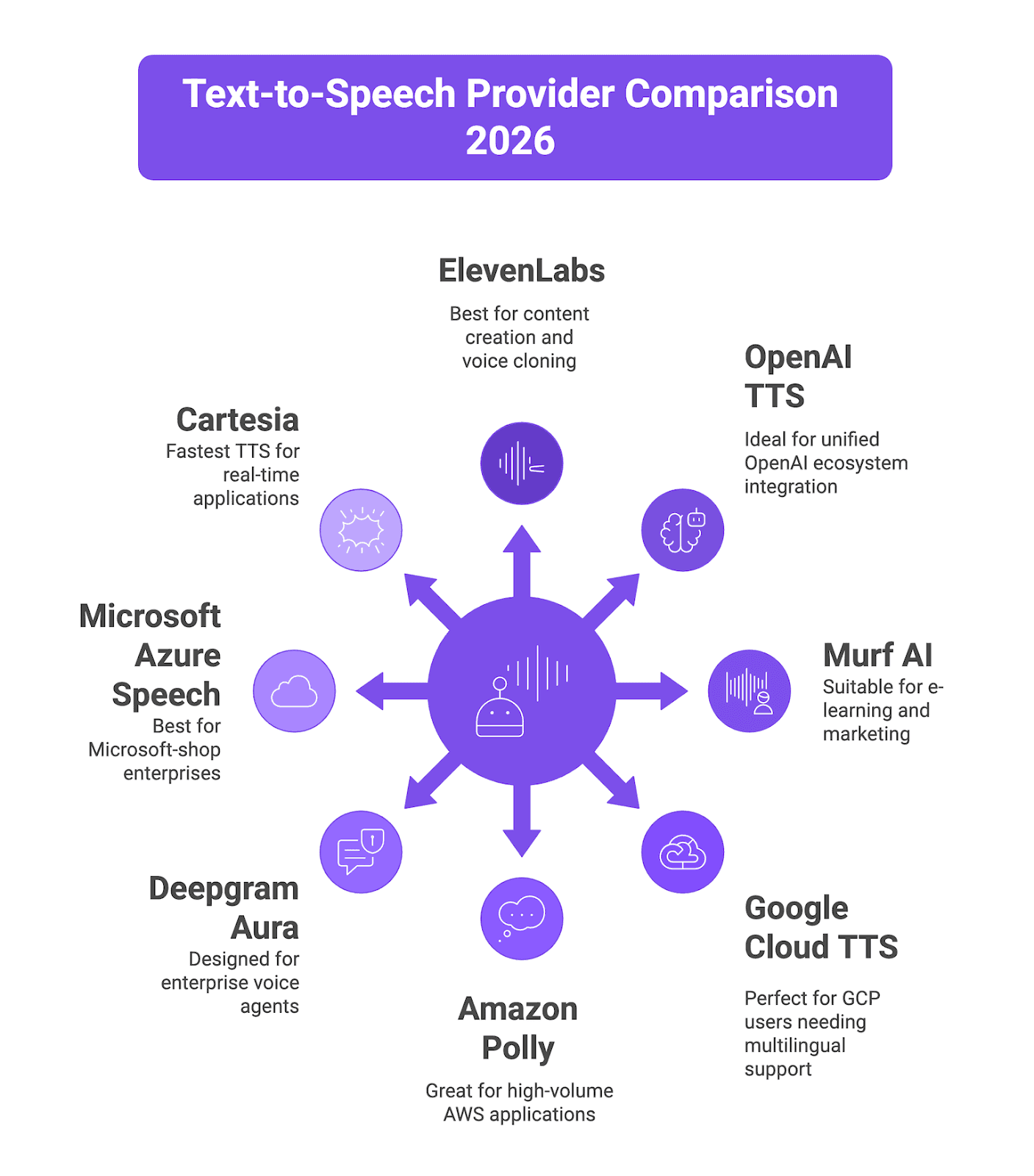
Figure 1: Text-to-Speech Provider Comparison 2026
4.1 ElevenLabs
What it is: ElevenLabs is probably the biggest name in TTS right now. They started out as a creator tool and have since grown into a full-blown audio infrastructure platform. They raised a $500M Series D at an $11B valuation, which tells you where the market thinks they are heading. Their models consistently produce some of the most emotionally rich and realistic voices you can get your hands on today.
Key features:
Eleven Flash v2.5 model achieves approximately 75ms TTFA for real-time applications
Multilingual v2/v3 models support 70+ languages with high naturalness scores
Voice cloning from as little as 3 minutes of reference audio (Professional Voice Cloning)
Over 3,000 voices in the library, including community-created options
Speech-to-speech voice transformation and AI dubbing
Best fit: Content creation (audiobooks, podcasts, video voiceovers), voice cloning applications, and any use case where voice expressiveness and emotional range are the top priority. If your TTS API comparison prioritizes expressiveness over raw speed, ElevenLabs belongs at the top of your shortlist.
Pricing: Free tier (10K credits/month). Starter at $5/month (30K characters). Creator at $22/month (100K characters). Pro at $99/month (500K characters). Scale at $330/month (2M characters). Business at $1,320/month (11M credits). Flash/Turbo models cost roughly 0.5 credits per character. Multilingual v2 costs 1 credit per character.
4.2 OpenAI TTS
What it is: OpenAI brought voice generation into the same API ecosystem developers already use for GPT models. Same auth, same billing, same dashboard. The newer gpt-4o-mini-tts model is interesting because it can follow instructions, so you can tell it how to speak, not just what to say.
Key features:
Three model tiers to pick from: TTS-1 for standard quality, TTS-1-HD if you want premium output, and gpt-4o-mini-tts which actually follows instructions on how to deliver the speech
13 built-in voices like Alloy, Ash, Coral, Echo, Nova, and Sage
Outputs in MP3, Opus, AAC, FLAC, WAV, and PCM so you are covered on format compatibility
Streaming works out of the box for real-time playback
Dead simple REST API with just one endpoint to hit
Best fit: Teams already using the OpenAI ecosystem who want to keep their stack unified. Rapid prototyping. Use cases where good-enough voice quality at predictable pricing beats premium expressiveness.
Pricing: TTS-1 standard costs $15 per million characters. TTS-1-HD costs $30 per million characters. gpt-4o-mini-tts uses token-based pricing at $0.60/1M input tokens + $12/1M audio output tokens (approximately $0.015 per minute).
4.3 Murf AI
What it is: Murf AI started as a voiceover studio for non-technical users and has evolved into a full audio content platform. Their newer Falcon model is purpose-built for low-latency conversational use cases and posts impressive benchmarks.
Key features:
Falcon model achieves 130ms TTFA across 10+ global regions measured via third-party relay
200+ voices in 35+ languages and multiple accents
Built-in studio with timeline editor, voice styling, and media sync
"Say it My Way" feature lets you record a rendition to guide AI delivery
99.38% pronunciation accuracy benchmark across multiple languages
Best fit: E-learning teams, marketing agencies producing video voiceovers, and enterprises needing a studio-style workflow with collaboration features. Falcon specifically targets voice agent deployments.
Pricing: $0.03/ 1000 characters for TTS Gen 2.
4.4 Google Cloud Text-to-Speech
What it is: Google Cloud Text-to-Speech lives inside the broader GCP AI suite. It offers more than 380 neural voices across 50+ languages. The nice thing is that it ties directly into the GCP tools your team already knows, including IAM for access control, billing, and monitoring.
Key features:
They offer several model tiers: Standard, WaveNet, Neural2, Studio, and Chirp 3 HD
More than 50 languages available with around 380 different voices
You get SSML support so you can fine-tune prosody control
Works directly with Dialogflow and Google Cloud Contact Center AI
Train custom voices to match your brand
Best fit: This is ideal if your organization already runs on GCP and needs everything to integrate smoothly across the platform. It's also a solid choice when you need extensive multilingual support and enterprise-level compliance standards.
Pricing: Standard voices at $4/million characters. WaveNet voices at $16/million characters. Neural2 and Studio voices cost more and sit in the higher pricing tiers. The free tier is fairly generous though, giving you 1M standard characters and 1M WaveNet characters every month to work with.
4.5 Amazon Polly
What it is: AWS's text-to-speech service, offering reliable speech synthesis with deep integration into the AWS ecosystem. It is the pragmatic, infrastructure-focused choice.
Key features:
Voice options come in Standard and Neural tiers covering 29+ languages.
A particularly useful feature is Speech Marks, which provides timestamps down to the word and phoneme level.
If you're building anything with lip-sync or animated characters, that's gold.
You can also set up custom lexicons to make sure brand names and technical jargon are pronounced correctly every time.
Long-form NTTS that works well for articles and books
Complete AWS integration including IAM, CloudWatch, S3, and Lambda
Best fit: Perfect for high-volume applications that already run on AWS infrastructure. Works great for IVR systems and telephony, especially when you need predictable costs at massive scale.
Pricing: Standard voices at $4/million characters. Neural voices at $16/million characters. Free tier includes 5 million characters/month for 12 months.
4.6 Deepgram Aura
What it is: Deepgram built its reputation on speech-to-text and extended that infrastructure to TTS with Aura-2. It's not a general-purpose model repurposed for voice. It was specifically designed for enterprise use cases like real-time voice agents and automated customer interactions.
Key features:
Time to first byte sits under 200ms, and with optimization you can push it down to around 90ms.
Pricing is refreshingly simple. All 40+ voices are available at one flat rate with no tier restrictions.
On the pronunciation side, it handles the tricky stuff that trips up most engines: drug names, legal references, alphanumeric IDs.
You can deploy it however you need to, whether that's cloud, VPC, or on your own hardware.
And since Deepgram offers both STT and TTS through their Enterprise Runtime, you can run your full speech pipeline on a single platform.
Best fit: Enterprise teams that need voice agents or call center automation they can count on in production. The on-premises option is a big deal for regulated industries. It's a particularly strong pick for customer service applications and IVR deployments. For teams focused on production TTS performance in regulated environments, Deepgram's on-premises option is a significant differentiator.
Pricing: $0.030 per 1,000 characters with usage-based pricing. Growth tier at $0.027/1K characters. All voices included at a single rate. No hidden fees for quality tiers.
4.7 Microsoft Azure Speech
What it is: This is Microsoft's neural TTS offering, packaged as part of Azure AI Services. It plugs right into the Microsoft ecosystem, which is a big plus if your team is already invested there. Worth noting that it also has the broadest language coverage you'll find among the major cloud providers.
Key features:
129+ neural voices across 54 locales
Custom Neural Voice for brand-specific voice training
On-premises deployment via neural TTS containers
SSML with fine-grained emotion, style, and role control
Batch synthesis for high-volume offline processing
Best fit: Microsoft-shop enterprises, applications needing maximum language and locale coverage, and regulated industries requiring on-premises deployment.
Pricing: Neural voices at $12/million characters. You can train and host a Custom Neural Voice if your use case calls for it, but that comes with additional charges on top of the base pricing. There's a free tier that includes 0.5 million neural characters per month, which gives you room to experiment before scaling up.
4.8 Cartesia
What it is: Cartesia doesn't follow the typical transformer playbook for TTS. They built their system on State Space Models (SSMs), which is a fundamentally different architecture. The payoff is extreme latency optimization that transformer-based alternatives have a hard time competing with. Their flagship offering is Sonic-3.
Key features:
Sonic Turbo hits 40ms time to first audio, which is the fastest you'll find on the market right now.
Standard Sonic-3 runs at 90ms, still fast enough for natural conversation flow.
You get 40+ languages that cover roughly 95% of the world's population.
You can get an instant clone from just 3 seconds of audio, or feed it 30 minutes of recordings for a professional-grade result backed by a 99.9% SLA with SOC2 compliance in place.
GDPR compliance is covered, and on-premises deployment is an option if you need it.
Best fit: Real-time voice agents in scenarios where even a small latency improvement changes how the conversation feels. Developers building brand-specific voice experiences. Companies needing the absolute fastest TTS response times.
Pricing: $0.038 per 1,000 characters. Enterprise pricing available via sales contact. Free developer sandbox available.
5. Comprehensive Comparison Table
Provider | TTFA (Best) | Languages | Voices | Pricing Model | Starting Price | Voice Cloning | On-Prem |
ElevenLabs | ~75ms (Flash) | 70+ | 3,000+ | Subscription + per-char | Free / $5/mo | Yes (from Starter) | No |
OpenAI TTS | ~200ms | 13+ | 13 | Pay-per-character/token | $15/1M chars | No | No |
Murf AI | ~130ms (Falcon) | 35+ | 200+ | Subscription | Free / $19/mo | Enterprise only | No |
Google Cloud TTS | ~200ms | 50+ | 380+ | Pay-per-character | $4/1M chars (Standard) | Custom Voice (paid) | No |
Amazon Polly | ~200ms | 29+ | 60+ | Pay-per-character | $4/1M chars (Standard) | No | No |
Deepgram Aura | ~90ms | 7+ | 40+ | Pay-per-character | $0.030/1K chars | No | Yes |
Azure Speech | ~200ms | 54 locales | 129+ | Pay-per-character | $16/1M chars (Neural) | Custom Neural Voice | Yes |
Cartesia | ~40ms (Turbo) | 40+ | Unlimited cloning | Pay-per-character | $0.038/1K chars | Yes (3s instant) | Yes |
Table 2: Comparison Table of Text-to-Speech Provider
The table below distills our full TTS API comparison into the metrics that matter most for text-to-speech for developers evaluating providers at scale.
6. How to Choose a TTS Provider: Decision Framework
Choosing a TTS provider is not just a feature comparison exercise. It is an architecture decision that affects your product's unit economics, user experience, and operational complexity. Here is a practical framework.
Step 1: Define your use case category.
When you're working on a real-time voice agent that needs to respond in under 300ms, you should focus on Cartesia Sonic, Deepgram Aura, ElevenLabs Flash, or Murf Falcon. But if you're creating content where quality matters more than speed, go with ElevenLabs Multilingual v2 or v3, or try Google Cloud Studio voices instead.
Step 2: Run your own TTS latency benchmarks
Never trust published numbers. Create a test setup that uses full production-length text instead of just two-sentence samples. Send your requests from the same geographic locations where your actual users are, and run concurrent requests that match the traffic you expect to handle. When measuring performance, track the P95 rather than averages.
Step 3: Calculate true cost at your projected scale.
Figure out how many characters or tokens you're using right now, then calculate what you'd need if your volume triples. Keep an eye on when you might jump to a higher pricing tier, any extra fees you'd pay for going over limits, and whether your credits expire. Just because a provider is the cheapest option when you're using 100K characters per month doesn't mean they'll still be the best deal when you hit 5 million. Comparing voice AI API pricing at your current volume is not enough, calculate what happens when volume triples.
Step 4: Test pronunciation on your domain.
Feed your provider medical terms, product names, street addresses, phone numbers, and currency values. Enterprise use cases live and die on how well a provider handles these edge cases.
Step 5: Evaluate vendor lock-in risk.
Make sure the provider works with standard audio formats and find out if you can move your voice clones to another service if needed. Think about how your workflow would change if they decide to raise prices later. When you use a unified evaluation layer, it becomes much easier to test different providers and switch between them without having to rebuild your entire pipeline from scratch. A provider-agnostic evaluation layer makes your TTS API comparison repeatable and removes switching costs.
7. How Future AGI Can Help You Evaluate TTS Providers
A TTS API comparison on paper is one thing, but validating production TTS performance under real conditions is what actually matters. Future AGI is an end-to-end evaluation, simulation, and observability platform for AI applications, including voice AI. Instead of relying on vendor-published benchmarks, Future AGI lets you test providers against your actual use cases.
Future AGI is built to evaluate your entire voice AI stack, not just one component. TTS is one critical layer, but production voice quality depends on how STT, LLM orchestration, and TTS all perform together. Here is how the platform helps:
Simulate lets you A/B test your complete voice stack (STT, LLM, TTS) by running thousands of simulated conversations with diverse accents, interruptions, and edge cases. For TTS specifically, you can compare providers like ElevenLabs, OpenAI, Deepgram, and Cartesia side-by-side with real audio output evaluation.
Audio-level evaluation catches problems transcripts miss across your entire pipeline: latency spikes, tone mismatches, robotic artifacts, and quality drops that only surface in the audio layer. TTS degradation is one of the most common issues it surfaces.
Observe provides real-time production monitoring across your full voice stack with automated alerts for latency spikes, tone anomalies, and quality drops. When your TTS provider has an off day, you will know immediately. Integrates with Slack, PagerDuty, and DataDog.
Provider-agnostic benchmarking lets you test and switch between TTS providers without rewriting your evaluation infrastructure.
One real-world example: a voice AI team handling 50,000 daily calls used Future AGI to discover that 4% of their calls had severe latency and quality issues invisible to transcript-based dashboards. After using Simulate and Observe together, they dropped P95 latency from 1.4 seconds to 380ms and improved tone consistency from 72% to 91%.
If you are serious about shipping voice AI that works in production, try Future AGI free.
8. Conclusion
Whether your priority is voice AI API pricing, TTS latency benchmarks, or voice quality, the right answer comes from testing not from spec sheets. This text-to-speech for developers guide should give you the framework to decide with confidence.
The short version: for the most expressive voices, go with ElevenLabs. For the lowest latency, Cartesia and Deepgram lead. For cloud ecosystem alignment, AWS Polly, Google Cloud TTS, or Azure Speech save you integration time. And for a unified evaluation layer that validates your provider actually performs in production, Future AGI should be your first stop.
Do not trust demo pages. Run your own benchmarks. Measure what matters. Ship voice experiences that hold up under real-world conditions.
Frequently Asked Questions
What do TTS latency benchmarks look like across the top providers in 2026?
How does voice AI API pricing compare for high-volume production workloads?
3. Can I use voice cloning with TTS providers?
4. How do I benchmark TTS providers for my specific use case?