Voice Agent Simulation: A 2026 Engineering Guide
Engineer voice agent simulation: 18 personas, auto-generated branching scenarios, four-step test wizard, Error Localization, programmatic eval API.
Table of Contents
The economics of voice agent QA flipped over the 2025 release cycle. Three years ago you tested by listening to recordings. Two years ago you tested by writing scripts that played transcripts at the agent. By the end of 2025 the right way to test a voice agent was to simulate thousands of synthetic personas placing real audio calls, score every turn with the eval engine, and use turn-level error localization to debug failures in minutes. This guide walks through the engineering surface for voice agent simulation as it stands in 2026: persona authoring, auto-generated scenarios, the four-step Run Tests wizard, Error Localization, and the programmatic eval API that turns simulation into a CI primitive.
TL;DR: the simulation loop
- Define the Agent Definition in Future AGI’s Simulate product. Includes name, behaviour, capabilities, constraints.
- Pick personas from the 18 pre-built library plus any custom personas you’ve authored.
- Generate scenarios in Workflow Builder. Auto-Generate Graph produces conversation paths, personas, situations, outcomes for 20, 50, or 100 rows.
- Run the 4-step wizard: Test Config, Scenario Select, Eval Config, Review and Execute.
- Triage with Error Localization plus the reasoning column. Each failure surfaces the exact turn and the judge’s explanation.
- Automate with the programmatic eval API for CI-driven re-runs.
The pre-launch test sprint that used to take six weeks now runs in three days. The compounding speedup is from the auto-generation plus turn-level localization plus the API surface, not from any single feature.
The five surfaces of Simulate
Future AGI’s Simulate product has five core surfaces. Each owns a specific part of the workflow.
Agent Definition. The FAGI representation of your voice agent. Combines name, behaviour, capabilities, constraints. The Agent Definition is reused across simulation and voice observability so you don’t define the agent twice.
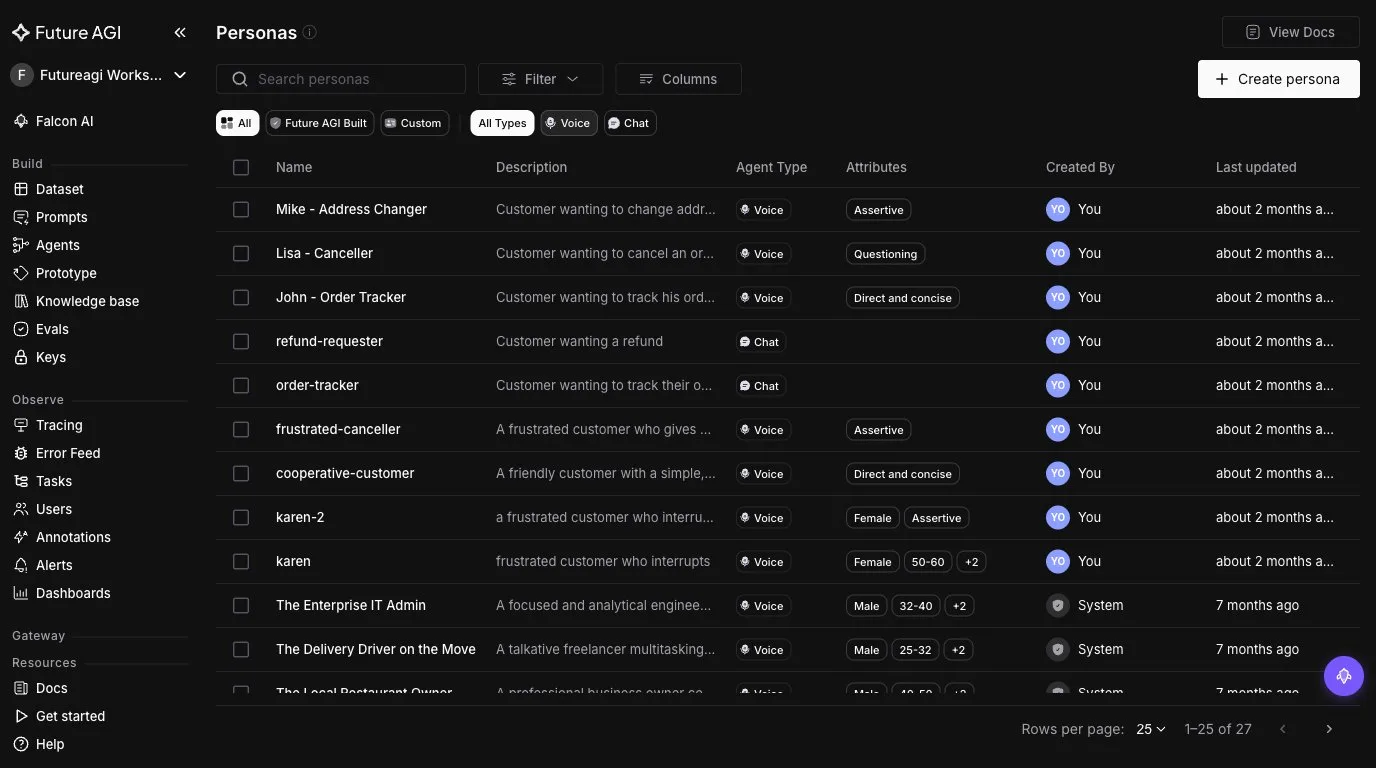
Persona library. 18 pre-built personas plus unlimited custom-persona authoring. Custom personas control gender, age range, location, accent, communication style, speed, background noise, and multilingual settings.
Scenarios. Workflow Builder is the primary scenario authoring surface. Manual scenario authoring is supported but auto-generation is the default path for non-trivial test matrices.
Run Tests. The 4-step wizard executes the test matrix. Search and filter let you slice the scenario library. Performance metrics show progress in real time.
Results triage. Error Localization, reasoning column, programmatic eval API. The triage surface is where simulation actually pays off because the failures it surfaces are the work you need to ship.
The surfaces stack. Agent Definition feeds Persona selection feeds Scenarios feeds Run Tests feeds Results. The dependency graph is linear; you don’t have to refactor downstream surfaces when you change upstream ones.
The 18 pre-built personas
The 18 pre-built personas span the common voice-agent caller archetypes:
- First-time caller, confused. Doesn’t know what to ask, requires patient handling.
- Repeat caller, in a hurry. Knows the system, wants the answer fast.
- Frustrated caller. Already had a bad experience, hostile tone.
- Elderly caller, hard of hearing. Slow speech, needs the agent to repeat.
- Tech-savvy customer. Will troubleshoot alongside the agent.
- Non-native English speaker. Strong accent, occasional grammar errors.
- Distracted caller. Background noise, multiple interruptions.
- Polite escalator. Calm but insistent on speaking to a human.
- Information-gatherer. Asks many questions before committing.
- Direct purchaser. Knows what they want, minimal small talk.
- Skeptical caller. Questions the agent’s competence.
- Caller with a complaint. Emotional, wants validation before resolution.
- Caller with a complex request. Multi-step, requires careful tracking.
- Repeat-question caller. Asks the same thing in different ways.
- Caller who interrupts. Breaks the agent mid-response.
- Compliance-conscious caller. Asks about data handling, privacy.
- Casual conversational caller. Treats the agent like a person.
- Hostile prankster. Tests the agent’s policy boundaries.
Each pre-built persona has default settings (age, gender, location, accent) that you can override per scenario. For most launch matrices the 18 pre-built personas plus a handful of custom personas (specific to your industry or customer base) is sufficient.
Custom persona authoring
The custom-persona authoring surface is where the real depth lives. The controls:
Basic Info:
- Name and description.
- Gender: male, female, both.
- Age range: 18-25, 25-32, 32-40, 40-50, 50-60, 60+.
- Location: US, Canada, UK, Australia, India (with custom strings for sub-regional variants).
Behavioural Settings:
- Personality traits (assertive, friendly, anxious, methodical).
- Communication style (formal, casual, business, customer-service).
- Accent (sub-regional dialect string).
Conversation Settings:
- Speed (slow, normal, fast).
- Response timing (quick, normal, deliberate).
- Background noise (none, light, moderate, heavy).
- Multilingual toggle (with language and accent specifier).
Custom Properties:
- Free-form key-value pairs for industry-specific attributes.
- Additional instructions in plain text.
The “additional instructions” field is what makes custom personas powerful for industry-specific testing. You can write “this persona has been on hold for 20 minutes before reaching the voice agent” or “this persona has been a customer for 5 years and references that history” and the persona behaves accordingly.
For an insurance sales agent the custom-persona surface might define:
- “First-time auto insurance shopper.” Female, 25-32, US, casual, fast speech, light background noise. Additional instructions: “Has just bought their first car, never had auto insurance before, asks basic questions, easily overwhelmed by jargon.”
- “Multi-policy switcher.” Male, 40-50, US, business register, normal speed, no background noise. Additional instructions: “Currently has auto and home with a competitor, is shopping for a bundled quote, knows industry terms, will negotiate.”
- “Senior citizen renewal.” Female, 60+, US, slow speech, moderate hearing impairment. Additional instructions: “Has had the same auto policy for 30 years, called to renew, will be confused by any process changes.”
- “Small business fleet.” Male, 32-40, UK, formal, fast speech, office background noise. Additional instructions: “Manages a fleet of 12 vehicles, calls for a quote, will ask about claims history discounts.”
Four personas plus the relevant pre-built ones cover most of the insurance sales call surface. The library grows over time as your agent evolves.
Workflow Builder: auto-generated scenarios
Workflow Builder is the visual scenario authoring surface. It exposes three node types (Conversation, End Call, Transfer Call) that compose into branching test graphs. Manual authoring is supported through node-by-node graph construction; auto-generation is the default path because it scales.
Three other scenario sources feed the same Run Tests wizard: Dataset scenarios (upload CSV/JSON/Excel files of conversation seeds, or run synthetic dataset generation against a description), Script-based scenarios (predetermined dialog scripts you author directly), and Auto-generated scenarios (the Workflow Builder path described below). All four routes (Workflow Builder, Dataset CSV/JSON/Excel, Synthetic Dataset, Script-based) produce scenario rows that the wizard runs identically.
The Auto-Generate Graph flow:
- Pick the Agent Definition.
- Describe the scenario in plain text. Example for the insurance sales agent: “Customer calls to get a quote for auto insurance. Some have never had insurance before, some are switching from a competitor, some are renewing. The agent has to qualify the customer (driving history, vehicle, location), present a quote, and close the sale or schedule a follow-up.”
- Pick the row count: 20, 50, or 100.
- Optionally attach a persona matrix (the personas the auto-generator should draw from).
FAGI generates the scenario graph automatically:
- Conversation paths: the branching dialog structures that cover the scenario surface.
- Personas: drawn from your matrix, balanced across the branches.
- Situations: variations on the base scenario (caller has driving violations vs clean record, single vehicle vs multiple vehicles, etc.).
- Outcomes: success criteria for each branch (quote presented, sale closed, follow-up scheduled, qualified out).
Branch visibility (released November 2025) shows the branching graph. If the auto-generator over-weighted the “first-time shopper” branch and under-weighted the “switcher” branch, the visualization surfaces it. You can rebalance before running tests.
For a 100-row insurance sales scenario the auto-generator typically produces 8-12 distinct conversation paths covering the qualification, quote, objection, and close phases. Each path has multiple persona-situation combinations. The full scenario graph is hundreds of test cases, all derived from one plain-text scenario description.
The four-step Run Tests wizard
The Run Tests wizard wraps execution in a four-step flow:
Step 1: Test Config. Name the test. Attach the Agent Definition. Set concurrency (default 5 parallel calls; high-volume tests can run 25+). Set retry behaviour (retry on transient failures, abort on agent errors). Toggle recording (keep audio recordings for failed scenarios so you can replay them).
Step 2: Scenario Select. Pick scenarios from the Workflow Builder library. Search by name; filter by tag, by date, by author. Multi-select to include scenarios from multiple workflows.
Step 3: Eval Config. Attach the rubrics that score each scenario. For voice testing, start with conversation_resolution, task_completion, audio_transcription, audio_quality, and the tone/style rubrics relevant to the workflow (is_polite, is_helpful, is_concise). Add the evaluate_function_calling template for tool-calling agents. Add domain-specific custom evaluators authored in code or via the in-product evaluator agent.
Step 4: Review and Execute. The review screen shows the matrix size (scenarios x personas x rubrics), the estimated cost, and the estimated wall-clock duration. Confirm and kick off.
# Programmatic equivalent
from fi.evals import (
    Evaluator,
    ConversationResolution,
    TaskCompletion,
    IsPolite,
    IsHelpful,
    IsConcise,
)
from fi.testcases import ConversationalTestCase, LLMTestCase

ev = Evaluator(fi_api_key="...", fi_secret_key="...")

# After the simulation run completes, score each conversation
conv = ConversationalTestCase(messages=[
    LLMTestCase(query="I'd like a quote for auto insurance.",
                response="I can help with that. Can I get your zip code?"),
    LLMTestCase(query="94107.",
                response="Got it. How many vehicles need coverage?"),
])

result = ev.evaluate(
    eval_templates=[
        ConversationResolution(),
        TaskCompletion(),
        IsPolite(),
        IsHelpful(),
        IsConcise(),
    ],
    inputs=[conv],
)
The wizard runs the same five-rubric package across every scenario in the test matrix. Live progress streams in the dashboard so you can watch the test execute and intervene if needed.
Error Localization: the turn-level debug surface
The most impactful Simulate feature for engineering productivity is Error Localization, released November 2025. When a scenario fails, Error Localization pinpoints the exact turn where the failure happened.
The before/after on debug time is significant. Before Error Localization the engineer reads each failing scenario’s transcript looking for the failure pattern. A 5,000-scenario test with a 15% fail rate produces 750 failing transcripts to read. At three minutes per transcript that’s 37 hours of manual review.
With Error Localization the engineer queries the dashboard:
SELECT failing_turn_index, COUNT(*) as count
FROM failed_scenarios
GROUP BY failing_turn_index
ORDER BY count DESC
(Conceptually, the dashboard ships the query as a one-click filter.) The output is a histogram showing which turn killed which scenarios. Drilling into the top turn surfaces the failure pattern in minutes, not days.
The reasoning column complements Error Localization. For each failing turn the eval judge surfaces its reasoning: “The agent’s response to the caller’s question about deductibles was technically accurate but contained insurance jargon (deductible-aggregate, third-party-liability) the caller wouldn’t understand. The caller responded with confusion. is_helpful scored 0.3 because the response wasn’t actionable for this persona.”
Together, Error Localization plus reasoning column compress hours of investigation into minutes. The eval surface becomes the debugger.
Programmatic eval API
The programmatic eval API (released November 2025) lets you configure and re-run evaluations against historical scenarios via API. Use cases:
Backfill a new rubric. A new rubric ships. You want to score the last 50,000 simulation runs against it without rerunning the simulations.
Update custom-evaluator weights. Your custom-evaluator weights changed after a calibration session. Re-score the test history with the new weights.
Re-run with new tag attribution. A new tag dimension goes live (e.g., caller_history for first-time vs repeat). Backfill the tag on historical runs.
CI integration. Run a smaller smoke test (50 scenarios) on every PR. Run the full launch matrix (5,000 scenarios) on every release candidate. Wire the API into your CI pipeline.
# Pseudocode: CI smoke test on PR. Refer to docs.futureagi.com for the current
# programmatic eval client surface; method names and arguments may differ.
from fi.evals import Evaluator

ev = Evaluator(fi_api_key="...", fi_secret_key="...")

results = ev.run_simulation(  # pseudocode
    agent_definition_id="insurance_sales_agent_v3",
    scenario_ids=["smoke_test_50_scenarios"],
    eval_templates=[
        "conversation_resolution",
        "task_completion",
        "is_polite",
        "is_helpful",
        "is_concise",
    ],
)

if results.pass_rate < 0.85:
    raise Exception(f"Smoke test failed: pass rate {results.pass_rate}")
The API surface plus the dashboard plus Error Localization plus Error Feed is the full simulation surface for both manual operators and automated CI. Teams that previously gated promotion on manual QA gate it on the API now.
The Enable Others mode and Indian phone numbers
Vapi, Retell, and LiveKit are natively supported in Simulate via provider API key + Assistant ID. Pipecat-based agents and custom-stack agents use the Enable Others mode, which simulates calls via real telephony to your agent’s phone number.
The Enable Others mode covers:
- Pipecat agents (any orchestration on top of Pipecat).
- LiveKit agents (any LiveKit-based voice stack).
- Custom voice stacks reachable by phone.
- Hosted IVR or telephony-first agents from Twilio, Telnyx, Agora.
- Any agent that has a phone number callers can dial.
The simulated persona’s voice is placed as a real phone call. The agent answers, the test proceeds end to end. The audio goes through real telephony codecs, which matters for accent and audio-quality testing (codecs degrade audio in ways that affect ASR more than they affect standard audio).
Indian phone number support was added November 2025. For deployments in India this means you can test the actual production call path through Indian telephony, not just simulate it in software. The codec degradation, the regional network latency, the local-carrier routing - all of it is in the test.
Custom voices from ElevenLabs and Cartesia
Custom voices from ElevenLabs and Cartesia (released November 2025) plug into the persona authoring config. For simulation this matters when:
- The default Simulate voices don’t carry the regional fidelity you need for hard-to-recognize dialects.
- You want to use a consented, licensed, or synthetic voice from ElevenLabs or Cartesia for reproducible testing of a specific edge case.
- You want lowest-latency TTS (Cartesia’s Sonic family) for high-concurrency simulation runs.
- You need a voice that matches a specific demographic (older female, particular regional accent) that the default library doesn’t ship.
The workflow:
- In ElevenLabs or Cartesia, pick or clone a voice.
- Configure the voice in Run Prompt and Experiments.
- Attach the voice to the persona authoring config.
- Run scenarios. The persona speaks with the custom voice.
The custom-voice route is what enables true regulator-grade simulation. A regulator audit that asks “did you test the elderly female caller with a Scottish accent?” is answered with “yes, here are the 500 simulated calls with that specific persona using a native Scottish female voice from ElevenLabs.”
A worked simulation plan: insurance sales agent
A worked plan for an insurance sales voice agent launching for personal auto insurance.
Week 1: Agent Definition and persona matrix.
Agent Definition: “Voice agent for personal auto insurance sales. Qualifies callers on driving history, vehicle details, and location. Generates a quote. Handles common objections (price, coverage limits, deductible). Closes sale or schedules follow-up. Handoff to human if caller requests, if objection is unfamiliar, or if caller becomes hostile.”
Persona matrix: 4 custom personas (first-time shopper, multi-policy switcher, senior renewal, small business fleet) + 6 pre-built personas (in-a-hurry, frustrated, polite escalator, information-gatherer, direct purchaser, skeptical).
Week 1, day 4: scenario generation.
Run Auto-Generate Graph against the Agent Definition. Description: “Customer calls to get a quote for personal auto insurance. Includes qualification, quote presentation, objection handling, and close or follow-up scheduling.” Row count: 100. Persona matrix: the 10 personas above.
Output: 12 conversation paths covering qualification depth (full vs minimal), quote outcome (qualified, qualified-with-conditions, declined), objection type (price, coverage, deductible, brand), and close (sale, follow-up, walk-away). 100 rows distributed across the 12 paths.
Branch visibility check: the auto-generator weighted the price-objection branch heavily (35% of rows). The team rebalances to 25% so other objection types get more coverage.
Week 2: test execution.
Run the four-step wizard. 100 scenarios x 10 personas x 5 rubrics = 5,000 scenario-rubric pairs. Concurrency at 10. Recording on for failures. Total wall-clock: 6 hours.
Week 2, day 3: triage.
Pass rate on conversation_resolution: 76%. Below the 80% pre-launch gate. Error Localization surfaces the failing turn distribution:
- Turn 5-6: 41% of failures. Quote presentation phase.
- Turn 8-9: 29% of failures. Objection handling phase.
- Turn 3-4: 22% of failures. Qualification phase.
- Other: 8%.
Error Feed clusters into seven named issues. Top three:
- Quote-jargon cluster (41% of failures). Agent uses insurance jargon (“deductible-aggregate”, “third-party-liability”) when presenting quotes to first-time shoppers. The personas can’t parse the response. Quick fix: jargon-glossary prompt for first-time shoppers (detect via the persona signal that they’re first-time, then plain-English the quote).
- Objection-rebuttal cluster (29% of failures). Agent’s first rebuttal to price objection is “this is the best value.” Personas push back, agent doesn’t have a second rebuttal. Quick fix: layered rebuttal sequence with three escalating arguments before escalation.
- Qualification-overcollection cluster (22% of failures). Agent asks 12+ qualification questions before presenting a quote. Personas get impatient and hang up. Quick fix: reduce required qualifications to 6 (the ones that materially affect the quote) and defer the rest to post-sale.
Week 3: patch and re-test.
Engineer ships the three quick-fixes. Re-run the same 100 scenarios via the programmatic eval API. Pass rate lifts to 89%. Pre-launch gate cleared. Launch proceeds.
The whole cycle from Agent Definition to launch-ready is three weeks. Without auto-generation plus Error Localization plus Error Feed plus the programmatic API the same cycle takes 12+ weeks.
CI integration: simulation as a gate
The programmatic eval API turns simulation into a CI primitive. The common gating pattern:
Per-PR smoke test. 50 scenarios covering the top three intents. Pass rate threshold: 85% on conversation_resolution. Runs in 20 minutes. Blocks merge if below threshold.
Per-release candidate full test. 5,000 scenarios across all intents and personas. Pass rate threshold: 80% on conversation_resolution, 85% on task_completion. Runs in 6 hours. Blocks release if below threshold.
Nightly drift test. 1,000 scenarios sampled randomly. Compares pass rate against the rolling baseline. Surfaces drift between releases (model provider changes, dependency updates).
The CI integration is what makes simulation a hard gate instead of a soft check. Teams that gate on simulation in CI catch regressions before canary rollout when scenarios cover the affected intents and personas.
Tag-based attribution in simulation
Tag-based attribution applies to simulation traces the same way it applies to production traces. The tags that matter for simulation:
scenario_id: the source scenario in the Workflow Builder.persona_id: the persona that ran the scenario.branch_path: which branch of the auto-generated graph this run took.agent_version: the Agent Definition version under test.eval_run_id: the test run that produced this trace.
Every dashboard slice reads off these tags. Pass rate by persona surfaces personas the agent struggles with. Pass rate by branch_path surfaces conversation paths the agent struggles with. Pass rate by agent_version surfaces regressions across builds.
For pre-launch testing, the cross-cuts that matter most:
- Pass rate by persona. Identifies persona-specific failures (the agent breaks on elderly callers, on frustrated callers, etc.).
- Pass rate by branch_path. Identifies path-specific failures (the agent breaks on the objection-handling branch).
- Pass rate by failing_turn_index. Identifies which turn kills the most scenarios.
The Future AGI stack on simulation
The simulation surface spans five products:
- Simulate: 18 pre-built personas + custom-persona authoring, Workflow Builder with Auto-Generate Graph, 4-step Run Tests wizard, Error Localization, programmatic eval API, Enable Others mode, Indian phone number support, custom voices from ElevenLabs and Cartesia.
- ai-evaluation: 70+ built-in eval templates including the five core voice-rubrics package. Apache 2.0. Custom evaluators authored by an in-product agent.
- traceAI: 30+ documented integrations across Python and TypeScript. OpenInference-compatible spans. Apache 2.0. Native voice observability for Vapi, Retell, and LiveKit.
- Error Feed: auto-clusters simulation failures into named issues with root cause, quick fix, and long-term recommendation.
- Agent Command Center: RBAC, SOC 2 Type II + HIPAA + GDPR + CCPA + ISO 27001 certified, AWS Marketplace, multi-region hosted, BYOC for regulated workloads.
The products stack. Agent Definitions in Simulate feed the production observability layer in traceAI. Custom evaluators in ai-evaluation work in both simulation and production. Error Feed clusters span both surfaces. The same eval surface that catches failures in pre-launch simulation catches them in production after launch.
Two deliberate tradeoffs
Optimization is an explicit, gated run. agent-opt (Bayesian Search, Meta-Prompt per arXiv 2505.09666, ProTeGi, GEPA Genetic-Pareto per arXiv 2507.19457, Random Search per arXiv 2311.09569, PromptWizard) is available both as a UI workflow inside the Dataset surface and a Python SDK, but it never auto-rewrites prompts in production. Every optimization run against a simulation-graded dataset is started by a human, gated by an evaluator, and surfaces candidate prompts for approval before they ship. Custom evaluators authored by the in-product agent calibrate from human review feedback so the simulation rubrics get sharper with each iteration.
For recorded calls and audio scoring, MLLMAudio supports seven formats (.mp3, .wav, .ogg, .m4a, .aac, .flac, .wma) from local paths or URLs.
Native voice observability ships for Vapi, Retell, and LiveKit out of the box. Simulate runs synthetic calls over real telephony (Enable Others mode with Indian phone number simulation live, other regions via any mobile number globally) or directly into your voice provider API. For end-to-end latency profiling under real-world network conditions, the production observability path via native dashboard ingest (Vapi, Retell, LiveKit) or traceAI SDK (any other runtime including Bland, ElevenLabs Agents, Pipecat, or a custom stack on Twilio/Plivo/Telnyx) gives the true network-conditioned latency, while Simulate gives the logic-correctness signal. Both surfaces share the same eval engine, the same Workflow Builder (Conversation / End Call / Transfer Call nodes), and the same Error Feed.
Related reading
- Voice Agent Scenarios Without Manual QA: the broader simulation pattern at scale.
- Accent and Dialect Testing for Voice AI Agents: the accent-specific simulation surface.
- Voice AI Evaluation Infrastructure: Developer’s Guide: the underlying rubric architecture.
- How to Improve Voice Agent CSAT with Analytics: the production analytics loop after simulation.
Sources and references
- Future AGI Simulate docs: docs.futureagi.com/docs/simulate
- ai-evaluation repository: github.com/future-agi/ai-evaluation
- traceAI repository: github.com/future-agi/traceAI
- Error Feed docs: docs.futureagi.com/docs/observe
- Future AGI trust page: futureagi.com/trust
- arXiv 2510.13351: Future AGI Protect model family (arxiv.org/abs/2510.13351)
- OpenInference specification: OpenTelemetry GenAI semantic conventions
Frequently Asked Questions
What is voice agent simulation and why does it matter?
How many personas does FAGI ship?
How does Auto-Generate Graph work?
What does the 4-step Run Tests wizard look like?
What is Error Localization and why does it matter?
Can I simulate agents that don't run on Vapi or Retell?
What's the programmatic eval API?
Run 10,000 voice agent test scenarios in minutes in 2026 with Future AGI Simulate. Manual QA replaced by simulated callers, parallel runs, and CI/CD.

Accent testing is not WER on Common Voice. 2026 methodology catches proper-noun, code-switching, filler, dialect failures production benchmarks miss.

Voice AI evaluation infrastructure in 2026: five testing layers, STT/LLM/TTS metrics, synthetic harness, traceAI, and FAGI Simulate.
