Monitoring Prompt Caching to Cut Token Usage
Prompt caching reuses a stable prompt prefix at a steep discount. See how it works across providers, which cache metrics to watch, and how to prove the savings.
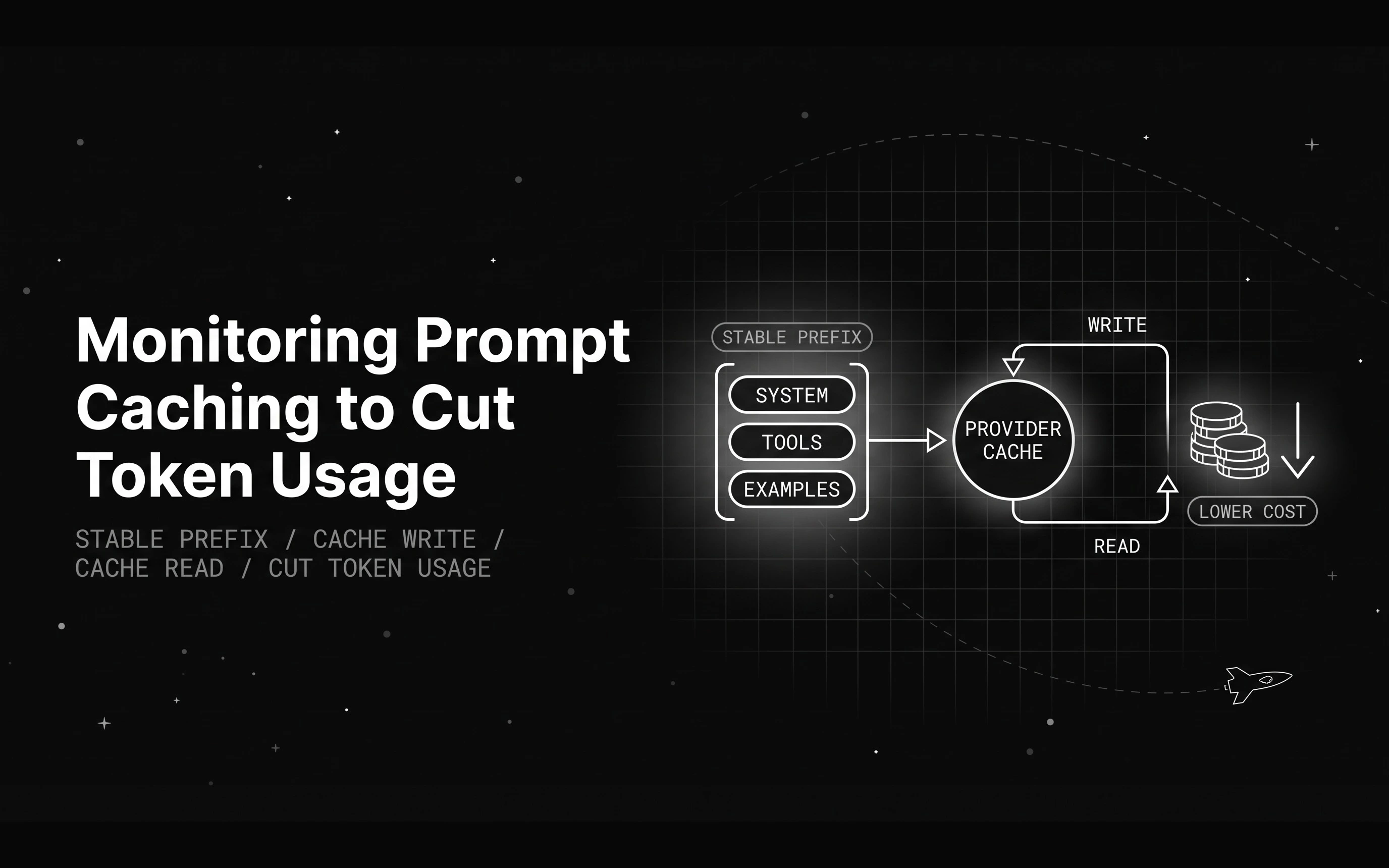
Table of Contents
Ship a chatbot, double the traffic, and the model bill often climbs faster than usage does. The prompts barely changed, so where is the money going?
The answer is repetition. A production LLM call is mostly the same text sent again and again: a long system prompt, a block of tool definitions, and a few worked examples, all prepended to every request. That fixed prefix usually dwarfs the user’s actual question.
You pay input-token rates on all of it, every single call. As traffic grows, you re-send and re-bill the identical prefix thousands of times a day. The fix is to cache that prefix.
This guide builds on how prompt caching works and focuses on the next problem: setting it up, measuring it, and keeping the savings from quietly slipping away.
What prompt caching is and how it cuts token usage
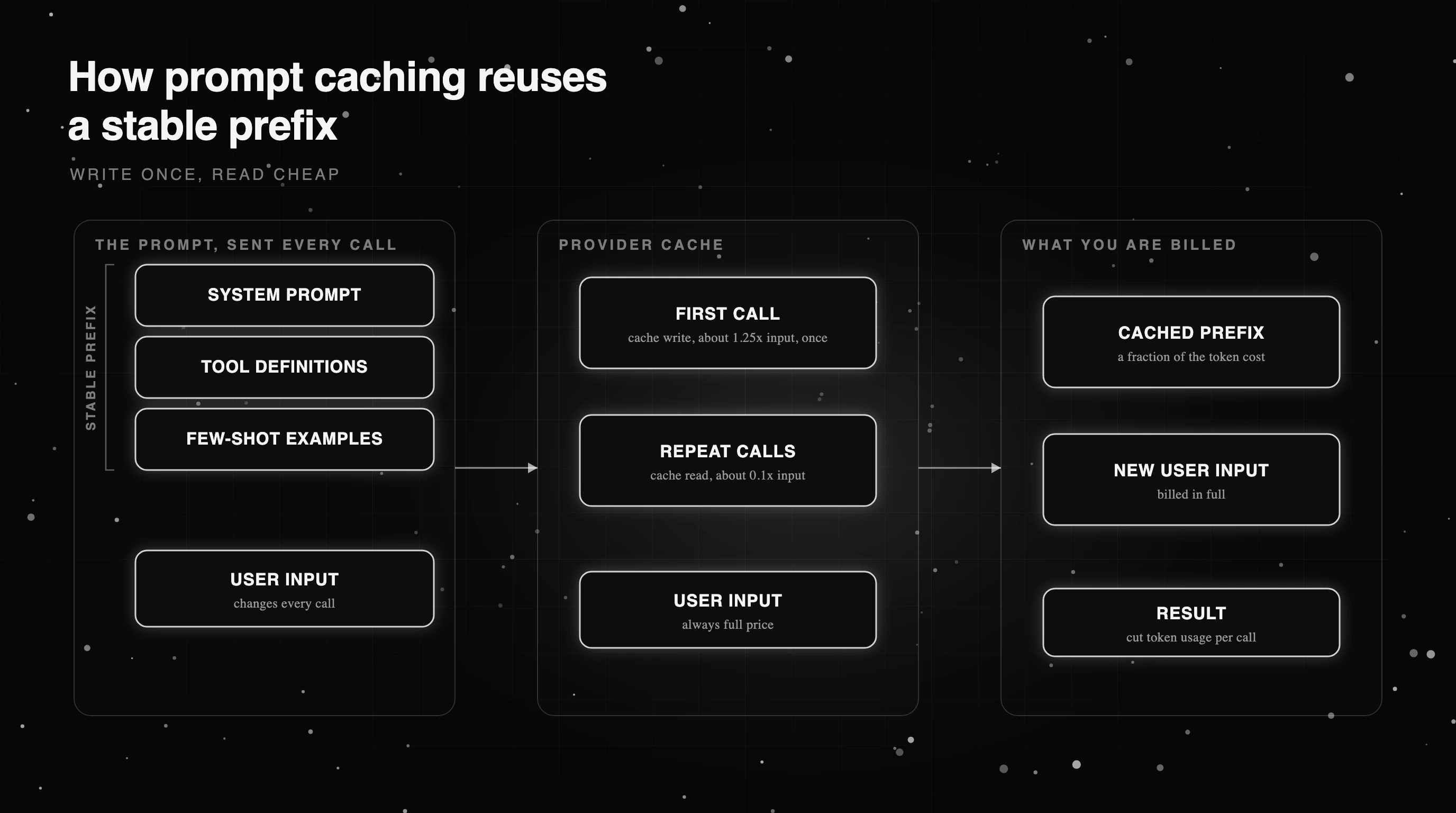
Prompt caching stores the stable prefix of your prompt on the provider’s side after the first call. Later calls with the exact same leading tokens reuse it instead of reprocessing it. The first call does a cache write, a little pricier than normal input; every later call that hits does a cache read, billed at a fraction of the rate.
The unit that matters is the prefix. Providers cache from the start of the prompt up to a breakpoint, so how tokens are counted at the front of your request decides what can be reused. The cache holds for a short time to live, usually a few minutes, and refreshes each time it is hit.
This is not the same as semantic response caching, which returns a stored answer when a new question looks similar. It also differs from cache-augmented generation, which preloads a knowledge base into context. Prompt caching reuses the literal prefix tokens and nothing more, so the model still runs in full on every call.
How prompt caching works across Anthropic, OpenAI, Gemini, and Bedrock
Anthropic, OpenAI, Google, and AWS all offer prompt caching now, but they enable and bill it differently, so a prompt cache that saves on one platform can do nothing on another. The split that matters is manual versus automatic. Some providers want you to mark the cacheable prefix explicitly; others detect a repeated prefix on their own.
Pricing follows the same split. A cache read is far cheaper than fresh input, but the discount is steep rather than identical, and some add a first-write surcharge or a storage fee while an explicit cache lives. Minimum length and time to live also differ. Table A lines up the mechanics so you can see where your workload gains.
| Provider | How caching is enabled | Cached-read price vs standard input | Minimum cacheable prefix | Cache time to live |
|---|---|---|---|---|
| Anthropic (Claude) | Explicit cache_control breakpoints, or a single top-level marker | About 0.1x input, a 90% discount; the newest models go to 0.05x or lower | 512 to 4,096 by model (1,024 on many, 512 on the newest flagships) | 5 minutes default, refreshed on each hit; 1 hour option |
| OpenAI | Automatic once a prompt crosses the threshold; newer models add explicit breakpoints | About 0.1x input, 90% off on current models; the newest go to 0.05x | 1,024 tokens on current models | About 30 minutes of inactivity on current models |
| Google Gemini | Implicit automatically, or explicit context caching you create | About 0.1x input on cached reads; explicit caching adds an hourly storage fee | 2,048 tokens implicit (4,096 on the newest models) | Explicit caches default near 60 minutes and are configurable |
| AWS Bedrock | Implicit, plus explicit cache checkpoints on supported models | About 0.1x on reads for Claude models; other hosted models vary | 512 to 4,096 by model (1,024 on many) | 5 minutes default, refreshed on hit; 1 hour on newer models |
| AI gateway (pass-through) | Passes provider cache-control through; some models cache automatically, others need breakpoints | Mirrors each upstream provider’s cache pricing | Set by the upstream provider | Set by the upstream provider |
Where to place cache breakpoints so the cache actually hits
A cache only hits when the leading tokens of a request are identical to a previous one. That single rule drives the whole design: put everything stable at the front, and everything that changes at the back. Order a prompt as system instructions, then tool definitions, then few-shot examples, then the live user input last.
One moved comma near the top invalidates everything after it, because the prefix no longer matches. So the volatile parts, the user’s message, retrieved documents, timestamps, go after the cacheable block, never woven through it. On providers that use explicit breakpoints, you place the marker at the end of the stable section to say where the reusable prefix stops.
Length matters too. Each provider sets a minimum cacheable prefix, often around a thousand tokens, below which caching does nothing. That favors exactly the prompts that hurt most: long system prompts and big tool schemas. If your prefix sits just under the threshold, it can be worth consolidating instructions to cross it, rather than leaving a short prompt uncached.
The metrics that tell you prompt caching is working
Turning caching on is not the same as caching working. A prompt edit, a reordered tool list, or an expired cache can quietly drop your hit rate to zero while the feature still looks enabled. The only way to know is to measure it per request, so monitoring is where prompt caching becomes a real saving.
The core number is cache hit rate: cached read tokens divided by total input tokens. Track it beside cost per request and your overall LLM token usage, and watch token usage per span so a regression shows up against the trace that caused it. Solid cost tracking turns these raw fields into caching cost savings you can chart.
Table B lists the health metrics worth an alert. The function below reads the usage fields Anthropic and Bedrock return on each response and gives the hit rate and the dollars saved versus sending the same tokens uncached, the number to put on a dashboard.
| Metric | How to compute it | What a regression means | Suggested alert |
|---|---|---|---|
| Cache hit rate | cache_read / total_input | A prompt change broke the prefix | Fire if it drops below your baseline |
| Cache-write ratio | cache_write / total_input | The cache is churning, not being reused | Fire if writes stay high across calls |
| Cost per request | billed_cost / requests | Savings are leaking back out | Fire on a sustained increase |
| Cached share of input | (cache_read + cache_write) / total_input | Less of the prompt is cacheable | Watch for a steady decline |
| TTL-expiry rate | reads lost to expiry over a window | Traffic is too sparse for the TTL | Fire if gaps exceed the cache lifetime |
def cache_savings(usage, input_price_per_mtok, cache_read_mult=0.1, cache_write_mult=1.25):
    """Cache hit rate and dollars saved from provider usage fields (Anthropic names shown).

    input_tokens here excludes cached tokens, which is true for Anthropic and Bedrock.
    On OpenAI, input_tokens already includes cached tokens, so pass
    fresh = input_tokens - cached_tokens or the hit rate reads low.
    """
    fresh  = usage.get("input_tokens", 0)                  # uncached input this call
    writes = usage.get("cache_creation_input_tokens", 0)   # tokens written to cache
    reads  = usage.get("cache_read_input_tokens", 0)       # tokens served from cache
    total_in = fresh + writes + reads
    hit_rate = reads / total_in if total_in else 0.0
    price = input_price_per_mtok / 1_000_000
    billed  = (fresh + writes * cache_write_mult + reads * cache_read_mult) * price
    nocache = total_in * price
    return {"hit_rate": round(hit_rate, 4), "saved_usd": round(nocache - billed, 6)}

def _demo():
    # 2,000-token cached prefix, 200 fresh tokens, $3 per million input tokens
    usage = {"input_tokens": 200, "cache_read_input_tokens": 2000}
    out = cache_savings(usage, 3.0)
    assert out["hit_rate"] == 0.9091 and out["saved_usd"] > 0, out

if __name__ == "__main__":
    _demo()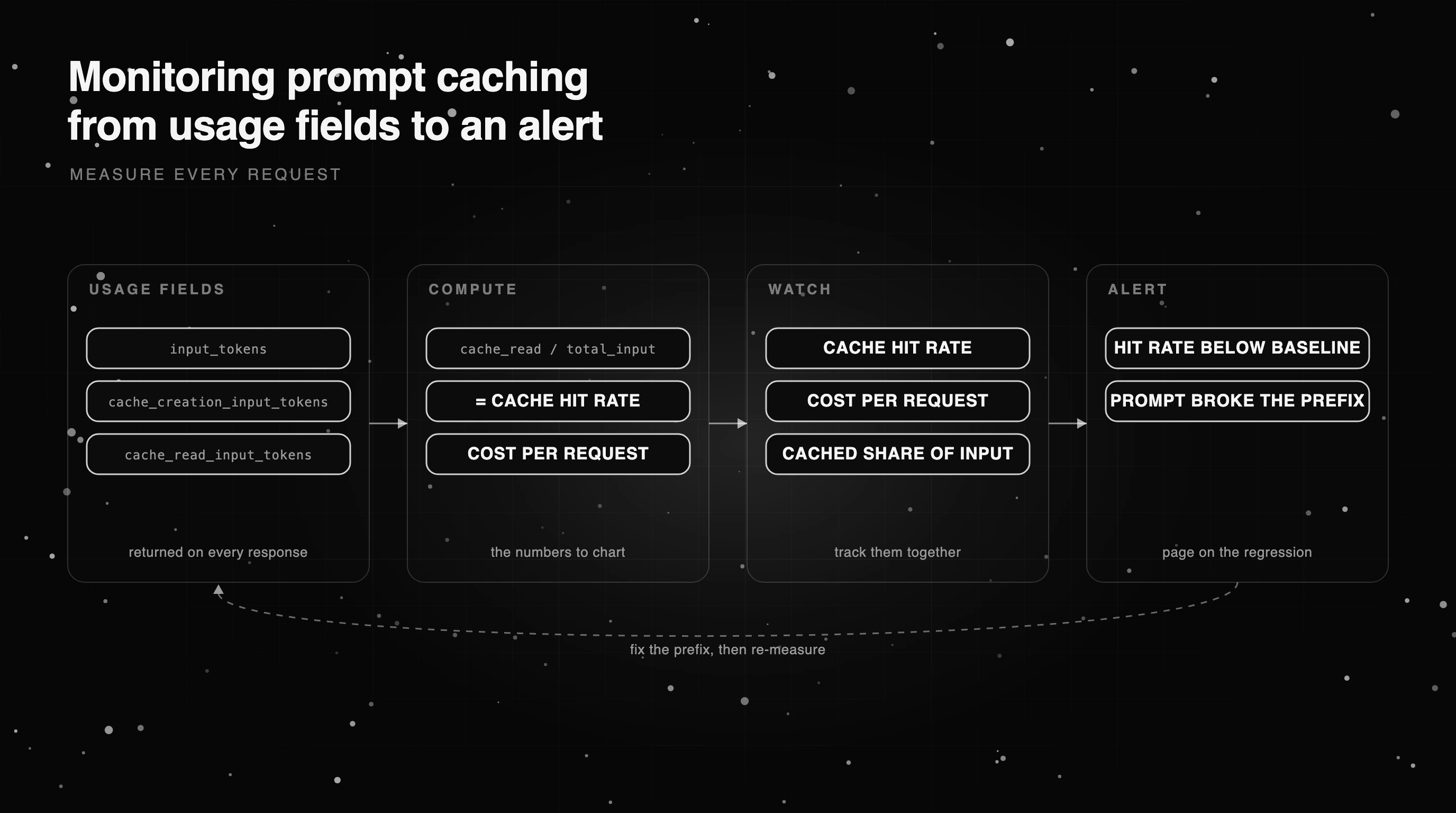
What silently breaks your cache, and how to catch it
A cache that worked last week can stop hitting with no error and no alert, just a slowly rising bill. Almost every cause is the same mistake: something non-identical sneaked into the prefix. The fix is to find it and move it past the cacheable block.
The usual culprits are small. A timestamp or request ID injected near the top of the system prompt changes the prefix on every call, so nothing is reused. Reordering tool definitions, or letting them return in a different order from a dictionary, does the same. A prompt edit can push content past your breakpoint, shortening what gets cached.
TTL expiry is the quiet one. If traffic is sparse enough that the gap between calls exceeds the cache lifetime, every call pays the write cost and never collects the read discount. Catch all of these by watching hit rate per prompt version, so the day a change drops it, the chart tells you which deploy to blame.
How much does prompt caching actually save?
The headline number is up to 90% off the cached tokens, and that is real, but it covers the cached portion only, not your whole bill.
If your stable prefix is 2,000 tokens and the question is 200, caching discounts the 2,000 and leaves the 200 at full price. Your blended saving tracks that ratio and your hit rate.
Work a quick example. At a 90% discount on reads, a 2,200-token request drops from 2,200 billed tokens to about 400 effective once the prefix is cached, roughly an 80% cut on input for that call.
The first call pays more, a cache write at about 1.25x on the prefix, so treat the saving as a steady-state number across the day’s hits, not a single headline percentage.
Caching does not always pay off. Short prompts under the minimum cacheable length never cache at all. Prompts with little stable content, or traffic too sparse to beat the TTL, can even cost slightly more because of the write surcharge. And token cost is not the whole story: a cheaper call that returns a worse answer is no saving.
Confirming the savings in production with Future AGI
Caching is a provider feature, so the provider turns it on, but you still have to confirm the savings reached production and did not quietly erode. That is an LLM observability job, and it is where Future AGI fits: it does not cache for you, it tells you whether your cache is still paying off.
The Agent Command Center gateway attaches a computed cost to every request through an x-agentcc-cost header, with budget alerts on top. A prompt change that stops the cache from hitting then shows up as a cost regression you get alerted on, not a month-end surprise.
Observe carries token usage per trace and span, so you can alert on the spike an unhit cache produces. Because the same traces carry your eval scores, you can also confirm a breakpoint change cut cost without degrading the answers.
Cache hit rate stays an app-side number you own, from the code above, while Future AGI watches the thing that actually hurts: the bill moving the wrong way. Send your first trace to start, and because the core is Apache-2.0 and self-hostable, you can run it next to your own gateway.
Turning a one-time cache setup into a standing cost win
The bill that climbed faster than traffic was never a pricing problem, it was the same prefix billed in full thousands of times. Prompt caching fixes that once: order the stable content to the front, set your breakpoint, and the re-sent tokens start billing at a fraction of the price.
The work after that is keeping it. Track cache hit rate and cost per request, alert when either moves against you, and re-check the prefix after any prompt edit so it does not quietly undo the win.
Review the numbers monthly, and one afternoon of setup becomes a cost cut that holds all year. Put cost per request and cache hit rate on one dashboard, and the next prefix change that breaks the cache shows up the same day, not on the month-end invoice.
Frequently Asked Questions
What is prompt caching?
How does prompt caching work?
How does prompt caching reduce inference costs?
How much does prompt caching save?
Which AI gateway handles prompt caching best?
Inside Future AGI open source in Q2 2026: the platform shipped under Apache 2.0, Error Feed and the Agent Command Center went live, traces hit billions.


Gemini 3.5 Flash dropped today at Google I/O 2026. The 8 benchmark numbers that matter, $1.50/$9 pricing breakdown, and what to instrument before you swap.


Voice AI evaluation infrastructure in 2026: five testing layers, STT/LLM/TTS metrics, synthetic harness, traceAI, and FAGI Simulate.