Agent Compass and Enterprise Security
Zero-config, trace-level performance insights for AI agents plus enterprise-grade security with comprehensive RBAC.
What's in this digest
Agent Compass — Instant Insights, Zero Setup
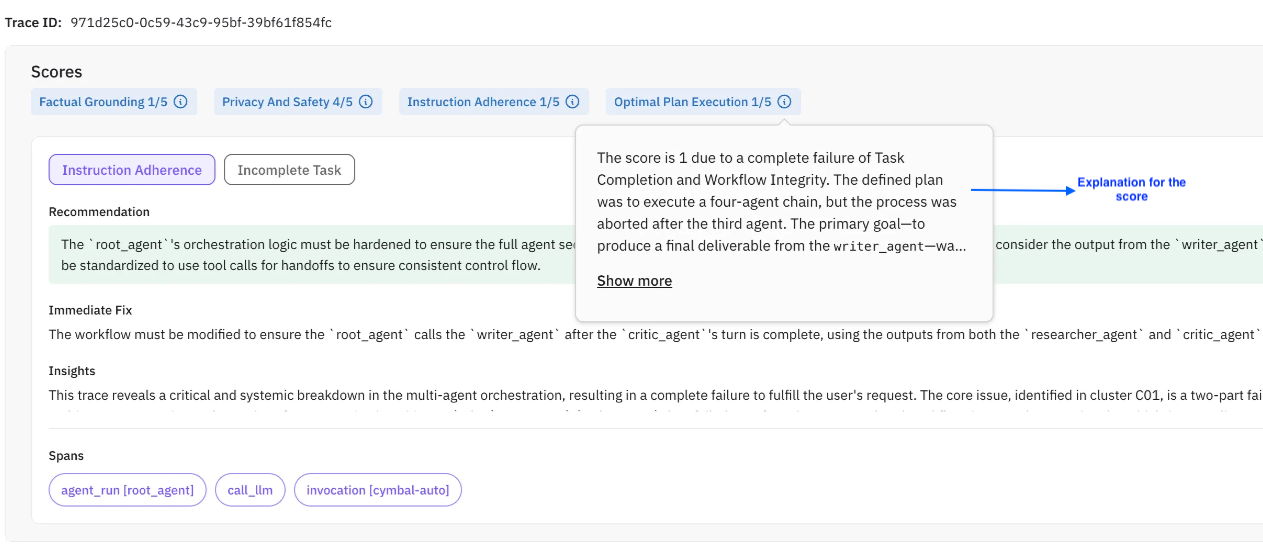
Most observability tools require you to define what you are looking for before you can find it. Set up evaluations, configure thresholds, write detection rules. Agent Compass inverts this entirely.
Point Agent Compass at your traces and it immediately surfaces performance issues, quality degradations, and anomalous behavior without any configuration. No evaluation templates to select. No thresholds to calibrate. No rules to write. It analyzes every trace in your agent’s execution history and automatically identifies patterns that matter.
Agent Compass detects latency anomalies where specific tool calls or LLM invocations take longer than expected. It flags quality regressions where agent responses deviate from established patterns. It surfaces error clusters where similar failures repeat across different user sessions. And it does all of this at the trace level, so you see exactly which execution step is responsible.
For teams that are just getting started with AI agent monitoring, Agent Compass provides immediate value on day one. For teams with mature evaluation setups, it catches the issues that fall between the cracks of your existing evaluations.
Annotation Quality Dashboard
Human evaluation is only as good as the humans doing it. When multiple annotators label the same data differently, which labels do you trust? The new annotation quality dashboard brings statistical rigor to your human evaluation pipeline.
Cohen’s kappa scores measure inter-annotator agreement beyond what chance alone would predict. The dashboard calculates these scores across your annotation team, highlighting where agreement is strong and where it breaks down. Annotator-level breakdowns show which team members are consistent and which might need calibration. Category-level analysis reveals which evaluation criteria are subjective and may need clearer rubrics.
This is essential infrastructure for teams that use human evaluation as ground truth. If your annotators disagree on what constitutes a hallucination, your evaluation scores are meaningless. The dashboard makes disagreement visible and actionable.
Enterprise Multi-Workspace Security
Large organizations need more than role-based access within a single workspace. The enterprise security framework introduces complete workspace isolation with dedicated RBAC policies per workspace, cross-workspace audit logging, and centralized administration.
Each workspace operates as an independent security boundary. Data, traces, evaluations, and configurations are fully isolated. Administrators can manage multiple workspaces from a central console while maintaining strict separation between teams, projects, or business units.
Combined with the RBAC framework introduced in the previous release, this gives enterprise security teams the governance model they need to approve AI tooling for production use.
Observability and Voice Testing Improvements
The observability feed now includes automatic error clustering and trend data. Instead of scrolling through individual error traces, you see patterns: “This tool call has failed 47 times in the last hour with a timeout error.” Trend lines show whether issues are getting better or worse over time.
Voice agent testing gains dedicated dashboard metrics and scenario column views. Track call success rates, average call duration, and scenario coverage from a single dashboard. Each simulation scenario now appears as a column in your test matrix, making it straightforward to verify that every conversation path has been tested.
Platform Improvements
Prompt libraries grow fast. The new folder-based prompt organization system brings structure to large collections. Create folders by project, team, or feature area. Use templates to standardize prompt structure across your organization. The eval grouping API lets you organize related evaluations programmatically, enabling CI/CD pipelines that run evaluation groups as test suites. And the redesigned onboarding flow adapts to your role and use case, getting new team members productive in minutes rather than hours.