Multilingual Voice AI Testing: A 2026 Engineering Guide
Engineer multilingual voice AI tests across many languages. Translation_accuracy, cultural_sensitivity, custom evaluators, ElevenLabs voice coverage.
Table of Contents
Voice AI in 2026 isn’t English-by-default any more. The largest growth markets for voice agents are in regions where English is the second language or a code-switched language, not the first. Building a voice agent that works across languages is now baseline; testing it properly is what separates the deployments that ship from the ones that get pulled back. This guide walks through the engineering surface for multilingual voice testing: persona language toggles, per-language scenario branching, the rubric package that catches language-specific failures, and the custom-voice route that makes native pronunciation testing real.
TL;DR: the multilingual testing surface
- Persona multilingual toggle covers many popular languages with per-language accent settings.
- Workflow Builder auto-generates per-language scenarios. Branch visibility shows coverage per language path.
- Four rubrics per language:
audio_transcription,conversation_resolution,translation_accuracy,cultural_sensitivity. - Custom evaluators authored by an in-product agent for language-specific rubrics (German task-completion, Tamil intent-preservation, French slang-handling).
- Custom voices from ElevenLabs and Cartesia for native pronunciation fidelity.
- Error Localization pinpoints the turn where the language broke down.
The matrix is languages times intents times personas. With the auto-generate path, a 10-language launch with five intents and four personas per language runs in about a day of test execution.
Why multilingual testing is its own discipline
Text-based LLM evaluation has roughly one failure mode per language: the LLM gets the language wrong. Voice testing has four:
- STT layer mishears the input. The acoustic model has to recognize the language correctly. Many production STT providers ship per-language models that have to be selected per call.
- LLM layer mishandles the language. The LLM may respond in English when asked in Spanish, or may mix grammar from two languages.
- TTS layer speaks the response with the wrong pronunciation. A response generated in Japanese spoken by an English-default voice carries enough phonetic distortion that callers can’t understand.
- Cultural layer produces technically correct but culturally inappropriate responses. Direct translations of polite English forms can sound abrupt in Japanese or overly formal in casual Spanish.
A multilingual voice test has to score all four. The four-rubric package in ai-evaluation is built for exactly this surface.
The persona multilingual toggle
Future AGI’s Simulate product ships 18 pre-built personas plus unlimited custom-persona authoring. Each persona’s authoring config includes a multilingual toggle. When the toggle is enabled, the persona speaks the configured language with the configured accent. The TTS voice that drives the simulated call respects the toggle.
The toggle covers many popular languages: English, Spanish, French, German, Italian, Portuguese, Dutch, Hindi, Tamil, Bengali, Marathi, Telugu, Mandarin, Japanese, Korean, Arabic, Hebrew, Turkish, Polish, Russian, Swedish, Norwegian, Danish, Finnish, Greek, and others. The multilingual toggle supports many popular languages; ElevenLabs and Cartesia custom voices can improve pronunciation fidelity per run.
For each language the persona’s other authoring controls still apply:
- Gender, age range, location: per-language demographic variation.
- Accent: regional accent within the language (Castilian vs Mexican Spanish, Parisian vs Quebec French, Mainland vs Taiwanese Mandarin, with Cantonese treated as a separate Chinese-language surface).
- Communication style: formal, casual, business, customer-service register.
- Conversation speed and background noise: same controls as English personas.
The combination means you can author a persona like “Maria, 32-40, Mexico, Spanish, casual register, fast speech, moderate background noise” and the simulated call audio matches that persona’s profile. The voice agent under test hears a real Mexican Spanish caller, not a flat-text proxy.
Defining the multilingual persona matrix
A typical multilingual launch matrix has four to six personas per language. The minimum set for a Spanish-language deployment:
- Maria, Mexico, casual register. Female, 25-32, Mexico.
- Carlos, Spain (Madrid), formal register. Male, 40-50, Spain.
- Sofia, Argentina, business register. Female, 32-40, Argentina.
- Luis, Colombia, casual register. Male, 18-25, Colombia.
- Ana, US Hispanic, code-switching Spanish-English. Female, 32-40, US.
That’s five personas spanning the broad accent and register surface. For each language you replicate the pattern: a couple of countries, a couple of registers, one code-switching variant if the language commonly appears alongside English in your target market.
For high-volume Asian-language deployments, the per-language surface looks different. Hindi alone has Mumbai, Delhi, Hyderabad, Bangalore, and Kolkata regional variants where formality cues differ. Mandarin splits between Mainland and Taiwanese forms. Arabic splits between Modern Standard Arabic and the country-specific dialects (Egyptian, Levantine, Gulf, Maghrebi). The persona authoring covers all of these with the accent string.
Per-language scenario branching
The Workflow Builder generates per-language branches of the same scenario. The auto-generate path:
- Pick the Agent Definition.
- Describe the scenario in plain text. Example: “Customer calls a clothing retailer to return an item. Some have the order number, some don’t. Some want a refund, some want exchange, some want store credit.”
- Pick the row count: 20, 50, or 100 per language.
- Attach the persona matrix.
The auto-generator produces conversation paths that branch per language. Some branches are language-agnostic (the return-with-order-number flow). Some branches are language-specific:
- Spanish branch includes formality switches between
túandustedbased on the persona’s age and register. - French branch includes the polite-form expectations around opening salutations.
- Japanese branch includes the keigo (formal speech) expectation when the persona is older or speaking to a business.
- Hindi branch includes code-switching to English for product names and technical terms.
- Arabic branch includes the difference between MSA in the opening and dialectal Arabic mid-conversation.
Branch visibility (released November 2025) shows the branching graph per language so you can see whether your test matrix covers the language-specific paths. If the Spanish branch under-weights the usted formal-form path, the visualization surfaces it and you can rebalance before running tests.
The four-rubric package for multilingual testing
Four rubrics from the ai-evaluation Apache 2.0 SDK form the core multilingual package:
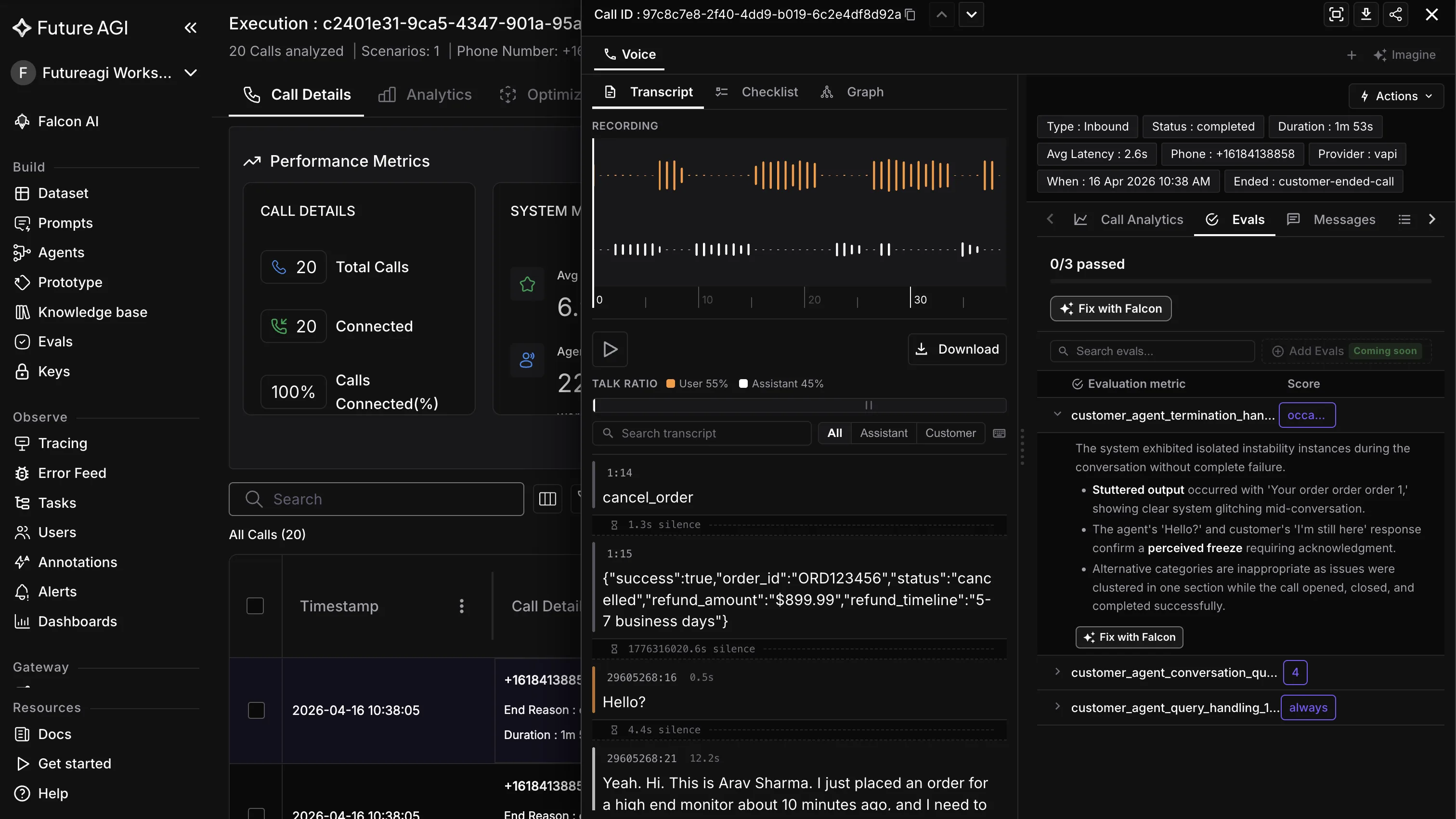
audio_transcription. Scores STT accuracy against the persona’s expected utterance. Language-agnostic because it compares transcribed text to ground truth.
conversation_resolution. Scores the outcome of the conversation. Did the agent resolve the caller’s intent in the target language?
translation_accuracy. Scores cases where the agent or the system translated between languages and may have lost meaning. Particularly important when the agent’s underlying LLM is English-trained and the response is translated to the target language for TTS.
cultural_sensitivity. Scores cultural appropriateness. The rubric flags responses that are technically correct in the target language but culturally tone-deaf. A direct translation of “I’ll get right on that” into Japanese can come across as overly casual in a business context; the rubric catches it.
# pip install ai-evaluation
from fi.testcases import MLLMTestCase, MLLMAudio, ConversationalTestCase, LLMTestCase
from fi.evals import (
    Evaluator,
    AudioTranscriptionEvaluator,
    ConversationResolution,
    TranslationAccuracy,
    CulturalSensitivity,
)

# Score a Spanish call
audio = MLLMAudio(url="https://recordings.example.com/spanish_call_034.wav")
asr_case = MLLMTestCase(
    input=audio,
    query="Score the STT transcript against the audio",
    expected_response="Quisiera devolver este artículo, por favor.",
)

conv = ConversationalTestCase(messages=[
    LLMTestCase(query="Quisiera devolver este artículo, por favor.",
                response="Con gusto le ayudo. ¿Tiene el número de pedido?"),
    LLMTestCase(query="Sí, es el 8821.",
                response="Procesando su devolución. ¿Prefiere reembolso o cambio?"),
])

ev = Evaluator(fi_api_key="...", fi_secret_key="...")
result = ev.evaluate(
    eval_templates=[
        AudioTranscriptionEvaluator(),
        ConversationResolution(),
        TranslationAccuracy(),
        CulturalSensitivity(),
    ],
    inputs=[asr_case, conv],
)
The same four-rubric package runs across every language. The dashboard aggregates per-language so you can compare conversation_resolution on Spanish against conversation_resolution on Japanese and see where the agent’s language coverage is weakest.
Custom evaluators for language-specific rubrics
The four built-in rubrics cover the broad multilingual surface. For language-specific concerns you author custom evaluators. The in-product custom-evaluator agent reads your existing trace data and proposes a rubric tuned to the surface you describe.
Examples of language-specific custom evaluators teams have shipped:
- German task-completion. Scores whether the agent’s response correctly handles the V2 verb-second word order in compound questions. Catches cases where the agent’s German is grammatically valid but stylistically wrong.
- Tamil intent-preservation. Scores whether the agent preserved the caller’s intent across the Tamil-to-English-to-Tamil translation roundtrip when the underlying LLM operates in English.
- French formality register. Scores whether the agent matched the caller’s
tuorvouschoice consistently across turns. - Japanese keigo adherence. Scores whether the agent used keigo (formal speech) when speaking to a business customer and casual speech with consumer customers.
- Hindi code-switch handling. Scores whether the agent correctly handled mid-sentence code switches (caller says “main reschedule karna chahta hu next Tuesday” - the agent should not get confused by the English noun in a Hindi sentence).
- Arabic dialect calibration. Scores whether the agent matched the caller’s dialect (Egyptian vs Levantine vs Gulf) instead of defaulting to MSA.
The custom-evaluator agent produces an executable rubric you can attach to test runs like any built-in. The rubric ships with reasoning so the eval output explains why a given response failed, not just that it failed.
# Custom evaluator authored by the in-product agent
from fi.evals.metrics import CustomLLMJudge
from fi.evals.llm import LiteLLMProvider

french_formality_judge = CustomLLMJudge(
    name="french_formality_register",
    grading_criteria=(
        "Score 1 if the agent's response uses the same formality register "
        "(tu or vous) as the caller. Score 0 if the agent switched register "
        "without an explicit cue from the caller. Score 0.5 if the response "
        "was ambiguous about register. Cite the specific phrase that "
        "determines the score."
    ),
    provider=LiteLLMProvider(model="gpt-4o"),
)
Custom evaluators can be authored with the in-product agent and calibrated from review feedback. Mark a few outputs where the judge got the score wrong and adjust the rubric; over time the rubric stabilizes at a level where manual review picks up little new.
Custom voices from ElevenLabs and Cartesia
Native pronunciation testing depends on having TTS voices that are genuinely native to the target language. The November 2025 release added custom-voice support from ElevenLabs and Cartesia in Run Prompt and Experiments. For multilingual testing this matters because:
- Default Simulate voices cover the major languages but may not have the regional fidelity you need. The default Spanish voice may sound Latin American when you need Castilian.
- ElevenLabs ships voice libraries with native speakers from specific regions, plus voice cloning so you can train a voice from a 30-second sample.
- Cartesia ships the lowest-latency streaming TTS in the industry plus per-language voice catalogs.
The workflow:
- Pick or clone a voice in ElevenLabs or Cartesia that’s genuinely native to the target dialect.
- Configure the voice in Run Prompt and Experiments.
- Attach the voice to the persona authoring config.
- Run scenarios. The persona now speaks with the genuinely native voice.
The custom-voice route is what enables true regulator-grade pronunciation testing. A regulator audit that asks “did you test the Egyptian Arabic accent specifically?” is answered with “yes, we used a native Egyptian Arabic voice from ElevenLabs, here are the 500 simulated calls.”
The Run Tests wizard for multilingual deployments
The four-step Run Tests wizard handles the multilingual matrix the same way it handles the English-only matrix:
Step 1: Test config. Name the test, attach the Agent Definition. The concurrency setting matters more for multilingual because language-specific TTS voices may have different rate limits.
Step 2: Scenario select. Pick scenarios from the Workflow Builder. Filter by language tag to grab only the scenarios for the languages you’re testing this run.
Step 3: Eval config. Attach the four-rubric package plus any custom language-specific evaluators you’ve authored.
Step 4: Review and execute. Verify the matrix size (languages times scenarios times personas times rubrics), confirm cost, kick off the run.
For a 10-language launch with five intents and four personas per language at 100 rows per matrix cell, the total run is in the tens of thousands of simulated calls. Wall-clock time depends on concurrency, voice-provider limits, and eval configuration; reserve a multi-day execution window plus triage.
Error Localization for multilingual debugging
Error Localization (released November 2025) pinpoints the turn where the multilingual call broke down. The diagnostic value is high because multilingual failures often cluster at a specific turn type.
A worked example. A Spanish persona calls a return flow. The simulated call fails. Error Localization shows:
- Turn 1: persona said “Quisiera devolver este artículo, por favor.” STT transcribed correctly. Agent responded in Spanish. Pass.
- Turn 2: persona said “Sí, es el 8821.” STT transcribed correctly. Agent responded in Spanish. Pass.
- Turn 3: persona said “Prefiero un cambio.” STT transcribed correctly. Agent responded in English: “Great, processing your exchange.” Fail.
The root cause is on turn 3: the LLM dropped the Spanish context after a tool call and reverted to English. The fix is concrete: add a language-locking instruction to the system prompt after tool calls, or pin the LLM’s response language to the conversation’s detected language.
Without Error Localization you only see the conversation failed. With it you see exactly which turn produced the language regression. The pattern repeats across languages: most multilingual failures cluster at a specific turn type rather than spreading across the conversation.
How multilingual failures cluster in Error Feed
Production multilingual failures cluster in Error Feed predictably:
- Language-drop cluster. The agent loses the language mid-conversation. Root cause is usually a tool-call response that resets context. Quick fix is a language-locking prompt instruction.
- Translation-loss cluster. The agent translated a phrase and the translation lost the original meaning. Root cause names the source phrase. Quick fix updates the translation prompt or adds the phrase to a glossary.
- Cultural-tone cluster. The agent’s response was correct but culturally inappropriate. Root cause names the cultural assumption. Quick fix updates the system prompt with regional context.
- Code-switch failure cluster. The agent broke on a mid-sentence language switch. Quick fix is either a multilingual STT model or a code-switch-aware few-shot example.
- Formality-register cluster. The agent’s formality didn’t match the caller’s. Root cause names the register mismatch. Quick fix updates the prompt with register-handling instructions.
- Diacritics-loss cluster. The agent’s transcript dropped diacritics (accents on letters), which changed the meaning of a word. Quick fix is an STT post-processing step or a different STT provider.
Each cluster carries a trend signal so you can prioritize the failures that are growing. Combined with per-language tag-based attribution, the cluster view becomes the multilingual work queue.
A worked multilingual launch plan
A worked plan for a retail voice agent launching in Mexico, Spain, France, Germany, and Japan:
Week 1: persona matrix. Define 20 personas (four per language). Vary age, region within each country, formality register.
Week 2: scenario generation. Auto-generate 100 rows per language per intent. Five intents (return, exchange, store credit, loyalty inquiry, complaint). Five languages. 2,500 scenarios per intent. 12,500 scenarios total.
Week 3: test execution. Run the four-step wizard. 12,500 scenarios x four-rubric package + per-language custom evaluators. Wall-clock time depends on concurrency, voice-provider limits, and eval configuration.
Week 4: triage. Error Localization surfaces failing turns. Error Feed clusters into 14 named issues. Top three:
- French formality drift (29% of French calls). Agent switches from
voustotuafter a tool call. Quick fix: language-locking system prompt instruction with formality preservation. Lift estimate +7. - Japanese keigo misuse on consumer calls (22% of Japanese consumer calls). Agent uses business-keigo when caller is consumer. Quick fix: register-detection few-shot examples. Lift estimate +5.
- Spanish code-switching break on product names (18% of US Hispanic Spanish calls). Agent gets confused by mid-sentence English product names. Quick fix: multilingual STT with code-switch tolerance. Lift estimate +6.
Week 5: re-test. Re-run the same 12,500 scenarios. Pass rate on conversation_resolution lifts from 73% per language to 87% per language average. Pre-launch gate (80% pass) cleared. Launch proceeds.
The pattern compounds. The next launch (adding Italian, Portuguese, Dutch, and Polish) reuses the persona-authoring patterns and the custom evaluators, so the third launch sprint is half the work of the second.
Tag-based attribution per language
Tag-based attribution on every trace maps directly to per-language dashboards. The trace tags that matter for multilingual:
language: the conversation’s primary language.region: the regional variant (Mexico vs Spain, Quebec vs France).formality_register: detected formality level (formal, casual, business).code_switch_observed: boolean for whether the caller switched languages mid-conversation.caller_age_range,caller_gender: the persona attributes.
The dashboard slices conversation_resolution by every combination. If conversation_resolution drops 12 points on the Japanese formal-business register but holds on the Japanese casual register, the dashboard surfaces that immediately. Without the tags the signal averages out.
For production deployments the same tags get set on real-traffic traces. Tag-based attribution is what lets the multilingual rollout monitor itself; without it you only see aggregate CSAT and the per-language regressions hide.
The Future AGI stack on the multilingual loop
The multilingual testing surface runs across five products:
- Simulate: 18 pre-built personas + custom-persona authoring with multilingual toggle, per-language scenario branching, Workflow Builder auto-generate with branch visibility, four-step Run Tests wizard, Error Localization.
- ai-evaluation: 70+ built-in eval templates including
audio_transcription,audio_quality,conversation_coherence,conversation_resolution,translation_accuracy, andcultural_sensitivity, plus unlimited custom evaluators authored by an in-product agent. Apache 2.0. - traceAI: 30+ documented integrations across Python and TypeScript. OpenInference-compatible spans for per-language tag-based attribution. Apache 2.0.
- Error Feed: auto-clusters multilingual failures into named issues with root cause, quick fix, and long-term recommendation.
- Agent Command Center: hosts the whole stack. RBAC, SOC 2 Type II + HIPAA + GDPR + CCPA + ISO 27001 certified, AWS Marketplace, multi-region hosted, BYOC available.
Custom voices from ElevenLabs and Cartesia plug into the Simulate persona authoring for native pronunciation fidelity. The integration is config, not code.
Two deliberate tradeoffs
Optimization is an explicit, gated run. agent-opt (Bayesian Search, Meta-Prompt per arXiv 2505.09666, ProTeGi, GEPA Genetic-Pareto per arXiv 2507.19457, Random Search per arXiv 2311.09569, PromptWizard) is available both as a UI workflow inside the Dataset surface and a Python SDK, but it never auto-rewrites prompts in production. Every optimization run against multilingual data is started by a human, gated by an evaluator (translation_accuracy, cultural_sensitivity, or a custom per-language rubric), and surfaces candidate prompts for approval before they ship. Custom evaluators authored by the in-product agent calibrate from human review feedback so the per-language rubrics get sharper with each triage round.
Native voice observability ships for Vapi, Retell, and LiveKit out of the box. The dashboard path covers the three runtimes most teams are on with no SDK required. For any other runtime (Bland, ElevenLabs Agents, Pipecat, or a custom stack on Twilio/Plivo/Telnyx), Enable Others mode + traceAI SDK + webhook covers ingest. Indian phone number simulation is live; other regions use Enable Others mode against any mobile number globally.
Related reading
- Accent and Dialect Testing for Voice AI Agents: the accent-specific testing surface.
- Voice AI Evaluation Infrastructure: Developer’s Guide: the underlying rubric architecture.
- Voice Agent Scenarios Without Manual QA: broader scenario authoring patterns.
- How to Implement Voice AI Observability: the instrumentation layer for live production traffic.
Sources and references
- ai-evaluation repository: github.com/future-agi/ai-evaluation
- traceAI repository: github.com/future-agi/traceAI
- Future AGI Simulate docs: docs.futureagi.com/docs/simulate
- Error Feed docs: docs.futureagi.com/docs/observe
- Future AGI trust page: futureagi.com/trust
- arXiv 2510.13351: Future AGI Protect model family (arxiv.org/abs/2510.13351)
- OpenInference specification: OpenTelemetry GenAI semantic conventions
Frequently Asked Questions
Why is multilingual voice testing harder than text testing?
Which rubrics does FAGI ship for multilingual evaluation?
How does the persona multilingual toggle work?
Can I use my own TTS voices for native pronunciation?
How do I branch a scenario per language?
What's the launch gate for multilingual deployments?
Can I score audio in non-English languages?
Accent testing is not WER on Common Voice. 2026 methodology catches proper-noun, code-switching, filler, dialect failures production benchmarks miss.


Voice AI evaluation infrastructure in 2026: five testing layers, STT/LLM/TTS metrics, synthetic harness, traceAI, and FAGI Simulate.

Run 10,000 voice agent test scenarios in minutes in 2026 with Future AGI Simulate. Manual QA replaced by simulated callers, parallel runs, and CI/CD.
