Meta Muse vs OpenAI Dots and Which One Is Worth Paying For
Compare Meta Muse and OpenAI Dots on setup, approvals, privacy, price and regions, from each company's own pages, to see which always-on agent fits your budget.
Table of Contents
Picture two people at one kitchen table. One already pays for ChatGPT Pro and spends the working day in Slack. The other runs a small shop and answers customers in WhatsApp between deliveries. Both watched two always-on agent launches land three weeks apart, and both want help that will not send the wrong email to the wrong person.
Meta Muse arrived on September 8, 2026, and OpenAI Dots followed on September 29. Each one promises an agent that keeps working after you close the app, on a computer of its own. The pitch sounds identical, but the price, the regions and the way each agent asks for permission are far apart.
This comparison uses only what OpenAI and Meta publish about their own products, plus one press report for launch-day context. It goes axis by axis: setup, approvals, price, regions, machines, apps and privacy. It ends with a fit for each reader and a plain answer to which one is worth paying for.
TL;DR
- OpenAI Dots lives inside ChatGPT and runs on GPT-6 Astra. Meta Muse lives in its own app and in WhatsApp and runs on Muse Spark.
- Your first dot comes included in ChatGPT Pro ($100, $200 or $500 a month) or Business Premium. Muse is free up to a usage limit, with Power at $20 and Maximum at $100 a month.
- Dots weighs risky steps with Auto-review and your Custom Rules. Muse sends anything bound for the internet past a separate Sentinel agent.
- Dots excludes Pro users in the EEA, Switzerland and the UK. Meta lists Muse in the US, Canada, Japan and Singapore.
- With either agent, start read-only, block sending without approval, and read the activity log for a week.
What are OpenAI Dots and Meta Muse?
Both are personal agents that keep working after you close the app, each on its own cloud computer. OpenAI Dots lives inside ChatGPT and runs on GPT-6 Astra. Meta Muse lives in its own app and in WhatsApp and runs on Muse Spark. Unlike a chatbot, both act across your apps and return for decisions.
OpenAI Dots, an always-on agent inside ChatGPT
OpenAI introduced dots on September 29, 2026. Each dot is powered by GPT-6 Astra, has its own cloud computer and browser, and can connect to over 4,000 apps through OpenAI’s plugin ecosystem. It learns your preferences over time and can work toward your goals around the clock, according to OpenAI’s dots announcement.
You can message or call a dot in ChatGPT on desktop, web and mobile, and you can message it in Slack and Teams. Calls happen inside ChatGPT. For organizations, OpenAI is also previewing specialist dots with their own identity and access, starting with focused enterprise pilots rather than a general release.
Meta Muse, a personal agent in its own app and WhatsApp
Meta announced Muse on September 8, 2026. It runs on Muse Spark, which Meta calls its most capable model to date, on Muse Secure VM, a dedicated cloud computer with its own browser. You talk to it in the Muse app or in WhatsApp, per Meta’s Muse announcement.
Meta’s Muse product page lists apps for iOS, Android, Mac and the web at muse.ai.
Meta says Muse is coming to its AI glasses. When a task needs a tool that does not exist, Muse builds one. Muse for Small Business adds skills and connectors for owners who run their shop through Meta’s apps and other business software.
OpenAI Dots vs Meta Muse at a glance
OpenAI Dots suits people who already pay for ChatGPT Pro or Business Premium and work across Slack, Teams and code. Meta Muse suits people who want a free start inside a messaging app. Under the shared idea, the deciding differences are price, region and how each agent asks before it acts, as the table below shows (as of 2026-11-01).
| OpenAI Dots | Meta Muse | |
|---|---|---|
| Setup | Create in the ChatGPT iOS or Android app, the desktop app, or desktop web; name it; connect apps | Muse app on iOS, Android, Mac and muse.ai, or a WhatsApp chat |
| Model | GPT-6 Astra | Muse Spark (Muse Wonder coming, subscribers first) |
| Where it runs | Own cloud computer and browser; optional access to your laptop, off by default | Muse Secure VM, a persistent isolated Linux computer with a full browser; the Mac app works with desktop files |
| Apps and integrations | Over 4,000 apps via plugins; Slack and Teams messaging; Codex cloud environments | Email, calendar, Instagram and more; builds its own tools; Small Business connectors |
| Permissions and approvals | Built-in rules plus Custom Rules (4 behaviours), Auto-review, mandatory confirmations and handoffs | Asks before sensitive actions; allow once, always allow or deny; Sentinel approves outbound traffic |
| Privacy and data handling | Business, Enterprise and Edu content not used for training by default; personal plans choose through a setting | Not shared with Meta’s ad systems; training setting starts on and can be turned off; ask Muse to forget |
| Price | First dot included in Pro ($100, $200 or $500 a month) or Business Premium (seat price not stated by OpenAI) | Free with a usage limit; Power $20 and Maximum $100 a month |
| Availability | Pro: 18+, outside the EEA, Switzerland and the UK; Business Premium in supported regions; Enterprise beta via admin | US, Canada, Japan and Singapore |
Setting up a dot or a Muse and where you talk to it
You create a dot inside ChatGPT on the mobile app, the desktop app or desktop web, then message or call it in ChatGPT and message it in Slack or Teams. Muse starts free from the Muse app on iOS, Android, Mac or muse.ai, or from a WhatsApp chat. Dots need a paid ChatGPT plan first.
OpenAI’s setup steps sit in its getting-started guide for dots.
The guide lists the iOS and Android apps, the desktop app (including Windows) and desktop web as setup surfaces, and says dots do not work on mobile web. A new dot gets the handle @yourname-dot, which changes when you name it. You connect Slack from ChatGPT on desktop, and you can connect a personal email account for your tasks.
There are launch limits worth knowing. A dot cannot have its own standalone email address yet, and it cannot call you, though you can call it from the ChatGPT mobile app. Texting is a beta for a limited number of Pro users in the US, works over iMessage or RCS, and is not supported in Business or Enterprise workspaces.
Muse feels more like adding a contact. You chat with it the way you message people, in the Muse app on mobile or Mac, or inside WhatsApp. The Mac app lets Muse work with your desktop files, apps and browser tabs. Starting costs nothing, though TechCrunch reports that Muse asks for a payment card to get started.
How OpenAI Dots and Meta Muse ask before they act
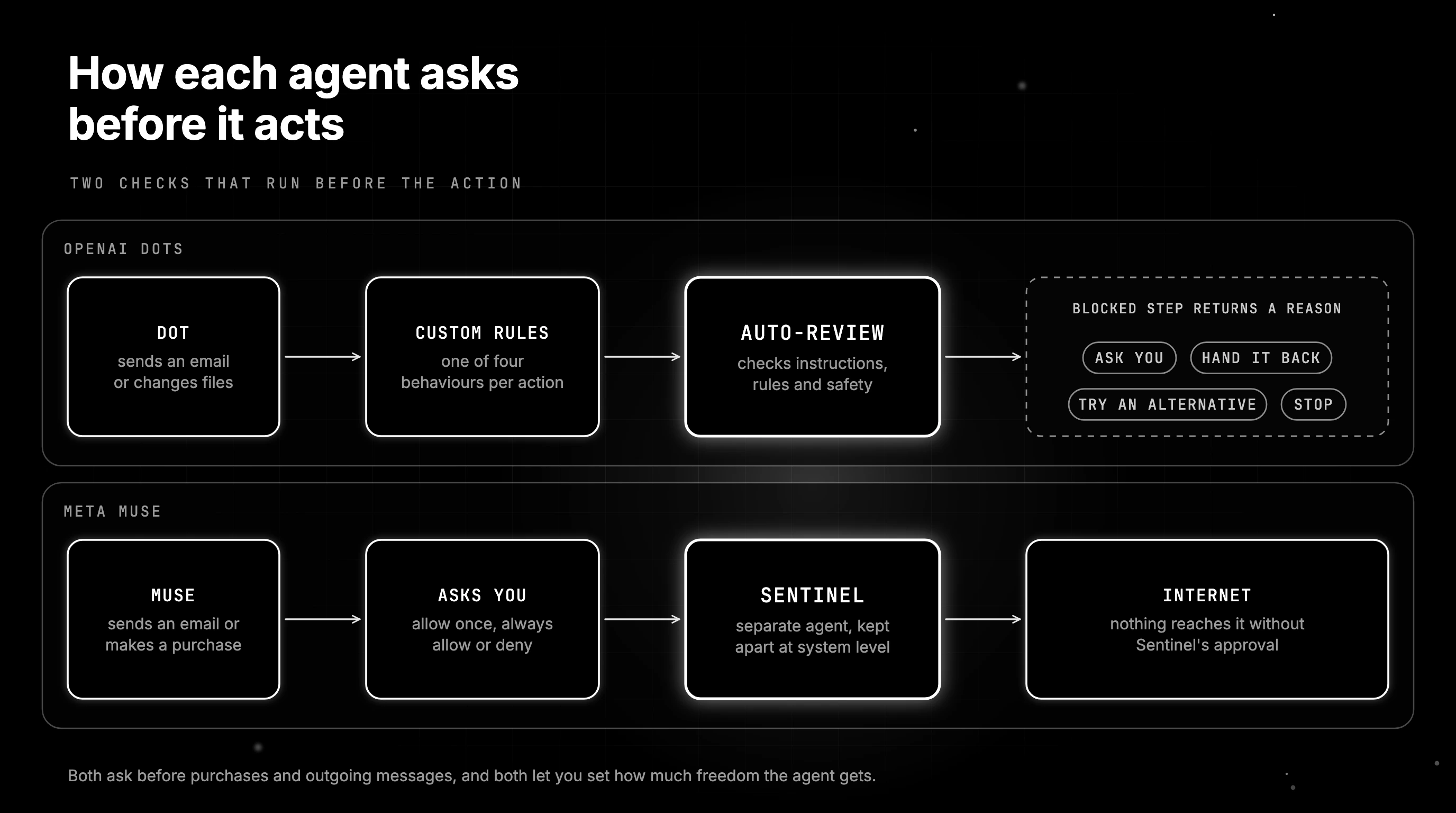
Dots check risky steps with a separate Auto-review system that weighs each action against your Custom Rules and OpenAI’s safety rules. Muse runs a separate Sentinel agent that must approve anything Muse sends to the internet. Both ask before purchases and outgoing messages, and both let you set how much freedom the agent gets.
The dots approval model
Dots start with built-in rules for when to act and when to ask. On top of those, Custom Rules let you pick one of four behaviours for an action: take action without asking, take action if pre-approved, ask before taking action, or hand off to you. “Pre-approved” means you explicitly asked for that action in your prompt.
That detail matters in practice. The help center says asking for a draft does not authorize sending it, so a dot that drafts a reply still needs a clear instruction to send. Custom Rules cannot grant app access or override built-in safeguards, and some steps, such as changing a password, always stay with you.
OpenAI explains the checking layer in how it builds safety into dots.
Before a dot sends an email or changes files, Auto-review checks the step against your instructions, Custom Rules and safety requirements. A blocked step returns a reason, and the dot can ask you, try an alternative, hand it back or stop. Your approval cannot override core safety rules, and monitoring can pause a dot over a safety concern.
That pattern, a check that runs before the action rather than after it, is the same idea behind runtime guardrails on agent tool calls.
The Muse approval model
Muse checks with you before sensitive actions such as sending an email or making a purchase. Meta’s Muse product page says you can allow an action once, always allow it, or deny it. Meta’s help center says many of these checks are enforced outside the AI model, so they do not rely only on Muse deciding whether to ask.
The Sentinel agent runs on the same machine as Muse but is kept apart at the system level, and nothing Muse does reaches the internet without its approval. Logins sit in a credential store the agent cannot read. At checkout, Link generates a one-time card number. Muse also keeps a complete audit trail.
| Action | OpenAI Dots | Meta Muse |
|---|---|---|
| Send a message or email | Needs authorization covering the information and the type of recipient; Auto-review checks recipient and content; a draft request does not authorize sending | Asks before sending; allow once, always allow or deny per connection |
| Make a purchase | Can buy with cards saved on a merchant’s site, with your approval | Asks before purchasing; one-time card number through Link; eligible purchases covered by Link’s protections |
| Permanently delete data | Requires your confirmation every time | Not stated by Meta |
| Change a password | Handed back to you | Not stated by Meta |
| Move money between accounts | Handed back to you | Not stated by Meta |
| Background research on connected apps | Uses read-only tools, enforced in code, that cannot send messages or change app content | Keeps working in the background; Sentinel must approve anything sent to the internet |
OpenAI Dots pricing and what Meta Muse costs
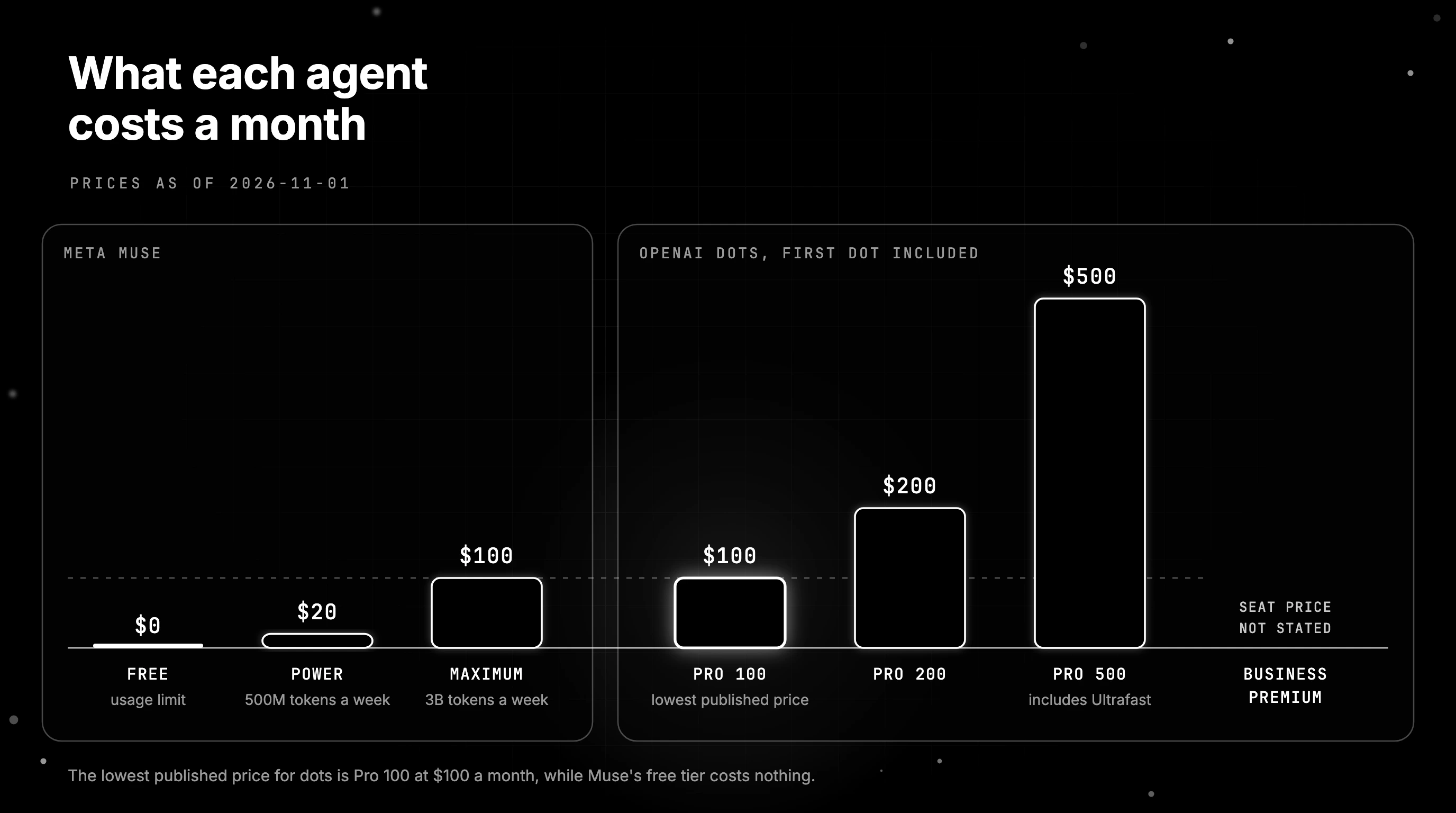
OpenAI Dots has no standalone price, because your first dot comes included inside ChatGPT Pro at $100, $200 or $500 a month, or inside Business Premium. Meta Muse is free up to a usage limit, and Meta sells two paid plans, Power at $20 and Maximum at $100 a month. Both prices are as of 2026-11-01.
The Pro prices come from OpenAI’s help article on ChatGPT Pro tiers.
Pro 100, Pro 200 and Pro 500 cost $100, $200 and $500 a month, and only Pro 500 includes the Ultrafast versions of GPT-6 Astra and GPT-6.1 Sol. Per the dots announcement, each plan includes an allowance for deeper dot work, extended in the first month after launch. OpenAI states no Business Premium seat price on these pages.
Chats with your dot do not count toward ChatGPT usage limits, but tasks your dot starts in Codex or ChatGPT Work do. OpenAI says that in the future you will be able to add more dots and scale each dot’s speed or monthly workload. None of that has a published price yet.
TechCrunch’s launch report gave the Muse plan prices on launch day.
TechCrunch reported Power at $20 a month and Maximum at $100 a month on launch day, said both plans buy more Muse usage, and said Meta expects most people to stay on the free tier. It also reported that the app shows a usage meter, so you can see how close you are to the free limit.
Meta now lists the same prices in its help article about Muse subscriptions.
That page gives Power 500M Muse tokens a week and Maximum 3B, and subscribers must be 18 or the age of majority. At the free limit, you can upgrade or wait for it to refresh. Meta adds that Muse and its subscriptions are in limited testing and not available in every location.
Where each agent is heading
OpenAI says it plans to expand dots to more users and, over time, to teams of dots working together. It is running specialist dot pilots with enterprises and working with Microsoft to manage specialist dots through Agent 365. More dots per account and faster or larger dots are stated plans, not shipped options.
Meta released its next models in Muse Wonder on October 12, 2026.
Muse Wonder is available to developers through the Meta Model API and Muse Code, and Meta says it will soon power experiences in Muse, rolling out first to subscribers. Meta has also announced a Muse Confidential VM and support for its AI glasses, and its launch post listed 1Password and Shop Pay as coming soon.
Who should pay for which
Already on ChatGPT Pro? Your first dot costs nothing extra, so try it first. Not on Pro? The lowest published price for dots is Pro 100 at $100 a month, while Muse’s free tier costs nothing. Power or Maximum buys more weekly Muse usage, and Meta says Muse Wonder reaches subscribers first.
Can you get OpenAI Dots or Meta Muse where you live?
Dots reach Pro users aged 18 and older outside the EEA, Switzerland and the UK, plus Business Premium users in supported regions and Enterprise workspaces with the beta on. Meta has said Muse is available in the US and Canada, in Japan since October 23 and in Singapore since October 27. Meta’s pages name no other countries so far.
OpenAI’s two pages read differently. The announcement says dots are rolling out to Pro and Business Premium users “in eligible markets”, with an Enterprise beta an admin can enable. Only the help center names the exclusions and the age limit, and the announcement’s “eligible markets” link points there, so treat it as the detailed rule.
The help center adds that workspace settings, encryption, and data or inference residency requirements can affect Business and Enterprise eligibility, and that access may take several days to reach your account. If you are in India, Australia or anywhere outside those exclusions, open chatgpt.com/dots in your own account to confirm.
Meta’s Muse for Small Business post describes Muse as available in the US and Canada.
Japan was the first market outside North America, from October 23, 2026, per Meta’s Japan launch post, which is in Japanese.
Singapore followed on October 27, 2026, on iOS, Android and muse.ai, according to Meta’s Singapore launch post. Readers searching for Muse in India will not find a date on Meta’s pages yet. Meta’s subscription page also notes that Muse is not available in all locations.
Two private cloud computers and how far each one reaches
Both agents work on their own isolated cloud machine with a browser you can open and take over at any point. Dots can also be granted access to your own laptop, an option that starts turned off, while Muse reaches the desktop files, apps and browser tabs on your computer through its Mac app.
OpenAI’s safety post says a dot’s cloud computer is sandboxed, isolated from other users, and runs a Linux system and Chrome browser that OpenAI maintains. You can open it from the dot’s profile, watch the work, and select Take over when you need control.
Local access is granted per computer from the ChatGPT desktop app with Allow access and removed with Revoke access. With it on, the help center says a dot can create Work or Codex tasks, use local skills, and use your local browser when its cloud browser is blocked.
Meta describes the machine behind Muse on its Muse product page.
Muse Secure VM is a persistent, isolated Linux computer with a full browser that you and the agent share, and Meta says you can intervene at any point. It calls it “your computer and your browser”, with storage, CPU and memory for real work. The Mac app extends Muse to the files and tabs on your own desktop.
Agents that drive a browser fail in ways a chat reply never does: a button moves, a page loads late, or a pop-up hides the field. That is why how screen-acting agents fail is worth reading before you hand either agent a checkout flow.
Connected apps and what each agent can reach
Dots draw on OpenAI’s plugin ecosystem of over 4,000 apps, plus Codex cloud environments, and you manage them through the same app controls ChatGPT already uses. Meta Muse connects to everyday consumer apps such as email, calendar and Instagram, adds local brand connectors rolling out progressively in Singapore, and builds its own tool when one is missing.
For dots, the app permissions are shared across ChatGPT, ChatGPT Work and Codex, and you review them under Plugins. A connected app lets the dot do more than answer questions. It can review that information proactively and form memories from it, even when you have not asked about it. Reading permission may not include permission to send or change things.
Muse connects to email, calendar, Instagram and more. Meta’s help center says it exchanges only the data a connector needs, so email access lets Muse search it without downloading the whole inbox unless you tell it to. In Singapore, Meta lists Gmail, Google Calendar and Instagram, plus brands such as Shopee, Grab and Lazada, with features rolling out progressively.
Muse for Small Business connects Instagram professional analytics, Facebook Pages and Meta ad accounts, and Meta says it reaches dozens of other business tools. Its launch post quotes partners such as Canva, QuickBooks and Slack, so Muse has a route into Slack too. Custom connectors cover services Meta does not support yet.
Privacy and what each company does with your data
OpenAI does not train on Business, Enterprise or Edu content by default and lets personal-plan users decide through a setting. Meta keeps Muse conversations and VM data away from its ad systems, lets you turn off training in Muse settings, and says a Muse Confidential VM encrypted with a key only you hold arrives later this year.
On personal plans, the “Improve the model for everyone” setting decides whether your dot’s conversations and work help train OpenAI’s models. OpenAI does not train directly on proactive research threads or the notes they produce. A note pulled into an eligible conversation can be used, depending on that setting, because it becomes part of the chat.
Disconnecting an app stops new sharing, but it does not delete what the dot already learned from it. Deleting the dot removes its own memories and scheduled tasks. Texting runs through Linq, a third-party provider, so OpenAI says texts are not end-to-end encrypted between you and your dot, even over iMessage or RCS.
Meta lays out its rules in how Muse handles your privacy.
Muse keeps your conversations and VM data from Meta’s ad systems. Training is on when you first use Muse, and you can switch it off under Data controls. You can delete messages and files, but Meta warns Muse may still remember what it learned from them, so ask it to forget. Resetting Muse deletes all your Muse data.
Meta’s announcement says Muse Confidential VM will encrypt the whole VM, including your data and conversations, “with a key only they hold, so not even Meta can access it.” Meta’s help center still describes it as a future choice, so treat it as announced, not shipped, when you weigh Muse for sensitive work.
Both companies name one shared risk. A webpage, email or file can carry hidden instructions meant to hijack the agent, an attack called prompt injection, and both describe layered defenses against it, from model training to limits on what the agent can access.
Matching each agent to the way you work
Pick dots if your work already runs through ChatGPT, Slack, Teams or Codex and you pay for Pro or Business Premium. Pick Muse if you live in WhatsApp, want to start free, and are in the US, Canada, Japan or Singapore. Anywhere else, check the region rules first, because they settle more than any feature does.
A developer on Pro gets the most from a dot. It can create cloud tasks in Codex, take messages in Slack, and reach a laptop you choose to connect. A team on Business Premium gets the same agent inside a ChatGPT Business workspace, where OpenAI does not train on content by default.
A small business owner who already sells through Instagram and answers customers in WhatsApp fits Muse better. The Small Business connectors read Instagram analytics and ad accounts, and the free tier costs nothing to try. A personal user with no budget has one real option in this pair, which is Muse’s free tier.
If you live in the UK or the EU, the dots Pro path is closed, and Meta has not announced Muse there. The dots help center excludes Pro users in the EEA, Switzerland and the UK, and Meta names only the US, Canada, Japan and Singapore for Muse. Work accounts on Business Premium or Enterprise follow other rules.
Back at the kitchen table, the Pro subscriber in Slack already has a dot included and should start there. The shop owner in WhatsApp should start Muse free. Dots are not OpenAI’s first agent, either. OpenAI Operator drove a browser for people in 2025, and dots extend that idea into a standing agent.
What to test in your first week before trusting either agent
Start each agent on read-only work with one low-stakes app, write one rule that blocks sending without your approval, and read its activity log for a week. Only then connect payment details, outgoing email or work accounts, because with dots, disconnecting an app later does not delete what it already learned.
- Connect one low-stakes app first, such as a calendar, and leave email, payments and work accounts for later.
- On a dot, add a Custom Rule set to “Ask before taking action” for sending messages, then follow the work in Activity View.
- On Muse, set new connections to allow once rather than always allow, and read the audit trail each evening.
- Ask each agent for a draft and confirm it does not send. A dot needs an explicit send instruction.
- Learn the stop controls before you need them: pause a dot from its profile, and change access or disconnect a Muse connection whenever you want.
- Remember that disconnecting a dot’s app keeps what it already learned, deleting the dot removes its memories, and deleted Muse messages may linger in memory unless you ask Muse to forget or reset Muse, which deletes all Muse data. Connect sensitive accounts last.
Every app you connect gives the agent a new way to act and a new place for bad instructions to come from. Our guide to AI agent security risks covers tool abuse and injection in more depth, and it is worth a read before the week is out.
Choosing the agent that earns your inbox
The Pro subscriber at that kitchen table can open ChatGPT once dots reach their account, start a dot on one real project, and add a Custom Rule that asks before anything is sent. The shop owner can install Muse, connect Instagram and a calendar, and keep every connection on allow once until the audit trail looks right.
Neither of them should hand over an inbox on day one. Give each agent a week of read-only work, read what it did and what it planned, and widen access only after it has earned that trust. By then, you will know which agent is worth your money, from evidence you gathered yourself.
Frequently Asked Questions
What are OpenAI dots?
Is OpenAI Dots free?
Is Meta Muse AI free?
Is OpenAI Dots available in the UK or Europe?
What model does Meta Muse use?

Voice AI evaluation infrastructure in 2026: five testing layers, STT/LLM/TTS metrics, synthetic harness, traceAI, and FAGI Simulate.

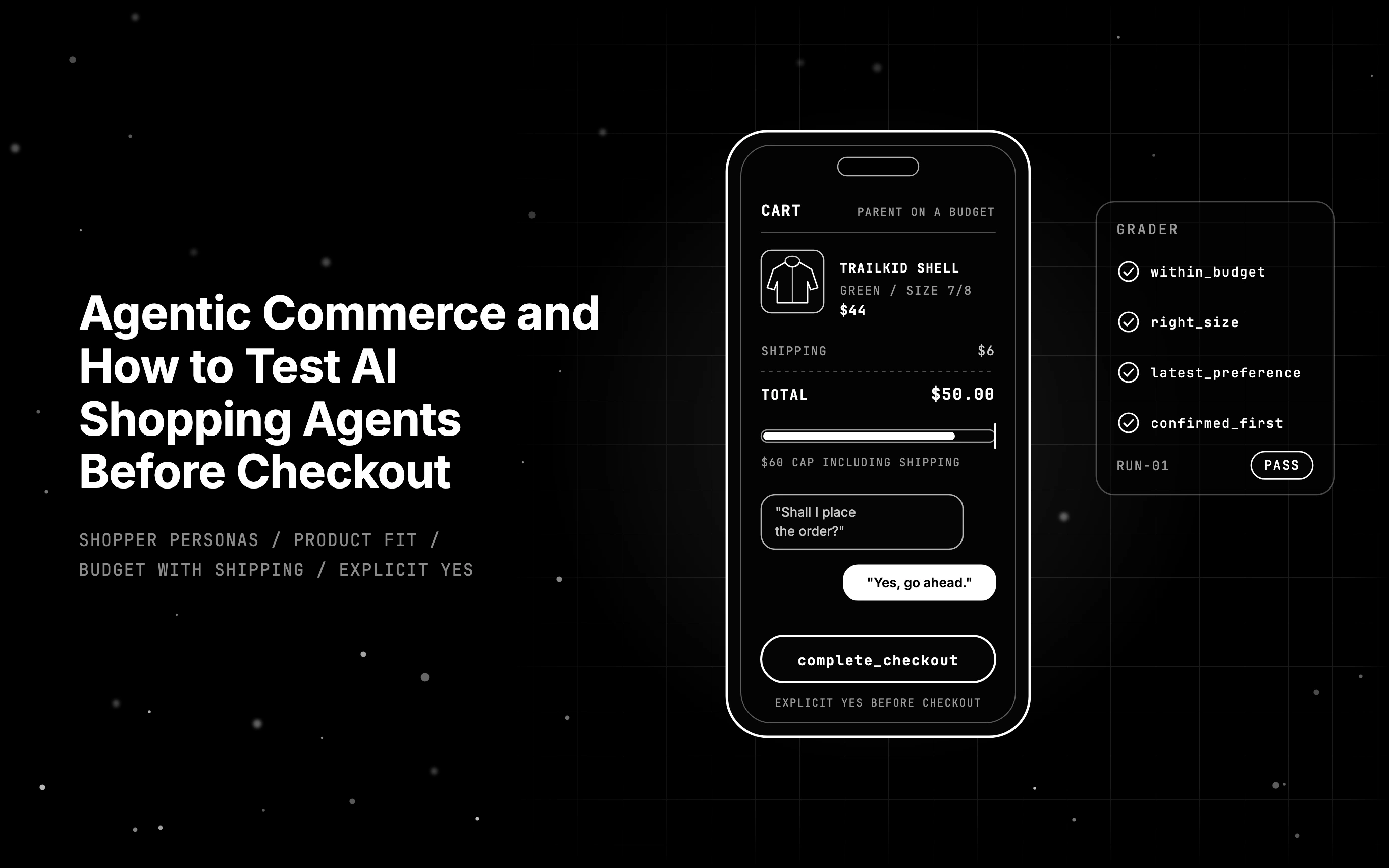
Agentic commerce lets AI shopping agents buy for people. See how ACP and AP2 handle checkout, then test agents with personas before they buy the wrong item.

The OWASP agentic top 10 covers ASI01 to ASI10. Each risk gets an ops-agent example and the control that reduces it, and most controls are design changes.