Future AGI MCP Server in 2026: Evaluate LLMs and Manage Datasets from Claude, Cursor, or Any MCP Client
Run Future AGI evaluations, datasets, guardrails, and synthetic data from Claude Desktop or Cursor via MCP. Setup, code, and gotchas for 2026.
Table of Contents
What MCP is and why this matters
Model Context Protocol (MCP) is an open standard from Anthropic for exposing tools and data to LLM clients (spec, GitHub). It is to AI tooling what the Language Server Protocol was to IDE integrations: one wire format, many clients, many servers. In 2026 many major AI tools and IDE clients support MCP, including Claude Desktop, Cursor, Claude Code, Zed, and Windsurf.
Future AGI’s MCP server makes the full evaluation, observability, guardrails, and synthetic data surface callable from any of those clients in natural language. Connect once, and you can ask Claude Desktop to run a faithfulness eval on your last 1000 traces, or ask Cursor to add traceAI instrumentation to a CrewAI agent, without leaving the IDE.
TL;DR
| Capability | What you can do from chat |
|---|---|
| Evaluations | Run faithfulness, toxicity, context relevance, custom LLM judges on single inputs or stored datasets |
| Datasets | Upload, evaluate, fetch results, download |
| Guardrails | Apply toxicity, prompt injection, and policy guardrails to apps |
| Synthetic data | Generate domain specific datasets by describing them in plain English |
| Observability | Have your IDE add traceAI instrumentation to existing agent code |
If you use Claude Desktop, Cursor, or Claude Code: install the Future AGI MCP server once, then everything Future AGI does is callable from your existing chat or IDE workflow.
Why use Future AGI over MCP
The win is workflow fit. Three concrete examples:
- You have a CSV of agent outputs and want to know which are unfaithful. Instead of opening the web app, importing the CSV, and clicking through evaluator settings, you ask Cursor: “Upload
rag_outputs.csvto Future AGI, run faithfulness and context relevance, then download the results.” Cursor calls the right MCP tools in order. - You are debugging an agent that hallucinates tool calls. Ask Claude Desktop: “Add traceAI instrumentation to my CrewAI agent at
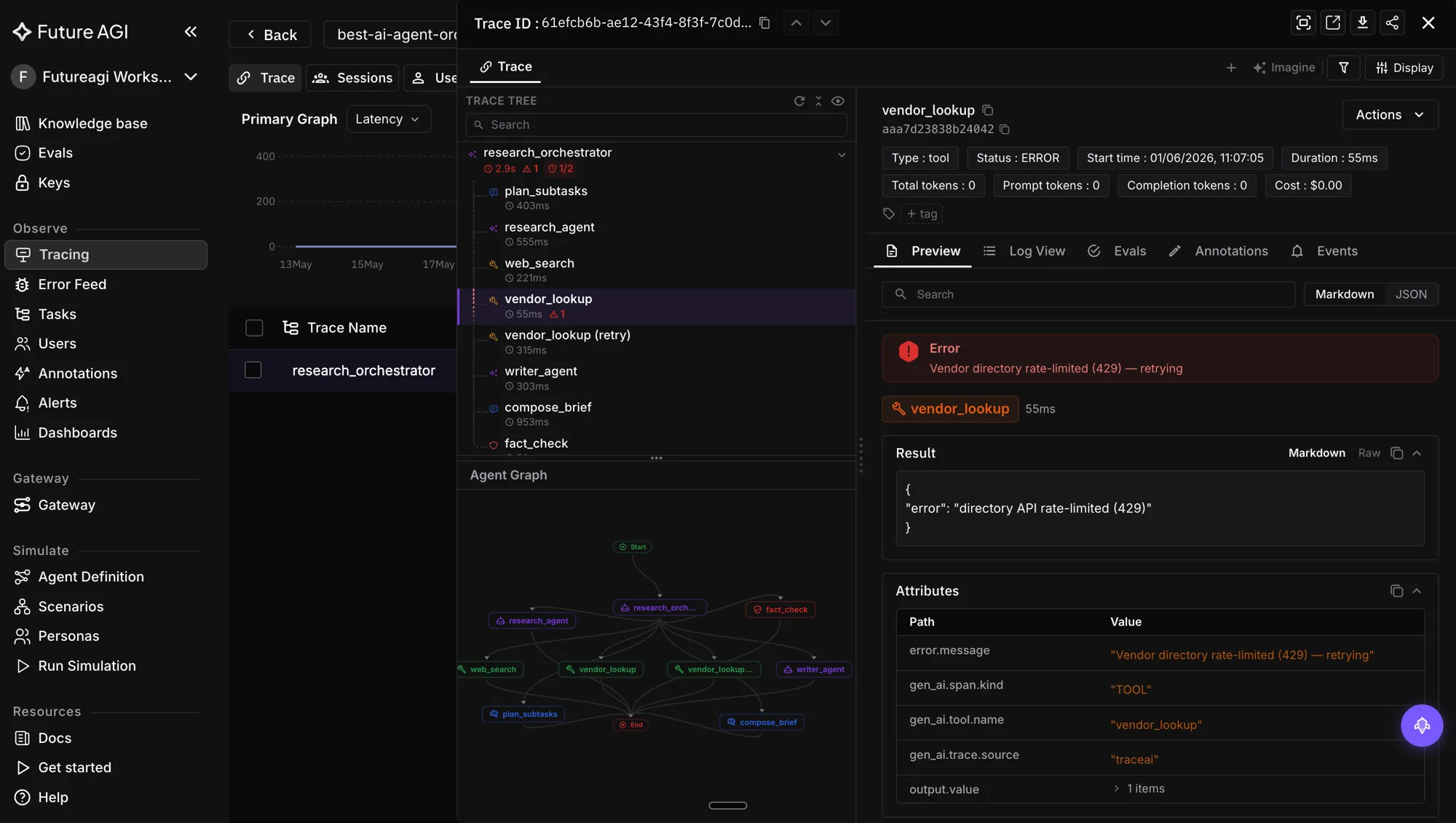
agents/research_agent.pyusingtraceai-crewai.” It edits the file, then you can rerun and see traces in the Agent Command Center at/platform/monitor/command-center. - You need a 500 row synthetic dataset of multilingual customer support queries. Ask: “Generate a Future AGI synthetic dataset of 500 multilingual customer support queries focused on refund and shipping issues, balanced across English, Spanish, and Hindi.” The server kicks off generation; you download when ready.
How to set up the Future AGI MCP server
Get your API keys
Sign in at app.futureagi.com and copy the FI_API_KEY and FI_SECRET_KEY from your dashboard. Both are required.
Option A: run from source (good for hacking)
git clone https://github.com/future-agi/futureagi-mcp-server.git
cd futureagi-mcp-server

# Install uv if you do not have it
brew install uv

uv sync

export FI_API_KEY="your_api_key"
export FI_SECRET_KEY="your_secret_key"

python main.py
Option B: configure your MCP client to run it via uvx
{
  "mcpServers": {
    "FutureAGI-MCP": {
      "command": "uvx",
      "args": ["futureagi-mcp-server"],
      "env": {
        "FI_API_KEY": "your_api_key",
        "FI_SECRET_KEY": "your_secret_key"
      }
    }
  }
}
Drop the JSON into the relevant config:
- Claude Desktop:
~/Library/Application Support/Claude/claude_desktop_config.json(macOS) - Cursor: Settings → MCP servers
- Claude Code: project or user
.claude/mcp.json - Zed:
~/.config/zed/settings.json(assistant.mcp) - Windsurf: Settings → AI → MCP servers
Restart the client and the Future AGI tools appear in the tool picker.
Option C: docs MCP (read only docs search)
For doc lookup only, the Future AGI documentation also ships its own MCP via Mintlify:
npx @mintlify/mcp@latest add futureagiThe Mintlify tool prompts you to pick which clients to wire up. This is read only and complementary to the main MCP server.
Worked examples
Evaluating a dataset from chat
User prompt to Cursor:
Find rag_chat.csv in this repo, upload it to Future AGI, suggest three evaluations
that match the columns, apply them to the dataset, and report a summary.
The MCP server exposes the dataset upload, evaluator listing, and evaluator attach operations as tools; the client agent (Cursor in this example) chooses which to call in which order. It discovers the file, uploads the dataset, lists the available evaluators, picks faithfulness, context relevance, and groundedness based on column names, attaches them to the dataset, polls for completion, and returns row level scores.
Adding traceAI instrumentation from your IDE
User prompt to Cursor:
Search the Future AGI docs for CrewAI instrumentation and edit
agents/research_agent.py to add a trace provider using traceai-crewai.
With the Future AGI docs MCP from Option C installed (or any docs search the client has access to), Cursor reads the relevant page and proposes a diff that adds the standard register plus FITracer boilerplate plus the framework specific instrumentor.
from fi_instrumentation import register, FITracer
from traceai_crewai import CrewAIInstrumentor

register(project_name="research-agent-prod")
CrewAIInstrumentor().instrument()
tracer = FITracer(__name__)
Same pattern works for traceai-langchain (LangChainInstrumentor), traceai-openai-agents, traceai-llama-index, and traceai-mcp. All are Apache 2.0 (traceAI repo).
Generating synthetic data
User prompt to Claude Desktop:
Generate a Future AGI synthetic dataset of 200 customer support queries
in English and Spanish, half about returns and half about subscription billing,
with one column for the query text, one for the intent label.
The MCP server: confirms columns and counts, calls the generation tool, and returns a dataset id. Later you can download it directly through the MCP server or from the web app.
Applying guardrails
User prompt to Claude Code:
Add Future AGI guardrails for toxicity and prompt injection to my chatbot,
and gate the response if either fires.
The server returns the relevant guardrail tooling and configuration; the client agent (Claude Code in this example) drafts the code change in your editor. Future AGI’s guardrails are documented at docs.futureagi.com/docs/protect.
Future AGI MCP vs other observability MCPs
| Server | What it covers | Where it fits |
|---|---|---|
| Future AGI MCP | Eval, datasets, guardrails, synthetic data, traceAI instrumentation | Default for end to end LLM and agent workflows in 2026 |
| LangSmith MCP | Tracing, datasets, run inspection | Good if your stack is heavy LangChain or LangGraph |
| Langfuse MCP | Tracing, datasets, scoring | Open source pick for tracing first teams |
| Phoenix MCP | Tracing, evaluator runs | Strong if you already run Arize Phoenix |
| Sentry MCP | Error traces and issues | Adjacent, not an LLM eval surface |
Future AGI has the widest surface in the eval and guardrails categories. The others are narrower and reasonable if you already pay for them.
Security and key handling
- Never put your real
FI_SECRET_KEYin a config file you commit to git. Use environment variables or the client’s secret manager. - For team setups, run the MCP server behind a proxy so each user authenticates with their own token.
- Rotate keys at least every 90 days and after any contractor offboarding.
- Treat MCP tool output as untrusted input to the LLM client, just like any other web call. Apply guardrails on responses that get fed back into the model.
Common gotchas
| Symptom | Cause | Fix |
|---|---|---|
| Client does not see the tools | Restart needed after config change | Fully quit and reopen Claude Desktop, Cursor, etc. |
| ”Authentication failed” | Wrong key or swapped key fields | Confirm FI_API_KEY and FI_SECRET_KEY (do not swap them) |
| Long generation timeout | Synthetic data jobs run async | Ask the agent to poll status, do not block on first response |
| Tool list is empty | Server crashed silently | Run python main.py in a terminal to see logs |
| Wrong evaluator suggested | Limited column metadata | Pass a sample row to the chat and ask the agent to re plan |
What is next
Future AGI’s MCP capabilities continue to expand. Roadmap items as of 2026:
- Prompt management endpoints (create, version, A or B test prompts from chat)
- Knowledge base backed synthetic data (anchor generation to your own docs)
- Streaming evaluator results for long datasets
- Tighter integration with the Agent Command Center for live trace inspection
See the Future AGI docs for the current tool list and the MCP server repo for source.
Related reads
Frequently Asked Questions
What is the Future AGI MCP server?
Which MCP clients work with Future AGI?
How do I install and run the Future AGI MCP server?
What can I do with Future AGI MCP that I cannot do in the web app?
How does Future AGI MCP compare to LangSmith or Langfuse over MCP?
Is the Future AGI MCP server open source?
How do I keep keys safe when using MCP?
Does MCP work with agents in production, or just in IDE chat?
Cloudflare MCP, Bifrost (Maxim), Composio, Smithery, MCP Inspector CLI, and Agent Command Center compared on registration, observability, auth, and OTel.

Evaluate MCP-connected agents in 2026: tool selection, argument correctness, task completion, OTEL tracing, and the 5-pillar production scoring framework.

What 2026 AI agents do well, where they still fail, and the open questions. A grounded read for teams shipping autonomous LLM systems.