Best 5 Error Analysis Tools for CX AI Agents in 2026
Five error analysis tools for CX AI agents in 2026: cluster support failures, localize the root cause, write the fix, and redact customer PII at the span layer.
Table of Contents
A CX AI agent does not fail with a red status code. A support agent loops on turn three without resolving the issue, quotes a refund policy that no longer applies, or fails to escalate a frustrated customer who has asked twice. The response reads clean. The trace is captured. Nothing pages.
Weeks later a QA review finds the pattern across hundreds of sessions, and now the question is not just how to fix it but how to show a reviewer you caught it, without exposing customer data in the process. That gap, between having every trace and knowing which failures matter and why, is what error analysis tools close. In CX, they also have to protect customer PII and keep a QA record.
TL;DR: Error analysis for CX AI agents means turning production failures into fixes you can defend: clustering CX failures into named issues, attributing each to a root cause, and shipping the change while redacting customer PII and keeping a QA record. Most 2026 tools now do the first half, they cluster failures and surface a root cause. Future AGI runs the loop end to end: it scores each cluster’s impact, ranks and prioritizes the issues, lets you run a deep-dive analysis to find the real root cause rather than a one-line guess, and cuts a Slack or Linear ticket you assign to the team from the UI, all while redacting customer PII at the span layer, on any stack.
The 5 Best Error Analysis Tools for CX AI Agents in 2026
Five tools carry a CX agent failure furthest, from a raw trace to a clustered, root-caused, fixable issue.
| Tool | Best for | Pricing |
|---|---|---|
| Future AGI | The whole loop in one tool: cluster failing CX traces into named issues, root-cause each to the exact span and field, and ship the written fix, with PII redacted at the span layer | Free tier, usage-based |
| LangSmith | Trace-native failure clustering for a support agent already built on LangChain or LangGraph | Free tier, seat-based paid |
| Arize Phoenix | Embedding-clustered failures and drift on a help-center or knowledge-base RAG surface; you name, rank, root-cause, and fix them yourself | Free tier + managed |
| Galileo | Automatic failure clustering and root-cause insights from production traces; enterprise-focused | Free tier, fixed-price Pro, quote-based Enterprise |
| Braintrust | Automatic behavioral clustering of production traces, plus an assistant to investigate the failing groups | Free tier, usage-based paid |
How We Scored the Tools: The 5-Criteria Error Analysis Scorecard
We scored every tool on the same five dimensions, the Future AGI Error Analysis Scorecard, shaped for CX. Each asks how far the tool carries a failure toward a defensible fix, not how polished its dashboard looks. Re-score them against your own stack.
- CX failure clustering. Does it auto-group similar CX failures (wrong resolution, missed escalation, tone drift) into a named issue, or leave you filtering a list?
- Root-cause attribution. Does it name the input field that broke, or stop at a pass or fail score?
- Drift on new intents, products, and tone. Does it catch a new failure pattern emerging on a new intent, a newly launched product, or a shift in tone before it reaches more customers?
- Fix loop. Does a failure link to a written next action, or end at “here is a trace”?
- Boundary and QA fit. Does it redact customer PII and keep a QA record your quality team can show a reviewer?
1. Future AGI: best for end-to-end error analysis, from trace to fix with PII redaction
Best for: CX teams that want the entire error-analysis loop in one tool: agent traces captured at the span level, failing ones auto-clustered into named issues, ranked by impact, root-caused to the input field that broke, paired with a concrete fix, cut into a ticket from the UI, and handled with PII redaction at the span layer, without a reviewer opening traces by hand.
Key strengths:
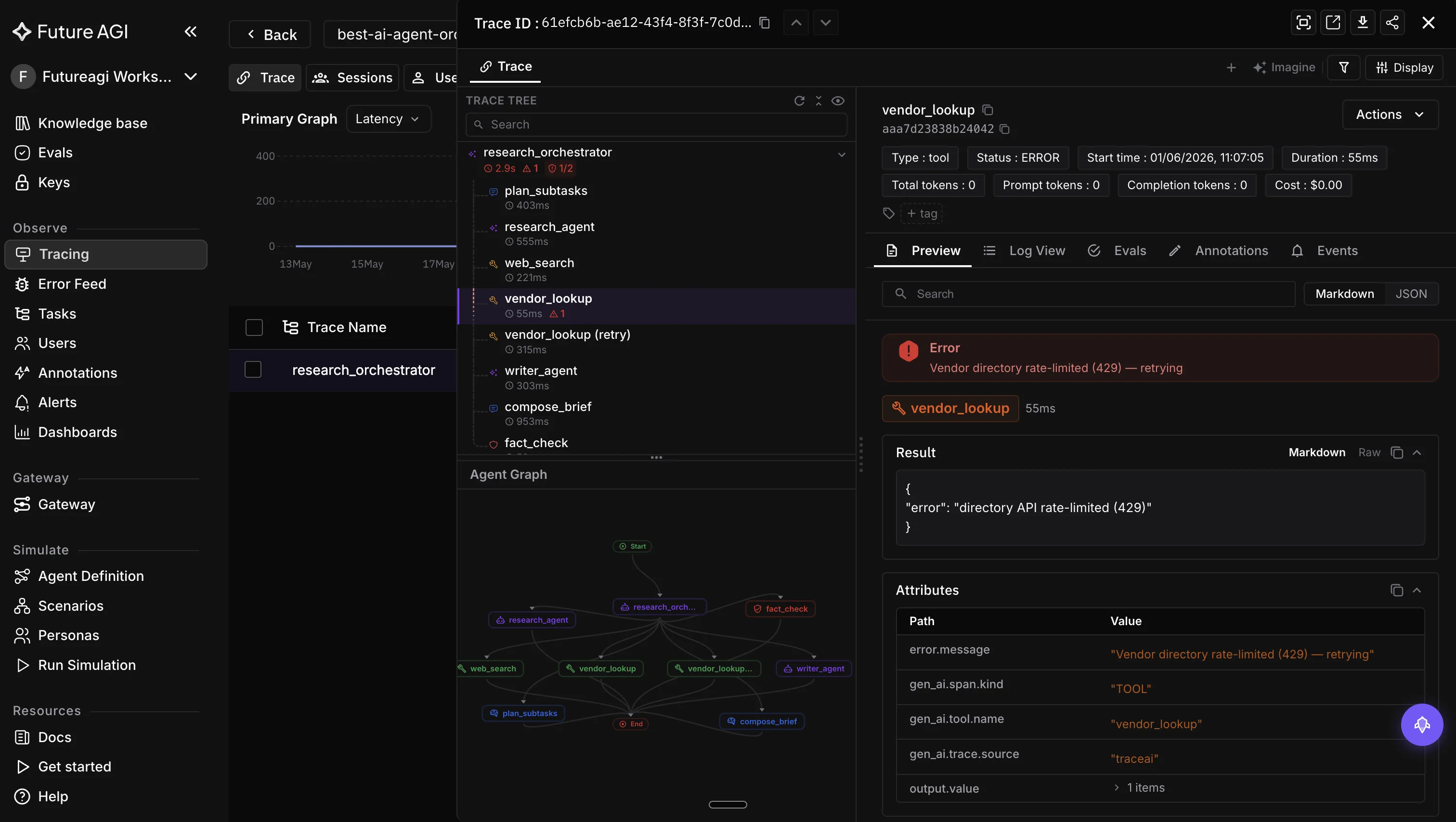
- The error feed auto-clusters failing CX traces into named issues.
- Each named issue is scored for impact, then ranked and prioritized, so the failures hurting the most customers rise to the top instead of sitting in arrival order.
- On any cluster you can run a deep-dive analysis that investigates the failing traces to find the real root cause, not just a one-line fix, so a wrong-resolution or missed-escalation pattern gets a change that addresses the cause rather than the symptom.
- Once a cluster is understood, you cut a Slack or Linear ticket and assign it to the team, directly from the UI, so a failure moves to an owner without leaving the tool.
- Error Localization attributes a failure to the exact input field that caused it, and a judge classifies each cluster against its error taxonomy, writes a four-dimension trace score (Factual Grounding, Privacy and Safety, Instruction Adherence, Optimal Plan Execution), and an
immediate_fixfor the quick cases. traceAIis OpenTelemetry-native, carries 14 span kinds and 50-plus AI surfaces across Python, TypeScript, Java, and C#, and auto-instruments OpenAI, LangChain, Groq, Portkey, and Gemini with no app code changes.- Built-in PII redaction at the span layer keeps customer data out of the analysis surface, and the same span tree feeds 50-plus evaluators from the Agent Learning Kit, so analysis and scoring live in one loop.
Under each cluster, the same trace carries span-level evaluation scores, so the root cause is attached to the exact step that produced it rather than inferred from the final answer.
Use-case fit: Customer-facing support and help-center agents, chat deflection bots, and post-purchase or returns agents where failures repeat and carry churn or brand-trust cost.
Pricing: Free tier to start; the error feed and other AI-powered features are credit/usage-based. Built-in PII redaction at the span layer. See pricing.
Verdict: The one tool here that carries a CX failure end to end, from a ranked, named cluster to a deep-dive root cause to a written fix and a ticket assigned to the team, and keeps customer PII redacted at the span layer, with the failure, its root cause, and the fix recorded. It earns the top slot on the fix loop, not on dashboard polish.
2. LangSmith: best for trace-native debugging in the LangChain ecosystem
Best for: CX teams building on LangChain or LangGraph that want agent traces, failure-mode clustering, and evaluation in the tool their stack already speaks.
Key strengths:
- Captures every LLM call, tool call, and agent step as a nested, replayable trace, then automatically analyzes and clusters those traces to surface common failure modes rather than leaving you to scan them by hand.
- The 2026 LangSmith Engine adds an AI layer that reads a failing or expensive run and suggests a fix, and the Polly assistant lets you interrogate a trace in plain language.
- Evaluation is first class: build datasets, define LLM-as-judge, code, or human evaluators, and run experiments with regression flags gated in pytest, Vitest, or a GitHub workflow.
Limitations:
- The experience is tightest inside the LangChain and LangGraph ecosystem; teams on other frameworks get less out of it, even with OpenTelemetry support.
- It drafts its fix as a PR against your codebase rather than writing a per-cluster fix you cut into a ticket and assign to the team, and it does not localize the failure to the exact input field the way Error Localization does, and it leaves PII handling to you.
Use-case fit: LangChain and LangGraph support agents where trace-level debugging and eval regression matter most.
Pricing: Free tier, then seat-based paid plans.
Verdict: The strongest pick for a LangChain-native support team, and the closest thing here to end-to-end error analysis, it clusters into prioritized issues, root-causes, and drafts a fix, though it stays inside the LangChain and LangGraph ecosystem and drafts a PR rather than cutting a ticket you assign.
3. Arize Phoenix: best for embedding drift on retrieval
Best for: Teams whose recurring failure is drift on a high-dimensional retrieval or embedding surface, such as a RAG-backed help-center or knowledge-base lookup. Phoenix is an observability and drift tool first; it surfaces the traces, the drift, and unlabeled embedding clusters, and leaves the rest of the error analysis (naming the issue and writing the fix) to you.
Key strengths:
- It clusters failures by embedding proximity and detects drift, so a help-center or knowledge-base RAG surface that is quietly degrading, or a batch of similar failing cases, surfaces as a group instead of staying buried in traces.
- Built-in evaluators (faithfulness, hallucination, relevance) flag failing traces so the clusters have something to form around.
Limitations:
- Its clusters are grouped by embedding proximity and left unlabeled, so you name and interpret each group yourself.
- No root-cause artifact, no written fix, and no ticket-and-assign per cluster; you get the clusters and the drift signal, then finish the error analysis by hand.
Use-case fit: RAG-heavy support agents where a stale or drifting help center is the dominant failure.
Pricing: Free tier, plus managed pricing for production features.
Verdict: The pick when embedding drift is the error you keep chasing, though the error analysis after that is on you.
4. Galileo: best for an automatic failure-insights engine
Best for: Enterprise support teams that want recurring failure patterns surfaced automatically from production traces.
Key strengths:
- Its Insights Engine automatically clusters similar failures from production traces, surfaces root-cause patterns, and recommends fixes, so recurring CX failure modes (a wrong resolution, a missed escalation) get found without reading traces one by one.
- Root-cause analysis links a detected failure back to the exact traces that produced it.
- A Graph Engine visualizes agent decision paths, so you can see where a multi-step support run went wrong.
Limitations:
- The Insights Engine clusters, root-causes, and recommends a fix, but Future AGI carries the loop one step further: you cut and assign a ticket to an engineer directly from the UI, so a confirmed failure moves straight to an owner.
- Galileo ties a failure to its traces; Future AGI’s Error Localization goes to the exact input field that broke.
- The platform is heavier to adopt than a drop-in tracer, which matters for a small team.
Use-case fit: Enterprise support programs that want automatic failure-pattern detection on production traces.
Pricing: Free tier, a fixed-price Pro plan, and quote-based Enterprise.
Verdict: A genuine error-analysis tool through the Insights Engine, strongest for enterprise support teams that want failure patterns surfaced automatically from production traces. It clusters and root-causes, but stops before ticketed remediation.
5. Braintrust: best for behavioral trace clustering with an investigation assistant
Best for: CX teams that want production traces grouped automatically by what happened inside each run, with an AI assistant to dig into the failing groups.
Key strengths:
- Braintrust clusters production traces by run behavior, using the trace content rather than a predefined metric, so similar behaviors land together and unusual groups surface as candidate failure modes to review.
- Loop, its AI assistant, takes a plain-language description of a failure, investigates the traces, and isolates the failing step against successful runs.
- Brainstore, its trace store, captures exhaustive agent traces (tool calls, errors, cost, latency) across millions of nested traces, so the assistant has the full failure history to read.
Limitations:
- Its clusters are candidate failure modes for review, but it does not localize a failure to the exact input field the way Error Localization does.
- It stops before the remediation half of the loop: no written per-cluster fix, and no ticket you cut and assign from the UI, so a confirmed failure still moves to an engineer by hand, and it leaves PII handling to you.
Use-case fit: CX teams that want automatic behavioral clustering plus an assistant to investigate the failing groups.
Pricing: Free tier, then usage-based paid plans.
Verdict: A real error-analysis contender: it auto-clusters production traces by behavior and its assistant investigates the failing groups, though the ranking, written fix, and ticketing are still yours to do.
How to Choose the Right Error Analysis Tool
Most of these tools now cluster failures and surface a root cause, so the choice comes down to the one constraint that actually decides it for your support team. If that constraint is finishing the job, carrying a CX failure all the way from a cluster to a ranked, field-localized, written fix and a ticket assigned to an engineer, with customer PII redacted at the span layer and no manual triage in between, Future AGI is the pick, and it works whatever framework you run. If instead the deciding factor is your framework, and your support agents already live in LangChain or LangGraph, LangSmith runs the same loop natively and even drafts the fix, though only within that ecosystem, and it opens a PR rather than cutting a ticket you assign. If it is org fit, an enterprise that needs failure patterns surfaced automatically from production traces, Galileo’s Insights Engine is built for that. If it is working style, and you would rather investigate a failure by asking an AI assistant than read a prioritized feed, Braintrust’s Loop is built for exactly that. And if it is a single failure type, embedding drift on a help-center or knowledge-base lookup and little else, Phoenix is the narrow, focused choice.
CX AI Agent Error Analysis Best Practices
Whichever tool you pick, the workflow around it decides whether error analysis shortens the fix cycle and holds up in a QA review.
- Score the whole trace, not the final answer. Most CX failures (a missed escalation, an inconsistent resolution, an off-tone reply) live upstream of the response, so grade the span tree as a unit.
- Cluster CX failures before you triage. Reading 400 traces one by one does not scale. Group similar failures into named issues first, then work the clusters by customer impact, not by arrival time.
- Tie every failure to a root cause you can act on. A red mark is not a fix. Insist on field-level attribution that points at the exact input, so a wrong-resolution or missed-escalation question resolves to one line.
- Redact customer PII at the trace layer. Customer identifiers and account detail should never sit in the analysis surface; redact at the span layer so the tool that finds your failures does not become a new exposure.
- Keep a QA record. Log every caught-and-fixed failure so you can show a reviewer not just that a problem existed but that you detected it, root-caused it, and corrected it.
Where Each Platform Earns Its Slot
Error analysis pays off when a failure ends at a fix, and in CX, at a fix that protects the customer and their data. That is the gap the Future AGI error feed was built to close, running the loop end to end instead of handing you a cluster and walking away: it clusters failing traces into named issues, scores and ranks them by impact, and for any cluster lets you run a deep-dive analysis that finds the real root cause rather than a one-line guess, then cut a Slack or Linear ticket and assign it to the team from the UI, with customer PII redacted at the span layer and Error Localization naming the input field that broke. Because traceAI spans feed the same evaluator surface, the loop from observing a failure to root-causing it to fixing it lives with one vendor, with the trace, root cause, and fix recorded together.
If you want to see it on your own traces, start with the Observe docs or the platform overview. This CX guide sits under our cross-industry ranking of AI agent error analysis tools and alongside the best AI observability tools for CX, which covers the trace layer beneath error analysis; for the methodology, read what error analysis for LLMs actually involves and how it plays out across LLM applications.
Frequently Asked Questions
What is error analysis for CX AI agents?
What is the best error analysis tool for CX AI agents in 2026?
Why do CX AI agents need error analysis beyond monitoring?
How does error analysis help with CX quality and QA?
How is error analysis different from observability for CX AI?
How does the Future AGI error feed work?
A 2026 error analysis workflow for LLM apps. Cluster failure cases, label root causes, prioritize fixes. Concrete dataset, code, and rubrics that ship.

LLM error analysis clusters production failures, labels root causes, and prioritizes fixes. The workflow, the embeddings, and the tools teams use in 2026.

Five CX AI observability platforms scored on conversation-trace inspection, escalation-event capture, and CSAT/NPS join to Zendesk and Intercom ticket IDs.