Choosing a Conversation Simulation Tool for Chat Agents: 5 Questions to Ask
Five questions for choosing a conversation simulation tool for chat agents: realistic multi-turn dialogue, user personas, automatic scoring, and scenario coverage.
Table of Contents
Your chat agent passes every test you typed by hand. Then a real user opens with “this is the third time I’m asking,” gives their order number two messages later, changes the request halfway through, and by the end the agent has lost the thread and promised a refund it cannot give. You never tested that conversation, because you were testing single messages, and real users do not send single messages.
That gap is what a conversation simulation tool is supposed to close. Instead of you hand-typing a few prompts, it plays a realistic user across a full back-and-forth and scores how your agent held up. The problem is that “simulation” means very different things across tools: some only replay one prompt, some play a single polite user, and some just record the transcript without telling you whether the agent actually did its job. Here are the 5 questions that separate a real chat conversation simulation tool from a glorified prompt tester, and how to answer each.
TL;DR: choose a conversation simulation tool that runs full multi-turn dialogues (not single prompts), plays a range of user personas (not one calm user), scores each conversation automatically against its goal (not just saves the transcript), and generates realistic scenarios at scale. That is how you catch the conversations that would break your agent before real users ever hit them.
New to testing conversational agents? Our guide to agent evaluation covers the scoring side, and this piece on why agents pass evals but fail in production explains why pre-launch testing has to look like real usage. If your agent is voice rather than text, see the voice agent simulation guide instead.
Why choosing a conversation simulation tool for chat agents is harder than it looks
Almost every testing tool now says it “simulates” conversations, so the word does not tell you much. The behavior does. A single-prompt tester sends one message and checks the reply, which tells you nothing about how the agent handles a user who circles back or changes direction. A one-persona tool always plays the same reasonable user, so it never finds the conversations a frustrated or confused person would trigger. And a record-only tool saves the transcript but leaves you to read hundreds of them by hand to decide which ones went wrong.
For a chat agent, the failures that matter almost always live in the turns: forgetting what the user said three messages ago, getting talked out of a rule, or drifting off the goal. So the buying decision is not “does it simulate conversations.” It is “does it run realistic multi-turn conversations, with different kinds of users, and tell me which ones failed and why.” Treat the five questions below as a scorecard, the Chat Simulation Readiness Test, and a tool should clear at least four of five before you trust it to gate a launch.
The 5 questions to ask before you choose
The Chat Simulation Readiness Test. Score each factor pass or fail. Aim for four or more.
| # | Factor | Pass if the tool… |
|---|---|---|
| 1 | Real multi-turn dialogue | Runs a full back-and-forth conversation, not a single prompt |
| 2 | A range of user personas | Plays different user types and moods, not one calm user |
| 3 | Automatic scoring | Scores each conversation against its goal, not just saves the transcript |
| 4 | Scenarios at scale | Generates many realistic situations, not only hand-written scripts |
| 5 | Connects to your evals | Feeds the same scoring and traces you already use, not a standalone toy |
1. Does it run a full conversation, or just one message?
Why it matters: a chat agent’s hardest job is holding a conversation together over many turns: remembering earlier details, handling a user who changes their mind, and still finishing the task. If the tool only sends one message and checks the reply, it never tests any of that, so it passes agents that fall apart on turn three.
What to look for: a tool that plays a full back-and-forth, where the simulated user responds to what the agent said and the conversation continues until the goal is met or clearly missed.
What to avoid: a platform/tool that sends a single prompt and grades a single reply, then calls it a conversation.
How FutureAGI fits: FutureAGI’s simulation runs full multi-turn conversations. You define a scenario with a goal and let a simulated user drive the exchange, turn by turn, until the conversation ends. The tool records the whole dialogue, not just one reply, so you can see where in the conversation the agent lost the thread. A single-prompt tester cannot show you that, because the failure only appears once the conversation gets going.
2. Can it play different kinds of users, or only one?
Why it matters: your agent does not fail on the calm, well-phrased user. It fails on the frustrated one who interrupts, the confused one who gives vague answers, and the one who tries to talk it out of its rules. If the tool only plays a single reasonable user, it tests the easy path and misses the ones that actually break in production.
What to look for: a way to run the same test as several different users (a persona), each with its own goal, tone, and behavior, so you cover the hard conversations, not just the polite ones.
What to avoid: a tool with one built-in user style, so every test conversation sounds the same.
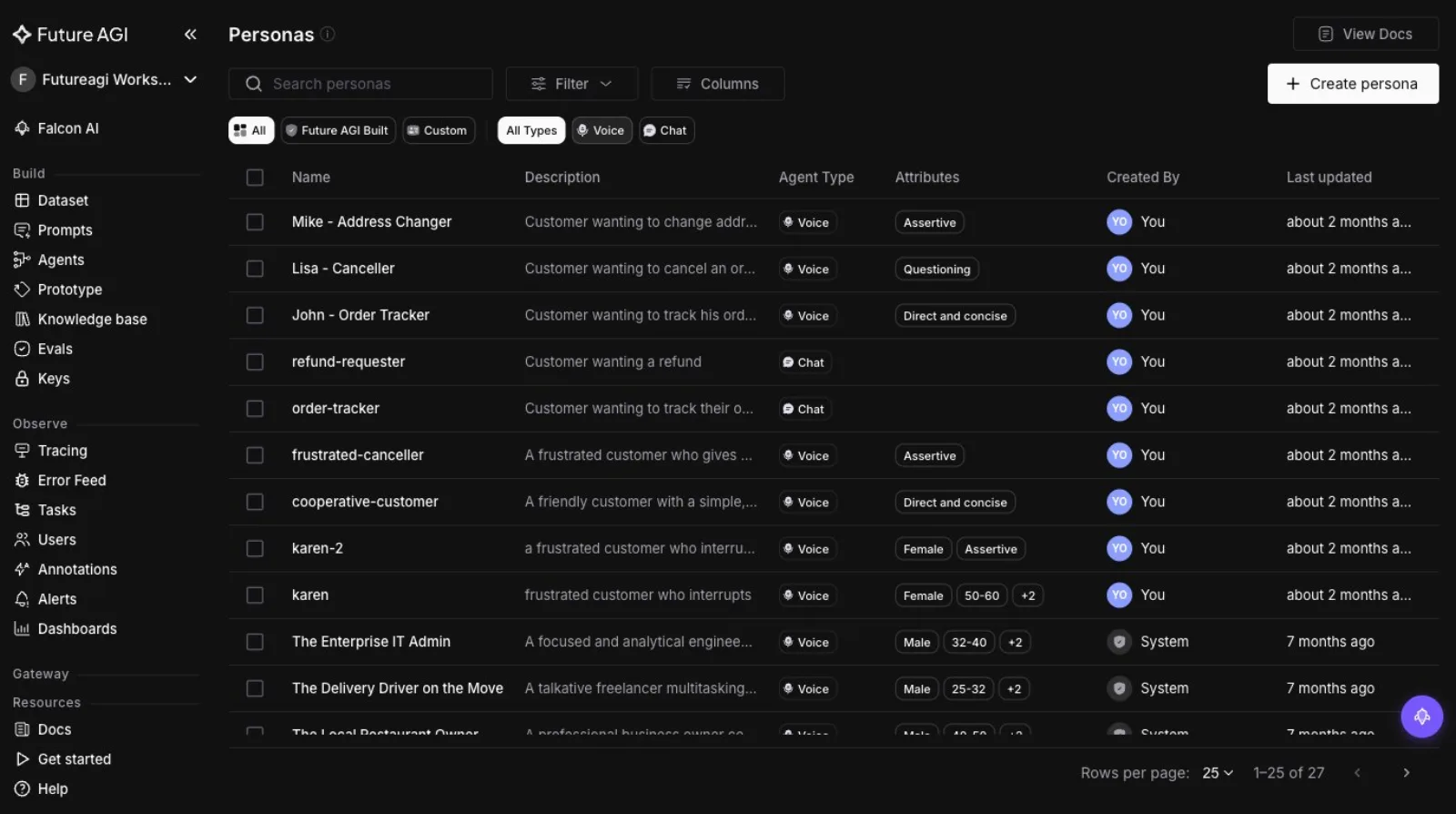
How FutureAGI fits: FutureAGI ships a library of user personas you can reuse and customize, covering both chat and voice, with traits like assertive, questioning, or direct. You can run one scenario against a frustrated customer, a first-time user, and an expert, and see which persona your agent handles badly. The screenshot below shows part of that persona library. Testing against a single user style leaves the difficult conversations, the ones that fill your support queue, untested.
3. Does it score each conversation, or just save the transcript?
Why it matters: running a hundred simulated conversations is not useful if you then have to read all hundred by hand to find the bad ones. The tool has to tell you which conversations failed and, ideally, why.
What to look for: automatic scoring on each conversation against its goal (did the agent complete the task, stay on topic, use tools correctly), with a clear pass or fail, so you can jump straight to the failures.
What to avoid: a tool whose only output is a pile of transcripts and a raw count of how many finished, leaving the judging to you.
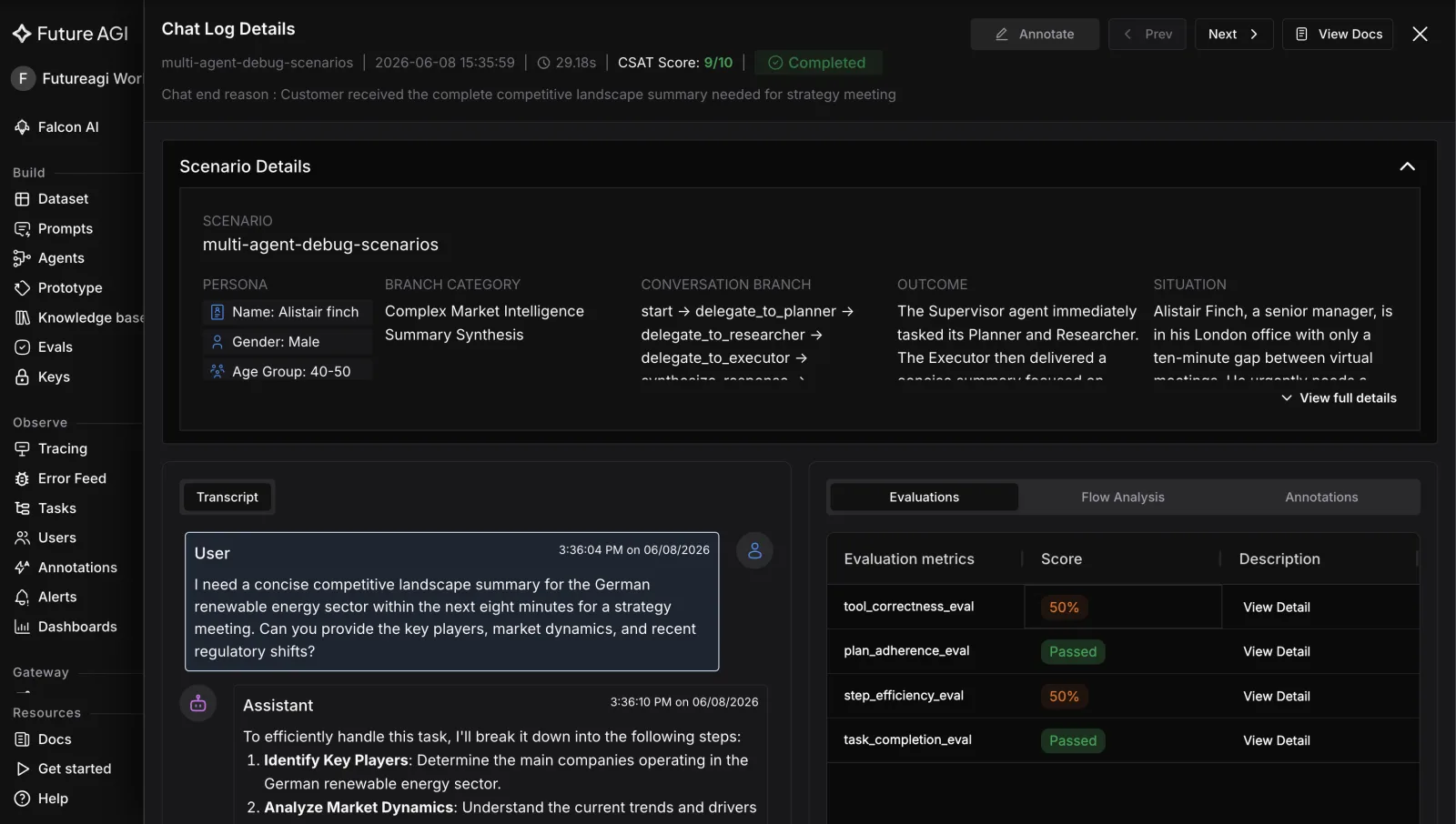
How FutureAGI fits: FutureAGI scores each simulated conversation automatically. A run produces a pass rate across all the conversations, and each one carries scores such as task completion, conversation coherence, and whether tools were called correctly, so you go straight to the conversations that failed and see the reason on the same screen. Record-only tools stop at the transcript and leave the hardest part, deciding what went wrong, to you.
4. Can it generate realistic scenarios at scale, or only run scripts you write?
Why it matters: if every test scenario has to be written by hand, your coverage is capped by how many you have time to write, and it drifts toward the situations you already thought of. The situations that break agents are usually the ones you did not think of.
What to look for: a way to generate many realistic scenarios from a short description, so you can cover a wide range of situations without scripting each one.
What to avoid: a tool that only runs a fixed set of hand-written scripts, so your test coverage never grows past what you manually author.
How FutureAGI fits: FutureAGI can generate a set of varied, realistic scenarios from a seed description, so you get broad coverage without hand-writing every case, and you can still add specific scripted scenarios where you need them. That mix, generated breadth plus hand-written depth, is how you test the situations you did not anticipate, which is where agents usually break.
5. Does it connect to the evaluations and traces you already use?
Why it matters: a simulation tool that lives entirely on its own becomes a second system to run and a second set of scores to reconcile. You want the conversations it generates to be scored by the same evaluators you use everywhere else, and to land in the same place you look at production traffic.
What to look for: a tool where simulation, scoring, and tracing are the same platform, so a pre-launch conversation is scored by the same rules as a live one and you are not comparing two different yardsticks.
What to avoid: a standalone simulator whose scores do not match your real evaluation setup, so a green simulation result means something different from a green production result.
How FutureAGI fits: in FutureAGI, simulation, evaluation, and tracing are one platform. A simulated conversation is scored by the same evaluators that score your production traffic, and it wraps common agent frameworks so you point it at your existing chat agent rather than rebuilding it. So a conversation that passes in simulation is judged by the same standard once it is live.
A quick decision framework
The five questions are the test; here is how the answers map to a pick.
| Choose | When | What decides it |
|---|---|---|
| A tool with real multi-turn dialogue | Your agent handles back-and-forth conversations, not one-shot questions | Factor 1; single-prompt testers are disqualified |
| A tool with a strong persona library | Your failures come from frustrated, confused, or adversarial users | Factor 2 |
| A tool with automatic scoring | You need to test many conversations without reading each transcript | Factor 3 |
| A tool with scenario generation | You cannot hand-write enough cases to cover real usage | Factor 4 |
| A single-platform tool | You already run evaluation and tracing and do not want a second silo | Factor 5 |
Where FutureAGI fits
The five questions get you a tool that can run and score realistic conversations before launch. Past that, two things make FutureAGI worth putting in your pre-launch pipeline rather than bolting on a separate simulator.
One loop: simulate, score, and fix. A simulated conversation is not a dead end. Each run produces a scored transcript with the persona, the scenario, and the per-turn evaluation results together, so a failed conversation shows you the exact turn and the reason, and low-scoring runs can feed straight into improving the agent. The screenshot below shows one simulated chat with its scenario, transcript, and evaluation scores on a single screen.
The same scoring before and after launch. The evaluators that score your simulated conversations are the same ones that score live traffic, so a pre-launch pass rate means the same thing once real users arrive. That removes the common trap where a simulator uses one set of scores and your production monitoring uses another, and the two never line up.
It points at the agent you already built. FutureAGI wraps common chat frameworks, so you connect it to your existing agent instead of rebuilding it inside a proprietary tool, which is what makes teams actually run simulations regularly instead of once.
If the five questions map to your agent, the fastest test is to run one scenario against three personas and read the scored transcripts. See the simulation documentation and the evaluation platform to set up your first run.
What to read next
- The Definitive Guide to AI Agent Evaluation (2026): how to score agents once you have conversations to judge, if you are designing the metrics.
- Why Agents Pass Evals but Fail in Production (2026): why pre-launch testing has to look like real usage, for teams whose agents surprise them live.
- Voice Agent Simulation Guide (2026): the same idea for voice agents, if your agent talks rather than types.
Inside Future AGI open source in Q2 2026: the platform shipped under Apache 2.0, Error Feed and the Agent Command Center went live, traces hit billions.

Gemini 3.5 Flash dropped today at Google I/O 2026. The 8 benchmark numbers that matter, $1.50/$9 pricing breakdown, and what to instrument before you swap.

Voice AI evaluation infrastructure in 2026: five testing layers, STT/LLM/TTS metrics, synthetic harness, traceAI, and FAGI Simulate.