A Root-Cause Analysis Agent for Error Feed, Observe Loads 50 to 70% Faster, and Claude 5 and the Gemini 3 Family
Error Feed gets a root-cause analysis agent that investigates a failing cluster on its own and lays out the likely cause. Observe load times drop by 50 to 70% on high-volume projects, the newest Claude 5 and Gemini 3 models are live across evaluations and the AI gateway, and editing a custom eval's prompt now saves and runs a new version. Plus custom date ranges, a Users CSV export, read-only access for the Viewer role, Bland.ai voice support across Simulate and Observe, and a larger dataset upload limit.
What's in this digest
A Root-Cause Analysis Agent for Error Feed
Error Feed already groups failing traces into clusters. Now a root-cause analysis agent investigates a cluster for you. Open one and the agent works through the traces on its own, streams its reasoning live in the Fix tab, and lands on the likely root cause. The result is saved, so reopening the cluster brings the analysis back instantly, and feed pages load a lot faster.
What’s new
- An agent that investigates on its own. Open a failing cluster and the root-cause analysis agent reads the traces, works through them, and lays out the probable cause, streaming its reasoning as it goes. (PR #853)
- Ask the agent follow-ups. Once it lands on a cause and suggests a fix, keep the conversation going in the same tab. Ask why it ruled something out, dig into a specific trace, or pressure-test the fix before you act on it.
- Answers are saved for instant replay. The agent caches its synthesis, so reopening a cluster brings the analysis straight back instead of running it again.
- A faster Error Feed. Feed pages load a lot faster alongside the agent.
Why it matters
Error Feed shows what is breaking at scale. The root-cause analysis agent takes the next step and tells you why, so you go from a cluster of failures to a likely cause without opening and comparing traces by hand.
Who it’s for
On-call engineers triaging a spike of failures, teams that want a fast first read on a new error cluster, and anyone who would rather start from a hypothesis than a wall of traces.
Claude 5 and the Gemini 3 Family Are Live
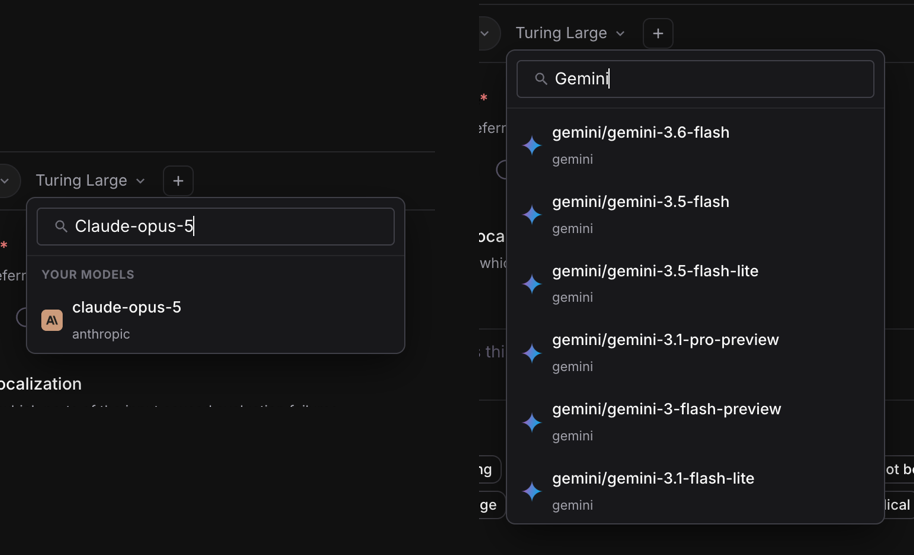
Add your Anthropic or Google API key and the newest models show up where you already work. Claude 5 and the Gemini 3 family are in the model picker across evaluations and the AI gateway, so you can score with them, route to them, and compare them against what you run today. Gemini 3.6 Flash, 3.5 Flash, and 3.1 Flash Lite are priced, so every call carries an accurate cost from the first request. (PR #1822, PR #1818, PR #867)
Improvements
Evaluation
Custom eval prompt edits are versioned. Editing a custom eval’s prompt on the dataset page now saves it as a new eval version and runs that version, so the prompt you edited is the one that gets used. Each edit is captured as a version you can pick from the version dropdown.
Eval usage tab. A new Eval Usage tab shows how often each eval has run, with the eval version recorded on every execution, so you can scope usage to any window and tie it back to the version that produced it.
Eval runs show live status. Eval tasks report their lifecycle status across the product, so a run’s state is clear while it works. Long-running and continuous eval tasks keep going and reconcile on their own instead of needing a manual nudge.
A clearer way to map variables into evals. You can now click any row to map it into a field instead of typing the path, across tracing, simulation, and dataset variable mapping. The dataset variable-mapping picker also handles nested JSON and array fields, with search that reaches deep fields directly, a tree that opens to a readable depth, and a picker that stays legible in dark mode.
LLM-as-a-judge editor matches the agent layout. The LLM-as-a-judge editor now uses the same layout as the agent editor, with correct model logos, so editing a judge feels the same as editing an agent.
Export experiment results to CSV. The aggregate experiment Summary view exports to CSV, with download progress and clear success or error feedback, so you can pull a full experiment out for analysis in one click.
Observe
Faster Observe and dashboards on high-volume projects. Observe load times drop by 50 to 70% on high-volume projects. Trace lists, the Users and Sessions tabs, and dashboard breakdown charts stay fast even across long date ranges, because queries read only the data inside your selected window, so a wide breakdown returns in seconds. Results are unchanged, just faster to return.
Export the Users tab to CSV. The Observe Users tab exports to CSV. The full list streams to a file straight from the view you are already looking at, so you can pull every user out for analysis without paging through the grid.
More users per page. The Observe Users grid shows 50 rows by default and adds a rows-per-page selector. A filter reads against the full set rather than a short first page, so counts match what you expect.
View a session from the annotation queue. You can now open a session directly from the annotation queue, without leaving it. When a queued trace or span belongs to a session, open the full session inline and jump back to the trace when you are done.
Dashboards
Custom date ranges on dashboards. The dashboard date bar now opens a Custom option where you pick any start and end date, and every widget updates to that range. The widget editor keeps the same range on reopen with its dates intact, instead of falling back to a preset.
Dashboard polish. Deleting a dashboard or widget asks you to confirm first. A chart whose data falls outside its configured axis range shows a clear warning instead of a blank canvas, and an empty dashboard shows an empty state rather than a blank page. Filter chips display the selected value names instead of a count, and the global time filter adds 30-minute and 6-hour options.
Simulate
Bland.ai as an inbound and outbound voice provider. Connect a Bland.ai voice agent as a provider and its production calls, inbound and outbound, come into both Simulate and Observe. You can run simulations against your Bland agents and trace their real calls alongside your other voice providers.
Platform
Read-only access for the Viewer role. The Viewer role gets a consistent read-only view across tasks, evaluations, dashboards, and the agent playground. Write actions like Create, Save, Test, Duplicate, and Delete render as disabled, matching the permissions the role already has, so viewers see exactly what they can act on.
Delete your own prompt templates. Prompt templates you created can be deleted from the Prompt Templates drawer, with a confirm step and a success message, so your template list stays tidy.
Larger dataset uploads. The dataset upload limit moves from 10 MB to 25 MB, so realistic prompt and eval datasets upload without hitting the cap.
Smoother self-hosted setup. Self-hosting is easier to stand up. A guided first-run setup walks an operator through launching a self-hosted stack, with live infrastructure checks, browser-based signup, and invite links for the team. One Docker setup serves both self-hosted and internal deployments, sign-in has a guided flow for creating an account and resetting a password, and Optimization and Knowledge Base are available in the open-source build.
AI Gateway
Works with more clients and models. The gateway now forwards max_completion_tokens to the latest OpenAI reasoning models, so your existing OpenAI client reaches them without extra setup. Chat completions always return a content field, so clients written to the OpenAI shape keep working even when a model returns no text. Sub-cent request costs show at full precision in the gateway logs.