Perplexity ships Sonar and gpt-5.1 to self-hosted Future AGI, plus polish across Evals, Observe, and Platform
Straight from Perplexity. The team sent a PR into the open-source Future AGI repo with first-party support for every current Perplexity model on self-host. Plus a new customer-agent task-completion eval, faster audio eval runs when there's no feedback to retrieve, filter and column fixes across Observe, and a pricing and usage page that renders correctly.
What's in this digest
Perplexity contributes Sonar and gpt-5.1 to self-hosted Future AGI
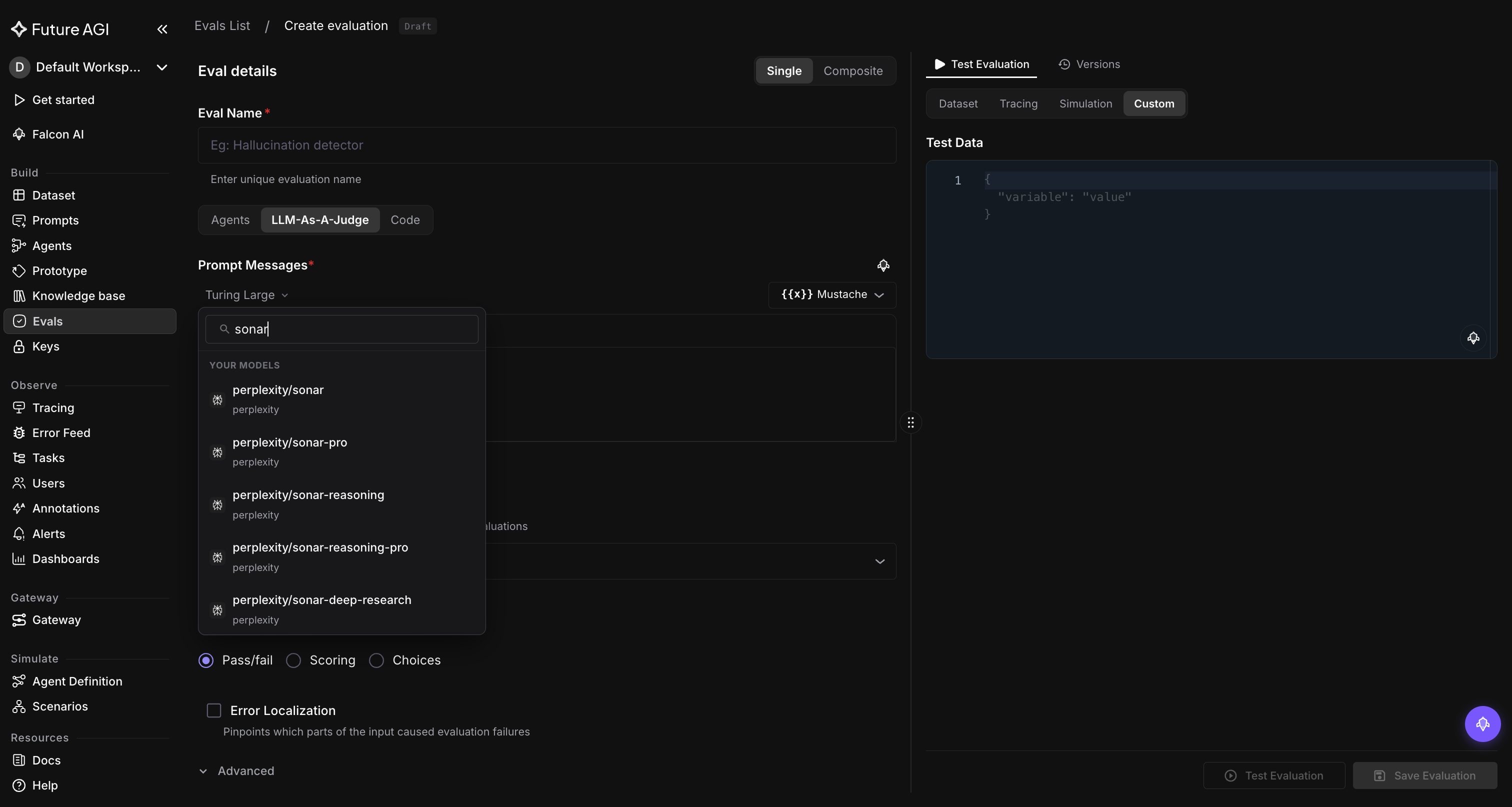
Straight from Perplexity. The team sent a PR to the open-source Future AGI repo that adds first-party support for every current Perplexity model. If you self-host, the full Sonar lineup and gpt-5.1 (through Perplexity’s Agent API) are now one environment variable away from your evals and prompt runs.
What you get
Five Sonar models with built-in web search. Every Sonar variant shows up in the eval model picker and the AI gateway. Every response is grounded in live web results.
sonar: lightweight, fast search-augmented chatsonar-pro: the new default. Flagship quality, 200K contextsonar-reasoningandsonar-reasoning-pro: chain-of-thought reasoning over live web resultssonar-deep-research: long-form, multi-source investigation
gpt-5.1 for agent workflows. Perplexity’s Agent API serves gpt-5.1 with built-in web search and tool use. Use it to build agents that can search the web and call tools as part of their reasoning. Works with your existing Perplexity key.
An up-to-date model list. Old Perplexity models that the provider has retired are no longer in the picker. The default search model is now sonar-pro.
How to turn it on
Add your Perplexity API key to your self-host environment as PERPLEXITY_API_KEY. That’s it. The models show up in the eval and prompt-run model pickers right away.
Why this matters
When a model provider contributes support for its own models directly into Future AGI, you skip the long tail: no code patches, no version drift, no waiting. Sonar’s built-in web search keeps factuality evals grounded in live sources, and gpt-5.1 through the Agent API opens up tool-using agent workflows over Perplexity’s search stack.
Who this is for
Self-hosted teams running ML and AI workloads on Future AGI, especially anyone whose evals or agents depend on web-search-augmented generation.
Improvements
Evaluation
Score whether your agent actually finished the job. A new built-in eval, customer_agent_task_completion, reads the full conversation and returns Pass or Fail with a reason on whether a customer-facing agent completed the task the user asked for. Useful as a top-line outcome metric on voice and chat support conversations, alongside the evals you run on each individual turn.
Regex PII detection now scans every type by default. If you don’t list detect_types on the Regex PII Detection eval, it catches all five PII categories (emails, phone numbers, SSNs, credit cards, IP addresses) instead of returning nothing. You can still narrow the list per eval.
New evals remember what kind of eval they are. Creating a new LLM-as-Judge or Code eval now writes the right eval type to the row, instead of defaulting to a placeholder. Reopening the eval picks up the correct type. Templates and saved evals behave the same.
Rerunning an eval no longer means retyping its config. When you add an eval inside an experiment and pick a baseline column, the eval settings (model, criteria, output type) auto-fill from that baseline. Faster setup when you’re rerunning an existing eval on a new run.
A batch of refinements across the eval workflow. Variables in your prompt highlight when you connect them to data in the test panel. Turning data injection on or off is now a clean toggle. Once you pick how the eval scores (pass/fail, numeric, choices), that choice is locked, but the specific labels, score numbers, and thresholds stay editable. When you upload expected answers as ground-truth data, you can watch the processing progress in real time. Pass Rate is now called Task Completion Rate across all stats and charts.
The eval picker stops flashing stale data. Reopen the eval picker after switching projects and it loads fresh, instead of briefly showing the previous project’s rows. Variable mapping rows stay disabled while the source columns are still loading, so you can’t map to a column that hasn’t arrived yet.
Custom eval URLs behave the way you expect. Opening a custom eval URL without a version parameter lands on the default version. A ?v= parameter in the URL is preserved across navigation inside the eval. When an eval task fails, the error panel has a Show more toggle that expands the full message.
Audio eval runs are ~3.5x faster when there’s no feedback to retrieve. Evals that use feedback-based retrieval now skip the lookup when there are no feedback rows yet. On audio-heavy projects with no feedback corpus, a single eval run is roughly 3.5x faster (about a 70% drop in time).
Media URL errors say what actually broke. When an eval fails because it can’t fetch an image or audio file from the URL you mapped, the error message says so and points at the URL, instead of returning a generic backend error. Easier to fix mapping mistakes and broken links.
Dataset evals stop crashing on template variables in instructions. Dataset evals whose instructions contain {{variable}} placeholders no longer crash trying to resolve those placeholders as IDs. The instructions stay untouched and the eval runs cleanly.
semantic_list_contains handles numbers without crashing. The semantic_list_contains comparator now accepts numeric expected values (for example, an ID or a quantity). Numbers are coerced to strings before comparison.
Few-shot examples actually reach the LLM eval. Few-shot example rows stored on a dataset now expand into the prompt for the LLM eval, instead of being passed as metadata only. Few-shot prompting on dataset-backed evals works as documented.
Voice eval mapping resolves more rows out of the box. When voice eval mapping can’t find a field in the structured trace data, it now falls back to the raw call log. More voice rows map cleanly without manual intervention.
The PDF filter chip finally lists PDF evals. Evals that accept PDF input are now tagged, so the PDF filter chip in the eval picker lists them. The chip previously returned no results; it now lists every PDF-capable eval.
Deleting an eval template asks first. A confirmation dialog now appears before an eval template is removed. Prevents accidental clicks on the row action.
Pass and Fail show up as Pass and Fail. When an eval returns a Pass or Fail result, the trace eval drawer shows a Pass or Fail chip instead of 100% or 0%. The outcome is obvious at a glance.
Multi-choice evals are scored as multi-choice end to end. If an eval is configured as multi-choice, that flag now flows through the playground run and the eval picker, so the run is scored the way the config says.
Error localiser opens up and stays out of composite evals. The Show more toggle on the error localiser now expands the full per-highlight reason for the highlighted span. The error localiser panel is hidden on composite evals, where it doesn’t apply.
Fix-with-Falcon stays off label-field eval rows that already pass. On evals where the result is stored in the label field, the Fix-with-Falcon button no longer appears on rows that already pass. Cleans up the action menu on passing rows.
Eval usage rollups respect your time window and the UI. The /eval-task/get_usage/ endpoint accepts a date range, so you can scope usage to any window. Rows targeting sessions are excluded from the per-trace usage rollup, so the count matches what you see in the UI.
Data injection on system evals checks your variable mappings. When you turn on data injection for a system eval, every required variable (like the question and expected answer) now needs to be mapped before you can save. The eval is ready to run as soon as you create it.
Long eval and label names are readable on hover. Truncated names in the Evals list and truncated labels in the Eval Usage detail panel now show the full text in a hover tooltip. The Evals list grid also fills its container properly instead of clipping.
Monitor
Trace Name and Span Name filters suggest from your project. The Trace Name and Span Name filter pickers on Observe now list the names from the current project as suggestions, instead of an empty dropdown.
Span-level annotations show up in the Annotations filter. Annotations applied at the span level (not just the trace level) are now included in the metrics endpoint that powers the filter picker. The Annotations category in the filter dropdown lists span-only score rows.
Text filters stop caring about case. Filters on text fields (Trace Name, Span Name, model, provider, span attribute strings) now match regardless of case. Searching for gpt-4o finds rows tagged GPT-4O.
Trace ID and Span ID filters match the way you actually use them. Both filters now render as a single-select control (a radio, no chips, no +N count), since a span belongs to one trace at a time. Reloading and then editing a saved filter with an ID also returns the right rows instead of zero.
Cleared filters stay cleared after a page refresh. Clearing a filter on Observe now sticks. The filter no longer reappears when you navigate away and come back to the page.
Annotation filters work the way you expect. Categorical and thumbs-up annotation filters show the right operator dropdown after the page hydrates. The chip label matches the selected operator. The Tasks filter returns rows on thumbs annotations instead of returning empty.
Filter chips work on every Observe tab now. The plus icon to add a filter chip, and click-to-edit on existing chips, now work on the Sessions, Users, and User Traces tabs. Previously these actions only worked on the Traces and Spans tabs.
Your column order survives auto-refresh. When you reorder columns by dragging on Traces, Spans, Sessions, or Call Logs, the new order survives the next auto-refresh and stays in sync with the display panel.
Every Observe grid looks the same. Header text colour, row hover state, and cell padding are now identical across all four Observe grids (Traces, Spans, Sessions, Users), instead of each grid having a slightly different look.
Call Logs grid behaves like the others. On the Call Logs grid (used by voice projects), the autosize columns action now fits column widths to content instead of being a no-op. Widening the Call ID column also shows more of the UUID, instead of clamping at 130 pixels and truncating in the middle of the value.
Long span-attribute keys are readable on hover. Long span-attribute paths in the Task Live Preview now show the full key as a tooltip on hover, so you can read the path without resizing the column.
The Users page shows one spinner, not two. Initial mount no longer stacks a pair of loading spinners. One spinner appears while data loads, then the rows render.
Save View is visible, and long view names keep their full text. The Save View button now reads cleanly against the dark theme on every Observe tab. Long view names truncate visually with an ellipsis instead of being cut down to a shorter stored string, so the full name stays in state.
Agent Graph and Agent Path: real fullscreen, off on voice. The fullscreen button on both views now opens a real fullscreen view of the graph, and dead zoom controls on Agent Path are removed. On voice projects, where there’s no agent graph to render, both tabs are now disabled with a tooltip explaining why, instead of opening to a black screen.
Tasks list popovers stop closing the moment you reach them. Cell chips on the Tasks list now keep their hover colour while the cursor moves onto the popover, so you can read the popover without it disappearing.
Eval tasks update live, no manual refresh. The eval tasks list now polls while any row is pending or running, so progress updates appear automatically. Relative-time cells (2 minutes ago) also refresh on each poll instead of going stale.
Hear the call that caused the error. On voice projects, the Error Feed cluster Overview tab now shows the call recording in place of the agent flow diagram, so you can listen to the exact call that produced the error.
Filter voice traces by agent talk time. agent_talk_percentage is now a first-class system metric for voice projects. The filter dropdown matches what you see in the grid (40% as a single metric), instead of showing 0.4 as a custom attribute.
The Users tab loads on busy workspaces. The Users tab now opens instead of timing out on workspaces with high session volume, and session detail no longer returns a 400 on slow queries. Both pages reach the data through a faster path on the backend.
Trace ingestion holds up under retries and custom user IDs. Two fixes. Traces with custom user IDs from the SDK no longer fail to ingest (the CUSTOM enum value was restored). And bulk span writes tolerate primary-key collisions during retry races, instead of dropping the whole batch.
Large voice runs stop losing rows in the queue. The scheduling window for voice eval fan-out is now twelve hours, so individual evals can wait that long to start without falling out of the run.
Platform
Pricing math is right. The pricing and usage page now rounds small numbers correctly, shows the right units on per-call costs, and surfaces free-tier savings as a separate line. Sub-1 usage and sub-cent costs render legibly. The legend is visible and the period caption matches the selected window.
Signup loads sooner and stops failing on fast typists. The signup form now waits for reCAPTCHA to be ready before allowing submit, so you can’t hit a reCAPTCHA not ready error. The page also preconnects to the reCAPTCHA host, so the script loads sooner.
Commit is one click on the prompt workbench. The Commit button moves onto the main toolbar, out of the More menu. Saved queries are invalidated right after a commit, so the new version shows up immediately in the version list.
Secondary text is readable everywhere. Text contrast has been tuned across the Agent builder, Persona, Scenarios, Test Detail, Eval Picker, and Error Feed pages, so labels and descriptions read clearly against the dark theme.
Bad media URLs fail fast. Image and audio fetches on dataset rows now have a request timeout, so a slow or unreachable URL fails quickly instead of hanging the eval indefinitely.
Malformed audio can’t hang a worker. ffmpeg subprocess calls inside voice and storage paths now have a timeout, so a malformed audio file fails instead of stalling the worker indefinitely.
Agentic Azure evals survive short-form responses. The agentic eval Azure callback no longer crashes when invocation_params comes back as None. Useful when Azure returns a short-form response that omits the params block.