Shadow AI in Engineering Teams and How to Bring It Under Control
Shadow AI in engineering starts with personal API keys, unapproved coding agents and unreviewed MCP servers. Find it in your logs, then build a sanctioned path.
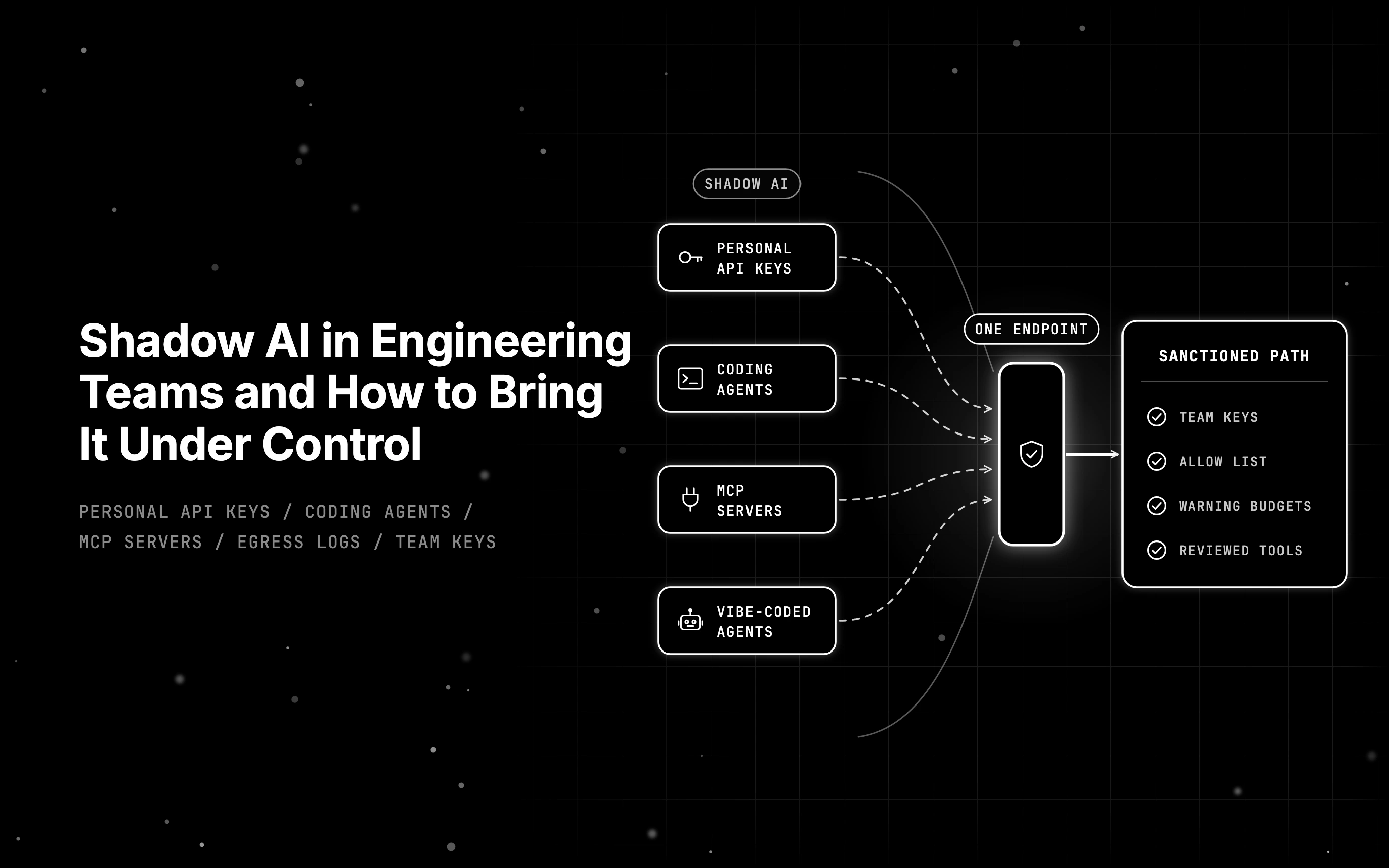
Table of Contents
A platform lead closing out the month’s AI spend finds two lines of shadow AI, the AI tools at work that nobody approved. One is an Anthropic charge on an engineer’s personal card, filed as an expense; the other is a CI job still calling OpenAI with a key that belonged to a contractor who left in the spring.
Nobody meant harm. The engineer had a deadline and no team key. The contractor’s script worked, so nobody touched it after the contract ended. This is the usual shape of shadow AI in engineering: ordinary people taking the fastest route to shipped code, one personal API key at a time.
Shadow AI in engineering is mostly a supply problem, and the way out is a sanctioned path that is easier than the workaround. Here is where it comes from, how to find it with a runnable log scan, why bans fail, and how to design that path.
TL;DR
- Shadow AI in engineering usually comes from personal provider keys, unapproved coding agents, unreviewed MCP servers and small agents built on internal data.
- Find it by following the traffic, the money and the keys: egress logs, expense data and secret scanning.
- Bans push usage out of sight; detection plus a faster sanctioned path brings it back.
- The sanctioned path is one endpoint, a key per team, an allow list of models, budgets that warn first, and reviewed MCP tools.
What does shadow AI mean in an engineering team?
Shadow AI is any AI tool, model, agent or API key used for work without the approval of the team that owns security or the platform. In engineering teams it usually looks like a personal provider key in a script, an unapproved coding agent, or an MCP server nobody reviewed.
A ChatGPT tab is shadow AI only when it holds work the company has not approved for that tool. Engineers should care because their version of the problem runs inside code. A key in a cron job keeps sending data long after the person who added it has moved on, and nobody sees a browser tab to notice.
How shadow AI differs from shadow IT
Shadow IT is any software adopted without approval: a file-sharing app, a personal project board. Shadow AI is the part of that problem where the unapproved tool reads company data, generates new content from it, and increasingly acts on it. An agent with tool access can open tickets, query databases and push code on its own.
That last step is why agents raise the stakes. In Gartner’s September 2026 research on shadow AI agents, analyst Jeremy D’Hoinne describes three forms they take: “embedded in existing enterprise software, consumed directly from the Internet or created by employees leveraging recent technological progress and ‘vibe coding’ to improve productivity.”
The 2026 numbers that made shadow AI a measured risk
Shadow AI now shows up in breach data. IBM’s Cost of a Data Breach Report 2026 puts the share of security incidents involving an organization’s shadow AI at 43%, up from 20% last year, and Gartner reports that 59% of senior cybersecurity professionals suspect or have evidence of unsanctioned employee use of AI agents.
The IBM figures come from the IBM Cost of a Data Breach Report 2026, research conducted by Ponemon Institute across 602 organizations hit by data breaches from March 2025 through February 2026.
IBM writes (pp. 46-47) that incidents involving shadow AI “more than doubled to 43% this year from 20% last year” and “led to higher average breach costs this year (USD 5.39 million) than last year (USD 4.63 million).” Of breached organizations, 68% lacked AI governance to manage AI or detect shadow AI, up from 63% (pp. 48-49).
The same Gartner article reports that 61% of senior cybersecurity professionals have observed AI agent automation inside approved enterprise software, and 59% “suspect or have evidence of unsanctioned employee use.” It also says 75% of organizations report unauthorized use of AI coding assistants, the figure closest to engineering work.
The worker side comes from PagerDuty’s 2026 shadow AI survey, run by Wakefield Research and published on June 11, 2026.
Two-thirds (66%) of 1,250 office professionals had used AI tools at work while believing they were not permitted. The sample excluded IT and technology roles, so it does not measure engineers directly. Engineering leaders should measure their own teams with the checks below rather than borrow the number.
Where shadow AI comes from in engineering teams
Engineering shadow AI comes from four common places: personal provider keys, coding agents nobody approved, MCP servers installed from a README, and small agents built on internal data. Each starts as a reasonable shortcut and becomes a standing path for company data to reach an unapproved provider.
Personal API keys in scripts, CI and side services
A key bought on a personal card or pulled from a free tier gets pasted into a .env file, a CI secret or a notebook. It works, so it stays. The key outlives the project and often the person, with no spend owner and no record of what data has passed through it.
Coding agents and IDE plugins outside the approved list
CLI coding agents and editor extensions send code, file contents and terminal output to whichever provider the engineer configured. One engineer points an agent at a personal key; another installs an extension that ships with its own hosted model. Both are reasonable choices for productivity and invisible to anyone reviewing the approved tool list.
MCP servers added without review
The Model Context Protocol lets a model call tools through a standard interface.
An MCP server can hand an agent a file system, a database, a ticketing system or a cloud console. Installing one from a README takes a single config line, and from then on the agent can do whatever that server allows, without anyone deciding it should.
Our guide on how to evaluate an MCP server before you trust it covers the review itself.
Vibe-coded agents on internal data
This is Gartner’s third form in engineering clothes. Someone builds a small agent over a weekend to summarize incidents or triage tickets, wires it to a service account, and shares it in a channel. A month later three teams depend on it, it runs with broad credentials, and it has never seen a security review.
Most of it traces back to one trait: the approved path was slower. No team key was available, the ticket for a new model sat for weeks, or the model the engineer wanted was not on the list. Engineers took the faster route.
How do you find shadow AI in an engineering org?
To find shadow AI, follow the traffic, the money and the keys: egress logs for calls to LLM API hosts, expense and card data for AI subscriptions, and secret scanning for provider keys in code. Each check catches what the other two miss, so run all three.
| Signal | Where to look | What it tells you |
|---|---|---|
| Direct calls to LLM API hosts from laptops, CI or services that are not the approved gateway | Egress proxy, firewall or DNS logs | Which hosts and users call providers directly, and how often |
| Provider API keys in repos, CI variables or notebooks | GitHub secret scanning (openai_api_key, anthropic_api_key patterns), CI secret inventory | Keys that exist outside the sanctioned key system, and who committed them |
| AI subscriptions and provider charges on cards | Expense reports, corporate card statements, procurement | Paid tools and personal accounts in use for work |
| Unapproved coding agents and IDE extensions | Endpoint or MDM software inventory, extension allow lists | Which agents run on developer machines |
| MCP server configs | Agent config files in repos and home directories, reviewed in code review | Which tools agents can reach, and who added them |
| Browser-based AI apps | SaaS discovery or CASB reports | Web AI tools in use; blind to API keys called from code |
Scan egress logs for direct LLM calls
The fastest first check is a scan of your proxy or DNS logs. Any call to a known LLM API host from a machine that is not your sanctioned gateway is a lead, not a verdict. It might be an approved exception, or it might be the contractor’s key still running in CI.
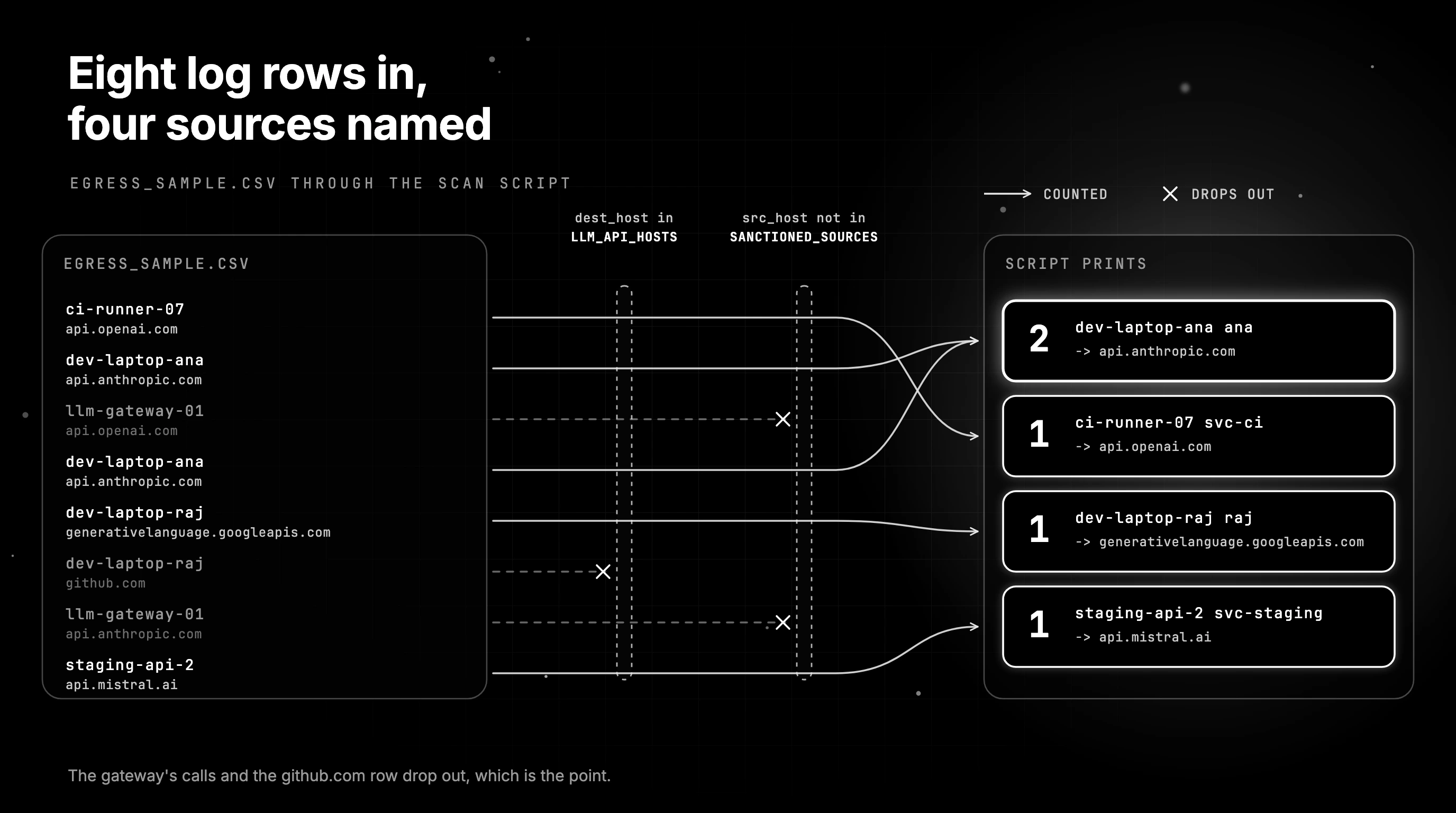
The script below reads a CSV export of proxy or DNS logs and counts direct provider calls by source, user and destination. It uses only the Python standard library. Map your log fields to the five columns in this sample header, and extend the host list with the providers your teams use.
timestamp,src_host,user,dest_host,bytes_out
2026-10-28T09:12:03Z,ci-runner-07,svc-ci,api.openai.com,18234
2026-10-28T09:14:41Z,dev-laptop-ana,ana,api.anthropic.com,95120
2026-10-28T09:15:02Z,llm-gateway-01,svc-gateway,api.openai.com,40211
2026-10-28T09:20:17Z,dev-laptop-ana,ana,api.anthropic.com,88004
2026-10-28T09:31:55Z,dev-laptop-raj,raj,generativelanguage.googleapis.com,12001
2026-10-28T09:33:10Z,dev-laptop-raj,raj,github.com,3022
2026-10-28T09:40:22Z,llm-gateway-01,svc-gateway,api.anthropic.com,51876
2026-10-28T10:02:09Z,staging-api-2,svc-staging,api.mistral.ai,7340
import csv
import sys
from collections import Counter
LLM_API_HOSTS = {
"api.openai.com",
"api.anthropic.com",
"generativelanguage.googleapis.com",
"api.mistral.ai",
"api.groq.com",
"api.deepseek.com",
}
SANCTIONED_SOURCES = {"llm-gateway-01"} # hosts allowed to call providers directly
def shadow_calls(path):
hits = Counter()
with open(path, newline="") as f:
for row in csv.DictReader(f):
if row["dest_host"] in LLM_API_HOSTS and row["src_host"] not in SANCTIONED_SOURCES:
hits[(row["src_host"], row["user"], row["dest_host"])] += 1
return hits
if __name__ == "__main__":
for (src, user, dest), n in shadow_calls(sys.argv[1]).most_common():
print(f"{n:>3} {src:<16} {user:<12} -> {dest}")Run it as python3 find_shadow_llm_calls.py egress_sample.csv against the eight-row sample above, which holds two calls from the sanctioned gateway, one call to github.com, and five direct provider calls from four machines. The script prints one line per source, user and destination:
  2  dev-laptop-ana   ana          -> api.anthropic.com
  1  ci-runner-07     svc-ci       -> api.openai.com
  1  dev-laptop-raj   raj          -> generativelanguage.googleapis.com
  1  staging-api-2    svc-staging  -> api.mistral.ai
The gateway’s calls and the github.com row drop out, which is the point. TLS hides URL paths, so the script works on hostnames from proxy, DNS or SNI logs. Four sources and four users now have names, and each one is a conversation rather than a disciplinary case.
Audit keys and expenses together
Keys tell you where code calls providers; expenses tell you who pays. Matching them is what finds the personal-card key from the opening scene. Start from provider charges on expense reports and corporate cards, then search for keys from those accounts in repos, CI variables and notebooks.
On GitHub, GitHub secret scanning lists patterns for OpenAI and Anthropic keys, including openai_api_key and anthropic_api_key.
Where SaaS discovery stops
SaaS discovery and CASB tools see browser apps, single sign-on logins and OAuth grants, so they are good at finding web chat tools. Shadow AI detection tools built on that data miss a provider key in a cron job, because that call never touches a browser or a login page. Treat discovery as one signal of six.
Why banning AI tools pushes shadow AI further underground
Bans fail because the work still needs doing. People route around the rule, and the usage moves somewhere you cannot see. In PagerDuty’s 2026 survey, two-thirds (66%) of office professionals said they had used AI at work while believing it was not permitted under company policy.
The details are in what PagerDuty’s respondents said about AI policies.
Of employees who used AI outside company policies, 53% received informal feedback or guidance and 48% faced formal consequences. Across all respondents, 72% “believe they understand how to use AI for their job better than the team responsible for managing AI at their company,” and 39% would rather use AI without telling anyone.
Engineers have plenty of ways around a ban. Block api.openai.com at the proxy and the key moves to a personal hotspot, a home machine or a cloud function in a personal account. The calls continue, your egress logs show nothing, and the scan from the previous section comes back clean for the wrong reason.
Shadow AI controls compared by what they catch and miss
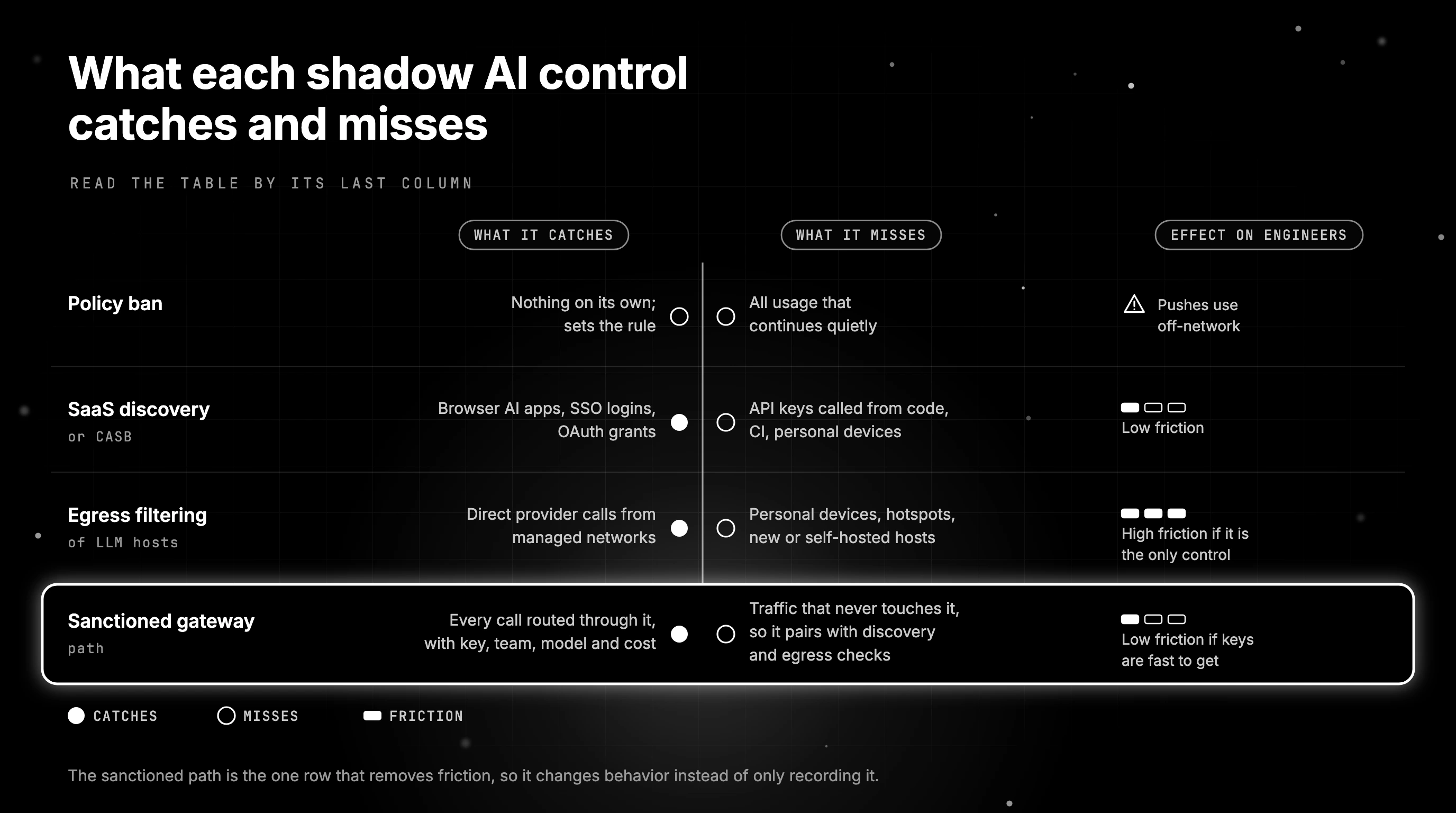
No single control finds all shadow AI. Bans and egress filters stop known paths, SaaS discovery finds browser use, and secret scanning finds keys in code. Only a sanctioned path gives people a reason to come back, so it pairs with the detection checks.
| Control | What it catches | What it misses | Effect on engineers |
|---|---|---|---|
| Policy ban | Nothing on its own; sets the rule | All usage that continues quietly | Pushes use off-network |
| SaaS discovery or CASB | Browser AI apps, SSO logins, OAuth grants | API keys called from code, CI, personal devices | Low friction |
| Egress filtering of LLM hosts | Direct provider calls from managed networks | Personal devices, hotspots, new or self-hosted hosts | High friction if it is the only control |
| Sanctioned gateway path | Every call routed through it, with key, team, model and cost | Traffic that never touches it, so it pairs with discovery and egress checks | Low friction if keys are fast to get |
Read the table by its last column. Controls that only add friction push engineers toward the gaps in the misses column. The sanctioned path is the one row that removes friction, so it changes behavior instead of only recording it. The detection rows stay, because they tell you whether it works.
If you are choosing among shadow AI tools, see AI governance platforms compared.
Designing a sanctioned path that beats the workaround
A sanctioned path wins when getting an approved key takes minutes, the models engineers want are on it, and the limits are visible before they bite. Build it from one endpoint, a key per team, an allow list of models, budgets that warn first, and reviewed MCP tools.
One endpoint and a key per team
Give every team one OpenAI-compatible endpoint and its own key. Existing SDKs and many coding agents can point at it with a base URL change, so adoption costs a config line rather than a rewrite. Every call then carries a team, a model and a cost.
If the gateway pattern is new to you, start with what an AI gateway does.
Approved models and providers as an allow list
Each team key carries a list of the models and providers it may use. Publish the list where engineers can see it and let it grow by request. If the model someone wants is missing, a personal key is one card payment away, so the list has to keep pace with demand.
Budgets that warn before they block
Set a budget per team with a soft warning first and a hard stop later, so nobody meets the limit when a job fails at month end. Engineers who can see their spend coming do not need a personal card to work around a surprise cap.
For the spend side, see cost tracking across coding agents.
MCP tools behind the same front door
Route agents’ MCP traffic through the same gateway and give each team key an explicit list of the tools it can see and call. A new MCP server then becomes a reviewed addition to that list, not a line someone pasted into a config file on a laptop.
A request lane with a deadline
Publish one place to ask for a new model, provider or tool, and answer within days. A request lane that stalls for a month recreates the slow path that caused shadow AI in the first place, so track its response time the way you track incident response.
These controls leave a per-call record of key, team, model and cost, so you can see which AI runs through the approved path. For control-surface depth, see control surfaces for CLI coding agents.
Running the sanctioned path on Future AGI Agent Command Center
Agent Command Center is one gateway a team can use for this path. It issues virtual keys scoped to approved models and providers, sets spending budgets per org, key, user or model, filters MCP tools with allow and deny lists, and runs as a self-hostable Apache-2.0 gateway.
Agent Command Center virtual keys carry models and providers lists.
Both are allow lists, and an empty list means all. A key can call only the models on its list. Keys also take per-key requests-per-minute and tokens-per-minute limits, an expiry date and team metadata, so a key per team maps straight onto the design above.
Spend limits live under budgets and rate limits.
Budgets can be set per org, key, user or model, so a key per team gives each team its own budget. Each one runs daily, weekly, monthly or in total, as a hard limit that rejects requests or a soft limit that logs a warning. A blocked request gets a budget-exceeded error instead of a silent failure.
For tools, the gateway supports MCP tool allow and deny lists on each key.
It acts as both an MCP server and an MCP client at /mcp, gathering upstream tool servers into one namespace. Per-key allowed_tools and denied_tools are enforced at the MCP layer, so an agent using that key only sees and can only call the tools its team was granted.
You can self-host the gateway from its Docker image, inside a self-hosted Future AGI install on Helm, or as a Go binary.
The gateway code is Apache-2.0 in the Future AGI on GitHub monorepo. One boundary matters: the gateway sees only the traffic routed through it, so the egress, key and expense checks from earlier still find what stays outside.
Bringing shadow AI under control one team key at a time
Back to the platform lead with two lines that would not reconcile. The contractor’s key is revoked and the CI job moves to its team’s key on the approved path. The engineer on the personal card gets a team key the same afternoon, with the model they wanted already on the list. Next month’s egress scan comes back shorter.
Run the egress scan from this guide against last week’s proxy logs this week, then match what it finds against keys and expenses. Stand up the sanctioned path with team keys, an allow list, warning budgets and reviewed tools. Repeat the scan every month and watch the list shrink.
If Agent Command Center is the gateway you pick, the virtual keys guide is the place to start.
Frequently Asked Questions
What is a shadow AI?
Is chat gpt shadow AI?
Why is shadow AI a problem?
How to find shadow AI?
What is the difference between shadow AI and shadow IT?
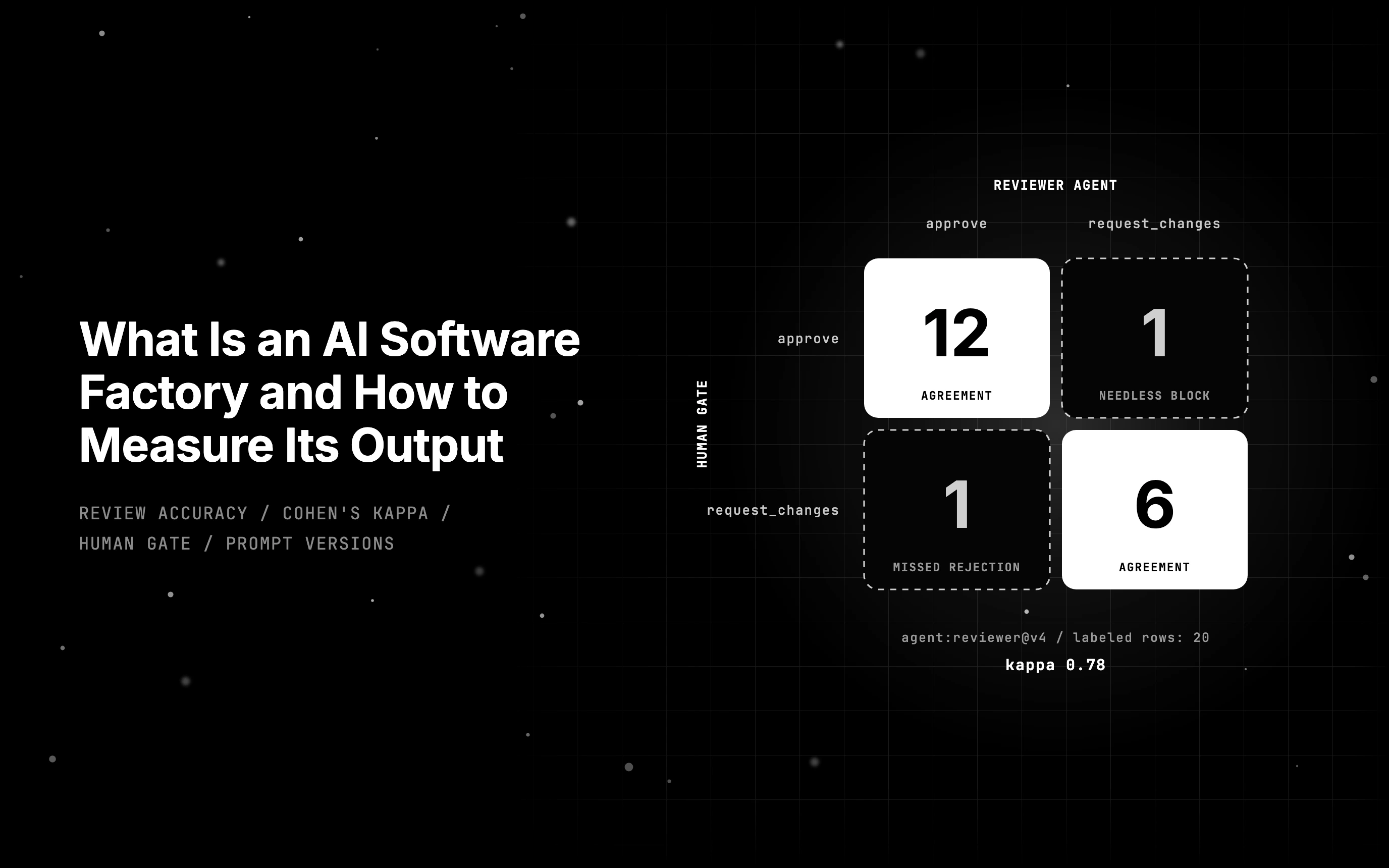
An AI software factory turns specs into shipped code with agents. See where the idea came from and how to score reviewer agents against human review verdicts.

The OWASP agentic top 10 covers ASI01 to ASI10. Each risk gets an ops-agent example and the control that reduces it, and most controls are design changes.

Sovereign AI infrastructure turns on where requests may go. See how data sovereignty, residency and localization differ and how a gateway keeps calls local.